
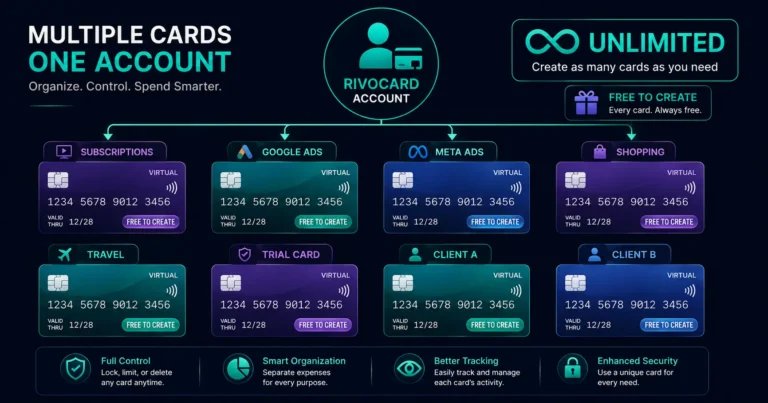
Quick answer: On Rivocard, you can create unlimited virtual Visa cards on a single account at no cost per card. Every card gets its own 16-digit number, expiry date, CVV, and independent balance. Cards can be created instantly, funded from your unified wallet balance, frozen, and deleted independently of each other. This makes Rivocard the only major crypto card platform with truly unlimited free card creation — enabling strategies that single-card platforms cannot match: per-merchant isolation, per-subscription management, per-ad-account control, and per-project budget tracking.
Why Multiple Cards Matter: The Single-Card Problem
With a single card, every merchant you use gets the same card number. If that number is compromised in a data breach at one merchant, every other merchant with that card number saved is potentially at risk. Cancelling and replacing that card number disrupts every other merchant’s recurring billing simultaneously.
A multi-card model solves this:
- Each merchant gets a unique card number
- A compromise at one merchant affects only that card
- Cancelling and replacing one card does not affect any other card
- Each card’s history shows only that specific context’s spending
Beyond security, multiple cards enable spending control that a single card cannot provide:
- Hard budget caps per use case (a card with $500 for ad spend can only spend $500)
- Clear per-category spending visibility
- Instant cancellation of specific spending streams (freeze one card)
- Clean accounting separation between personal, business, and project spending
What Multiple Cards on Rivocard Looks Like in Practice
Each Rivocard virtual card has:
- A unique 16-digit Visa card number
- Its own expiry date (typically 2-3 years from creation)
- Its own CVV
- Its own independent balance (separate from other cards and from the wallet)
- Its own transaction history
- Its own freeze/delete controls
Cards share one thing: they all draw from the same Rivocard wallet balance when being funded. The wallet is the central pool; each card is a funded allocation from that pool.
Example account with 8 cards:
- Card 1: Subscriptions – $90/month loaded
- Card 2: Google Ads – $300 loaded
- Card 3: Meta Ads – $500 loaded
- Card 4: Online shopping – $150 loaded
- Card 5: Travel (loaded before trips only)
- Card 6: Testing free trials (minimal load)
- Card 7: Client project A (specific project budget)
- Card 8: Client project B (separate project budget)
Total wallet balance: however much is deposited. Individual card balances are independent allocations from that pool. Creating 8 cards cost $0 in creation fees. Funding them costs 5% of each funded amount.
The Strategies: When to Use Multiple Cards
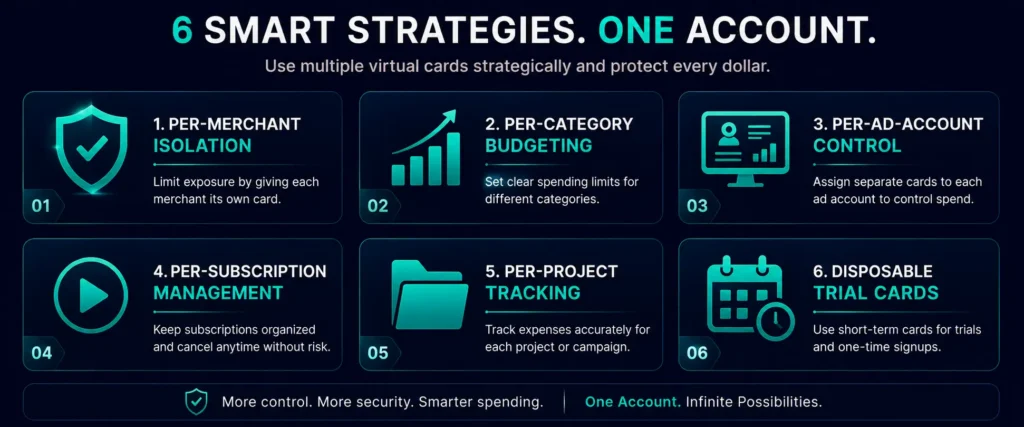
Strategy 1: Per-Merchant Isolation (Security)
One card per merchant or merchant category. If you shop at Amazon, one card. If you buy from Etsy, a different card. If you pay Adobe, another card.
Why: Merchant data breaches happen. If Amazon’s card data is compromised, only the card saved at Amazon is at risk. Your Adobe card, Etsy card, and other cards are completely unaffected. You freeze the compromised card, create a replacement, and update only Amazon’s payment method — not every merchant simultaneously.
Practical implementation: This level of granularity (one card per merchant) suits users with a smaller number of regular merchants. For users with dozens of merchants, per-category is more manageable than per-merchant.
Strategy 2: Per-Category Organization (Budgeting)
One card per spending category. A subscriptions card, a shopping card, an advertising card, a travel card.
Why: Each category card’s transaction history shows only that category’s spending. Budget tracking is cleaner — you see exactly what the subscriptions card has spent vs the shopping card, without mixing.
Monthly reload pattern: At the start of each month, reload each category card with its budget allocation:
- Subscriptions card: $85 (covers all subscriptions)
- Shopping card: $200 (monthly shopping budget)
- Advertising card: $500 (monthly ad spend)
- Travel card: $0 until a trip is planned
Each card’s zero balance at month end confirms you stayed within budget. An over-spend requires an additional reload — creating a visible decision point.
Strategy 3: Per-Ad-Account Control (Digital Advertising)
One card per ad account or per campaign. This is the standard practice for professional media buyers and agencies.
Why: If one ad account’s card is flagged by the platform, only that account is affected. Other accounts continue running. When a campaign ends, delete the campaign’s card — no risk of accidental future billing on an ended campaign.
Setup for managing multiple ad accounts:
- Ad Account 1 (Brand A): Card loaded with campaign budget
- Ad Account 2 (Brand B): Separate card, separate budget
- Ad Account 3 (Brand C): Separate card, separate budget
Cards can be created in seconds when new ad accounts need billing setup. Rivocard’s unlimited card creation means adding a new ad account to the billing setup never requires waiting for a new card.
Strategy 4: Per-Subscription Management
One card per subscription service. Netflix on its own card. Spotify on its own card. Adobe on its own card.
Why: Cancelling a subscription is as simple as freezing that card — the subscription service’s renewal attempt hits a frozen card and fails. No navigating the subscription service’s cancellation flow, no waiting for a chat agent, no retention offers. Freeze the card, done.
Also why: Subscription price increases appear clearly per-card. If Spotify raises its price, the Spotify card’s next reload reflects the new amount — you see exactly what changed without it being buried in a general spending statement.
Strategy 5: Per-Project Budget Tracking
One card per project or client. Each project’s expenses go on its own card. The card’s transaction history is the project’s expense log.
For freelancers: Tool purchases, software subscriptions, advertising, and one-off expenses for each client project on separate cards. At project close, the card’s statement is the basis for expense reporting.
For businesses: Each department or cost center gets a dedicated card. Marketing on one card, product on another, operations on a third. Card histories become departmental spend reports.
Strategy 6: Disposable Cards for Free Trials
One card per free trial. Fund minimally ($1-$5). Freeze before the trial billing date. The renewal fails. Create a new trial card for the next service.
This was covered in detail in the disposable virtual card guide. With unlimited free card creation, trial management adds no per-card cost.
How to Create Multiple Cards on Rivocard
Creating a card:
- Log into your Rivocard dashboard
- Navigate to the Cards section
- Click “Create New Card”
- Enter the amount to fund from your wallet balance
- Confirm — card created and funded instantly
There is no limit on how many times you repeat this. Every card creation is instant and free.
Managing cards:
- Each card appears in your dashboard’s card list
- Click any card to see its balance, transaction history, and controls
- Freeze or unfreeze any card independently
- Delete a card to return its balance to your wallet
Naming or labeling cards: If Rivocard’s dashboard supports card naming (feature availability may vary), name each card by its purpose: “Netflix,” “Google Ads March,” “Client A,” etc. This makes the card list readable at a glance as your card count grows.
The Wallet vs Card Relationship
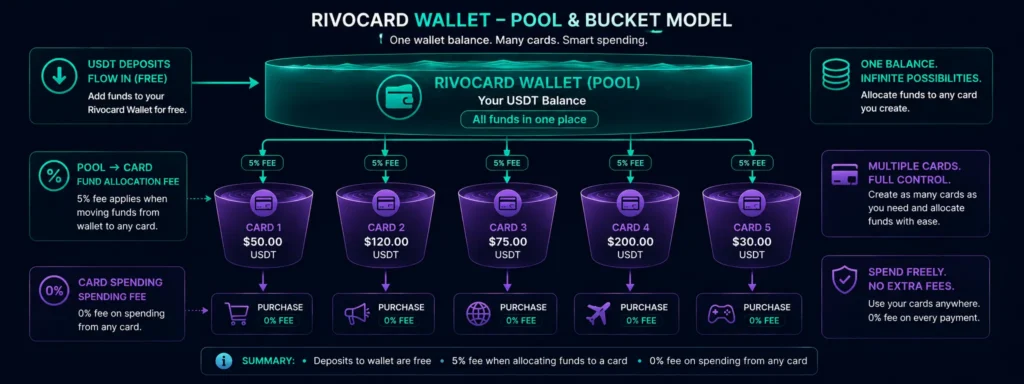
One concept that helps manage multiple cards: the distinction between wallet balance and card balance.
Wallet balance: The pool. All your crypto deposits convert here. No spending occurs from the wallet directly.
Card balance: An allocation from the wallet pool. The 5% fee applies when moving wallet balance to a card. Once on a card, spending is free.
The flow:
- Deposit USDT to Rivocard wallet (free)
- Create 5 cards, each funded from wallet (5% fee per card funding)
- Spend from cards (0% fee)
- When a card runs low: reload from wallet (5% fee on the reload amount)
- When a card is deleted: balance returns to wallet (no fee)
Keeping a buffer in your wallet ensures you can fund or reload any card at any time without needing to make a new crypto deposit first.
Cost of the Multi-Card Strategy
Creating multiple cards does not cost more than creating one card. The cost model:
- Card creation: $0 (regardless of how many cards)
- Card deletion: $0
- Card freeze/unfreeze: $0
- Funding (wallet to card): 5% of the funded amount
Example: Creating 10 cards and funding each with $100
- Card creation cost: $0 x 10 = $0
- Funding cost: 5% x ($100 x 10) = $50 total
- Total balance on all 10 cards: $1,000 – $50 = $950
- Average effective fee per dollar on card: 5%
The cost is identical to funding one card with $1,000. The multi-card structure adds zero additional cost vs single-card usage at equivalent total funding amounts.
Platform Comparison: Unlimited Cards vs Single-Card Platforms
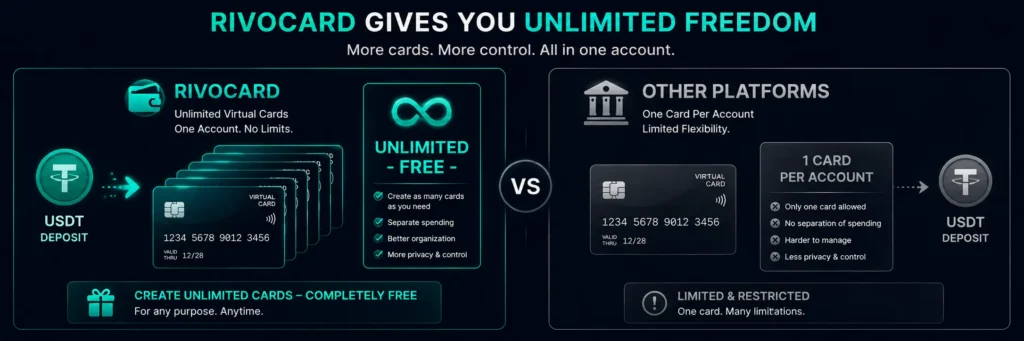
| Platform | Cards per account | Per-card fee |
|---|---|---|
| Rivocard | Unlimited | $0 |
| Bybit Card | 1 virtual + 1 physical | $0 |
| Crypto.com | 1 virtual + 1 physical | $0 |
| MetaMask Card | 1 | $0 |
| Wirex | Multiple (tier-dependent) | Varies |
No major crypto card platform other than Rivocard offers unlimited free virtual card creation. The per-ad-account, per-subscription, and per-merchant strategies described above are unique to Rivocard among major crypto card platforms.
FAQs
Can I have multiple crypto cards on one Rivocard account?
Yes. Rivocard allows unlimited virtual card creation on a single account at no per-card cost. Each card has its own unique number, expiry, CVV, balance, and transaction history.
Is there a limit on how many Rivocard cards I can create?
No. Card creation is truly unlimited on Rivocard. Create as many cards as your use cases require – 5, 20, 50, or more. Each creation is instant and free.
Do multiple Rivocard cards share a balance?
No. Each card has its own independent balance. Cards share a funding source – the Rivocard wallet – but once balance is moved to a card, that balance belongs to that specific card. Other cards’ balances are unaffected.
Does creating multiple cards cost extra?
No. Card creation is always free on Rivocard regardless of how many cards you create. The 5% Rivocard fee applies when you fund a card from your wallet balance – not to the act of creating the card itself.
How do I manage many virtual cards on one Rivocard account?
Use the card labeling feature (if available in your dashboard version) to name each card by its purpose. Keep a personal log or spreadsheet noting which card is used where if managing many cards. Freeze inactive cards rather than leaving them open with balance.
If one Rivocard card is compromised, are my other cards affected?
No. Each card has a unique number. A compromise at one merchant (or even a card number theft) affects only that specific card. Freeze or delete the compromised card and all other cards continue working normally. The only shared element between cards is the wallet balance, which is protected separately.
Can I use multiple Rivocard cards across different platforms simultaneously?
Yes. Each card can be saved at a different platform or merchant. They operate completely independently – charges at one platform do not affect cards saved at other platforms.
What is the best number of Rivocard cards to have?
As many as your use cases justify. Common starting setups: 3-5 cards (subscriptions, shopping, advertising, travel, miscellaneous). Power users with complex needs (agencies, freelancers managing multiple clients) may use 10-30+ cards. There is no overhead cost to having many cards – only the funded amounts cost the 5% fee.
Can I transfer balance between Rivocard cards?
Cards cannot transfer balance directly to each other. To move balance from one card to another: delete the first card (balance returns to wallet), then fund the second card from the wallet (5% fee applies on the new funding). Alternatively, freeze the first card and fund the second card from your wallet directly.
How do I delete a Rivocard card and what happens to the balance?
Navigate to the card in your dashboard, select the delete option, and confirm. Any remaining balance on the deleted card is automatically returned to your Rivocard wallet. The card number is permanently invalidated.
Get Started
Create as many cards as you need – subscriptions, ads, merchants, all on one account. Create your Rivocard account
