
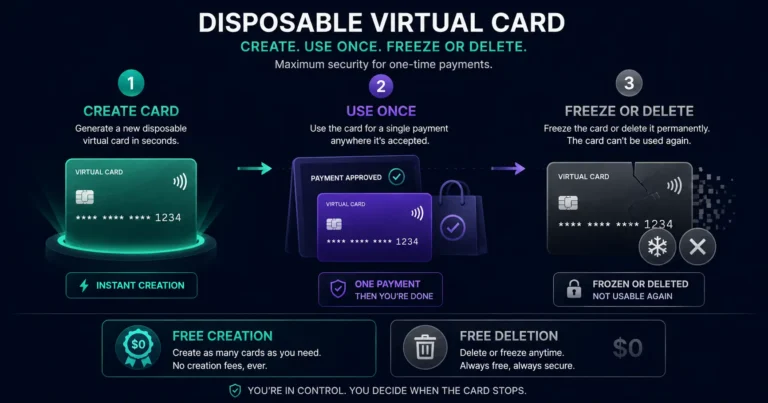
Quick answer: A disposable virtual card for crypto payments is a virtual card created for a specific one-time purpose — used once (or for a brief period) and then frozen or deleted to prevent future charges. On Rivocard, this is not a separate card type — every Rivocard virtual card can be used as a disposable card by freezing or deleting it after the intended use. Card creation is free, card deletion is free, and creating a new card after disposing of one takes seconds. The use cases: free trials you do not want to auto-renew, one-time purchases from merchants you do not trust with a saved card number, single-campaign ad spend with a hard budget cap, and high-value one-off purchases where you do not want the card number retained.
What Makes a Card ‘Disposable’
A traditional physical card has a persistent number you cannot easily change — if you use it at a merchant and that merchant’s database is breached, your card number is exposed and you need to wait for a replacement. A virtual card used disposably changes this entirely:
- You create a card with a specific number for a specific purpose
- You complete the purchase or trial
- You freeze or delete the card immediately after
- The card number is now inactive (if frozen) or permanently gone (if deleted)
- Any future attempt to charge that number fails
This is disposable behavior — not necessarily a single transaction, but a controlled lifespan where you decide exactly when the card stops accepting charges.
On Rivocard: card creation is free, card deletion is free, and creating a replacement takes under 30 seconds. The economics of disposable card use are the same as any other card use — just the intended lifespan is different.
Primary Use Cases for Disposable Virtual Cards
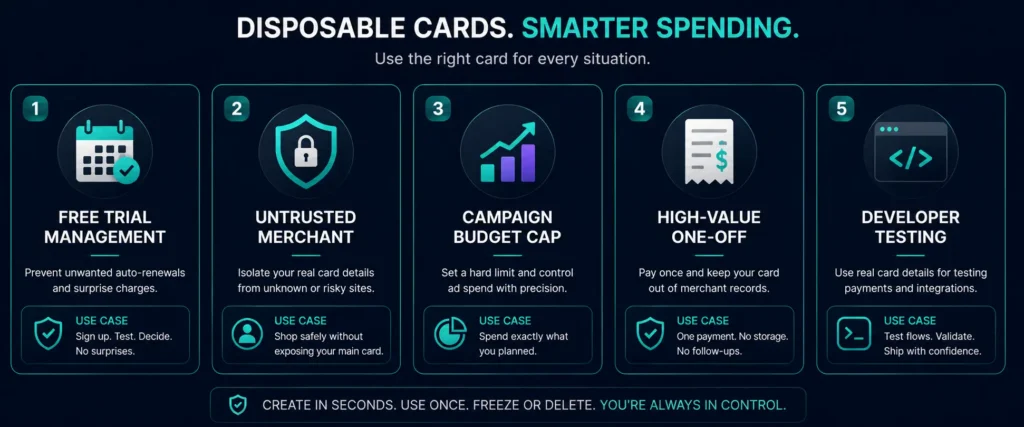
Use Case 1: Free Trial Management
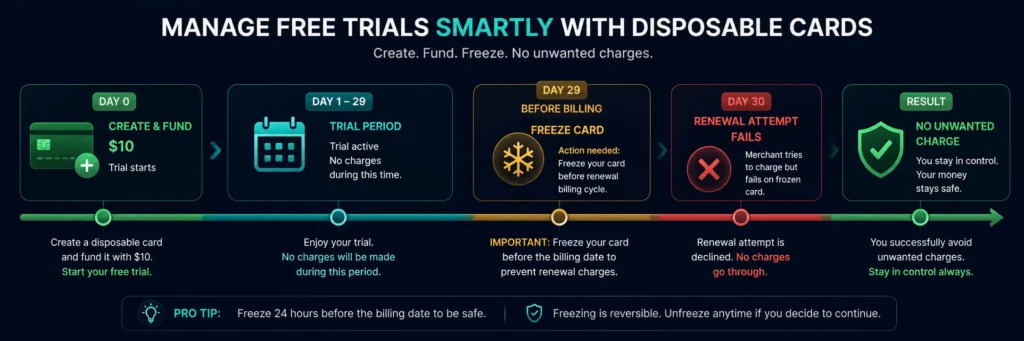
Free trials at software services, streaming platforms, SaaS tools, and subscription sites typically require a card on file that will auto-charge at the end of the trial period. The friction of managing trial expirations leads to many users being charged for services they did not intend to subscribe to.
The disposable card approach:
- Create a new Rivocard virtual card
- Fund it with a small amount (enough to pass the initial authorization check — typically $1-$5 or the first-month charge if applicable)
- Complete the free trial signup using this card
- Note the trial end date
- Before the trial converts to paid: freeze or delete the card
- The merchant’s renewal charge hits a frozen or deleted card and fails
- The service suspends or cancels the trial — you are not charged
This eliminates the need to remember to cancel trials, navigate retention flows, or contact support. The card simply stops accepting charges.
If you decide to subscribe: Unfreeze the card and add the subscription amount before the billing date. Or create a dedicated reloadable subscription card, update the payment method at the service, and manage it as an ongoing subscription from there.
Use Case 2: One-Time Purchases From Untrusted Merchants
When purchasing from a new merchant, a smaller online store, or a platform you have not used before, saving your primary card number carries risk if that merchant’s security is compromised.
The disposable card approach:
- Create a new Rivocard card specifically for this purchase
- Fund it with exactly the purchase amount (plus a small buffer for shipping variance or tax)
- Complete the purchase
- After the order confirms: freeze the card (or delete it, if you are certain the merchant will not need to issue a refund to the same card)
The refund consideration: If you delete a card and the merchant subsequently issues a refund to that card number, the refund may fail (the card no longer exists). For purchases where a refund is possible (most retail purchases), freezing rather than deleting is safer — frozen cards can receive refunds even when they cannot initiate new charges, and you can delete once the return window closes.
Use Case 3: Single-Campaign Digital Advertising Budget
For digital advertising, a disposable card approach creates a hard budget cap per campaign:
- Create a card specifically for Campaign X
- Fund it with exactly the campaign budget ($500, for example)
- Link it to the ad account for this campaign
- When the campaign ends: delete the card
The ad platform cannot charge beyond the card’s loaded balance. When the campaign is over, the card is gone — no risk of the card being charged by the platform for future campaigns or budget adjustments.
For ongoing advertising spend, a reloadable per-account card is better. For specific campaigns with defined budgets, a disposable card enforces the budget more cleanly.
Use Case 4: High-Value One-Off Purchases
For large one-time purchases (software licenses, annual subscriptions paid annually, high-value services), creating a dedicated card prevents that merchant from retaining a card number that can be used again later.
Example: You buy an annual software license for $299. You create a Rivocard card, fund it with $299 (plus a few dollars buffer), make the purchase, and then delete the card. The software vendor has your card number on file for receipt purposes, but the number is now dead — it cannot be charged again in 12 months when the license renews, or if the vendor suffers a data breach.
Use Case 5: Testing Payment Flows (Developers and Testers)
For developers testing payment integrations, creating disposable Rivocard cards provides real card numbers for testing without using a primary card. Test a checkout flow, confirm the transaction processed correctly, and delete the test card. Next time: create a fresh card with a fresh number.
The Mechanics: Freeze vs Delete for Disposable Cards
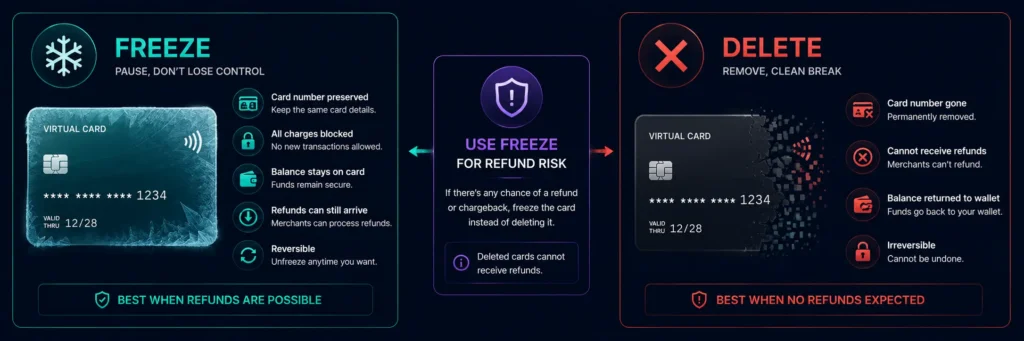
When you are done with a disposable card, you have two options:
Freeze:
- The card number remains associated with your account
- All future charge attempts are declined
- The card balance (any remaining amount) stays on the card
- The card can be unfrozen and reused at any time
- Refunds from merchants can still be credited to a frozen card
- Use when: you might want to reactivate, or when there is a possibility of a refund
Delete:
- The card number is permanently invalidated and removed from your account
- Future charge attempts fail as “card not found”
- Any remaining card balance is returned to your Rivocard wallet
- The action is permanent — this card number cannot be recovered
- Refunds from merchants to a deleted card number may not process
- Use when: you are certain the card is fully done, no refunds expected, and you want a clean removal from the account
For most disposable use cases, freeze is the safer default. You can always delete later once you are certain no further refund or reversal could arrive.
Funding Strategy for Disposable Cards
Minimum viable funding: Many free trials and initial signups require only a small authorization check (often $0-$1) rather than a full first-month charge. For pure trial management where you will freeze before the trial ends, funding with $5-$10 ensures the authorization passes without over-loading the card.
First-month-funded approach: Some trials charge the first month immediately, with renewal scheduled afterward. For these, fund the card with the full first-month cost. After the initial charge, freeze the card before the second billing date.
Exactly-the-purchase-amount approach: For one-time purchases, calculate the exact amount including shipping, tax, and any applicable fees. Fund the card with that amount plus a $5-$10 buffer. Complete the purchase. Unused balance returns to your wallet when you delete the card.
No over-loading: There is no reason to fund a disposable card with more than you need. The 5% Rivocard fee applies to the funded amount — over-loading a card you plan to dispose of means paying 5% on value that returns unused to your wallet (it will be at the wallet level again, but the fee was paid at the card funding step).
How to Create and Dispose of a Card on Rivocard: Step by Step
Creating the disposable card:
- Log into your Rivocard dashboard
- Navigate to Cards
- Click “Create New Card”
- Enter the funding amount (what you need for this specific use)
- Confirm — the card is created and funded immediately
Using the card: Enter the card number, expiry date, and CVV at the merchant checkout. Or add to Apple Pay for in-person use (though for truly one-time disposable use, directly entering the number is more appropriate).
Disposing of the card (freeze):
- Navigate to the card in your dashboard
- Toggle the freeze control to “Frozen”
- Card is immediately inactive for new charges
Disposing of the card (delete):
- Navigate to the card in your dashboard
- Select the delete or remove option
- Confirm — remaining balance returns to wallet, card is permanently gone
Cost of Disposable Card Use
The cost model is identical to any Rivocard card use:
- Card creation: free
- Funding: 5% fee on amount loaded to card
- Purchases: 0% fee
- Freeze: free
- Delete: free
- Balance recovery on delete: automatic, returned to wallet
Example: Free trial management for 10 services per month Each trial card funded with $10 (to pass authorization): 10 cards x $10 = $100 funded Rivocard fee: 5% x $100 = $5/month Per trial: $0.50 in Rivocard fees
If all 10 trial cards are frozen before charging: you pay $5 for the capability to test 10 services this month without any unwanted subscription charges.
FAQs
What is a disposable virtual card for crypto payments?
A disposable virtual card is a virtual card created for a specific one-time purpose, used briefly, and then frozen or deleted to prevent future charges. On Rivocard, any virtual card can be used disposably – create a card, complete the purchase or trial, then freeze or delete the card. Card creation and deletion are always free.
How do I create a disposable card on Rivocard?
Navigate to Cards in your Rivocard dashboard, click ‘Create New Card’, fund it with the amount needed for your specific use, and confirm. Complete the purchase or trial with the card details. When done, freeze or delete the card from the dashboard.
Should I freeze or delete a disposable card after use?
Freeze is safer for most disposable use cases because frozen cards can still receive refunds from merchants. Delete is permanent – any refund to a deleted card number may not process. Freeze when there is any possibility of a refund or reversal. Delete once you are certain no further activity will occur.
Can I use a disposable card for free trial management?
Yes. Create a Rivocard card, fund it minimally (enough to pass the trial authorization), sign up for the trial, and freeze the card before the trial converts to paid. The renewal charge hits a frozen card and fails. No manual cancellation needed.
Does deleting a Rivocard card return the remaining balance?
Yes. When you delete a card, any remaining card balance is automatically returned to your Rivocard wallet balance. You do not lose unspent funds.
What happens to a refund if I delete the card?
If a merchant issues a refund to a deleted card number, the refund may not process – the card no longer exists. For purchases where a refund is possible (retail goods with return policies), freeze rather than delete until the return window closes.
Is there an extra fee for creating and deleting multiple disposable cards?
No. Card creation and deletion are always free on Rivocard regardless of how many cards you create or delete. The only fee is the 5% card funding fee when you load balance onto a card. Creating 50 disposable cards in a month has no per-card creation or deletion fee.
Can I use a disposable card with Apple Pay?
Yes, but adding a card to Apple Pay for a single use and then removing it adds friction that makes the disposable approach less practical for in-person one-time use. Disposable cards are more naturally suited to online purchases where you enter card details directly rather than via a stored digital wallet.
How many disposable cards can I create on Rivocard?
Unlimited. There is no cap on the number of virtual cards you can create per account or per time period. Create as many disposable cards as your use cases require.
Is there a minimum funding amount for a disposable card?
No stated minimum per card funding – but the overall Rivocard minimum deposit is $10 USD equivalent to the wallet. For card funding, amounts as small as a few dollars are practical for authorization-only trial cards. Ensure the amount is sufficient to pass the merchant’s card verification.
Get Started
Create disposable cards for any purpose – free trials, one-time purchases, campaign budgets. Create your Rivocard account – cards are free to create and delete
