
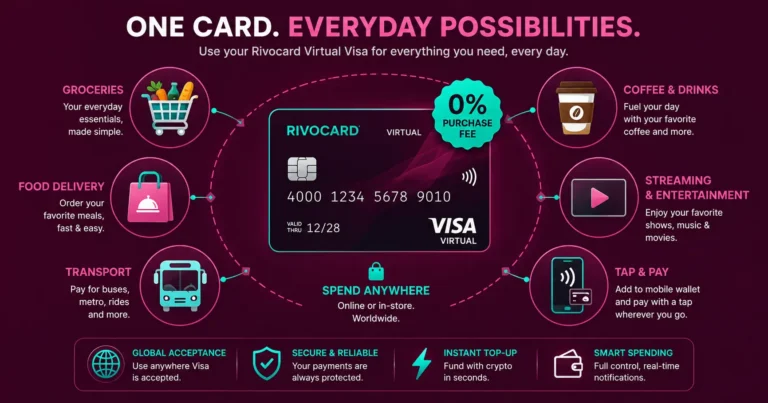
Quick answer: A Rivocard virtual Visa card works for everyday purchases anywhere Visa is accepted — online shopping, grocery delivery, food delivery, streaming, software, transport bookings, and in-person contactless payments via Apple Pay or Google Pay. Crypto cards have crossed into the mainstream in 2026 because they work like the cards you already use — at checkout, assets convert to local currency, and you can tap to pay worldwide. For Rivocard specifically, the model is: deposit crypto once, fund a card (5% fee), and spend from that balance at 0% purchase fee across all everyday merchant categories.
What ‘Everyday Purchases’ Actually Means for a Crypto Card
Everyday spending breaks into four distinct categories, each with slightly different card requirements:
1. Online purchases — Any website that accepts Visa. Enter card number, expiry, CVV. Works identically to any other Visa card. No merchant awareness that the card is crypto-funded.
2. In-person contactless (via Apple Pay or Google Pay) — Tap your phone at any NFC terminal. Works at grocery stores, coffee shops, pharmacies, restaurants, transit systems, and most modern retail. The virtual card is added to the digital wallet and functions exactly as a physical card would at NFC readers.
3. Recurring subscriptions — Netflix, Spotify, utilities (where card payment is accepted), delivery service memberships, and any recurring bill. Saved once, charged automatically on the renewal date.
4. In-app and mobile purchases — App Store, Google Play, food delivery apps, ride-sharing apps, and any mobile purchase flow.
Rivocard virtual cards work for categories 1, 2, 3, and 4 when the underlying platform accepts Visa. The one exception is category 5: ATM cash withdrawals, which require a physical card with a chip.
Everyday Purchase Categories: What Works
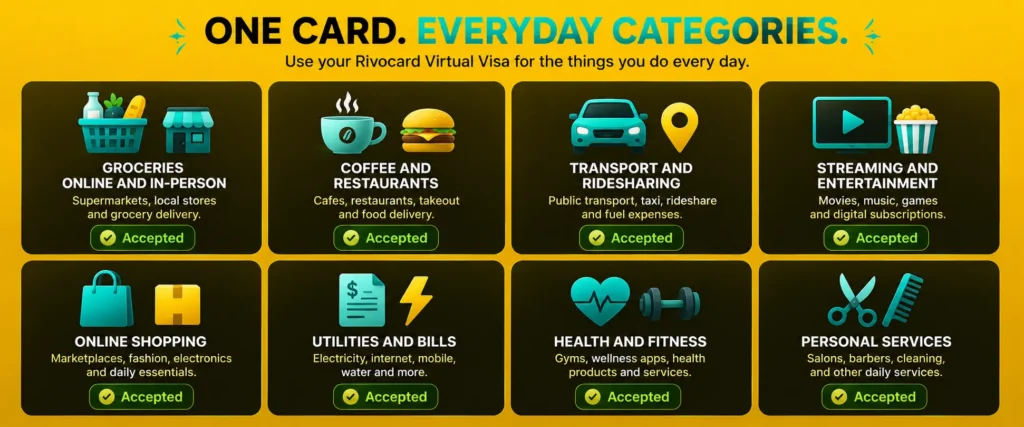
Groceries and Household Shopping
Online grocery delivery — Instacart, Amazon Fresh, Walmart Grocery, Tesco online, Ocado — accepts Visa cards. Enter Rivocard card details at checkout like any other card.
In-person at grocery stores: Add your Rivocard virtual card to Apple Pay or Google Pay. Tap your phone at the checkout NFC terminal. Works at Walmart, Kroger, Tesco, Sainsbury’s, Carrefour, Lidl, and any grocery chain with contactless readers — which in 2026 is the vast majority of modern supermarkets globally.
Coffee Shops and Restaurants
In-person via Apple Pay or Google Pay at any cafe or restaurant with an NFC terminal. Most major chains (Starbucks, Costa, McDonald’s, Subway, Pret a Manger) support tap-to-pay. Independent cafes with modern card terminals also support contactless.
Online food delivery: Uber Eats, DoorDash, Deliveroo, Just Eat, Grubhub all accept Visa. Save your Rivocard card in the app for one-tap ordering.
Restaurant booking deposits: OpenTable, Resy, and similar platforms accept Visa for reservation deposits.
Transport and Ridesharing
Uber, Lyft, Bolt, and other rideshare apps accept Visa cards saved to the app. Add your Rivocard once, all rides charged from that balance.
Transit systems with NFC: London Underground (TfL), New York MTA, Singapore MRT, Sydney Opal, and many other transit systems accept Apple Pay and Google Pay directly at fare gates. Rivocard via Apple Pay works at any of these.
Online transport bookings: train tickets (Trainline, Amtrak, DB Bahn), bus bookings, ferry tickets — all accept Visa at checkout.
Streaming and Entertainment
Netflix, Spotify, Disney+, YouTube Premium, Apple TV+, HBO Max — all accept Visa for recurring subscription billing. Save your Rivocard once, all monthly charges process from that balance. See the dedicated crypto card for subscriptions guide for the full subscription management strategy.
Online Shopping
Amazon, eBay, AliExpress, ASOS, Zara, H&M, IKEA online, and essentially any e-commerce site accepting Visa. Rivocard works identically to any other Visa card at checkout. International sites (shipping from different countries) also work with 0% FX fee.
Utilities and Bills (Card-Accepting Billers)
Some utility providers and services accept Visa card payments for bills — electricity, internet, phone plans, insurance where online payment is available. Enter Rivocard details in the payment portal.
Note: Direct debit and bank transfer billers cannot accept a virtual card — those require bank account access. For utilities that require bank payment, the card does not apply.
Health, Fitness and Wellness
Gym memberships that bill via card: Planet Fitness, PureGym, and many gym chains accept Visa for monthly billing.
Health apps: subscription-based fitness apps (MyFitnessPal Premium, Calm, Headspace, Peloton digital), telemedicine platforms, and pharmacy delivery services accept Visa.
Online pharmacies and health retailers: iHerb, pharmacy chains’ online stores, supplement retailers.
Personal Care and Services
Online appointment booking with card deposits: many salons, barbershops, and personal services book via platforms like Fresha or Booksy that accept Visa for deposits.
Delivery services and concierge: TaskRabbit, Amazon Home Services, Rover, and similar gig economy platforms accept Visa.
Setting Up Rivocard for Daily Spending
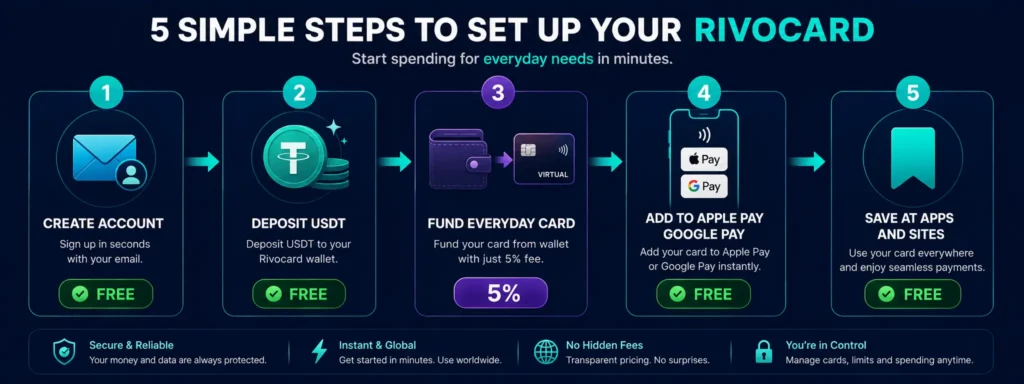
Step 1: Create your account. Email verification only. No ID at Basic KYC. See the account creation guide.
Step 2: Deposit USDT for everyday spending. USDT on TRC-20 is ideal: stable $1 value, seconds to confirm, negligible fees. Deposit your estimated weekly or monthly spending amount. A good starting point for everyday spending: deposit a month of expected spend at once to minimize deposit frequency.
Step 3: Create your everyday spending card. Create a virtual card specifically for daily purchases. Fund it with your expected spending for the period (week or month). The 5% Rivocard fee applies when you fund the card.
Example monthly budget for everyday spending:
- Groceries and household: $300
- Food delivery and restaurants: $150
- Subscriptions: $75
- Transport: $80
- Miscellaneous online: $95
- Total: $700
To have $700 available on your everyday card: deposit approximately $737 from your wallet ($737 x 95% = $700). Rivocard fee: $37. All subsequent purchases: 0%.
Step 4: Add the card to Apple Pay or Google Pay. For in-person everyday spending (grocery stores, coffee, transit), adding the card to your phone’s digital wallet is the most convenient setup. Tap your phone at any NFC terminal — no need to have the card number memorized or accessible.
Step 5: Save the card at recurring merchants. For delivery apps (Uber Eats, Amazon), streaming services, and any app where you spend regularly, save the Rivocard card once. Future charges bill automatically.
Practical Tips for Everyday Card Use
Reload before your card runs low, not after. A card with zero balance declines at checkout. Check your balance before major shopping trips or at the start of each week. Reload is instant from your Rivocard wallet.
Keep a buffer on your everyday card. Fund slightly more than your exact planned spend. Unexpected purchases, delivery tips, or price variations can push a purchase slightly over your planned amount.
Use one card for day-to-day, another for subscriptions. Keeping everyday purchases and recurring subscriptions on separate cards gives cleaner spending visibility and prevents a subscription billing issue from affecting your daily spending card.
For in-person spending, use the phone wallet, not the card number. Apple Pay and Google Pay with your Rivocard virtual card are more convenient than reciting or typing a card number at in-person checkout. The tap-to-pay experience is identical to using a physical card.
Monitor your balance weekly. A quick check of your card balance at the start of each week prevents mid-week surprises. Most everyday spending is predictable enough that a weekly deposit matching your expected spend keeps the card funded.
How Rivocard Compares to Using a Bank Card for Everyday Spending
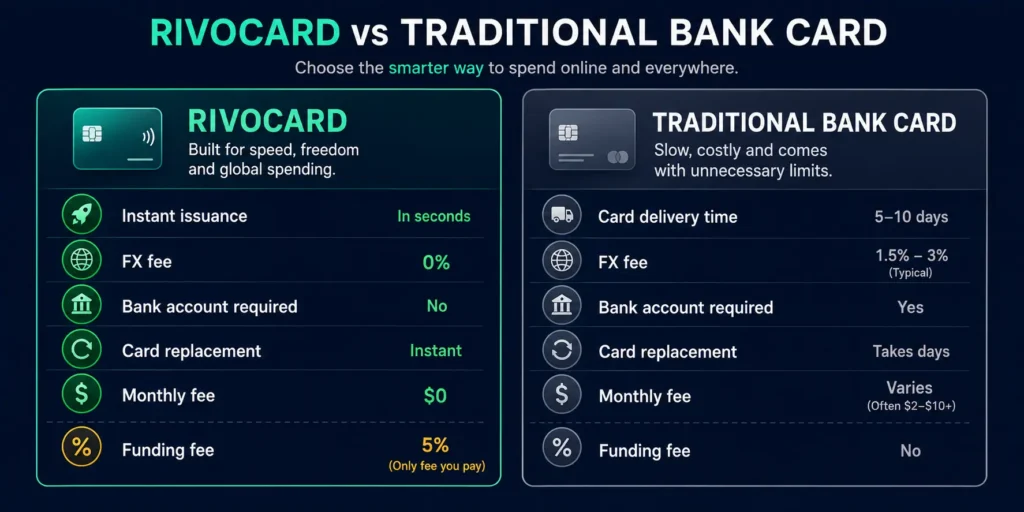
| Rivocard virtual Visa | Traditional bank debit card | |
|---|---|---|
| Works online | Yes | Yes |
| Works via Apple Pay or Google Pay | Yes | Yes |
| International purchases | 0% FX fee | 1.5-3% FX fee typical |
| Card issuance | Instant | 5-10 business days |
| Replacement if compromised | Instant, free | 5-10 business days |
| Funded from crypto | Yes | No |
| Bank account required | No | Yes |
| Monthly account fee | $0 | Varies ($0-$25) |
| Spending fee | 0% (5% at card funding only) | 0% |
The main trade-off: the 5% Rivocard fee at card funding versus no funding fee on a bank debit card. For users whose income or savings are in crypto, converting via Rivocard at 5% is the path to spending that crypto — the alternative is a more complex conversion path through an exchange and bank transfer.
The Everyday Spending Tax Consideration
Cryptocurrency is no longer just for investment — it is increasingly used for everyday spending in 2026, but the tax implications remain a consideration for users spending appreciated volatile assets.
For Rivocard users specifically: USDT deposited at $1 and spent from a Rivocard card at $1 creates no price appreciation and typically no capital gains event. This makes USDT the most tax-efficient funding asset for everyday spending compared to spending appreciated Bitcoin or Ethereum directly.
Consult a qualified tax professional in your jurisdiction — crypto spending tax rules vary significantly by country.
FAQs
Can I use a Rivocard for everyday purchases like groceries and coffee?
Yes. A Rivocard virtual Visa card works for online grocery delivery (Amazon Fresh, Instacart, Tesco online), food delivery apps (Uber Eats, DoorDash, Deliveroo), and in-person at any store with a contactless NFC terminal via Apple Pay or Google Pay. 0% purchase fee on all transactions.
How do I use a Rivocard in person without a physical card?
Add your Rivocard virtual card to Apple Pay or Google Pay. Then tap your phone at any NFC contactless terminal to pay. This works at grocery stores, coffee shops, restaurants, pharmacies, transit systems, and any merchant with tap-to-pay capability. The experience is identical to using a physical card.
Can I save a Rivocard card in delivery apps like Uber Eats?
Yes. Add your Rivocard card details to Uber Eats, DoorDash, Deliveroo, or any food delivery app’s payment settings. Future orders charge from your saved card automatically. 0% purchase fee applies.
How much should I put on my everyday Rivocard for a month?
Estimate your expected monthly spend across all categories (groceries, food, transport, subscriptions, misc). Divide by 0.95 to account for Rivocard’s 5% fee. Example: $700 of spending requires funding approximately $737 from your wallet. The $37 difference is Rivocard’s fee. All subsequent purchases are 0%.
Does Rivocard work for grocery stores in person?
Via Apple Pay or Google Pay, yes. Add your Rivocard virtual card to your phone’s digital wallet. Tap your phone at any NFC contactless checkout in any grocery store that supports tap-to-pay – which in 2026 includes the vast majority of modern supermarkets globally.
Can I use Rivocard for ridesharing apps like Uber?
Yes. Uber, Lyft, Bolt, and other rideshare apps accept Visa cards. Save your Rivocard card in the app once and all rides charge from that balance. Add the card to Apple Pay for in-person use at transit systems that accept contactless payment.
Is Rivocard suitable as a main everyday spending card?
Rivocard works well as an everyday spending card for users with crypto income or holdings they want to convert to spending power. The key consideration is the 5% card funding fee – this is the cost of converting crypto holdings to spendable Visa card balance. For users already holding USDT, this is the primary conversion cost between crypto and everyday spending.
Does using Rivocard for everyday purchases trigger capital gains tax?
For purchases funded with USDT (stable at $1), there is typically no capital gains event since the asset value has not changed. For volatile assets (BTC, ETH), spending appreciated holdings may trigger capital gains in many jurisdictions. USDT funding is the most tax-efficient approach for everyday spending with Rivocard. Consult a qualified tax professional for your specific jurisdiction.
Can I use Rivocard for transit systems like the London Underground?
Yes, via Apple Pay or Google Pay. Add your Rivocard card to your phone’s digital wallet and tap at TfL fare gates on the London Underground, Overground, and buses. The same works for New York MTA, Singapore MRT, Sydney Opal, and other transit systems that accept Apple Pay and Google Pay.
What happens if my Rivocard runs out of balance mid-month?
The next purchase attempts will decline. From your Rivocard dashboard, reload the card from your wallet balance (5% fee applies to the reload amount). The reload is instant. Alternatively, transfer USDT from your exchange to your Rivocard wallet first if your wallet balance is also low – this takes under 4 minutes on TRC-20.
Get Started
Ready to spend your crypto on everyday purchases? Create your Rivocard account – start spending in under 5 minutes
