
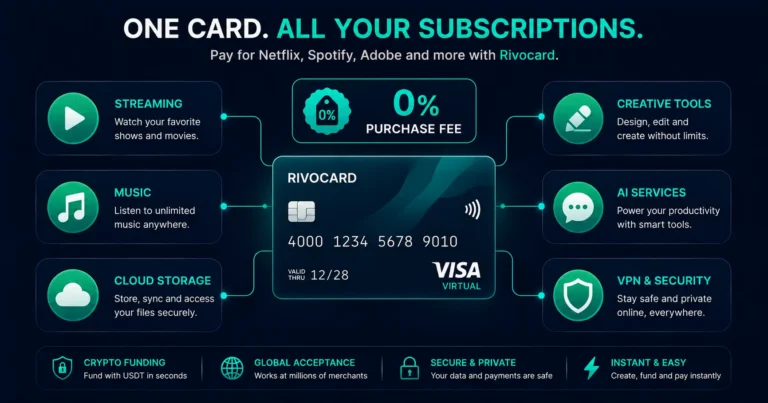
Quick answer: A Rivocard virtual Visa card works for all major subscription services — Netflix, Spotify, Disney+, Adobe Creative Cloud, YouTube Premium, ChatGPT Plus, Microsoft 365, Apple services, and any other subscription that accepts Visa. Fund the card with USDT (converts to a stable dollar balance), save the card details at your subscription service, and the monthly charge processes automatically. Rivocard’s unlimited free card creation makes a one-card-per-subscription setup practical: each subscription gets its own dedicated virtual card, and cancelling a subscription is as simple as freezing or deleting that card. Purchase fees: 0%.
The Crypto Subscription Problem — and How Prepaid Cards Solve It
Using crypto for subscriptions has historically had one specific friction: subscription merchants like Adobe, Microsoft, and Netflix often filter out cards with a ‘Prepaid’ Bank Identification Number (BIN). A card with a Prepaid BIN triggers automatic rejection at checkout for many subscription services.
This is not universal, and the landscape has improved significantly — but it remains a real issue for some crypto cards issued by certain providers.
For Rivocard specifically, the card functions as a standard Visa card at subscription checkouts. If you encounter a decline, see the troubleshooting section below. For the vast majority of subscription services, Rivocard works without issue.
The more practical problem crypto users face with subscriptions is using volatile assets:
- Bitcoin’s price is unpredictable. If Netflix bills $15.99 monthly and your BTC value fluctuates, you cannot predict what the charge represents in BTC terms
- Volatile-asset funded cards can decline if the fiat value drops below the subscription amount between top-ups
- Capital gains tax may apply each time a volatile-asset card is charged for a subscription
Rivocard solves this: deposit USDT (pegged to $1), fund a card with a specific dollar amount, and the subscription charges a stable dollar balance. No volatility. No guessing. No capital gains event on a $1-pegged stablecoin.
Every Major Subscription Service: Does Rivocard Work?
| Service | Monthly cost (standard plan) | Rivocard accepted |
|---|---|---|
| Netflix | $15.49 – $22.99 | Yes |
| Spotify Premium | $11.99 | Yes |
| Disney+ | $7.99 – $13.99 | Yes |
| YouTube Premium | $13.99 | Yes |
| Apple TV+ | $9.99 | Yes |
| HBO Max | $9.99 – $15.99 | Yes |
| Amazon Prime | $14.99/month | Yes |
| Adobe Creative Cloud | $54.99 – $89.99 | Yes |
| Microsoft 365 | $6.99 – $9.99 | Yes |
| ChatGPT Plus | $20.00 | Yes |
| Claude Pro | $20.00 | Yes |
| Google One | $1.99 – $9.99 | Yes |
| iCloud+ | $0.99 – $12.99 | Yes |
| Dropbox | $9.99 – $16.58 | Yes |
| NordVPN | $3.29 – $14.99 | Yes |
| ExpressVPN | $8.32 – $12.95 | Yes |
| 1Password | $2.99 – $4.99 | Yes |
| Canva Pro | $14.99 | Yes |
| Figma | $12.00 – $15.00 | Yes |
| Notion | $8.00 – $15.00 | Yes |
All of these accept Visa cards and process recurring billing on standard Visa card rails.
The One-Card-Per-Subscription Strategy
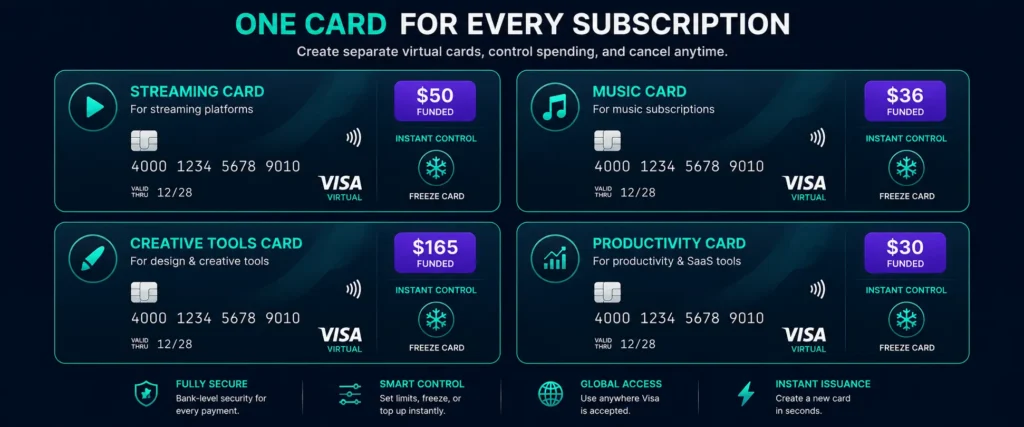
Rivocard’s unlimited free card creation makes a subscription management approach that physical cards and single-card models cannot match.
The approach: Create a dedicated virtual card for each subscription. Fund each card with enough to cover 1-3 months of that subscription at a time.
Example setup:
- Card 1 (Netflix): Funded with $50 — covers approximately 2-3 months at $15.49-$22.99
- Card 2 (Spotify): Funded with $36 — covers 3 months at $11.99
- Card 3 (Adobe): Funded with $165 — covers 3 months at $54.99
- Card 4 (Microsoft 365): Funded with $30 — covers 3 months at $9.99
Why this approach is better than one card for all subscriptions:
Instant cancellation: To cancel any subscription, freeze or delete its card. The merchant cannot charge a frozen card. No need to log in to the subscription service, find the cancellation page, navigate through retention flows, or wait for a chat agent. Freeze the card — billing stops.
Isolated breach risk: If one subscription service’s payment database is compromised and card details are leaked, only that service’s dedicated card is affected. Your other subscription cards — and your main wallet balance — are untouched.
Clear spending visibility: Each card’s transaction history shows only that subscription’s charges. No mixing of different services on one statement.
Free trial control: For free trials, create a card, fund it minimally (just enough to pass the authorization), and delete it before the trial converts to paid. The merchant cannot charge a deleted card.
How to Set Up Rivocard for Your Subscriptions
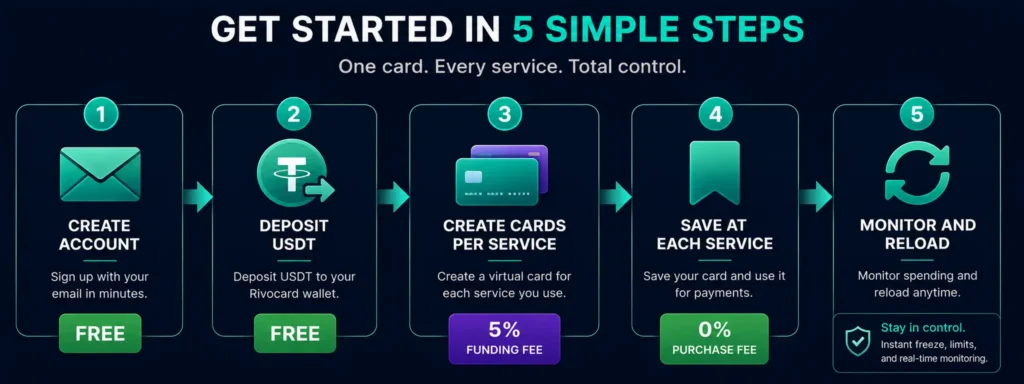
Step 1: Create your Rivocard account. Email verification only. No ID required at the Basic KYC tier. See how to create a Rivocard account.
Step 2: Deposit USDT to your wallet. Deposit USDT on TRC-20 from your exchange (Binance, OKX, Bybit, etc.). Free at deposit. Arrives in seconds. For monthly subscriptions, deposit enough for 2-3 months of all your subscriptions at once to minimize deposit frequency.
Calculating how much to deposit: Total your monthly subscription costs (e.g., $75/month), multiply by 3 months = $225. Add Rivocard’s 5% card funding fee: $225 / 0.95 = $236.84 total to deposit. This covers 3 months of all subscriptions.
Step 3: Create a dedicated card for each subscription. From your dashboard, create a new virtual card. Fund it with enough for 1-3 months of that specific subscription, plus a small buffer for price changes. The 5% Rivocard fee applies at this funding step.
Step 4: Save the card at each subscription service.
For each service, go to payment/billing settings and add your Rivocard card:
- Netflix: Account, Manage Payment Info, Add a payment method, enter card details
- Spotify: Account, Payment, Update payment method, enter card details
- Adobe: Account, Plans and payment, Manage plan, Update credit card
- ChatGPT: Settings, Subscription, Manage plan, Update payment method
- Microsoft 365: Account, Payment and billing, Payment methods, Add payment method
For each service, enter: card number, expiry date (MM/YY), CVV, name on card, billing address.
Step 5: Monitor balances and reload before renewal dates. Check card balances before each expected renewal date. If a card is running low, reload from your wallet. A card with insufficient balance at renewal will cause the subscription to fail and potentially pause your service.
Calculating the Real Cost of Managing Subscriptions With Rivocard
Monthly subscription total example: $75/month across all services
If you load 3 months of subscriptions at a time:
- 3-month subscription cost: $225
- Amount to deposit from wallet (covering 5% fee): $236.84
- Rivocard fee paid: $11.84
- Annual Rivocard fee (reload quarterly): $47.36 per year
Annualized comparison:
- Annual subscription cost: $900
- Annual Rivocard fee at 5%: $47.36 (if loading quarterly)
- Rivocard’s 0% purchase fee means no additional cost per charge
- No monthly Rivocard account fee
- Total additional cost vs a free bank debit card: $47.36/year (5.3% of subscription costs)
This 5% is the transparent, single cost of using crypto for your subscriptions. No hidden spread, no inactivity fee, no monthly platform fee.
Handling Free Trials With Rivocard
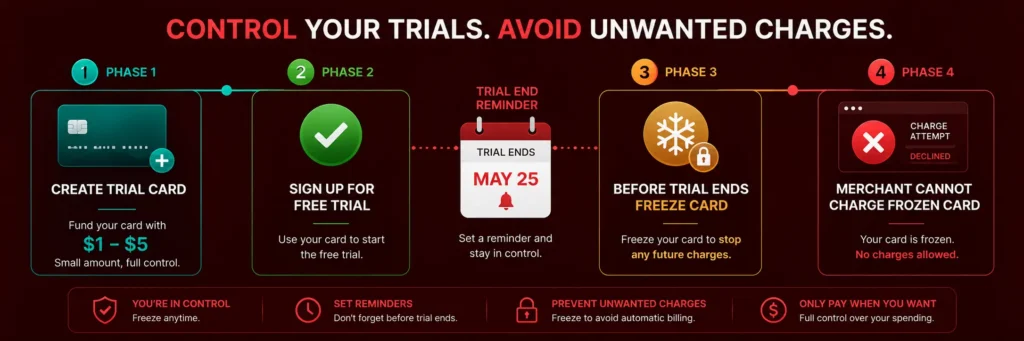
Free trials that require a card to activate are one of the most practical use cases for Rivocard’s unlimited virtual cards.
The approach:
- Create a new virtual card specifically for the trial
- Fund it with a minimal amount — $1 to $5 is usually sufficient to pass the authorization check most trials run at signup
- Complete the trial signup with this card’s details
- Before the trial converts to paid (check the exact end date): freeze or delete the card
- The merchant cannot charge a frozen or deleted card
- If you decide you want to subscribe: unfreeze the card and reload it with enough for the first billing cycle, or update the subscription to a different Rivocard card
Why this works better than cancelling through the subscription service:
- No navigating retention flows designed to keep you subscribed
- No relying on your memory to cancel before the deadline
- No risk of forgetting and being charged for a service you did not intend to keep
- The card simply stops working for that merchant
Services where this is especially useful:
- Any streaming service offering a 30-day free trial
- Software tools with 14-day trials
- News subscriptions with discounted first-month offers
- SaaS platforms with trial periods
Managing Subscription Renewals: Practical Tips
Keep a buffer on subscription cards. Do not fund cards to exactly the renewal amount. Leave 10-20% extra to account for price increases, additional taxes at checkout, or minor billing variations.
Know your renewal dates. Most subscriptions have a fixed billing date each month. Note these and check your card balances a few days before each renewal cycle. This is especially important for annual subscriptions that renew once a year.
Reload in batches. Instead of reloading each subscription card individually, reload your Rivocard wallet with a larger USDT deposit and then distribute across cards. This reduces the number of exchange withdrawal transactions and their associated fees.
Set calendar reminders for annual subscriptions. Adobe, Microsoft 365, and other services with annual billing can catch users off-guard when the yearly charge hits. A calendar reminder 1-2 weeks before the annual renewal gives you time to ensure the card has sufficient balance.
Keep a wallet buffer. Maintain a small ongoing USDT deposit in your Rivocard wallet that you do not allocate to any specific card — a reserve that covers unexpected renewals or emergency top-ups.
What to Do if a Subscription Declines
If a subscription service declines your Rivocard:
Insufficient balance: The most common cause. Check the card balance in your dashboard. Reload from your wallet if needed.
Card expired: Virtual cards have an expiry date. If your card has expired, create a new card, update the payment method at the subscription service with the new card details.
Billing address mismatch: Some services perform address verification. Enter your Rivocard-registered billing address exactly at the subscription service.
BIN filtering: Some subscription services filter certain card categories. If you suspect this is the issue, contact Rivocard support to discuss the specific service and any available solutions.
3D Secure required: Some services trigger 3DS for card verification. Complete the verification through your Rivocard account if prompted.
FAQs
Can I use a Rivocard virtual card for Netflix and Spotify?
Yes. Both Netflix and Spotify accept Visa cards for subscription billing. Enter your Rivocard card number, expiry, and CVV in the payment settings of each service. The monthly charge processes from your card’s dollar balance at 0% purchase fee.
Does Rivocard work for recurring subscription charges?
Yes. Once a Rivocard virtual card is saved at a subscription service, recurring monthly or annual charges process automatically from the card’s balance – the same as any other saved Visa card. Ensure the card has sufficient balance before each renewal date.
How do I cancel a subscription using Rivocard?
Freeze or delete the virtual card dedicated to that subscription from your Rivocard dashboard. A frozen or deleted card cannot be charged. This stops billing immediately without navigating the subscription service’s cancellation flow. Note: this does not formally cancel the subscription account – for that, follow the service’s own cancellation process.
Can I use one Rivocard for all my subscriptions?
Yes, technically. But using a dedicated card per subscription gives you instant cancellation control, isolated security, and clear spending visibility per service. Since Rivocard card creation is free and unlimited, the dedicated-card approach is practical at no extra cost.
How do I handle free trials with a Rivocard?
Create a new virtual card for the trial, fund it minimally (enough to pass the initial authorization), and freeze or delete it before the trial converts to paid. The merchant cannot charge a frozen or deleted card. If you decide to continue, reload the card before the trial end date.
Is Rivocard accepted by Adobe Creative Cloud?
Yes. Adobe accepts Visa cards for Creative Cloud billing. Enter your Rivocard card under Account, Plans and Payment, Manage Plan. Adobe may run a small authorization check at signup. Ensure the card has sufficient balance for the first billing cycle.
What happens if my card has insufficient balance at subscription renewal?
The renewal charge fails. The subscription service will typically retry the charge 1-3 times over several days before suspending the service. You will usually receive an email notification about the failed payment. Reload the card from your Rivocard wallet to restore the balance and the service will attempt to re-charge.
Does using Rivocard for subscriptions trigger capital gains tax?
Rivocard converts your crypto deposit to a dollar balance at deposit time. If you use USDT (stable at $1), there is no price appreciation and typically no capital gains event at either deposit or subscription charge. Consult a qualified tax advisor for your specific jurisdiction, as tax rules vary.
Can I use Rivocard for annual subscription plans?
Yes. Annual subscription charges process the same as monthly charges – a single larger charge against your card balance. Ensure the card is funded with at least the full annual amount before the renewal date. A calendar reminder 2 weeks ahead is recommended for annual plans.
How much does it cost to manage all my subscriptions with Rivocard?
The 5% card funding fee applies when you load your wallet balance onto a card. If you load $100 to cover subscriptions, $5 is the fee – the card has $95. On purchases, the fee is 0%. No monthly Rivocard account fee. No FX fee. For $75/month in subscriptions, the annual Rivocard cost is approximately $47 if you load quarterly.
Get Started
Pay all your subscriptions with crypto – set up your dedicated subscription cards today. Create your Rivocard account
