

Quick answer: Rivocard supports 12+ major cryptocurrencies for funding your Rivocard wallet, including Bitcoin (BTC), Ethereum (ETH), Tether (USDT on TRC-20 and ERC-20), USD Coin (USDC), Solana (SOL), Litecoin (LTC), Monero (XMR), Dash, Ripple (XRP), BNB (BEP-20), Dogecoin (DOGE), and Tron (TRX). All deposits are free — there’s no fee for depositing any supported cryptocurrency. The 5% fee only applies later, when you fund a virtual card from your wallet balance.
If you’re new to the full funding process, our step-by-step guide on how to fund a prepaid card with crypto covers the mechanics. This article focuses on the which coin to use question — and what each one is best for.
How Rivocard’s Wallet Works (the Short Version)
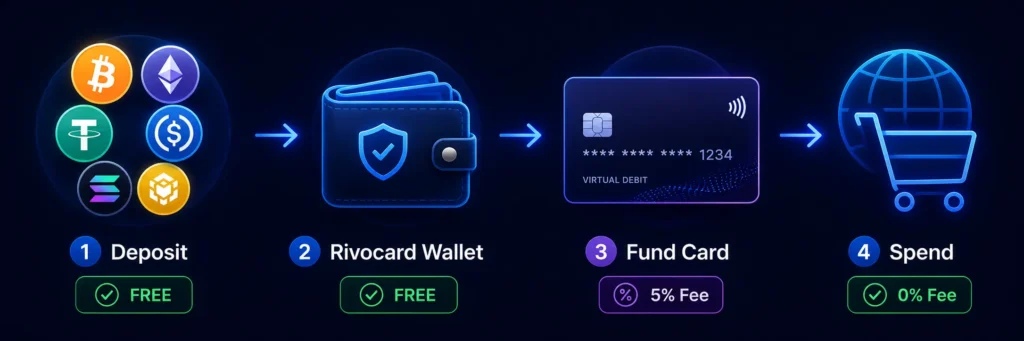
Before the list, one important piece of context: Rivocard separates your wallet from your virtual cards. You deposit crypto to your Rivocard wallet — always free, regardless of which supported coin you choose. From that wallet balance, you create virtual cards (also free) and fund them with however much you want. The 5% fee applies only at the card funding step, not at the deposit step.
This means choosing a cryptocurrency for your deposit is primarily a question of speed and network cost, not Rivocard fees — those are identical regardless of which coin you pick.
The Full List of Supported Cryptocurrencies
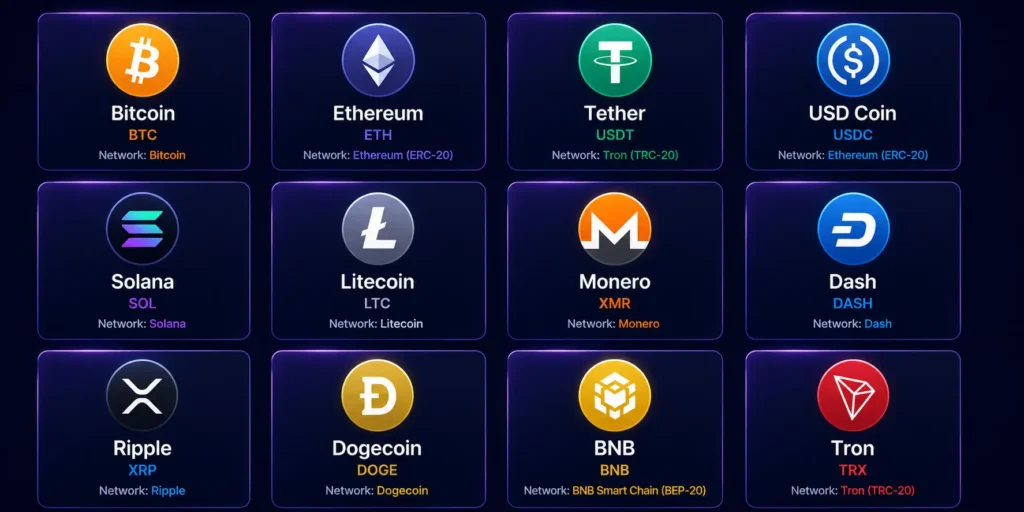
| Cryptocurrency | Ticker | Network(s) | Best For |
|---|---|---|---|
| Bitcoin | BTC | Bitcoin Network | Large, predictable deposits |
| Ethereum | ETH | ERC-20 | ETH holders, DeFi users |
| Tether | USDT | TRC-20, ERC-20 | Stable value, fast deposits |
| USD Coin | USDC | ERC-20, Solana | Stable value, regulated stablecoin |
| Solana | SOL | Solana Network | Fast, low-cost transfers |
| Litecoin | LTC | Litecoin Network | Low network fees |
| Monero | XMR | Monero Network | On-chain privacy |
| Dash | DASH | Dash Network | Fast, instant-send capable |
| Ripple | XRP | XRP Ledger | Very fast, very low fees |
| Dogecoin | DOGE | Dogecoin Network | DOGE holders, low minimums |
| BNB | BNB | BEP-20 (BSC) | Low fees, BSC users |
| Tron | TRX | TRON Network | Very low network fees |
New cryptocurrencies are added as demand and network support evolve — always check your Rivocard dashboard for the most current list before sending.
Quick Decision: Which Coin Should You Deposit?
If you have multiple cryptocurrencies available to send, the choice matters — not for whether it’ll work, but for how fast and how cheap the blockchain network fee ends up being.
Pick USDT on TRC-20 if: you want the fastest, cheapest stablecoin deposit. Confirmation is typically under a minute, network fees are extremely low, and the dollar value is stable between sending and arrival.
Pick USDC on Solana if: you prefer USDC over USDT but still want speed — Solana network fees are minimal, and confirmation is near-instant.
Pick BTC if: you’re sending a larger one-time deposit and don’t mind waiting 10–30 minutes for confirmation. Bitcoin’s network fees are predictable, and it’s the most universally recognized asset.
Pick ETH if: you already hold ETH and want to use it directly. Note that ERC-20 network fees can spike during high-traffic periods — if you’re sending during a busy moment, consider a different network temporarily.
Pick XMR if: on-chain privacy matters to you. Monero’s privacy features are the strongest among the supported list, though network fees and confirmation times are moderate.
Pick LTC, TRX, or BNB if: you want low fees and confirmation speeds that are fast but not Solana-level — solid all-rounders with established networks.
For most users, the practical recommendation is: USDT on TRC-20 for frequent deposits, BTC for occasional larger deposits. That combination handles 90% of typical use cases.
Deposit Limits per Transaction
The same parameters apply across every supported cryptocurrency — no per-coin variations:
- Minimum deposit: $10 USD equivalent
- Maximum per deposit transaction: $10,000 USD equivalent
- Deposit fee: FREE (no fee on any supported cryptocurrency deposit)
- Card funding fee (later step): 5% deducted from amount when you fund or reload a card
- Purchase fee: 0%
- International transaction fee: 0%
If you need to deposit more than $10,000 in one go, you can make multiple deposits — your wallet aggregates all of them into a single balance. For full fee structure details, see our Rivocard fees breakdown.
Stablecoins vs. Volatile Assets — What to Know
There’s one important consideration when choosing between a stablecoin (USDT, USDC) and a volatile asset (BTC, ETH, SOL, etc.) for deposits:
Stablecoins are pegged to the US dollar. The amount you send is approximately the amount that lands in your wallet. There’s no risk of the value shifting during the few minutes between sending and confirmation. If you want predictable, “what I send is what I get” behavior, stablecoins are the obvious pick.
Volatile assets convert at the live market rate at the moment the funds land in your wallet. If BTC moves significantly during the confirmation window (especially during high-volatility periods), the final wallet balance could differ slightly from what you’d have calculated when sending. This isn’t usually a meaningful issue for under-15-minute confirmations, but it’s worth knowing — especially for larger deposits.
Once your wallet balance is set, funding a card from it isn’t affected by market movement — your wallet balance is already in dollars, and the 5% fee applies to that dollar amount.
How Each Network Compares for Speed and Cost
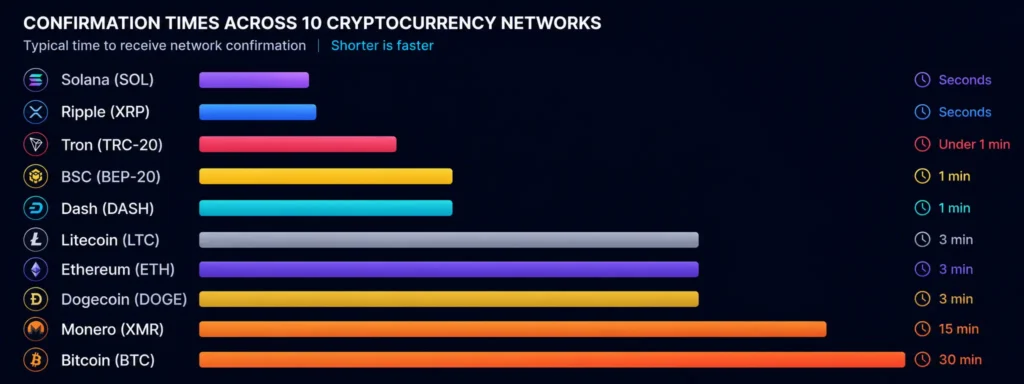
| Network | Typical Confirmation Time | Network Fee Range |
|---|---|---|
| Tron (TRC-20 USDT) | Under 1 minute | Very low |
| Solana (USDC, SOL) | Seconds | Very low |
| Ripple (XRP Ledger) | Seconds | Very low |
| BSC (BNB, BEP-20) | Seconds to 1 minute | Low |
| Litecoin | 2–5 minutes | Low |
| Dash | Seconds (with InstantSend) | Low |
| Dogecoin | 2–5 minutes | Low |
| Ethereum (ETH, ERC-20) | 1–5 minutes | Variable (low to high) |
| Monero | 5–20 minutes | Moderate |
| Bitcoin | 10–60 minutes | Moderate |
Network fees aren’t paid to Rivocard — they’re paid to the underlying blockchain (miners or validators). Rivocard itself charges zero on the deposit.
Adding Stablecoins to the Mix (Why USDT and USDC Are Popular)
Stablecoins are the most popular deposit method for crypto cards, and for good reason: they combine the speed and global reach of crypto with the price stability of fiat. If you’re funding cards to spend predictable amounts (subscriptions, ads, online shopping), stablecoins eliminate one variable from the equation.
Among the stablecoins Rivocard supports:
- USDT (Tether) — the most widely used stablecoin globally, available on both TRC-20 (cheap, fast) and ERC-20 (more expensive but useful if your wallet is already on Ethereum)
- USDC (USD Coin) — issued by Circle, well-regulated, available on ERC-20 and Solana
For Tether specifically, we have a USDT guide covering the full process. For Bitcoin users, see our Bitcoin guide.
Common Mistakes to Avoid When Depositing a Coin
- Sending USDT on the wrong network. USDT exists on multiple chains (Tron, Ethereum, Solana, and more). The deposit address only recognizes the specific network it was generated for. Sending TRC-20 USDT to an ERC-20 address (or vice versa) usually means losing the funds.
- Sending an unsupported coin. If a coin isn’t on the supported list, sending it to a Rivocard address won’t credit your wallet, and the funds may be unrecoverable.
- Ignoring network fee spikes. Ethereum network fees can spike significantly during congestion. If you’re sending ERC-20 assets, check current fees before sending — switching to Tron or Solana can save meaningful money.
- Confusing tickers. Some tokens have similar tickers across different chains. Always confirm both the asset and network match what your dashboard expects.
- Sending below the minimum. Deposits below $10 equivalent may not credit properly. Always send at least the minimum or more.
Is My Coin Supported If It’s Not On the List?
If your preferred cryptocurrency isn’t on the supported list, the best path is:
- Convert it first. Use an exchange to swap your coin into one of the supported assets (typically USDT or BTC), then deposit that to your Rivocard wallet.
- Check the dashboard. New coins are added periodically — what wasn’t supported last month might be available now.
- Contact support. If you have a large amount of an unsupported asset, support may be able to suggest the best workaround.
What Happens After You Deposit
Once your deposit confirms on the blockchain, the dollar value appears in your Rivocard wallet — no fee deducted. From there, you can:
- Create as many virtual cards as you need — card creation itself is free
- Fund cards from your wallet balance — the 5% fee applies here, deducted from the amount funded
- Spend from any funded card anywhere Visa is accepted — 0% on purchases, 0% on international transactions
So depositing crypto and creating cards are both free; the only fee is the 5% at the card-funding step.
Whichever asset you hold, you can fund your crypto virtual card in a few taps.
Frequently Asked Questions
What cryptocurrencies can I deposit to my Rivocard wallet?
Rivocard supports 12+ major cryptocurrencies: Bitcoin, Ethereum, Tether (USDT TRC-20 and ERC-20), USD Coin (USDC on ERC-20 and Solana), Solana, Litecoin, Monero, Dash, Ripple, Dogecoin, BNB (BEP-20), and Tron. The current list is always shown in your Rivocard dashboard.
Is there a fee for depositing crypto to Rivocard?
No. Depositing any supported cryptocurrency to your Rivocard wallet is always free. The 5% fee only applies later, when you fund or reload a virtual card from your wallet balance.
Which cryptocurrency is fastest to deposit?
USDT on TRC-20 (Tron) and USDC on Solana are typically the fastest, with confirmations often in under a minute. XRP and BSC are similarly fast. Bitcoin is the slowest, with multi-block confirmation times of 10–60 minutes.
Which cryptocurrency has the lowest fees to deposit?
For network fees (paid to the blockchain, not Rivocard), Tron-based USDT, Solana-based USDC, XRP, LTC, DASH, and DOGE all have very low network fees. Rivocard itself charges 0% on deposits regardless of coin.
Can I deposit with USDT on Ethereum (ERC-20)?
yes. Rivocard supports USDT on both TRC-20 (Tron) and ERC-20 (Ethereum). Make sure to use the matching deposit address for whichever network you’re sending from — they’re not interchangeable.
Is there a minimum deposit amount?
Yes — $10 USD equivalent in any supported cryptocurrency. This applies across all supported coins.
Is there a maximum deposit amount?
The per-deposit-transaction maximum is $10,000 USD equivalent. You can make multiple deposits if you need to fund more — they all aggregate into a single wallet balance.
What happens if I send a coin that isn’t supported?
The transaction will go to the blockchain but won’t be credited to your wallet, and the funds may be unrecoverable. Always confirm the coin is on the supported list before sending.
Can I use the same deposit address for multiple deposits?
Each deposit typically generates a fresh address for security purposes. Always copy the current address from your dashboard before each deposit rather than reusing an old one.
Does my deposit value change if the crypto market moves?
The deposit value is locked at the rate when it confirms in your wallet. For stablecoins, this is essentially the same as what you sent. For volatile assets, large market moves during the confirmation window could affect the final wallet balance — but once it’s in your wallet (in dollars), it doesn’t move with the market afterward.
Ready to deposit crypto and create your first card? See all supported cryptocurrencies →
