

Quick answer: A Bitcoin prepaid card lets you deposit BTC to a card platform’s wallet, which converts it to a spendable dollar balance you can load onto a virtual Visa card — then use anywhere Visa is accepted, online or in person, with zero purchase fees. It’s the fastest path from “I hold Bitcoin” to “I can buy something with it” without going through the full exchange-to-bank-account process.
Most guides about “Bitcoin prepaid cards” are actually about buying Bitcoin with a prepaid card — using a card to purchase BTC on an exchange. This guide covers the opposite: using Bitcoin to fund a card and spend it like cash, anywhere in the world.
What a Bitcoin Prepaid Card Actually Is
A Bitcoin prepaid card isn’t a credit card or a debit card. It’s a prepaid virtual Visa (or Mastercard) that’s funded with Bitcoin instead of cash. You deposit BTC, the platform converts it to dollars, you load those dollars onto a virtual card, and you spend from that card balance at any merchant worldwide — online, in-app, through Apple Pay or Google Pay, or in person with a physical card.
The merchant never knows Bitcoin was involved. To their terminal, it’s a standard Visa payment. The crypto-to-fiat conversion happens entirely on the card platform’s side, before the payment ever touches Visa’s network.
This is meaningfully different from “spending Bitcoin” in the theoretical sense. You’re not paying a merchant in BTC — you’re converting BTC to dollars first, then spending dollars via a standard card. The end result is the same: your Bitcoin holdings become everyday spending power. The mechanism is just more practical.
Why Bitcoin Specifically — and Why It’s Slower Than Other Options
Bitcoin is the most widely recognized and widely held cryptocurrency — which makes it a natural first choice for people funding a card. But there’s a practical detail worth knowing upfront:
Bitcoin is the slowest supported deposit option. Block times average around 10 minutes, and most platforms wait for multiple block confirmations before crediting your wallet — meaning a BTC deposit can take anywhere from 20 minutes to over an hour to appear, depending on network congestion and how many confirmations the platform requires.
This isn’t a platform limitation — it’s how Bitcoin’s blockchain works. If speed matters (say, you need the card balance ready within minutes), USDT on Tron or USDC on Solana are materially faster. Bitcoin is better suited for larger, planned deposits where you can afford to wait.
That said, if BTC is what you hold, BTC is still a perfectly practical deposit asset — you just need to plan the timing.
How to Use Bitcoin to Fund a Prepaid Card: Step by Step
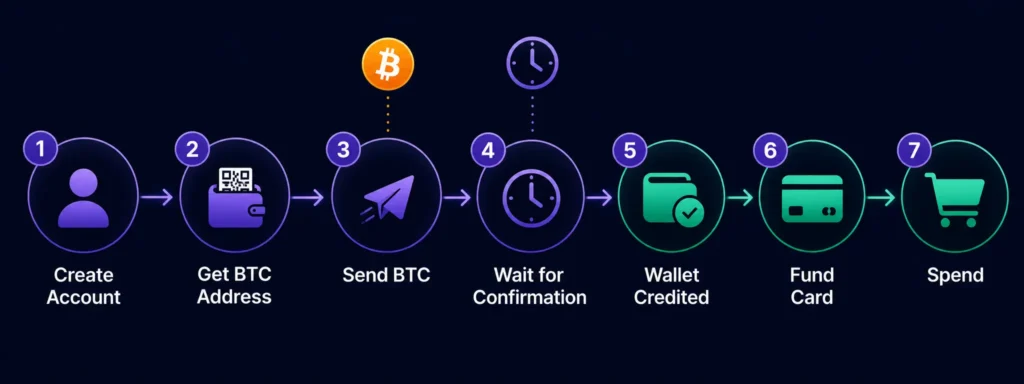
Step 1: Create your Rivocard account. Sign up with your email, verify it, and your Rivocard wallet is ready. No KYC required to start — you can deposit and spend up to your Basic KYC tier limit without submitting ID. If you need help with this step, see our account creation guide.
Step 2: Get your Bitcoin deposit address from the Rivocard dashboard. Inside your dashboard, select Bitcoin (BTC) as the deposit asset. You’ll see a BTC deposit address and a QR code. This address is unique to your account and specific to the Bitcoin network — do not send any other asset to this address.
Step 3: Send Bitcoin from your wallet or exchange. Open your Bitcoin wallet (hardware wallet, software wallet, or exchange) and:
- Paste the Rivocard BTC deposit address exactly — do not type it manually
- Confirm the network is Bitcoin (not a wrapped BTC version on another chain)
- Enter the amount you want to deposit (minimum $10 equivalent)
- Review the network fee, then send
The transaction is now broadcast to the Bitcoin network. You can paste the transaction hash (TXID) into a blockchain explorer like blockchain.com/explorer to track confirmation progress in real time.
Step 4: Wait for blockchain confirmation. Bitcoin typically requires multiple block confirmations before a platform credits the deposit. Each block takes roughly 10 minutes on average, though this varies with network congestion. Typical wait time: 20–60 minutes.
During high-congestion periods (when many Bitcoin transactions are competing for block space), unconfirmed transactions can take longer. If you’re in a hurry, using a higher network fee when you send will typically prioritize your transaction in the mempool.
Step 5: Your Rivocard wallet is credited. Once confirmed, the BTC is converted to its dollar value at the rate active when it lands, and that dollar amount appears in your Rivocard wallet. No fee is charged on the deposit — the full dollar equivalent hits your wallet.
Step 6: Create a virtual card and fund it from your wallet. From your dashboard, create a new virtual card (free) and choose how much to fund it with from your wallet balance. A 5% fee is deducted from the funded amount — fund a card with $200, the card receives $190. The exact fee and resulting balance are shown before you confirm.
Step 7: Spend anywhere Visa is accepted. Your card is now active with its full balance. Use it for:
- Online purchases and subscriptions
- Google/Facebook/Meta ad spend
- Travel bookings, hotels, flights
- Apple Pay and Google Pay (add the card to your digital wallet)
- Any in-person merchant with a Visa terminal (if you have a physical card)
All purchases are 0% — no transaction fees, no foreign exchange fees, no per-use charges.
The Bitcoin-Specific Considerations
1. Volatility between send and confirm. This is the key difference between depositing BTC versus a stablecoin. Bitcoin’s price moves continuously. If you send $500 worth of BTC and Bitcoin drops 3% during the confirmation window, your wallet might be credited $485 instead of $500. In practice this isn’t usually dramatic for 20–60 minute windows — but during high-volatility periods (major news events, market moves), it’s worth knowing.
If price certainty matters to you, consider:
- Depositing a stablecoin (USDT or USDC) instead of BTC for the card-funding step
- Or accepting the small variance as a trade-off for using the asset you already hold
2. Network fees fluctuate. Bitcoin network fees (paid to miners, separate from Rivocard’s fee) can vary widely — from under $1 during quiet periods to $5–20+ during high congestion. Before sending, check the current fee environment on a mempool tracker like mempool.space. If fees are unusually high, waiting a few hours or switching to a different deposit asset temporarily can save meaningful money on larger transfers.
3. Confirmation time is unpredictable. Unlike Tron or Solana where confirmations are nearly instant, Bitcoin’s confirmation time is probabilistic. The 10-minute average is just that — an average. During congestion, your transaction may sit in the mempool longer than expected, especially if you sent with a low fee. You can use a Replace-By-Fee (RBF) transaction from a supporting wallet to bump the fee and accelerate confirmation, if needed.
4. Never send to the wrong address. Bitcoin transactions are irreversible. A single incorrect character in the deposit address means the funds go to a different address and are unrecoverable. Always copy-paste, never type the address manually.
Bitcoin Prepaid Card vs. Stablecoin Prepaid Card
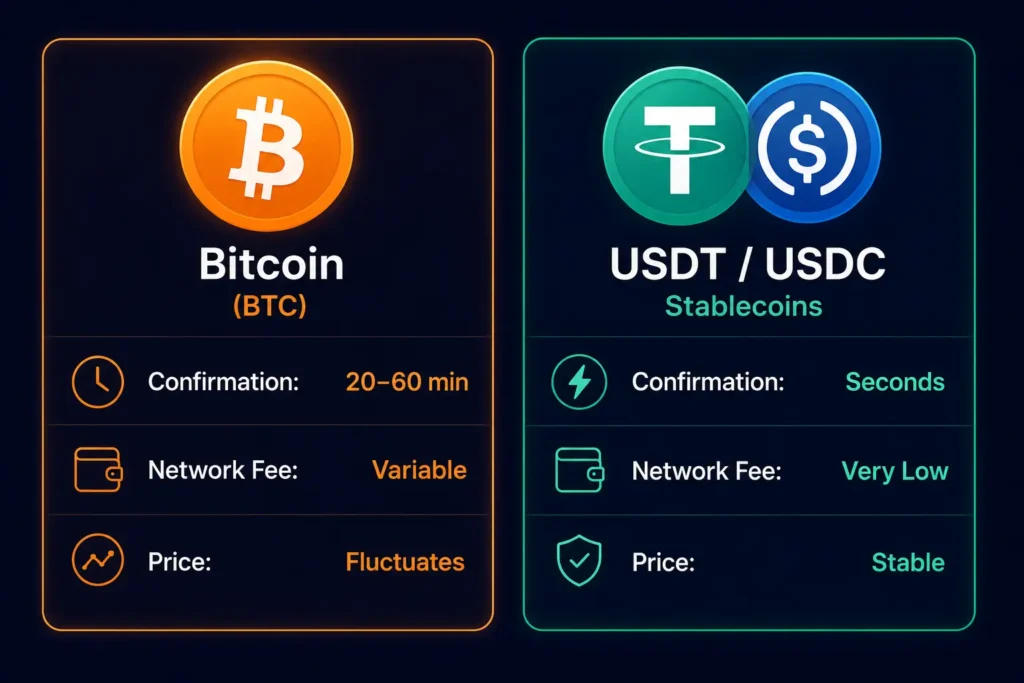
| Bitcoin (BTC) | USDT / USDC | |
|---|---|---|
| Confirmation time | 20–60 minutes | Seconds to ~1 minute (Tron/Solana) |
| Network fee | Variable ($1–$20+) | Very low (typically cents on Tron) |
| Price at deposit | Varies — locked in at confirmation | Stable — $1 in ≈ $1 credited |
| Best for | Larger planned deposits, BTC holders | Frequent smaller deposits, price certainty |
| Rivocard deposit fee | FREE | FREE |
| Card funding fee | 5% (deducted) | 5% (deducted) |
| Purchase fee | 0% | 0% |
For most users doing frequent, smaller card top-ups — subscriptions, ad spend, day-to-day purchases — stablecoins are the more practical option simply because of speed and fee predictability. Bitcoin shines for larger one-time deposits where the 20–60 minute wait isn’t a problem.
For a full comparison of USDT vs BTC for card funding, see our USDT guide.
How Much Bitcoin Do You Need?
The minimum deposit is $10 USD equivalent in BTC. There’s no maximum on deposits themselves (per-transaction limit is $10,000 equivalent, but you can make multiple deposits). The card creation and loading limits depend on your KYC tier:
| KYC Tier | Card Load Limit | Daily Spend |
|---|---|---|
| Basic KYC | $2,000 | $1,000 |
| Full KYC | $20,000 | $10,000 |
| Enhanced KYC | $100,000 | $50,000 |
A typical starting deposit for someone new to the card: $100–$500 worth of BTC. Fund a card with $200, the card has $190 after the 5% fee. That’s enough to cover a month of subscriptions or a travel booking.
Is Using Bitcoin for a Prepaid Card Worth It?
Honest answer: it depends entirely on your situation.
It makes clear sense if:
- You hold Bitcoin and want to spend it without going through a lengthy exchange-withdrawal-to-bank process
- You’re comfortable with BTC’s confirmation time for deposits
- You’re not in a situation where every dollar of the card balance matters (i.e., you can handle minor variance from price movement during confirmation)
A stablecoin might suit you better if:
- You need card balance fast (subscriptions renewing today, ad spend that needs to happen now)
- You want exactly predictable card balances
- You’re making frequent smaller deposits rather than occasional larger ones
Neither is “wrong” — they’re different deposit assets for different use cases. Many Rivocard users deposit BTC for larger amounts and switch to USDT for speed when they need quick card balance. Your wallet aggregates both, and you fund cards from the combined balance.
Common Bitcoin Deposit Mistakes — and How to Avoid Them
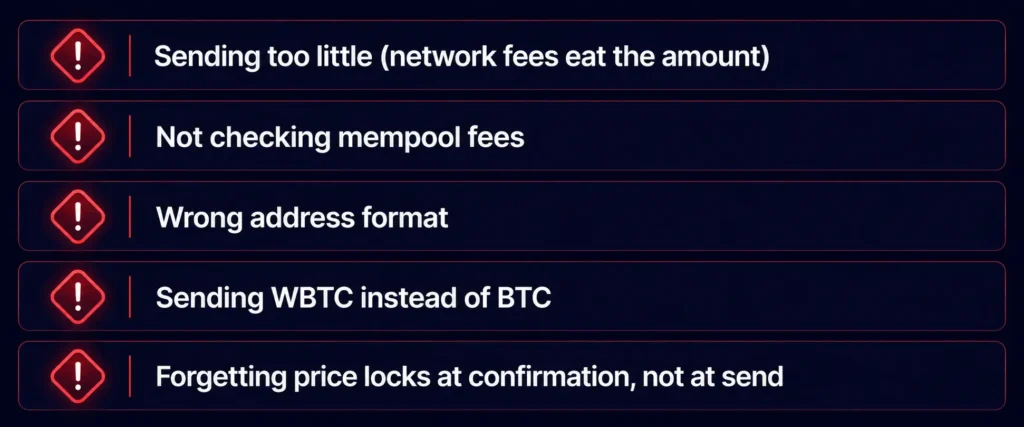
Sending too small an amount. Bitcoin network fees are paid regardless of deposit size. If you send $12 worth of BTC and pay $5 in network fees, only $7 arrives. Always factor the current network fee into your deposit amount.
Not checking the mempool before sending. If you send Bitcoin during a congestion spike with a default fee, your transaction might sit unconfirmed for hours. Check mempool.space first. If fees are high, wait for a quieter period or use an asset with lower fees temporarily.
Using the wrong address type. Bitcoin has multiple address formats (Legacy P2PKH starting with “1”, SegWit P2SH starting with “3”, and Native SegWit Bech32 starting with “bc1”). Most platforms prefer or require a specific format. Use the address exactly as generated in your dashboard — don’t convert or reformat it.
Sending wrapped BTC (WBTC) instead of native BTC. WBTC is an ERC-20 token representing Bitcoin on the Ethereum network — it is not the same as native Bitcoin and uses a different network. Sending WBTC to a native BTC address means the funds won’t arrive. Always confirm you’re sending native BTC on the Bitcoin network.
Forgetting that the price locks at confirmation, not at send. The dollar value credited to your wallet reflects the BTC price when the transaction confirms, not when you sent it. During volatile periods, this can create a small gap between what you expected and what you received.
Security: What You Should Know
The moment your Bitcoin leaves your wallet and confirms on-chain, it’s in Rivocard’s custody as a fiat balance in your account. From that point, it’s protected under the same security infrastructure as any regulated card product — PCI DSS-compliant processing, encrypted storage, standard card-network fraud protections. You can read more about Rivocard’s security measures for the full detail.
On your end: protect your Rivocard account with a strong unique password and enable two-factor authentication if available. The card balance, once funded, is only as secure as your account credentials.
FAQs
Can I use Bitcoin to fund a prepaid card?
Yes. Rivocard accepts Bitcoin deposits to your wallet, converts them to dollars, and lets you fund unlimited virtual Visa cards from that balance. Deposit is free; the 5% fee only applies when you fund a card.
How long does a Bitcoin deposit take to show up on my card?
BTC deposits typically take 20–60 minutes from send to wallet credit, depending on network congestion and how many confirmations the platform requires. Once in your wallet, funding a card is instant.
Is there a fee for depositing Bitcoin to Rivocard?
No — depositing BTC to your Rivocard wallet is free. The 5% fee only applies when you move money from your wallet balance onto a virtual card.
What’s the minimum Bitcoin deposit I can make?
The minimum deposit equivalent is $10 USD worth of BTC. Note that Bitcoin network fees are additional and come out of the amount sent, so factor the current network fee into your calculation.
What happens if Bitcoin’s price drops while my deposit is confirming?
The dollar value credited to your Rivocard wallet is calculated at the BTC price when the transaction confirms — not when you sent it. A price drop during the confirmation window will result in a slightly lower wallet balance than expected.
Can I send WBTC (Wrapped Bitcoin) instead of BTC?
No. WBTC is a different token on the Ethereum network and is not the same as native Bitcoin. Only native BTC on the Bitcoin network is accepted for BTC deposits. Sending WBTC to a BTC deposit address will likely result in lost funds.
What Bitcoin wallet types does Rivocard accept deposits from?
Any Bitcoin wallet or exchange that supports on-chain BTC withdrawal — hardware wallets (Ledger, Trezor), software wallets (Electrum, BlueWallet, Trust Wallet), or exchange withdrawals (Binance, Coinbase, Kraken, etc.). The funds just need to be sent on the Bitcoin network to the address shown in your dashboard.
How do Bitcoin network fees affect my deposit amount?
Bitcoin network fees are deducted from your transaction before the amount reaches Rivocard’s wallet — they’re paid to Bitcoin miners, not to Rivocard. If you send exactly $100 worth of BTC but pay $3 in network fees, approximately $97 worth of BTC arrives and is credited to your wallet.
Can I use a Bitcoin Lightning Network payment to deposit?
Standard deposits use the Bitcoin main chain (on-chain transactions), not the Lightning Network. Check your dashboard for the current supported deposit methods — if Lightning is supported, it will be listed explicitly.
Is a Bitcoin prepaid card legal?
Yes — using a Bitcoin-funded prepaid card is legal in most countries. Note that converting BTC to fiat may be a taxable disposal event in many jurisdictions. Confirm your local tax obligations before making deposits.
Ready to fund your card with Bitcoin? Get started with your crypto virtual card →
