
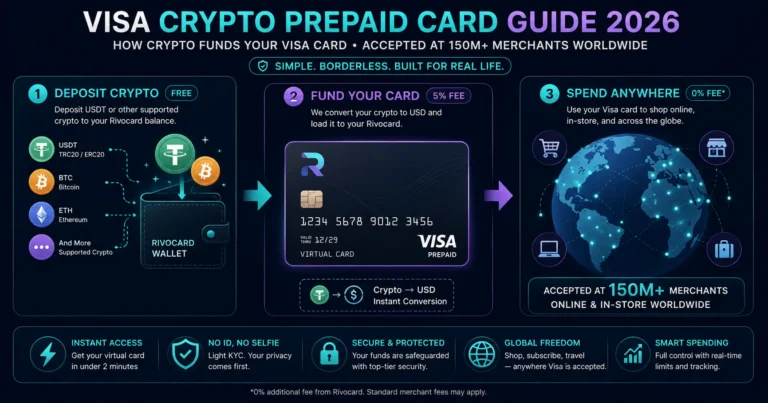
Quick answer: A Visa crypto prepaid card is a prepaid Visa card funded with cryptocurrency instead of a bank account. When you deposit crypto, the platform converts it to a dollar balance. You load that balance onto a Visa-branded virtual card, which is then accepted anywhere Visa is accepted globally — over 150 million merchant locations in 200+ countries. Rivocard issues virtual cards on the Visa network. From the merchant’s perspective, a Rivocard Visa card is indistinguishable from any bank-issued Visa debit card: same network, same authorization flow, same consumer protections. A virtual cryptocurrency card with Visa branding works on all sites accepting Visa. The merchant processes your payment like any other card. Online stores see no difference.
What Makes Visa the Dominant Crypto Card Network
Visa runs more than 130 stablecoin-linked card programs across more than 50 countries in 2026 — more than any other card network. This dominance reflects Visa’s early investment in crypto card infrastructure and its deeper partnerships with the regulated fintech and banking entities that issue crypto cards.
Visa’s advantages for crypto cards:
- Broadest global merchant acceptance (150M+ locations vs Mastercard’s 100M+)
- Strongest presence in emerging markets where crypto card adoption is growing
- 130+ stablecoin card programs built on Visa rails
- Visa Token Service enables seamless Apple Pay and Google Pay integration
- Visa Direct for faster settlement
- Visa 3D Secure (3DS2) for online purchase authentication
How a Visa Crypto Prepaid Card Works
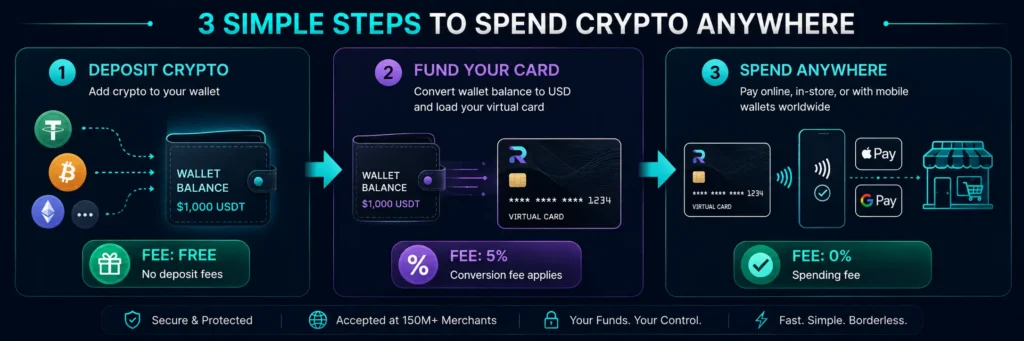
The mechanics differ slightly depending on whether the card uses a prepaid model (like Rivocard) or a debit model (like Crypto.com). Here is how the Rivocard prepaid model works:
Step 1 — Crypto deposit (free): You send cryptocurrency (USDT, BTC, ETH, or any supported asset) to your Rivocard wallet address. The platform confirms the blockchain transaction and converts the crypto to a dollar balance. No Rivocard fee at this step.
Step 2 — Card funding (5% fee): From your wallet balance, you fund a virtual Visa card with a specific dollar amount. The 5% Rivocard fee is deducted here. Fund $100, card has $95.
Step 3 — Spending (0% fee): Use your Visa card number, expiry date, and CVV at any online merchant, or tap via Apple Pay or Google Pay at any NFC contactless terminal. The Visa network processes the authorization, the merchant receives payment, and your card balance reduces by the purchase amount.
From the Visa network’s perspective at Step 3: This is a standard prepaid Visa card authorization. Visa sees card credentials, confirms the card is active with sufficient balance, and approves or declines the transaction. Visa does not know or care that the card was funded with cryptocurrency. The transaction processes on exactly the same rails as any other Visa prepaid card.
Visa-Specific Features That Benefit Crypto Card Users
Visa Zero Liability Policy
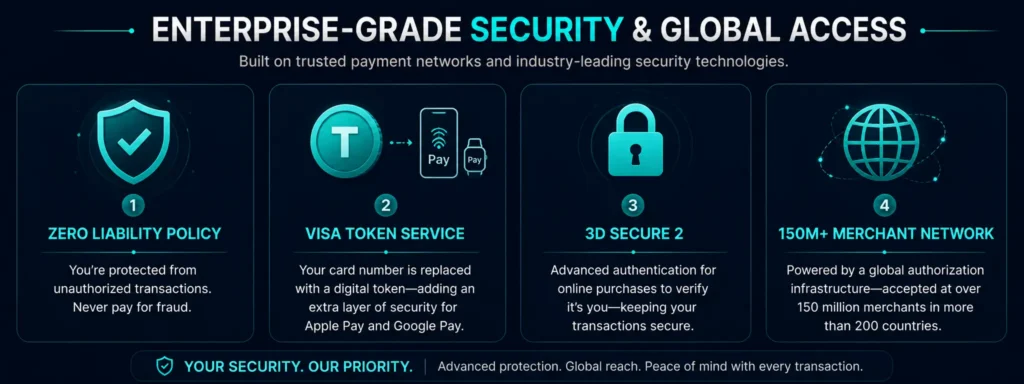
Visa’s Zero Liability Policy protects cardholders from unauthorized transactions. When a transaction is not authorized by the cardholder and is reported promptly, the cardholder is not held responsible for the charge.
This applies to Rivocard virtual Visa cards. If unauthorized transactions occur and are reported to Rivocard support promptly, Visa’s Zero Liability framework provides the backstop protection. This is a genuine advantage of operating on the Visa network rather than unregulated card programs — the consumer protection infrastructure of a global card network backs every transaction.
Conditions for Zero Liability protection:
- Report the unauthorized transaction promptly after discovery
- Exercise reasonable care with card credentials (not sharing card number, CVV, etc.)
- The card was not used with gross negligence or complicity
Visa Token Service (Apple Pay and Google Pay)
When you add a Rivocard virtual card to Apple Pay or Google Pay, Visa’s Token Service replaces your actual card number with a digital token. This token is what the payment terminal sees during a contactless transaction — your real card number is never transmitted to the merchant or the payment terminal.
Benefits for crypto card users:
- Your actual card number is never exposed during in-person contactless payments
- A compromised merchant system cannot obtain your real card number from contactless transaction data
- If your phone is lost, the token can be revoked without cancelling the underlying card
- Biometric authentication (FaceID, TouchID) on your device adds an additional authentication layer
Visa 3D Secure (3DS2)
3D Secure is Visa’s additional authentication system for online transactions. When a merchant triggers a 3DS check, you see a verification popup or redirect asking you to confirm the purchase through your card issuer’s authentication method.
For Rivocard purchases, 3DS verification uses your Rivocard account authentication. This protects against unauthorized use of card credentials obtained through merchant data breaches — even if someone has your card number, expiry, and CVV, they cannot complete a 3DS-protected transaction without your account authentication.
3D Secure 2 (3DS2) is the current version, which adds device fingerprinting and behavioral analysis to reduce friction for genuine cardholders while blocking fraudulent attempts.
Visa’s Global Authorization Network
Every Visa card transaction flows through Visa’s global authorization network, which:
- Processes billions of transactions per day with near-zero downtime
- Applies fraud screening in real time
- Handles currency conversion at competitive interbank rates
- Routes transactions between issuer and acquirer within milliseconds
For a crypto card user, this means your Rivocard virtual card benefits from the same transaction infrastructure reliability as any bank-issued Visa card. The card works at 2AM at a Japanese convenience store just as reliably as it does at a London supermarket at noon.
Visa Acceptance: Where Your Crypto Card Works
The Visa network accepts cards at:
Online: Every major e-commerce site that accepts Visa. Amazon, eBay, Alibaba, Booking.com, Expedia, Google Play, Apple App Store (via Apple Pay), Steam, Netflix, Spotify, Adobe, Microsoft 365, Google Ads, Meta Ads — the list covers essentially every significant online merchant category.
In-person via Apple Pay or Google Pay: Any NFC contactless terminal displaying the contactless symbol. In 2026, the vast majority of modern merchants globally have contactless readers. Grocery stores, pharmacies, restaurants, coffee shops, public transit, convenience stores, and retail chains.
International: 200+ countries and territories. 0% FX fee on Rivocard specifically — Visa converts currency at the interbank rate with no Rivocard markup.
Categories that sometimes restrict prepaid cards: Hotel check-in holds (some luxury properties prefer credit), car rental pickup deposits (many require credit), gambling sites (often restricted by network rules). For the vast majority of everyday spending categories, no restrictions apply.
Visa Crypto Card vs Visa Bank Card: The User Experience
From the end-user perspective at checkout, the experience of using a Rivocard Visa card is identical to using any other Visa card:
| Action | Rivocard Visa | Bank-issued Visa debit |
|---|---|---|
| Online purchase | Enter 16-digit number, expiry, CVV | Enter 16-digit number, expiry, CVV |
| Contactless in-person | Tap via Apple Pay or Google Pay | Tap physical card or via Apple Pay |
| 3D Secure | Complete Rivocard account auth | Complete bank’s auth |
| Receipt | Shows Visa card, last 4 digits | Shows Visa card, last 4 digits |
| Merchant’s view | Standard Visa authorization | Standard Visa authorization |
| Dispute process | Through Rivocard support | Through bank |
The only difference visible to the user: the source of funds (crypto converted to card balance vs bank account) and the specific dispute resolution contact (Rivocard vs issuing bank).
Supported Cryptocurrencies on Rivocard’s Visa Card
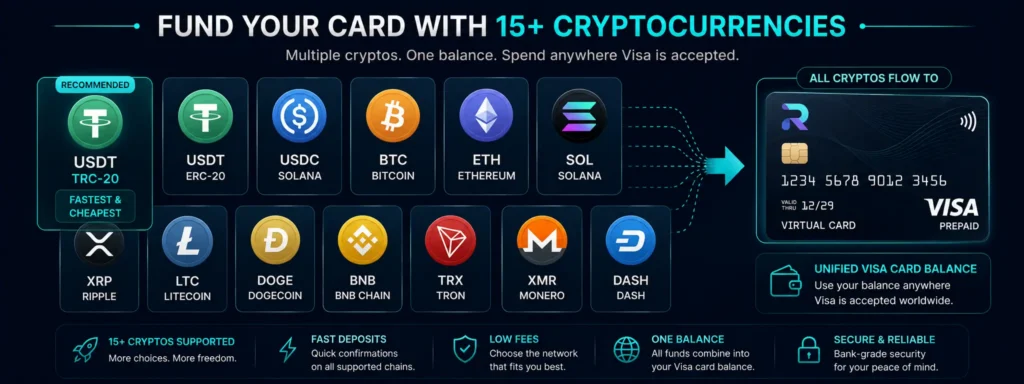
Rivocard accepts deposits from 12+ cryptocurrencies, all converting to a unified dollar balance that funds Visa card spending:
- USDT (TRC-20 on Tron — recommended: fastest and cheapest)
- USDT (ERC-20 on Ethereum)
- USDC (Solana)
- BTC (Bitcoin mainnet)
- ETH (Ethereum mainnet)
- SOL (Solana)
- XRP (XRP Ledger)
- LTC (Litecoin)
- DOGE (Dogecoin)
- BNB (Binance Smart Chain)
- TRX (Tron native)
- XMR (Monero)
- DASH (Dash)
All assets deposit free. All convert to the same dollar balance. All fund the same Visa card spending.
Why Visa Crypto Prepaid Cards Are Better Than Crypto-to-Gift-Card Routes
An alternative approach to spending crypto is buying gift cards (Amazon, Google Play, Apple) with crypto through services like Bitrefill. Why a Visa crypto prepaid card is generally better:
Universal acceptance. A Visa card works at every Visa merchant. Gift cards are merchant-specific — an Amazon gift card cannot pay a Spotify bill.
Exact amounts. A Visa card charges exactly the purchase price. Gift cards come in fixed denominations — to buy a $34.99 game, you might buy a $25 and a $10 gift card, with $0.01 wasted.
Subscription management. Subscriptions require a saved payment card. Gift card balances cannot be saved as a recurring payment method. A Rivocard Visa card handles all subscription renewals automatically.
No third-party intermediary. Gift card services are separate platforms with their own fees and reliability risks. A Rivocard Visa card draws from your own balance with no intermediary.
Setting Up Your Rivocard Visa Card
Step 1: Go to rivocard.com, sign up with your email. Email verification gives immediate access — Basic KYC, no ID required.
Step 2: From your dashboard, go to the deposit section. Select USDT (TRC-20) for fastest, cheapest funding. Copy your deposit address. Send USDT from your exchange or wallet.
Step 3: Once the deposit confirms (seconds on TRC-20), your wallet balance updates.
Step 4: Create a virtual Visa card. Fund it from your wallet balance (5% fee applies). The card is ready immediately.
Step 5: Use the card number, expiry, and CVV at any Visa merchant. Or add to Apple Pay or Google Pay for contactless use.
FAQs
What is a Visa crypto prepaid card?
A Visa crypto prepaid card is a prepaid Visa card funded with cryptocurrency. You deposit crypto, it converts to a dollar balance, and you load that balance onto a Visa-branded card. The card is accepted at any Visa merchant globally – the network processes it identically to any other Visa prepaid card.
How does a Visa crypto card work at checkout?
At online checkout, enter your card number (16 digits), expiry date, and CVV. At in-person contactless terminals, tap via Apple Pay or Google Pay. The Visa network authorizes the transaction, the merchant receives payment, and your card balance decreases by the purchase amount. 0% purchase fee on Rivocard.
Where is a Visa crypto prepaid card accepted?
Anywhere Visa is accepted – 150+ million merchant locations in 200+ countries. This includes all major online retailers, subscription services, digital advertising platforms, travel booking sites, and in-person merchants with contactless NFC terminals (via Apple Pay or Google Pay).
What is Visa Zero Liability and does it apply to crypto cards?
Visa Zero Liability protects cardholders from unauthorized transactions when reported promptly and when basic security practices were followed. It applies to Rivocard virtual Visa cards. If unauthorized use occurs, contact Rivocard support immediately to initiate the dispute process under this protection.
Is a Visa crypto card the same as a regular Visa debit card at checkout?
Yes, from the merchant’s perspective. The merchant sees a standard Visa card authorization. They do not know the card is crypto-funded or prepaid. The transaction processing is identical to any other Visa card.
What cryptocurrencies can fund a Rivocard Visa card?
12+ cryptocurrencies including USDT (TRC-20 and ERC-20), USDC, BTC, ETH, SOL, XRP, LTC, DOGE, BNB, TRX, XMR, and DASH. All deposit free and convert to a unified dollar balance funding the Visa card.
Does a Visa crypto prepaid card work with Apple Pay?
Yes. Add your Rivocard virtual Visa card to Apple Pay. Visa’s Token Service replaces your actual card number with a digital token for contactless payments. Tap your phone at any NFC terminal – 0% FX fee on all international contactless payments.
How many Visa crypto cards can I create on Rivocard?
Unlimited. Card creation on Rivocard is always free. Create separate cards for subscriptions, shopping, advertising, travel, or any other purpose. Each card has its own balance and number.
What is 3D Secure and how does it affect Visa crypto card purchases?
3D Secure (3DS2) is Visa’s additional authentication layer for online purchases. When triggered by a merchant, you verify the transaction through your Rivocard account. This protects against unauthorized use of stolen card credentials – even someone with your card number cannot complete a 3DS-protected transaction without your account authentication.
Does the Visa crypto prepaid card have spending limits?
Yes – set by your KYC tier. Basic KYC (email only): $500/transaction, $1,000/day, $5,000/month. Full KYC (ID + selfie): $5,000/transaction, $10,000/day, $50,000/month. Enhanced KYC: $10,000/transaction, $50,000/day, unlimited/month.
Get Started
Ready to spend your crypto on the world’s largest payment network? Create your Rivocard Visa account – email only, card ready instantly
