
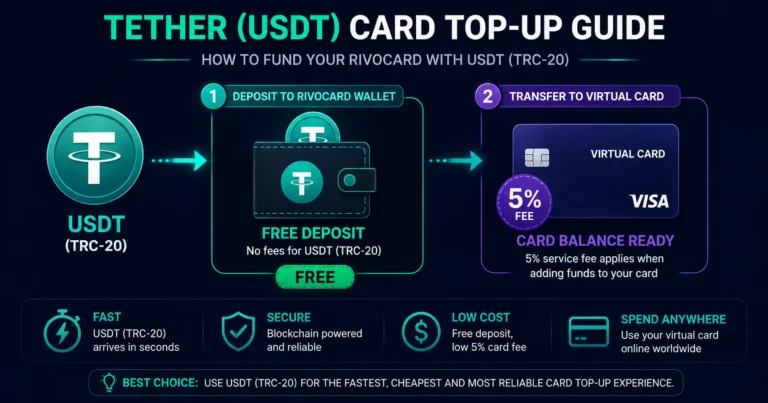
Quick answer: To top up your Rivocard with Tether (USDT), log into your dashboard, select USDT as the deposit asset, choose TRC-20 as the network, copy the deposit address, and send USDT from your exchange or wallet. The deposit is free. USDT on TRC-20 confirms in seconds to under a minute, and the dollar-equivalent balance appears in your Rivocard wallet automatically. Then fund a virtual card from that balance — the 5% Rivocard fee applies at this step. Total time from Binance withdrawal to funded card: under 4 minutes. USDT cards let you spend your Tether balance directly without converting to fiat first — the conversion happens automatically when Rivocard receives your deposit.
Why Tether Is the Ideal Card Top-Up Asset
Tether (USDT) is a stablecoin designed to maintain a stable value by pegging its price to the US dollar. Unlike Bitcoin or Ethereum, whose prices can swing 10% or more in a single day, USDT stays close to $1.00 — that price stability is what makes it practical for everyday spending.
For Rivocard top-ups specifically, USDT offers three advantages over every other deposit asset:
Stable value. $100 USDT sent equals approximately $100 in your wallet — regardless of when the deposit confirms. No price risk during the confirmation window.
Near-zero fees on TRC-20. The Tron network processes USDT transactions for fractions of a cent. A $500 USDT deposit on TRC-20 costs approximately $0.01 in network fees.
Seconds to confirm. TRC-20 USDT typically confirms in 3-30 seconds. On Ethereum (ERC-20), confirmation takes 1-30+ minutes and costs significantly more in gas fees.
The Network Choice: TRC-20 vs ERC-20
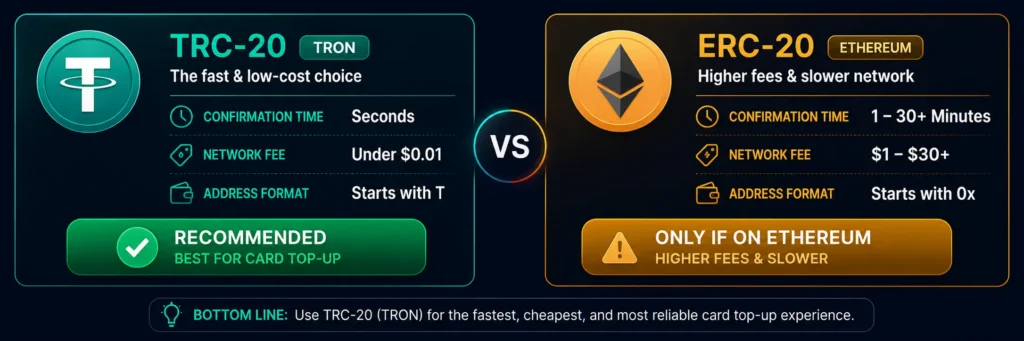
The most important decision when topping up with Tether is which network to use. USDT runs on multiple blockchains — choosing the right one matters significantly for speed and cost.
| TRC-20 (Tron) | ERC-20 (Ethereum) | |
|---|---|---|
| Confirmation time | 3-30 seconds | 1-30+ minutes |
| Network fee | Under $0.01 | $1-$30+ |
| Address format | Starts with T | Starts with 0x |
| Recommendation | ✅ Always use this | Only if USDT is already on Ethereum |
Default rule: always use TRC-20 unless you specifically have USDT on Ethereum.
If your USDT is on an exchange (Binance, OKX, Bybit, Kraken), you can choose TRC-20 as the withdrawal network regardless of which network it was originally deposited to. All major exchanges support TRC-20 USDT withdrawals.
Step-by-Step: How to Top Up Rivocard With Tether (USDT)
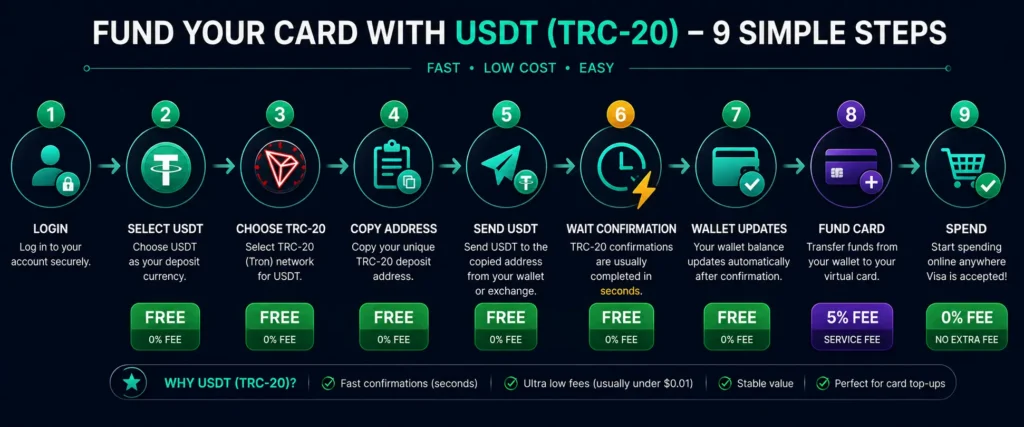
Step 1: Log into your Rivocard account. Go to rivocard.com and sign in. If you do not have an account yet, see our account creation guide — signup takes under 2 minutes with email only.
Step 2: Navigate to the deposit section. From your dashboard, select Deposit, Top Up, or Add Funds — whichever appears in your interface.
Step 3: Select USDT and choose the TRC-20 network. From the asset list, select USDT (Tether). When prompted to choose a network, select TRC-20 (Tron). Your dashboard displays:
- A TRC-20 deposit address (starts with T)
- A QR code for scanning
Step 4: Copy the deposit address. Click the copy icon — do not type the address manually. Paste it somewhere you can verify it. After pasting in your sending wallet, check the first 4 and last 4 characters match exactly what Rivocard shows. Clipboard hijacker malware can silently replace copied addresses — always verify.
Step 5: Send USDT from your exchange or wallet. Open your sending source and initiate a withdrawal or transfer. The key settings:
- Destination address: Paste the Rivocard TRC-20 address
- Network: Select TRX / TRC20 (not ERC20, not BEP20)
- Amount: Minimum $10 USDT equivalent
- Fee: Shown by the exchange — typically under $1 on TRC-20
Step 6: Wait for confirmation. TRC-20 confirmations typically arrive within seconds to 1 minute. You do not need to do anything — Rivocard detects the confirmed transaction automatically.
Step 7: Your wallet balance updates. Once confirmed, the dollar equivalent of your USDT deposit appears in your Rivocard wallet. This is the free conversion step — no fee applied at deposit.
Step 8: Fund a virtual card. From your dashboard, create or select a virtual card and choose how much to fund from your wallet balance. The 5% Rivocard fee is deducted at this step.
Step 9: Spend. Your card is immediately active. Use it anywhere Visa is accepted — 0% purchase fees, 0% FX fees.
How to Send USDT From Each Major Exchange
Binance: Wallet → Fiat and Spot → USDT → Withdraw → paste Rivocard address → Network: TRX (TRC20) → enter amount → confirm with 2FA. Typical processing: 1-2 minutes (Binance processing) + seconds on-chain.
OKX: Assets → Withdraw → search USDT → External Withdrawal → paste address → Chain: TRON (TRC20) → amount → verify. On-chain confirmation in seconds after OKX processes.
Bybit: Assets → Withdraw → USDT → On-Chain Withdrawal → paste Rivocard TRC-20 address → Chain: TRC20 → amount → submit. Bybit processes quickly — typically under 2 minutes total.
Kraken: Funding → Withdraw → USDT Tether → Add new address → paste Rivocard address → select TRC-20 as network → amount → confirm. Kraken may add a security hold for new addresses — add the address in advance if time-sensitive.
KuCoin: Assets → Withdraw → USDT → enter Rivocard address → Network: TRC-20 → amount → submit. KuCoin processing typically under 5 minutes.
Trust Wallet (self-custody): Open Trust Wallet → navigate to Tron network USDT (not Ethereum USDT — make sure you’re on the Tron network) → Send → paste Rivocard TRC-20 address → enter amount → confirm. Transaction fee is paid in TRX — ensure you have a small TRX balance in your Trust Wallet for gas.
MetaMask: MetaMask is primarily an Ethereum wallet. If your USDT is on Ethereum in MetaMask, use the ERC-20 deposit address from Rivocard (starts with 0x). Consider switching to TRC-20 USDT in the future for lower fees.
How Long Does a Tether Card Top-Up Take?
| Step | Time |
|---|---|
| Exchange initiates withdrawal | 1-5 minutes (varies by exchange) |
| TRC-20 blockchain confirmation | 3-30 seconds |
| Rivocard credits wallet | Automatic, under 30 seconds |
| Fund virtual card from wallet | Instant |
| Total from withdrawal to spendable card | Under 5 minutes |
For ERC-20 USDT, the blockchain confirmation alone takes 1-30+ minutes depending on Ethereum network congestion — add the exchange processing time on top of that.
What Does a Tether Top-Up Cost?
| Fee | Who charges it | Amount |
|---|---|---|
| Deposit to Rivocard wallet | Rivocard | Free |
| Blockchain network fee (TRC-20) | Tron network | Under $0.01 |
| Blockchain network fee (ERC-20) | Ethereum network | $1-$30+ depending on gas |
| Exchange withdrawal fee | Your exchange | Varies — typically $1-$2 for Binance TRC-20 |
| Card funding fee | Rivocard | 5% of funded amount |
| Purchase fee | — | 0% |
The total cost to fund your card: exchange withdrawal fee (~$1-2) + Rivocard’s 5% on the card funding step. Everything in between is free.
Troubleshooting: What to Do If Your USDT Top-Up Has Not Arrived
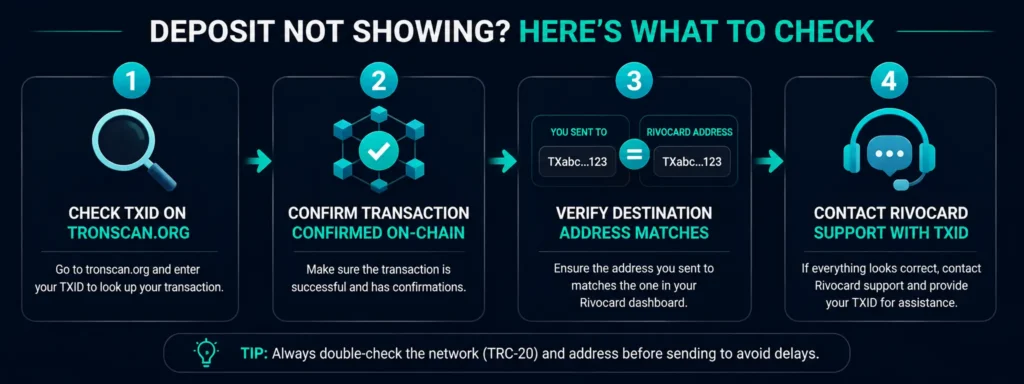
Check the blockchain first. Go to tronscan.org and paste your transaction hash (TXID) from your exchange or wallet. You will see:
- Whether the transaction confirmed on-chain
- The destination address it was sent to
- The confirmation count
If unconfirmed: The transaction is still in the network queue. TRC-20 transactions almost always confirm within 1 minute. If it has been longer, check if the Tron network is experiencing unusual congestion (rare).
If confirmed to the wrong address: The funds went to an address that is not your Rivocard deposit address. This is typically caused by a clipboard hijacker or a manual typing error. Blockchain transactions are irreversible — these funds cannot be recovered.
If confirmed to the correct address but wallet not updated: Allow 5-15 minutes beyond the confirmation for Rivocard’s system to process and credit the deposit. If more time has passed:
- Verify the amount met the $10 minimum
- Verify you used the correct network (TRC-20 to a TRC-20 address)
- Contact Rivocard support with your TXID
If you accidentally sent ERC-20 USDT to a TRC-20 address: The addresses look different (TRC-20 starts with T, ERC-20 starts with 0x). If you sent on the wrong network, the funds typically cannot be credited. Always verify both the address and the network before sending.
Common Mistakes to Avoid
Wrong network. The most common and most costly mistake. Always confirm: TRC-20 selected in your exchange AND the Rivocard address starts with T. ERC-20 and TRC-20 addresses are visually distinct — a T-address cannot receive ERC-20 transactions.
Not verifying the pasted address. Copy-paste and then visually verify the first and last 4 characters against your Rivocard dashboard. This takes 5 seconds and prevents clipboard hijacker losses.
Confusing USDT with USDC. Both are stablecoins that look similar in wallet interfaces. Always confirm the asset shows “USDT” or “Tether” — not USDC, BUSD, or any other stablecoin.
Sending below the minimum. The minimum Rivocard deposit is $10 USDT equivalent. Anything below may not credit.
Reusing an old deposit address. Always generate a fresh deposit address from your dashboard before each deposit.
Forgetting TRX for Trust Wallet gas. On Trust Wallet (Tron network), you need a small TRX balance to pay gas for USDT transfers. Ensure you have at least 10-20 TRX in your Trust Wallet before sending USDT.
Maximizing Efficiency: Deposit Strategy for Regular Top-Ups
For users who top up Rivocard regularly with USDT:
Deposit in weekly or monthly batches. Exchange withdrawal fees are typically $1-2 per transaction regardless of amount. Depositing $500 once pays one withdrawal fee; depositing $100 five times pays five. Since Rivocard’s wallet balance carries no maintenance fee, accumulating a larger balance in fewer transactions saves on exchange fees.
Fund cards on demand, not in advance. Your wallet balance accrues no Rivocard fees. The 5% only applies when you move balance to a card. Keep your wallet balance higher and fund cards as needed rather than pre-loading large card balances you may not spend immediately.
Set up TRC-20 as your default withdrawal network. In your exchange account settings, save your Rivocard TRC-20 address as a trusted withdrawal address. This eliminates address copying steps for recurring deposits.
FAQs
How do I top up my Rivocard with Tether (USDT)?
Log into your Rivocard dashboard, select USDT as the deposit asset, choose TRC-20 as the network, copy the deposit address (starts with T), and send USDT from your exchange or wallet. The deposit is free. Once the Tron network confirms the transaction (seconds to under a minute), the dollar balance appears in your wallet and you can fund a virtual card.
Which Tether network should I use for Rivocard — TRC-20 or ERC-20?
Always use TRC-20 (Tron) unless your USDT is specifically on Ethereum and you cannot switch. TRC-20 confirms in seconds and costs fractions of a cent. ERC-20 (Ethereum) takes 1-30+ minutes and costs $1-$30+ in gas fees.
How long does a Tether top-up take on Rivocard?
Under 5 minutes end-to-end using TRC-20: exchange withdrawal processing (1-5 minutes) + TRC-20 blockchain confirmation (seconds) + Rivocard wallet credit (under 30 seconds). ERC-20 deposits take longer depending on Ethereum network congestion.
Is there a fee to deposit USDT to Rivocard?
Rivocard does not charge a deposit fee. The only costs are the exchange’s withdrawal fee (typically $1-2 for TRC-20 on Binance) and the Tron network fee (under $0.01). The 5% Rivocard fee applies only when you fund a virtual card from your wallet balance.
What is the minimum Tether deposit on Rivocard?
$10 USDT equivalent. Deposits below this minimum may not credit to your account.
Why has my USDT deposit not arrived?
Check your transaction hash on tronscan.org to verify it confirmed on-chain. If confirmed to the correct address, allow up to 15 minutes for processing. If it has been longer, contact Rivocard support with your TXID. Common causes of failed deposits: wrong network, wrong address, or amount below the $10 minimum.
Can I send USDT from Binance to Rivocard directly?
Yes. In Binance, go to Withdraw → USDT → select TRX (TRC20) as the network → paste your Rivocard TRC-20 deposit address → enter amount → confirm. Binance supports TRC-20 USDT withdrawals and the process takes under 5 minutes end-to-end.
Is Tether (USDT) safe to use for card top-ups?
Yes. USDT is the world’s largest stablecoin by market cap and daily volume, with reserves audited regularly. Once deposited to Rivocard and converted to a wallet balance, your funds are protected under PCI DSS-compliant infrastructure in segregated banking accounts. The deposit process itself is on-chain and irreversible — follow address verification steps carefully.
What happens if I send ERC-20 USDT to a TRC-20 address?
The funds are sent to a different blockchain than intended. The TRC-20 address (starts with T) is on the Tron blockchain — it cannot receive ERC-20 transactions from Ethereum. Funds sent on the wrong network are typically unrecoverable. Always verify both the address format and your wallet’s selected network before sending.
Can I deposit USDT to Rivocard from a hardware wallet?
Yes, if your hardware wallet supports TRC-20 USDT. Ledger supports TRC-20 USDT via the Tron app in Ledger Live. Send from your Ledger TRC-20 USDT address to your Rivocard TRC-20 deposit address. Ensure your Ledger has the Tron app installed and your USDT is on the Tron network (not Ethereum).
Get Started
Ready to top up with Tether in under 5 minutes? Create your Rivocard account →
