
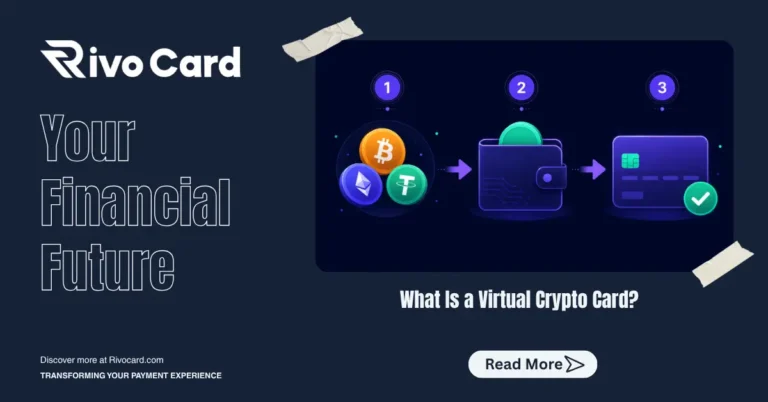
Quick answer: To use a crypto prepaid card, you sign up for an account, deposit cryptocurrency to your platform wallet (free), create a virtual card (free), fund it from your wallet (5% fee deducted from the funded amount), and spend anywhere Visa or Mastercard is accepted — with 0% purchase fees. On Rivocard, the entire process from signup to first purchase takes under 10 minutes, and no KYC is required to start.
This guide walks through every step from zero to spending, including what to prepare, what each step costs, and the specific things that trip up first-time users.
Before You Start: What You Need
You do not need much. Here is everything required before opening the guide:
- A supported cryptocurrency — USDT (TRC-20 recommended), BTC, ETH, or any of Rivocard’s 12+ supported coins
- A wallet or exchange to send from — Binance, OKX, Bybit, Trust Wallet, Ledger, or any wallet that supports on-chain withdrawals
- A working email address — for account verification
- 10 minutes — the realistic end-to-end time for first-time setup
That is the complete list. No bank account, no credit check, no physical address required.
The Complete Step-by-Step Process
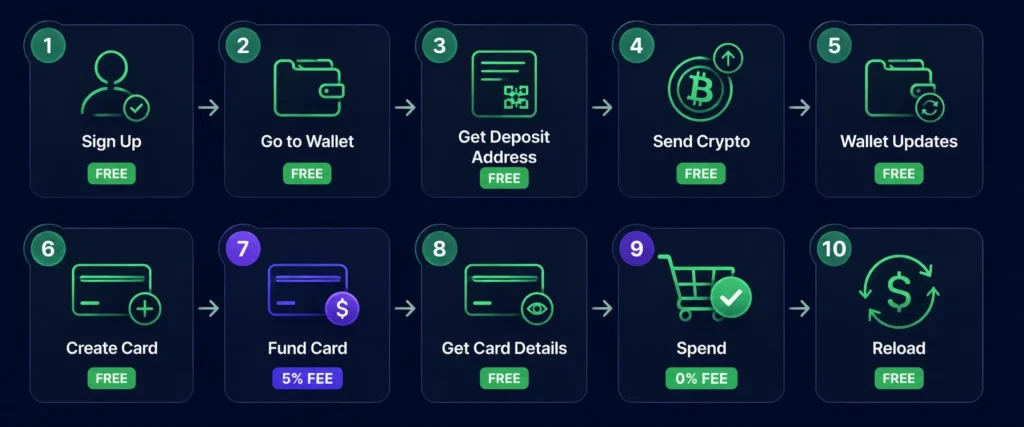
Step 1: Sign Up for a Rivocard Account
Go to rivocard.com and click the sign-up button. You will be asked for:
- Your email address
- A password (use a unique one — this account will hold spending power)
Click create account. A verification email arrives within seconds. Open it and click the confirmation link. Your account is now active.
Time: under 2 minutes. Cost: $0. KYC required: No. You do not need to submit any ID at this stage. Rivocard (no-KYC crypto virtual card) operates on a tiered model — you can deposit, create cards, and spend up to your Basic KYC tier limit without ever submitting identity documents.
Step 2: Navigate to Your Rivocard Wallet
After email verification, you are inside your Rivocard dashboard. Your account includes an internal wallet — this is where deposited cryptocurrency lands and converts to a dollar balance.
You will see your wallet balance (currently $0.00) and options to deposit supported cryptocurrencies. This wallet is the foundation of the two-layer model: funds sit here first, then get moved to individual virtual cards when needed.
Time: 30 seconds. Cost: $0.
Step 3: Choose Your Cryptocurrency and Get a Deposit Address
Click the deposit option in your dashboard and select the cryptocurrency you want to use. For most users, USDT on TRC-20 (Tron network) is the recommended choice:
- Confirmation time: seconds to ~1 minute
- Network fees: fractions of a cent
- Price stability: pegged to $1, so no market risk during the confirmation window
The dashboard will show you a deposit address and a QR code specific to your account and the selected network. This is where you send your funds.
Important: The address shown is network-specific. If you selected TRC-20, the address is only valid for TRC-20 transactions. Sending a different asset or using the wrong network means the funds will not arrive. Double-check this before proceeding.
Time: 1 minute. Cost: $0 (from Rivocard’s side).
Step 4: Send Cryptocurrency From Your Wallet or Exchange
Open your sending wallet or exchange and initiate a withdrawal or transfer:
- Paste the Rivocard deposit address exactly — do not type it manually
- Select the matching network — if you copied a TRC-20 address, select TRC-20 in your sending wallet
- Enter the amount — minimum $10 USD equivalent
- Review the network fee — this is paid to the blockchain, not Rivocard; typically under $0.01 on Tron
- Confirm and send
Once sent, the transaction is broadcast to the blockchain. You can track its progress by pasting the transaction hash (TXID) into a blockchain explorer — for Tron transactions, use tronscan.org.
Time: 2-3 minutes to initiate. Confirmation time depends on network:
| Network | Typical confirmation time |
|---|---|
| USDT TRC-20 (Tron) | Seconds to ~1 minute |
| USDC on Solana | Seconds |
| ETH / ERC-20 USDT | 1-5 minutes |
| Bitcoin (BTC) | 20-60 minutes |
Cost: Blockchain network fee only (not a Rivocard charge).
Step 5: Your Wallet Balance Updates
Once the blockchain confirms the transaction, Rivocard converts your cryptocurrency to its dollar equivalent at the live market rate. That dollar amount appears in your wallet balance.
For stablecoins like USDT, the conversion is approximately 1:1 — deposit $100 USDT, receive ~$100 wallet balance. For volatile assets like Bitcoin, the rate is the live price at the moment of confirmation.
This is the only conversion step. Your wallet balance is now in dollars and stays fixed — market movements after this point do not affect it.
Time: Automatic, happens immediately after blockchain confirmation. Cost: $0 (Rivocard does not charge for deposits).
Step 6: Create a Virtual Card
From your dashboard, navigate to card creation. Click “Create Card” (or equivalent button in your dashboard). Card creation itself is free on Rivocard, and there is no limit on how many cards you can create.
After creating the card, you will be prompted to fund it.
Time: 30 seconds. Cost: $0 for card creation.
Step 7: Fund Your Card From Your Wallet
Choose how much of your wallet balance to put on the card. This is the only fee trigger in the entire Rivocard flow:
5% is deducted from the funded amount:
| You Fund | Fee (5%) | Card Balance |
|---|---|---|
| $50 | $2.50 | $47.50 |
| $100 | $5.00 | $95.00 |
| $200 | $10.00 | $190.00 |
| $500 | $25.00 | $475.00 |
| $1,000 | $50.00 | $950.00 |
The fee and resulting balance are shown before you confirm — no surprises. Once you confirm, the card is funded instantly.
Time: Under 1 minute. Cost: 5% deducted from the funded amount.
Step 8: Get Your Card Details
Your virtual card details appear in your dashboard immediately after funding:
- Card number — 16-digit Visa number
- Expiry date — month and year
- CVV — 3-digit security code
These are all you need for any online purchase. The card is active from the moment it is funded — no activation step, no waiting period.
Optionally: add the card to Apple Pay or Google Pay for in-person contactless payments. Most platforms supporting virtual Visa cards allow this from the wallet app on your phone.
Time: Instant. Cost: $0.
Step 9: Spend Anywhere Visa Is Accepted
Your card is now ready to use. At any online checkout, enter the card number, expiry, and CVV — exactly like any other card. The payment processes through the standard Visa network. The merchant receives a regular fiat payment and has no visibility into the crypto origin of the funds.
Purchase fee: 0%. International transaction fee: 0%. Foreign exchange fee: 0%.
You pay only for what you buy, nothing more.
Step 10 (When Needed): Reload or Create New Cards
When your card balance runs low, you have two options:
Option A — Reload the existing card. Add more funds from your wallet balance to the same card. The 5% fee applies again on the reloaded amount.
Option B — Create a new card. If you prefer a fresh card (useful for separating budgets or for security), create a new one and fund it separately. Card creation is always free.
If your wallet balance is running low, go back to Step 3 and make another deposit. Deposits are always free.
The Full Cost Summary
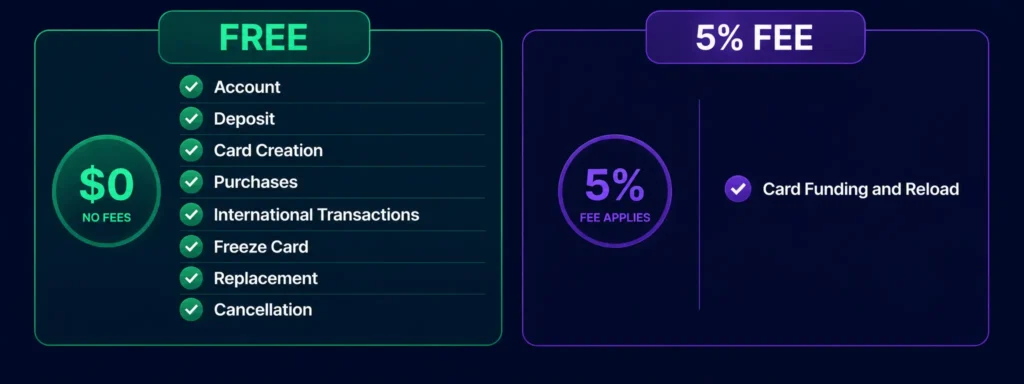
Every cost in the Rivocard flow, in one place:
| Action | Cost |
|---|---|
| Account creation | Free |
| Email verification | Free |
| Crypto deposit to wallet | Free (+ blockchain network fee paid to network) |
| Wallet balance conversion | Free |
| Card creation | Free |
| Card funding / reload | 5% deducted from funded amount |
| Purchases (any size, anywhere) | 0% |
| International transactions | 0% |
| Card freeze / unfreeze | Free |
| Card replacement | Free |
| Account cancellation | Free |
One fee. Everything else free.
Common First-Time Mistakes and How to Avoid Them
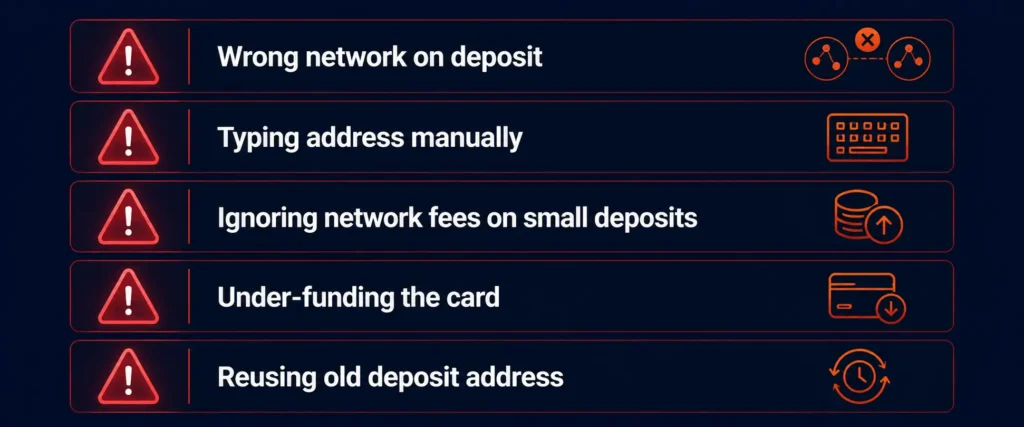
These are the issues that appear most often with first-time users — not as warnings but as practical things worth knowing before you start:
Wrong network on deposit. The most expensive mistake. Sending USDT on ERC-20 to a TRC-20 deposit address means the funds go to the wrong blockchain and are typically unrecoverable. Always match the network in your sending wallet to the network shown on the Rivocard deposit page.
Typing the deposit address manually. Copy-paste only. A single wrong character sends funds to a different address with no way to recover them.
Not accounting for network fees on small deposits. On most networks, network fees are negligible. On Ethereum during congestion, they can be meaningful. If you plan to deposit exactly $10 on Ethereum, the network fee could eat into that amount. Use Tron for small deposits.
Funding too little on the card. If you need $95 to spend, fund the card with $100 (after the 5% fee, the card has $95). If you fund $95, the card has $90.25. Calculate backward from the amount you want on the card.
Reusing an old deposit address. Always generate a fresh deposit address from your dashboard before each new deposit. Old addresses may still work depending on your platform, but always use the current one shown in your dashboard.
Who Gets the Most Value From This Setup
The step-by-step process above works for anyone, but certain situations get disproportionate value from it:
Freelancers paid in crypto. If your clients pay you in USDT, ETH, or BTC, Rivocard gives you a direct path from income to spending without a bank account in the middle. Deposit your payment, create a card, spend it.
Digital advertisers. Running Google Ads, Meta Ads, or TikTok Ads requires a card. Creating a dedicated Rivocard virtual card for ad spend keeps advertising budgets separated and funded directly from crypto.
Travelers. Deposit before a trip, fund a card, spend internationally with 0% foreign transaction fees. No currency conversion hassle, no bank fees for international use.
Anyone avoiding the exchange-to-bank pipeline. The traditional path from crypto to spending is: sell on exchange → wait for fiat to settle → transfer to bank → wait for transfer → spend. Rivocard collapses that entire chain. Deposit crypto, fund a card, spend in under 10 minutes.
FAQs
How long does it take to set up a crypto prepaid card on Rivocard?
Under 10 minutes from signup to first purchase, assuming you use USDT on TRC-20 (the fastest deposit option). Account creation takes under 2 minutes. TRC-20 deposits confirm in seconds to a minute. Card creation and funding are instant. The limiting factor is the blockchain confirmation time for your deposit.
Do I need to complete KYC verification to use a crypto prepaid card?
On Rivocard, no KYC is required to start. You can sign up, deposit crypto, create virtual cards, and spend up to your Basic KYC tier limits without submitting any identity documents. KYC is only required if you want to access higher spending tiers.
What is the minimum amount I need to get started?
The minimum deposit is $10 USD equivalent in any supported cryptocurrency. After the 5% card funding fee, a $10 deposit and card funding would give you $9.50 on the card. For a more comfortable starting balance, $20-$50 is practical for most use cases.
What is the total fee from deposit to spending?
One fee: 5% deducted when you fund or reload a card. Depositing crypto to your wallet is free. Creating cards is free. Spending is 0%. The only cost is the 5% at the wallet-to-card step, plus any blockchain network fee paid to the network (not Rivocard) when you deposit.
Can I have multiple cards on one Rivocard account?
Yes. There is no limit on the number of virtual cards you can create. Card creation is always free — the 5% fee only applies when you fund a card with balance. Many users maintain separate cards for different purposes: one for subscriptions, one for ad spend, one for travel.
What happens if my card balance runs out?
The card declines at the next attempted purchase. You can reload the same card (5% fee on the reload amount) or create a new card and fund it from your wallet balance. Your wallet balance is unaffected by card spending — it only decreases when you actively fund or reload a card.
Can I withdraw unused card balance back to crypto?
This depends on Rivocard’s current withdrawal policy. Check the platform’s terms or support documentation for current withdrawal options. What is certain: unused wallet balance can be left in your account indefinitely at no cost.
Is a crypto prepaid card legal?
Yes, in most countries. Using a Visa prepaid card funded via cryptocurrency is legal in the vast majority of jurisdictions. Note that converting crypto to fiat (which happens at the deposit step) may be a taxable event in your country — check the IRS digital assets guidance for US obligations, or your local tax authority for other countries.
What if my deposit does not arrive?
First, check the transaction on a blockchain explorer using your TXID to confirm it has been broadcast and confirmed. If confirmed on-chain but not credited to your wallet, verify the deposit address and network match what Rivocard’s dashboard showed you. If both are correct and the deposit still has not arrived after the expected confirmation time, contact Rivocard support with your TXID.
Can I add a Rivocard virtual card to Apple Pay or Google Pay?
Yes. After your card is funded, you can add it to Apple Pay or Google Pay from your phone’s wallet app. This enables contactless NFC payments in person at any merchant with a tap-to-pay terminal.
Get Started
Ready to create your first crypto prepaid card? Get started with Rivocard →
