
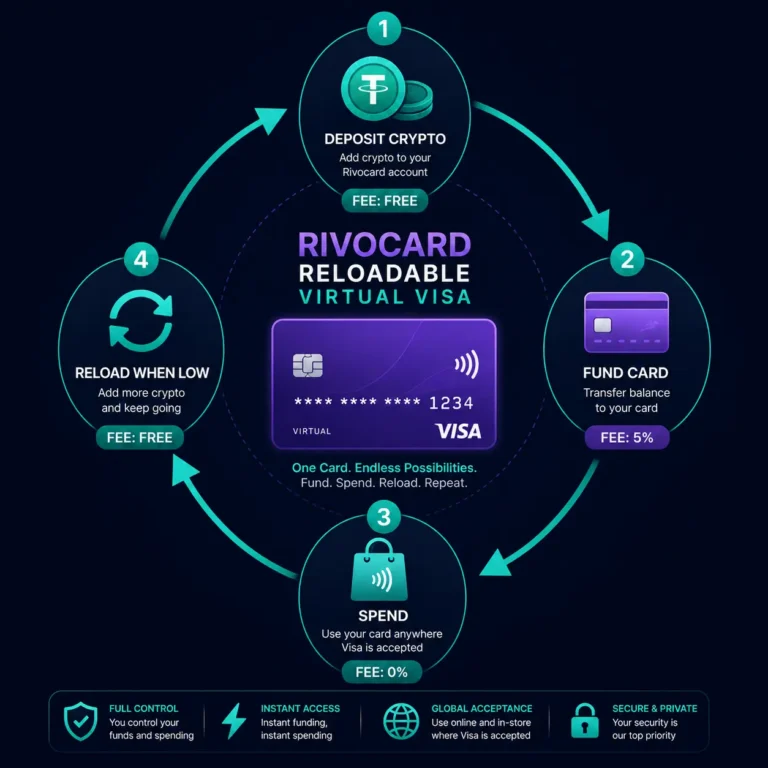
Quick answer: A reloadable crypto prepaid card is a card that can be topped up multiple times — you load it with value, spend from it, and add more value when the balance runs low. This is the standard model for general-purpose crypto cards including Rivocard. The alternative is a single-use or disposable card: loaded once with a fixed amount and discarded after use. On Rivocard, every virtual card is reloadable — you can add to any card’s balance as many times as you need, with no limit on reload frequency or number of reloads. The 5% Rivocard fee applies each time you reload (add balance to the card), not on purchases. This article explains how reloading works, what it costs, and when a reloadable card is better than a disposable one.
Reloadable vs Single-Use: The Core Difference
Reloadable card: A card with a persistent card number, expiry date, and CVV that can be funded multiple times. The card stays active until you freeze or delete it. Merchants, subscription services, and digital wallets can save the card number for future charges.
Single-use / disposable card: A card with a one-time-use number — typically used for a single transaction and then invalidated. The number cannot be reloaded or reused.
Rivocard model: All Rivocard virtual cards are reloadable by default. You can also use any Rivocard card as a disposable card by funding it once, using it for a specific purpose, and then freezing or deleting it. The reloadable architecture does not prevent disposable usage — it provides additional flexibility.
How Reloading Works on Rivocard
Reloading a Rivocard virtual card means transferring additional balance from your Rivocard wallet to the card. The process:
Step 1: Ensure your Rivocard wallet has sufficient balance. If your wallet balance is low or empty, deposit additional cryptocurrency first (USDT TRC-20 recommended — free, seconds to confirm).
Step 2: Navigate to the card you want to reload in your dashboard.
Step 3: Select “Fund Card” or “Add Balance” (the specific button label depends on your dashboard version).
Step 4: Enter the amount to add. The 5% Rivocard fee is shown before you confirm.
Step 5: Confirm. The balance transfers from your wallet to the card immediately.
The card’s new balance is available for spending instantly — no delay, no processing time.
The Reload Fee: How It Works
The 5% Rivocard fee applies every time you move wallet balance to a card. This is called the card funding fee, not a reload fee — it is the same fee whether you are funding a new card or adding to an existing one.
Example: Reloading a subscription card monthly
Your subscription card is set up for Netflix ($17.99), Spotify ($11.99), and Adobe ($54.99) — a total of $84.97/month.
To have $84.97 available at the start of each month, you need to reload:
- Amount needed on card: $84.97
- Amount to reload from wallet: $89.44 ($84.97 / 0.95)
- Rivocard fee: $4.47
Each month, deposit $89.44 from wallet to card, pay $4.47 in fees, have $84.97 for subscriptions.
Annual reload cost for this example: $4.47 x 12 = $53.64 in Rivocard fees per year for all three subscriptions.
Why Reloadable Cards Are Better for Regular Spending
For any recurring or regular spending, a reloadable card is significantly more practical than a new disposable card each time:
Subscription continuity: Netflix, Spotify, Adobe, and other subscription services save your card number for recurring billing. A reloadable card with a persistent number allows subscriptions to charge automatically — no updating payment methods each month. A disposable card would require updating the payment method after every card creation.
Digital advertising: Google Ads and Meta Ads save your billing card. If you create a new card each month for ad spend, you must update billing at every platform at the start of each campaign cycle. A reloadable card saves once and recharges as needed.
Apple Pay and Google Pay: Once added to a digital wallet, your card is saved for future tap-to-pay use. A reloadable card stays in your wallet and works each time you tap. A disposable card used once would need to be re-added to the wallet for the next transaction.
Per-category budget management: Keep a dedicated reloadable card for grocery delivery, one for software tools, one for digital advertising. Reload each category card as needed. This gives persistent spending records per category without recreating cards.
The Reload Frequency Strategy: Less Is More Efficient
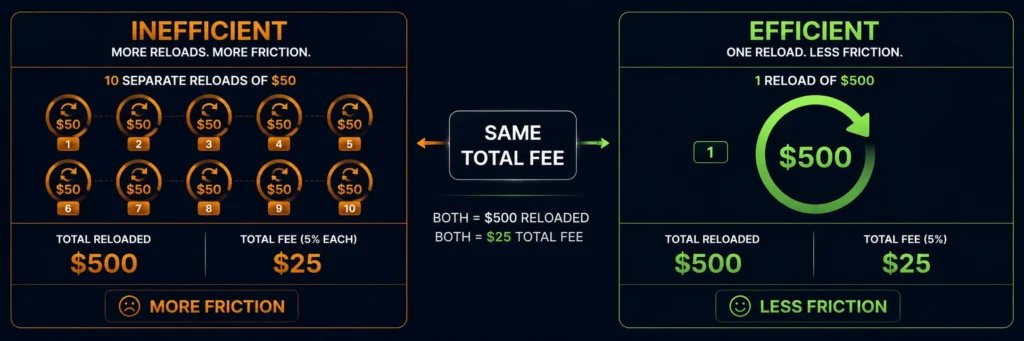
Since the 5% fee applies per reload, consolidating reloads reduces the fee-per-dollar-spent ratio on overhead costs:
Inefficient: Reload $50 to a card 10 times a month
- 10 reloads x $50 = $500 in spending
- 10 reloads x 5% = $25 in fees spread across many transactions
- Same total cost, more friction
Efficient: Reload $500 to a card once a month
- 1 reload x $500 = $500 in spending
- 1 reload x 5% = $25 in fees in one transaction
- Same total cost, less friction
The reload frequency does not change the total fee — the 5% applies to the total amount loaded regardless of whether you load it in one transaction or ten. However, fewer reloads means fewer exchange withdrawal transactions (each of which may have its own withdrawal fee at your exchange) and less operational friction.
Recommended strategy: Load each card with enough to cover 1-3 months of that card’s expected spend at once. This minimizes reload frequency without over-loading cards with idle balance.
Reloadable Card as a Budget Management Tool
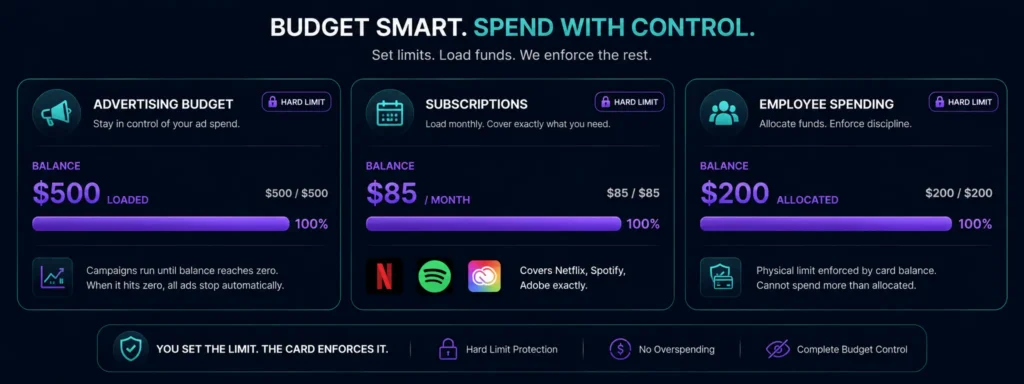
The reloadable model gives explicit spending control through pre-committed balance:
The hard limit: A reloadable card cannot be spent beyond its loaded balance. If the card has $95 and you attempt a $100 purchase, the purchase declines. This is a feature, not a limitation — it creates a hard spending cap that cannot be accidentally exceeded.
Practical budgeting use cases:
Monthly advertising budget: Load your advertising card with your planned monthly ad budget at the start of each month. When the card balance hits zero, ads stop. You cannot accidentally overspend your ad budget because the card physically cannot charge beyond its balance.
Subscription control: Load your subscription card with exactly what your subscriptions will cost each month. If a subscription raises its price, the charge still processes (as long as balance covers it) — but you see the unexpected deduction in your card history and can adjust the reload amount next month.
Employee spending: If managing cards for a team, reload each person’s card with their allocated budget. Spending is physically capped at the loaded amount — no approval workflow required to enforce the limit.
Reloading from Different Crypto Sources
Each reload draws from your Rivocard wallet balance. Your wallet balance can be built from any supported cryptocurrency:
- Reload your wallet with USDT TRC-20 (recommended: free, instant, stable)
- Or reload with BTC, ETH, USDT ERC-20, USDC, SOL, XRP, LTC, DOGE, BNB, TRX, XMR, DASH
- All crypto deposits convert to dollar balance in your wallet
- Fund any card from that unified dollar balance
There is no limit on how many times you can deposit to your wallet or reload cards. No minimum reload frequency. No maximum.
When to Use a Reloadable Card vs a Disposable Card
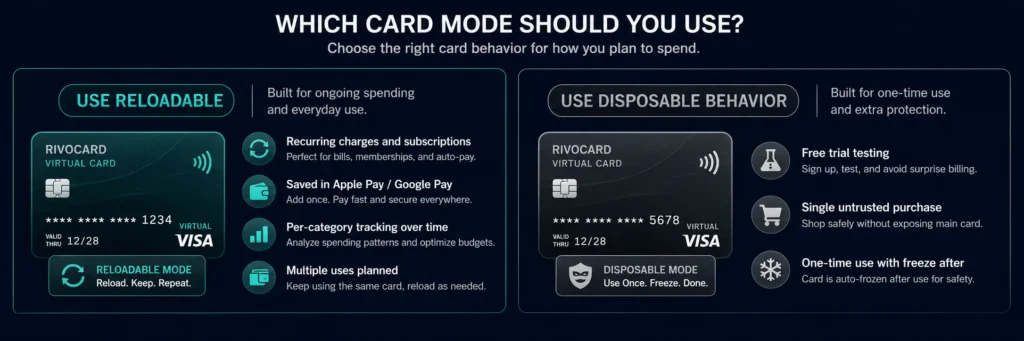
Use reloadable (the default Rivocard model) when:
- You have recurring charges (subscriptions, regular suppliers, ad platforms)
- You want the card saved in Apple Pay or Google Pay for ongoing use
- You want per-category card tracking over time
- You plan to use the card more than once or twice
Use disposable behavior (single load, then freeze/delete) when:
- You are testing a service or free trial and do not want future charges
- You are making a one-time purchase from an untrusted merchant
- You want to use one card number for exactly one purchase with no future access
On Rivocard, you choose the behavior per card. The architecture is reloadable, but you can use any card as disposable by freezing or deleting it after the intended use.
Reloadable Crypto Cards vs Traditional Prepaid Cards
Traditional bank-issued prepaid cards (Green Dot, Vanilla Prepaid, etc.) are reloadable via bank transfer, direct deposit, or retailer top-up points. Crypto prepaid cards like Rivocard are reloadable via cryptocurrency deposits. The key differences:
| Rivocard (crypto reload) | Traditional prepaid (bank reload) | |
|---|---|---|
| Reload method | Deposit USDT or 12+ other cryptos | Bank transfer, direct deposit, retailer |
| Reload speed | Seconds to minutes (TRC-20) | Hours to days |
| Reload fee | 5% at card funding step | Varies ($0-$6 per reload at some services) |
| Account requirement | Email only (Basic KYC) | Often bank account linked |
| Geographic access | Global | Country-specific |
| Virtual card option | Yes (primary model) | Some services, not all |
| Unlimited reloads | Yes | Yes (typically) |
FAQs
What is a reloadable crypto prepaid card?
A reloadable crypto prepaid card is a card that can be funded multiple times with cryptocurrency. You load it with value, spend from it, and add more when the balance runs low. On Rivocard, all virtual cards are reloadable – add balance from your wallet as many times as needed. The 5% fee applies each time you add balance, not on purchases.
How do I reload a Rivocard virtual card?
First ensure your Rivocard wallet has sufficient balance (deposit USDT or other supported crypto if needed). Then navigate to the card in your dashboard, select ‘Fund Card’ or ‘Add Balance’, enter the reload amount, review the 5% fee, and confirm. The balance updates on the card immediately.
Is there a fee to reload a Rivocard?
Yes – the same 5% card funding fee applies whether you are initially loading a new card or adding to an existing one. There is no additional per-reload fee beyond the standard 5%. Purchases from the card are 0% fee.
How many times can I reload a Rivocard card?
There is no limit on reload frequency or number of reloads. You can reload any card as many times as needed, as often as needed.
What is the difference between a reloadable and disposable crypto card?
A reloadable card has a persistent number that can be funded multiple times and used for recurring charges, subscriptions, and ongoing spending. A disposable card is loaded once and discarded after use. On Rivocard, all cards are reloadable by architecture – you can use any card as disposable by freezing or deleting it after a single use.
Can subscription services charge a reloaded Rivocard card automatically?
Yes. Subscription services save your card number for recurring charges. A reloadable Rivocard card with a persistent number allows subscriptions to renew automatically. Ensure the card has sufficient balance before each renewal date. The 5% fee is paid at your reload step, not when the subscription charges.
How often should I reload my Rivocard cards?
Reload frequency is a personal choice. Monthly reloading for subscription cards (enough to cover the month’s subscriptions) is practical. For advertising spend, load at the start of a campaign. For everyday spending, load weekly or monthly based on expected spend. The 5% fee applies to the total amount loaded regardless of frequency.
What happens if I try to reload but my wallet balance is insufficient?
The reload will fail with insufficient wallet balance. Top up your Rivocard wallet first by depositing more cryptocurrency (USDT TRC-20 recommended), wait for the deposit to confirm, and then complete the card reload.
Is there a minimum or maximum reload amount?
There is no stated minimum per reload beyond the $10 overall minimum for wallet deposits. Maximum card balance and per-transaction limits are governed by your KYC tier (Basic: $500/transaction, $2,000 card balance; Full KYC: $5,000/transaction, $20,000 card balance).
Can I reload a frozen card?
No. A frozen card cannot be used for spending, but it also cannot receive additional balance while frozen. Unfreeze the card first, then add balance. Alternatively, the unfreezing and reloading can be done in sequence with no delay between steps.
Get Started
Reloadable virtual cards for every purpose – create yours now. Create your Rivocard account
