
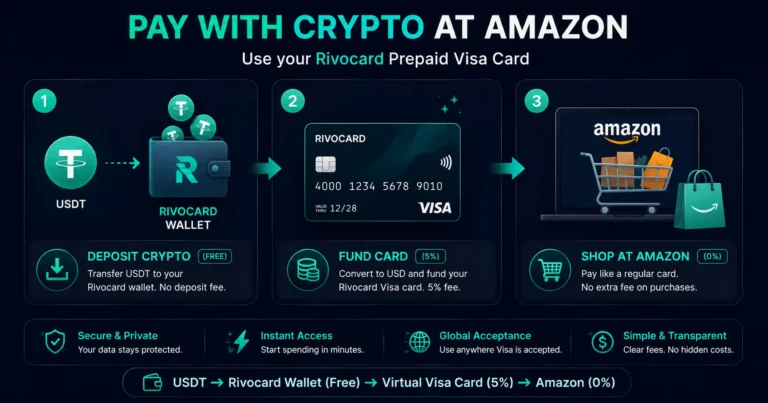
Quick answer: Amazon does not accept cryptocurrency directly at checkout. The cleanest method to pay with crypto at Amazon is a Rivocard virtual Visa card — deposit USDT or any supported crypto to your Rivocard wallet (free), fund a virtual Visa card (5% fee), and enter that card at Amazon checkout exactly as any other Visa card. Amazon sees a standard Visa transaction. No gift card step. No browser extension. No conversion delay. Works for all Amazon purchases including Prime, Subscribe and Save, Amazon Fresh, Kindle, digital apps, and international Amazon sites. As of 2026, Amazon still accepts only traditional payment methods at checkout — credit cards, debit cards, Amazon gift cards, and bank transfers — but no cryptocurrency of any kind directly.
Why a Prepaid Card Is the Best Way to Pay With Crypto at Amazon
Several workarounds exist for using crypto at Amazon. The main options:
Method 1: Crypto-funded prepaid Visa card (Rivocard) Deposit crypto, get a Visa card number. Enter at Amazon checkout. Amazon processes it as a standard Visa debit. Instant. No intermediary step. Works for all Amazon purchase types.
Method 2: Amazon gift cards bought with crypto Buy an Amazon gift card from a third-party service (Bitrefill, CoinGate, Coinsbee) using crypto. Apply the gift card code to your Amazon account. Limitations: gift card balances are locked to Amazon only, a third-party service is involved with its own fees, and the gift card approach adds 1-2 extra steps.
Method 3: Browser extension methods Some browser extensions claim to enable crypto payments at Amazon by acting as an intermediary. These vary in reliability, add privacy concerns from third-party extensions, and are not consistently supported across Amazon’s regional sites.
Why Method 1 wins for regular Amazon shoppers:
- No third-party service involved
- Works for all Amazon purchase types without restriction
- Card is reusable across Amazon and 150M+ other Visa merchants
- No gift card denomination limitations (no need to estimate your spend and buy a fixed-value card)
- Amazon Prime, Subscribe and Save, and recurring charges all work normally
- 0% purchase fee at Amazon, 0% FX fee for international Amazon sites
Step-by-Step: Paying at Amazon With Rivocard
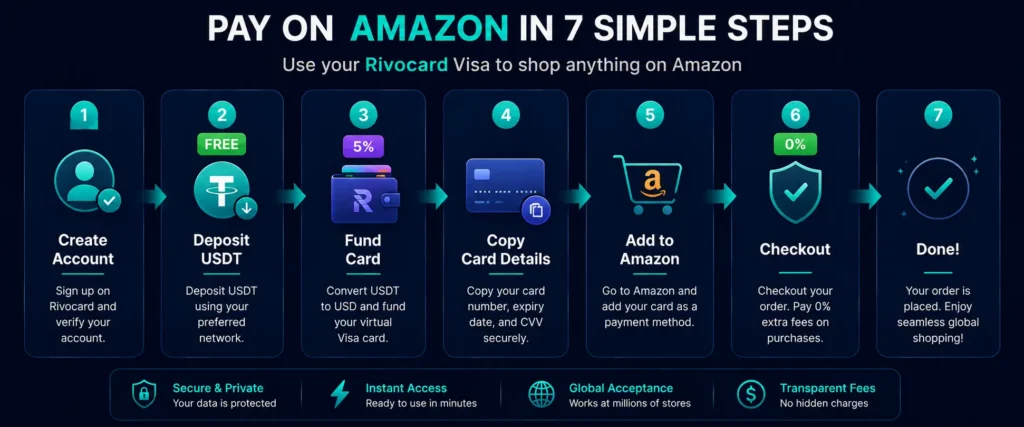
Step 1: Create your Rivocard account. Go to rivocard.com and sign up with your email address. Email verification takes under 2 minutes. No ID required at the Basic KYC tier. See the full account creation guide for details.
Step 2: Deposit crypto to your Rivocard wallet. From your dashboard, select a deposit asset. USDT on TRC-20 is recommended: seconds to confirm, fractions of a cent in network fees, stable $1 value. Copy your TRC-20 deposit address and send USDT from your exchange or wallet. The deposit is free. Your wallet balance updates within 1 minute.
Step 3: Create and fund a virtual card. From your dashboard, create a new virtual card (free). Enter the amount to fund from your wallet balance. The 5% Rivocard fee is deducted: fund $100, card has $95. For an Amazon purchase of $85.50, fund at least $90 to ensure sufficient balance after the fee.
Step 4: Copy your virtual card details. From your dashboard, copy the:
- 16-digit card number
- Expiry date (MM/YY)
- CVV (3 digits)
Step 5: Add the card to your Amazon account. In Amazon, go to Account and Lists, then Your Account, then Payment Methods, then Add a payment method. Select debit or credit card. Enter your Rivocard card number, expiry date, and CVV. For the billing name, use the name on your Rivocard account. For the billing address, enter the address registered with your Rivocard account.
Step 6: Complete your Amazon purchase. At checkout, select your Rivocard card as the payment method. Review the order total. Place the order. Amazon charges the card like any other Visa. The card balance reduces by the purchase amount.
Step 7: If 3D Secure is triggered. Amazon sometimes triggers 3D Secure verification for new cards. If you see an additional verification step, complete it through your Rivocard account method. This typically only happens the first time a new card is used.
How Much Does It Cost to Shop at Amazon With Crypto via Rivocard
| Cost item | Amount |
|---|---|
| Depositing crypto to Rivocard wallet | Free |
| Network fee for USDT TRC-20 deposit | Under $0.01 |
| Card creation | Free |
| Rivocard card funding fee | 5% of funded amount |
| Amazon purchase fee | 0% |
| Foreign transaction fee (international Amazon sites) | 0% |
| Card freeze or replacement | Free |
Example: $100 Amazon order
- Deposit $106 USDT (gives you $100+ in wallet after negligible TRC-20 fee)
- Fund card with $106: 5% fee = $5.30 deducted, card has $100.70
- Place $100 Amazon order: charged exactly $100, $0.70 remaining on card
- Total cost beyond the purchase price: $5.30 (the Rivocard funding fee)
The only additional cost compared to using a traditional bank card is Rivocard’s 5% card funding fee. There are no purchase fees, no Amazon surcharges, no FX fees on international sites.
What Amazon Services Work With Rivocard
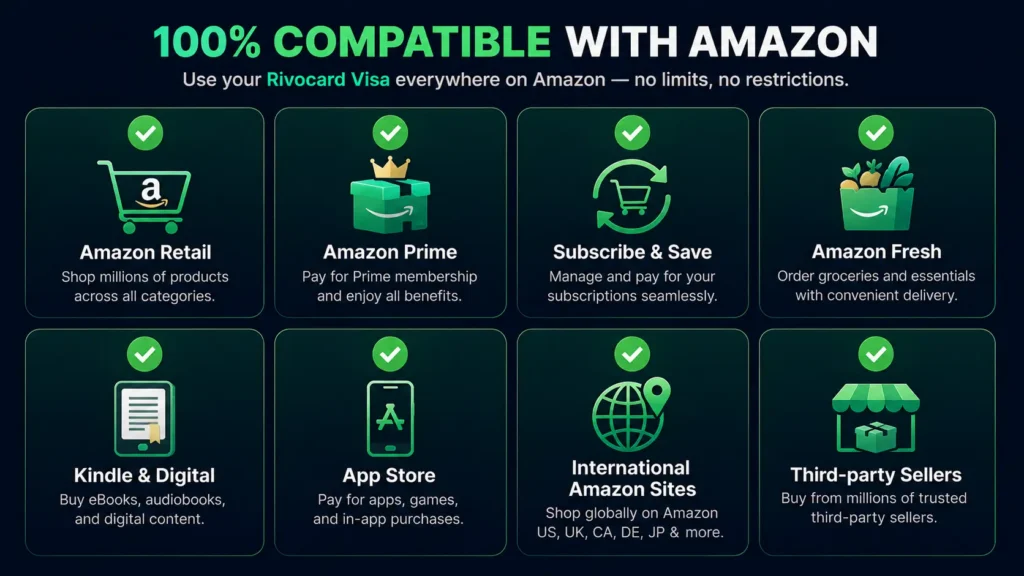
Standard product purchases: All physical and digital products on Amazon retail work with a Rivocard Visa card — electronics, books, clothing, household items, software, anything in Amazon’s catalog.
Amazon Prime: Add your Rivocard card as the payment method for your Prime membership. The monthly or annual charge processes against the card like any other recurring payment. Ensure the card has sufficient balance at billing time.
Amazon Subscribe and Save: Recurring subscribe-and-save orders bill to your default payment method on the scheduled date. A Rivocard card works for subscribe-and-save — just ensure balance is reloaded before each billing cycle or keep a card funded with a running balance.
Amazon Fresh and Whole Foods: Grocery delivery and Whole Foods orders billed to an Amazon account accept Rivocard Visa cards. These process the same as standard Amazon orders.
Kindle books and digital content: All Kindle purchases, Amazon Music, Prime Video purchases and rentals accept a Rivocard card.
Amazon App Store apps: In-app purchases and app downloads on Android via Amazon App Store work with a Rivocard card saved to the account.
International Amazon sites: Amazon.co.uk, Amazon.de, Amazon.ca, Amazon.com.au, Amazon.co.jp, and other regional Amazon sites all accept Visa. Rivocard charges 0% FX fee on international Amazon purchases — no surcharge for buying from a non-US Amazon storefront.
Third-party sellers on Amazon: Purchases from third-party marketplace sellers on Amazon are processed through Amazon’s standard checkout — a Rivocard card works the same as for first-party purchases.
Setting Up Rivocard for Recurring Amazon Purchases
For regular Amazon shoppers who want to use crypto consistently, a streamlined setup:
Option A — Balance-based approach: Fund a dedicated Amazon Rivocard card with your estimated monthly Amazon spend at the start of each month. Load enough to cover a month’s purchases with some buffer. Reload when the balance runs low.
Calculation: If you spend $200/month on Amazon, fund the card with $210 at the start of the month ($200 for purchases plus $10 buffer for variance). The 5% Rivocard funding fee on $210 is $10.50 — total monthly cost beyond purchases: $10.50.
Option B — Per-purchase top-up: Keep a wallet balance funded and top up the card before each Amazon order. Slightly more friction but precise control over each card’s balance.
Option C — Multi-card approach: Use one card for Amazon specifically, another for other purchases. This way your Amazon balance and purchase history is isolated.
Comparing Rivocard vs Gift Cards for Amazon Crypto Payments
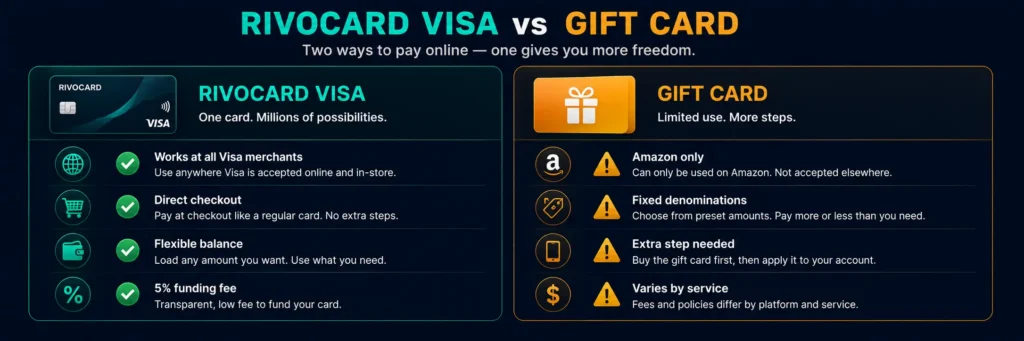
| Rivocard prepaid Visa | Amazon gift cards with crypto | |
|---|---|---|
| Third-party service needed | No | Yes (Bitrefill, CoinGate, etc.) |
| Works for all Amazon purchases | Yes | Yes (including Prime) |
| Card usable elsewhere | Yes — all Visa merchants | No — Amazon only |
| Fee structure | 5% Rivocard card funding fee | Varies by gift card service (0-5%) |
| Gift card denomination flexibility | Not applicable | Fixed denominations (often $15-$200) |
| Overspend buffer | Yes — unused balance stays on card | Limited — must estimate precisely |
| Subscribe and Save | Yes | Yes (applied to account balance) |
| Speed | Under 5 min (USDT TRC-20) | Typically instant to 5 min |
The gift card method costs less if the service charges low fees, but the Rivocard method offers flexibility — the card works beyond Amazon, eliminates denomination guessing, and integrates directly into Amazon’s standard card payment flow with no workarounds.
Handling Amazon’s Address Verification
Amazon sometimes performs Address Verification Service (AVS) checks — comparing the billing address entered at checkout against the address on file with the card issuer.
For Rivocard cards, ensure the billing address you enter at Amazon matches exactly what is registered in your Rivocard account. If there is a mismatch, Amazon may decline the card or flag the order for review.
If you have not set a billing address in your Rivocard account, add one before using the card at Amazon. The address does not need to be in the same country as your Amazon account — it needs to match what Rivocard has on file.
FAQs
Does Amazon accept cryptocurrency directly?
No. As of 2026, Amazon does not accept Bitcoin, Ethereum, USDT, or any other cryptocurrency as a direct payment method at checkout. The practical way to pay with crypto at Amazon is through a crypto-funded Visa card like Rivocard, which Amazon recognizes as a standard Visa card.
How do I pay with crypto at Amazon using a prepaid card?
Deposit crypto (USDT recommended) to your Rivocard wallet, fund a virtual Visa card (5% fee applies), then enter the card number, expiry, and CVV at Amazon checkout. Amazon processes it as a standard Visa payment. No gift card step required.
Does Rivocard work for Amazon Prime membership?
Yes. Add your Rivocard virtual Visa card as the payment method for Amazon Prime. The monthly or annual charge processes normally. Keep the card funded at billing time to avoid subscription interruption.
Can I use Rivocard for Amazon Subscribe and Save?
Yes. Subscribe and Save orders bill to your Amazon account’s default payment method on a scheduled date. A Rivocard Visa card works for this. Ensure the card has sufficient balance before each billing cycle.
What is the total cost of paying with crypto at Amazon via Rivocard?
The only additional cost beyond the purchase price is Rivocard’s 5% card funding fee – charged when you load your wallet balance onto the virtual card, not at Amazon checkout. A $100 Amazon order requires funding approximately $105 from your wallet, costing $5.25 in Rivocard fees. Amazon charges 0% purchase fee and Rivocard charges 0% FX fee.
Is Rivocard better than Amazon gift cards for crypto payments?
It depends on usage. Rivocard costs 5% in card funding fees but works at all Visa merchants (not just Amazon) and integrates directly into Amazon’s standard Visa payment flow. Amazon gift cards bought with crypto may have lower fees from some services but lock the value to Amazon only and require fixed denominations. For regular multi-merchant crypto spenders, Rivocard is more flexible.
Does Rivocard charge extra for international Amazon sites?
No. Rivocard charges 0% on all international transactions. Purchasing from Amazon.co.uk, Amazon.de, Amazon.ca, or any other regional Amazon site incurs no foreign transaction fee – only the Amazon price and Rivocard’s 5% card funding fee (already charged at card loading time).
Can I use Rivocard for Amazon digital purchases like Kindle books and Prime Video?
Yes. All Amazon digital purchases – Kindle books, Prime Video rentals and purchases, Amazon Music, app downloads – work with a Rivocard Visa card saved to your Amazon account.
What if Amazon declines my Rivocard?
Common causes: insufficient card balance (fund more from your wallet), billing address mismatch (enter your Rivocard registered address at Amazon), card not yet activated (ensure the card is funded and active in your dashboard), or a 3D Secure verification step that needs completion. Contact Rivocard support if the issue persists after checking these.
How do I fund my Rivocard card to cover a specific Amazon order amount?
To have exactly X dollars on your card after Rivocard’s 5% fee, deposit X divided by 0.95 from your wallet. Example: to have $100 on the card, fund $105.26 from your wallet ($105.26 times 95% = $100). Add a small buffer for shipping or price variance.
Get Started
Ready to use your crypto at Amazon today? Create your Rivocard account – card ready in under 5 minutes
