
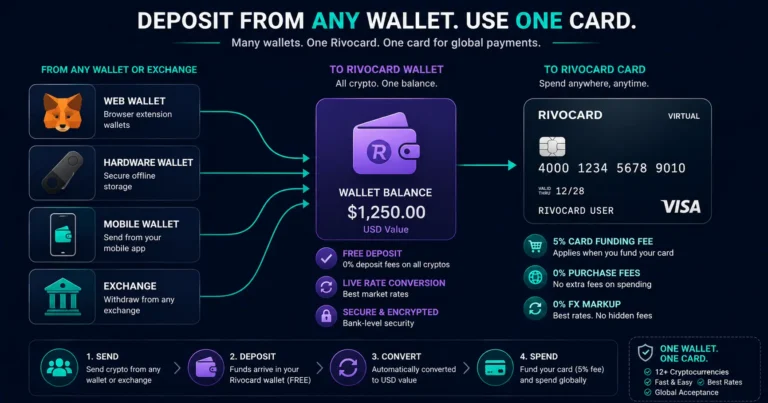
Quick answer: You can fund a Rivocard virtual card from any wallet or exchange that holds a supported cryptocurrency — MetaMask, Ledger, Trust Wallet, Phantom, Binance, OKX, Bybit, Coinbase, Kraken, or any other source. The average active crypto user in 2026 holds assets on four to six different blockchains. Rivocard accepts 12+ coins across multiple networks, meaning your BTC on Bitcoin mainnet, your ETH in MetaMask, your USDT on Tron in Trust Wallet, and your SOL in Phantom can all deposit to the same Rivocard wallet balance — at no deposit fee — and fund the same unlimited virtual Visa cards. The critical step in every case is matching the network selected in your wallet to the network shown on Rivocard’s deposit page.
The Core Concept: One Wallet Balance, Many Sources
Rivocard’s model is straightforward regardless of how many wallets or exchanges you are depositing from:
- Every supported cryptocurrency can be sent to your Rivocard wallet — free
- Each deposit converts to dollar value and adds to the same unified wallet balance
- You fund virtual cards from that unified balance — the 5% fee applies at this step
- All virtual cards accept payments at 0% purchase fee
There is no per-coin balance. BTC, ETH, USDT, SOL, XRP, LTC, DOGE, BNB, TRX, XMR, DASH — all convert to dollars and aggregate into one balance. You can deposit USDT today, top up with BNB next week, and both contribute to the same pool you draw cards from.
This unified model simplifies multi-wallet management: you do not need to track which coin funded which card. Every deposit, from any source, feeds the same balance.
The Critical Rule: Network Matching
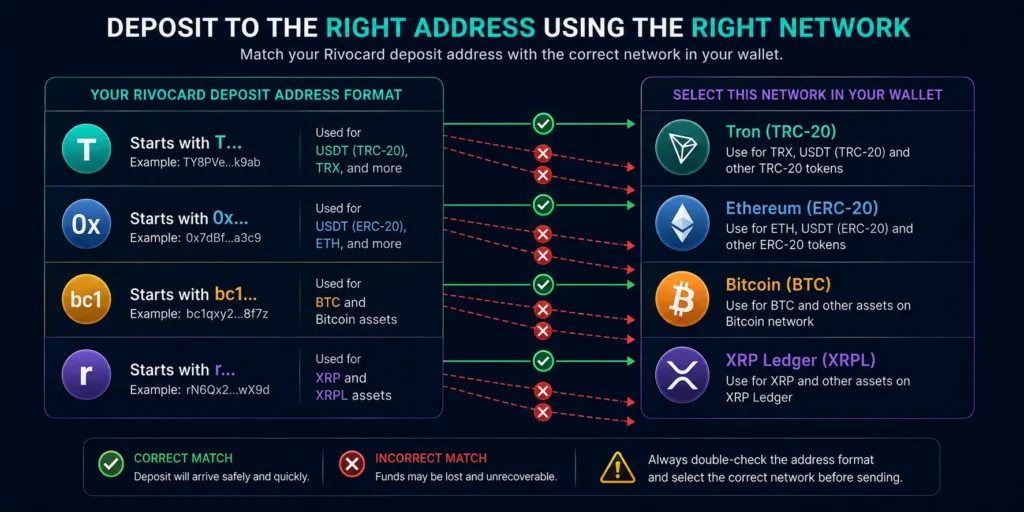
The single most important concept when depositing from any wallet — whether multi-chain or single-chain — is network matching. The network you select in your sending wallet must exactly match the network of the deposit address shown on your Rivocard dashboard.
How to verify network matching:
| Rivocard deposit shows | Your wallet must send on |
|---|---|
| TRC-20 (Tron) address — starts with T | Tron / TRC-20 network |
| ERC-20 (Ethereum) address — starts with 0x | Ethereum mainnet |
| Bitcoin address — starts with 1, 3, or bc1 | Bitcoin mainnet |
| Solana address — Solana format | Solana mainnet |
| XRP address — starts with r | XRP Ledger |
| BSC (BEP-20) address — starts with 0x | Binance Smart Chain |
Sending on the wrong network — for example, sending ERC-20 USDT to a TRC-20 address — results in funds going to a different blockchain. These transactions are typically unrecoverable.
Sending From MetaMask
MetaMask is primarily an Ethereum and EVM-compatible wallet. It works well for ETH and ERC-20 USDT deposits on Rivocard.
For ETH deposits:
- Open MetaMask → select the Ethereum network (ensure you are not on Arbitrum, Optimism, or another Layer 2 unless Rivocard supports that network)
- Click Send → paste your Rivocard ETH deposit address (starts with 0x)
- Confirm the network shown in MetaMask matches “Ethereum Mainnet”
- Enter amount → set gas fee → confirm
For ERC-20 USDT deposits from MetaMask:
- Ensure USDT (Tether ERC-20) is in your MetaMask token list
- Click on USDT → Send → paste your Rivocard ERC-20 USDT deposit address
- Confirm network is Ethereum Mainnet
- Enter amount → confirm gas fee → send
MetaMask limitation: MetaMask does not natively support TRC-20 (Tron) or Bitcoin. If your USDT is in MetaMask on Ethereum, you either use the ERC-20 deposit option (higher gas fees) or transfer your USDT to an exchange and withdraw via TRC-20 (lower fees). For regular Rivocard top-ups, the latter is more cost-efficient.
Sending From Ledger Hardware Wallet
Ledger supports multiple blockchain apps through Ledger Live, making it one of the most capable multi-chain wallets for Rivocard deposits.
For Bitcoin (BTC) deposits:
- Connect Ledger → open Ledger Live → select your Bitcoin account
- Click Send → paste your Rivocard Bitcoin deposit address
- Verify network is Bitcoin (not wrapped BTC on other chains)
- Enter amount → confirm on device → send
For Ethereum (ETH) deposits:
- Connect Ledger → open Ledger Live → select your Ethereum account
- Click Send → paste your Rivocard ETH deposit address (0x…)
- Confirm network is Ethereum Mainnet
- Enter amount → confirm on device
For TRC-20 USDT from Ledger:
- Install the Tron app on Ledger via Ledger Live’s App Catalog
- Open the Tron account in Ledger Live
- Add TRC-20 USDT token to the Tron account
- Send to your Rivocard TRC-20 address (starts with T)
- Gas is paid in TRX — ensure your Tron account has some TRX for fees
Ledger advantage: Hardware isolation means your private key never touches an internet-connected device during the signing process — the most secure way to make a Rivocard deposit.
Sending From Trust Wallet
Trust Wallet is a mobile multi-chain wallet that supports most assets Rivocard accepts.
For TRC-20 USDT (recommended for most top-ups):
- Open Trust Wallet → navigate to the Tron network USDT (not Ethereum USDT — confirm the network label shows “TRC20” or “Tron”)
- Tap Send → paste your Rivocard TRC-20 address (starts with T)
- Enter amount → confirm
- Important: Trust Wallet pays Tron gas in TRX. You need a small TRX balance (10-20 TRX) in your Trust Wallet to cover transaction fees. Without TRX, the USDT transfer will fail.
For BTC from Trust Wallet:
- Navigate to Bitcoin in Trust Wallet
- Send → paste your Rivocard Bitcoin address
- Enter amount → adjust fee if needed → confirm
For ETH from Trust Wallet:
- Navigate to Ethereum in Trust Wallet
- Confirm you are on Ethereum mainnet (not a connected Layer 2)
- Send → paste Rivocard ETH address → confirm
Trust Wallet tip: The wallet interface shows the network label next to each asset. Always verify this label before sending. “USDT” may appear multiple times for different networks — select the one matching your Rivocard deposit address.
Sending From Phantom Wallet
Phantom is primarily a Solana wallet, making it the right tool for SOL and USDC on Solana deposits.
For SOL deposits:
- Open Phantom → select SOL
- Send → paste your Rivocard SOL deposit address
- Enter amount → confirm fee (near-zero on Solana) → send
For USDC on Solana:
- Open Phantom → navigate to USDC in your token list
- Send → paste your Rivocard USDC deposit address
- Enter amount → confirm → send
Phantom limitation: Phantom supports Solana and Ethereum. It does not support Bitcoin, Tron, XRP Ledger, or other non-EVM chains. For those assets, use a different wallet or exchange.
Sending From Exodus Wallet
Exodus is a multi-chain desktop and mobile wallet supporting most Rivocard-accepted assets.
General Exodus flow:
- Open Exodus → select the asset to send (BTC, ETH, USDT, LTC, DOGE, XRP, etc.)
- Click Send → paste the appropriate Rivocard deposit address
- Verify the asset and network match what Rivocard shows
- Enter amount → review fee → confirm
Exodus USDT note: Exodus supports USDT on multiple networks. When selecting USDT, confirm which network your USDT is on and which deposit address Rivocard is showing. ERC-20 USDT → use the Rivocard ERC-20 address. If you want TRC-20, you need to have USDT on the Tron network in Exodus first.
Sending From Exchanges (Multi-Coin)
Exchanges are often the most convenient multi-coin source because they support network switching without needing to manage separate wallets.
The exchange advantage for multi-crypto users: If you hold BTC, ETH, USDT, and SOL on the same exchange (Binance, OKX, Bybit, etc.), you can deposit each coin to Rivocard at the optimal network:
- BTC → Bitcoin mainnet (no alternative)
- ETH → Ethereum mainnet
- USDT → select TRC-20 for cheap, fast deposits (even if you bought it on Ethereum — exchanges hold it in internal accounts and let you withdraw to any supported network)
- SOL → Solana mainnet
The network selection at withdrawal time is the key step on every exchange. Always select TRC-20 for USDT regardless of which network it was originally deposited to the exchange — this is the exchange’s internal operation and is safe.
Managing Deposits From Multiple Sources: Workflow
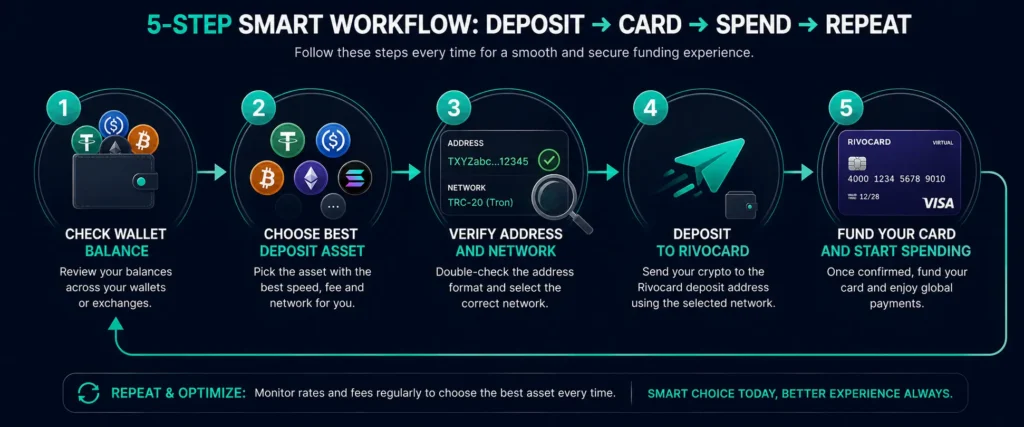
For users who hold crypto across multiple wallets and exchanges, here is a practical workflow for keeping Rivocard topped up:
Weekly or monthly review:
- Check your Rivocard wallet balance — is it sufficient for your expected card spend this period?
- Identify which wallets or exchanges have the most available balance
- Choose the asset with the lowest deposit cost from that source (USDT TRC-20 if available; otherwise next best option from the best crypto ranking guide)
- Initiate deposit, verify address and network, confirm
- Once balance arrives (seconds for TRC-20, minutes for others), fund your virtual card
The multi-wallet address book approach: Save your Rivocard deposit addresses as named entries in each wallet you use regularly:
- In Binance: save as “Rivocard USDT TRC-20” with the TRC-20 address
- In MetaMask: save as “Rivocard ETH” with the ETH address
- In Trust Wallet: save as “Rivocard USDT TRC-20” with the TRC-20 address
This eliminates copy-paste errors on repeat deposits. Once the address is saved and verified once, subsequent deposits are faster and safer.
Generate fresh addresses when required: Some platforms rotate deposit addresses for security. Always verify the deposit address matches your dashboard’s current address before sending, even for addresses you have used before.
Network-Specific Tips by Wallet Type
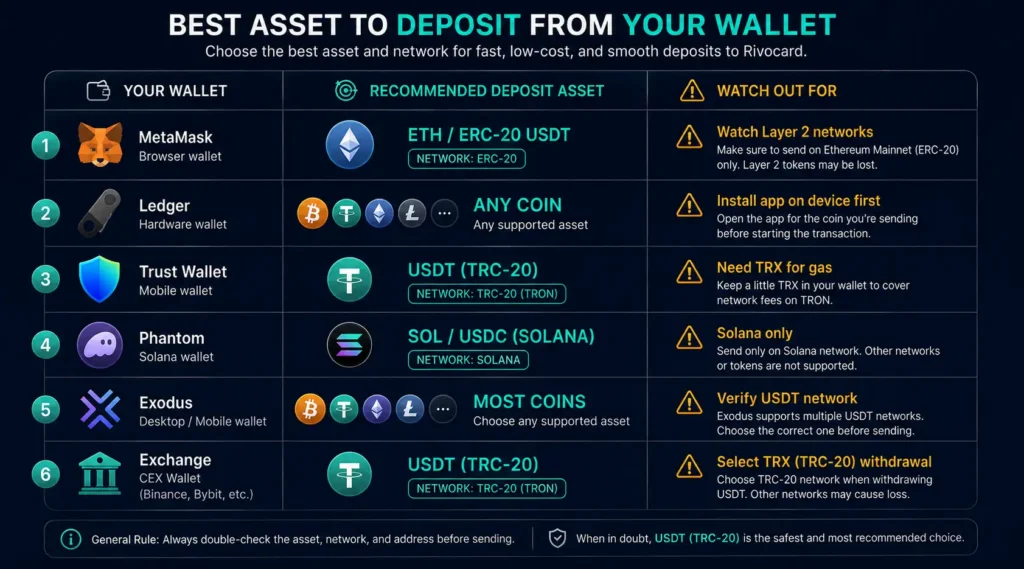
| Wallet | Best asset to send to Rivocard | Watch out for |
|---|---|---|
| MetaMask | ETH or ERC-20 USDT | Layer 2 networks selected by default |
| Ledger | Any supported coin (most versatile) | Need coin-specific app installed |
| Trust Wallet | TRC-20 USDT | Need TRX balance for gas |
| Phantom | SOL or USDC on Solana | Only Solana and EVM networks |
| Exodus | Most coins supported | Verify network on USDT selection |
| Binance | USDT TRC-20 (most efficient) | Select TRX not ETH for USDT |
| OKX | USDT TRC-20 | Select TRON as chain |
| Bybit | USDT TRC-20 | Select TRC20 chain |
| Coinbase | ETH or USDC | USDC on Ethereum — higher gas |
What to Do When a Network Is Not Supported
If your crypto is on a network Rivocard does not show as a deposit option (e.g., USDT on Arbitrum, USDT on Polygon, ETH on Base), you have three options:
Option 1: Bridge to a supported network Use a bridge (Across, Stargate, Synapse) to move your asset to a supported network. USDT on Arbitrum can be bridged to Tron or Ethereum. Bridge fees and transaction complexity apply.
Option 2: Transfer to an exchange and withdraw on a supported network Send your asset to Binance, OKX, or Bybit and withdraw via a supported network. Binance accepts USDT on Arbitrum as a deposit and allows withdrawal as TRC-20. This is often the simplest path.
Option 3: Swap to a natively supported asset Use a DEX or exchange to swap your Layer 2 asset to an asset Rivocard does support on a supported network. For example: USDT on Arbitrum → swap to ETH on Arbitrum → bridge to Ethereum mainnet → deposit ETH to Rivocard.
FAQs
Can I fund a Rivocard card from multiple different wallets?
Yes. You can deposit from any combination of wallets and exchanges — Ledger, MetaMask, Trust Wallet, Phantom, Binance, OKX, or any other source holding a supported coin. All deposits convert to dollars and aggregate into the same Rivocard wallet balance.
How do I send from MetaMask to Rivocard?
Open MetaMask on Ethereum mainnet → Send → paste your Rivocard ETH or ERC-20 USDT deposit address → confirm the network is Ethereum Mainnet → enter amount → confirm. Note: ERC-20 Ethereum gas fees ($1-$30+) make TRC-20 USDT via an exchange more cost-efficient for regular top-ups.
Can I send TRC-20 USDT from Trust Wallet to Rivocard?
Yes. In Trust Wallet, select the Tron network USDT (labeled TRC20) → Send → paste your Rivocard TRC-20 deposit address (starts with T) → enter amount → confirm. You need a small TRX balance in your Trust Wallet to pay the Tron network gas fee.
What is the safest wallet to send from to Rivocard?
A hardware wallet (Ledger, Trezor) is the most secure sending source — private keys never leave the device. The deposit process itself is equally safe from any wallet; hardware wallets protect your funds before and after the deposit, not during the blockchain transaction itself.
Can I deposit from a Ledger hardware wallet to Rivocard?
Yes. Ledger supports most Rivocard-accepted coins through Ledger Live — Bitcoin, Ethereum, TRC-20 USDT (via Tron app), Litecoin, and others. Install the relevant coin app, initiate a send from Ledger Live, and paste your Rivocard deposit address. Verify and sign on the device.
What happens if my wallet does not support the network I need?
If your wallet only holds an asset on an unsupported network (e.g., USDT on Arbitrum), transfer to an exchange that accepts that network as a deposit and withdraw via a supported network (typically TRC-20 for USDT). This is the most reliable path without needing to use bridges.
Get Started
Hold crypto across multiple wallets? Start with your cheapest, fastest source. Check which cryptocurrencies Rivocard accepts →
