

Quick answer: To top up a crypto card with Bitcoin, log into your card account, navigate to the deposit section, select Bitcoin (BTC) as the deposit asset, copy the BTC deposit address shown, and send Bitcoin from your wallet or exchange to that address. On Rivocard, depositing Bitcoin to your wallet is free — no fee at this step. Once the Bitcoin network confirms the transaction (typically 20-60 minutes), the dollar equivalent appears in your Rivocard wallet. You then fund a virtual card from that wallet balance, where the 5% fee applies.
Bitcoin is the most recognized cryptocurrency but not always the most practical for card top-ups. This guide covers every step, the Bitcoin-specific quirks you need to know, and when it makes more sense to use a different asset instead.
Why Bitcoin Top-Ups Work Differently Than Stablecoin Top-Ups
Before the steps, one distinction worth understanding: Bitcoin deposits behave differently from stablecoin deposits in two important ways.
Confirmation time. Bitcoin’s blockchain produces a new block roughly every 10 minutes. Most platforms require multiple block confirmations before crediting a deposit — meaning a Bitcoin deposit can take anywhere from 20 minutes to over an hour to appear in your wallet. Stablecoins on Tron (TRC-20) typically confirm in seconds to a minute.
Price volatility during the confirmation window. The dollar value credited to your wallet is calculated at the Bitcoin price when the transaction confirms — not when you sent it. During volatile periods, Bitcoin’s price can shift meaningfully in the 20-60 minutes between sending and confirmation. A $500 BTC deposit sent during a price drop might arrive worth $485.
Neither of these is a problem if you plan for them. They are only surprises if you expect Bitcoin top-ups to behave like stablecoin top-ups.
Step-by-Step: How to Top Up a Crypto Card With Bitcoin
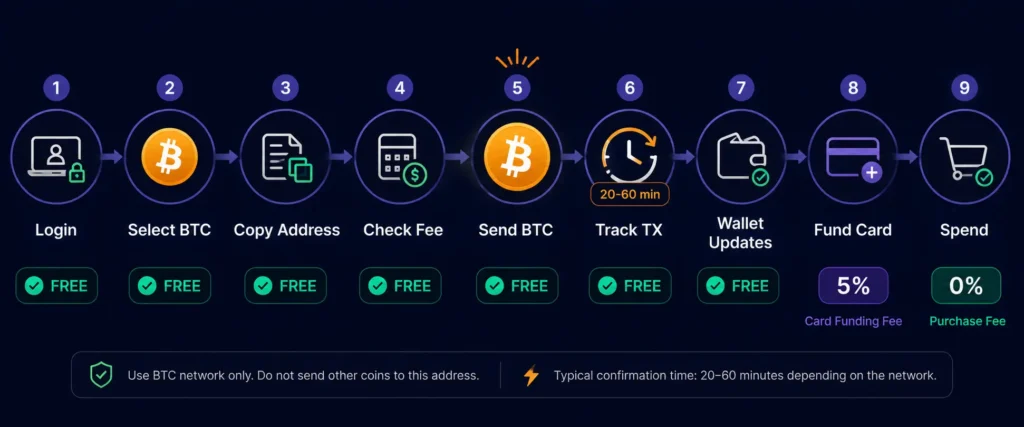
Step 1: Log into your Rivocard account and navigate to deposits. From your dashboard, find the wallet deposit section. This is typically labeled “Top Up,” “Deposit,” or “Add Funds.” Click it to proceed.
Step 2: Select Bitcoin (BTC) as your deposit asset. From the list of supported cryptocurrencies, choose Bitcoin. Make sure you select the correct asset — Bitcoin (BTC) is a specific coin, distinct from Bitcoin Cash (BCH), Wrapped Bitcoin (WBTC), or any other Bitcoin-derivative. Only native BTC on the Bitcoin network is accepted.
Step 3: Copy your Bitcoin deposit address. Your dashboard will display a Bitcoin deposit address — a long string of alphanumeric characters — along with a QR code. This address is unique to your account and specific to the Bitcoin network.
Copy the address exactly. The two safe ways to do this:
- Copy and paste directly from the dashboard
- Scan the QR code with your sending wallet’s camera
Do not type the address manually. A single wrong character sends funds to a different address on the Bitcoin blockchain, and that transaction is irreversible.
Step 4: Check the current Bitcoin network fee before sending. Bitcoin network fees (paid to miners, separate from any Rivocard fee) vary based on network congestion. Before sending, check the current fee environment at mempool.space. This shows you current fee rates and estimated confirmation times at different fee levels.
During low-congestion periods, fees may be under $1. During high-congestion periods (large market moves, high transaction volume), fees can climb to $5, $10, or more. If fees are unusually high, you have three options:
- Wait for a lower-fee period
- Use a fee acceleration option in your wallet (higher fee = faster confirmation)
- Switch to a different deposit asset temporarily (USDT on Tron is typically under $0.01 in fees)
Step 5: Send Bitcoin from your wallet or exchange. Open your Bitcoin wallet (hardware wallet, software wallet, or exchange account) and initiate a withdrawal or transfer:
- Paste the Rivocard BTC deposit address in the destination field
- Confirm the network is Bitcoin (not a wrapped version, not another chain)
- Enter the amount you want to send (minimum $10 USD equivalent in BTC)
- Set the network fee — use the “recommended” or “medium” setting for normal confirmation times
- Review everything, then confirm and send
The transaction is now broadcast to the Bitcoin network. At this point it is irreversible. You cannot cancel or redirect a sent Bitcoin transaction.
Step 6: Track your transaction. Copy the transaction hash (TXID) from your wallet after sending. Paste it into blockchain.com/explorer or mempool.space to see:
- How many confirmations it has received
- Its current position in the mempool (if unconfirmed)
- The estimated time to confirmation
Most platforms require 1-3 confirmations before crediting a deposit. At 10 minutes per block, a 3-confirmation requirement means roughly 30 minutes from when your transaction gets included in a block.
Step 7: Your Rivocard wallet balance updates. Once the required confirmations are reached, Rivocard converts the Bitcoin to its dollar value at the current market rate and credits your wallet. The deposit is free — no Rivocard fee at this step.
Step 8: Fund a virtual card from your wallet. With your wallet balance updated, navigate to card creation or reload. Select how much to fund the card with from your wallet balance. The 5% fee applies here — fund a card with $200, the card receives $190.
| You Fund Card With | 5% Fee | Card Balance |
|---|---|---|
| $100 worth of BTC | $5 | $95 |
| $200 worth of BTC | $10 | $190 |
| $500 worth of BTC | $25 | $475 |
| $1,000 worth of BTC | $50 | $950 |
Step 9: Start spending. Your virtual card is now active with its funded balance. Use it for online purchases, subscriptions, Apple Pay or Google Pay — anywhere Visa is accepted. Purchases are 0%.
Bitcoin Address Formats: Which One to Use
Bitcoin has three address formats in active use. Understanding them prevents a specific type of error:
| Format | Prefix | Also called | Network fee |
|---|---|---|---|
| Legacy | 1… | P2PKH | Highest |
| SegWit (P2SH) | 3… | Wrapped SegWit | Medium |
| Native SegWit | bc1… | Bech32 | Lowest |
All three formats receive Bitcoin on the Bitcoin network. However, some older wallets cannot send to bc1… (Native SegWit) addresses. When Rivocard gives you a deposit address, use that exact address format — do not convert or reformat it. Your wallet must be able to send to whichever format is shown.
If your wallet cannot send to the address format Rivocard shows, the simplest solution is to use a different wallet or exchange that supports the required format. Most modern wallets support all three.
Bitcoin Confirmation Times: What to Expect
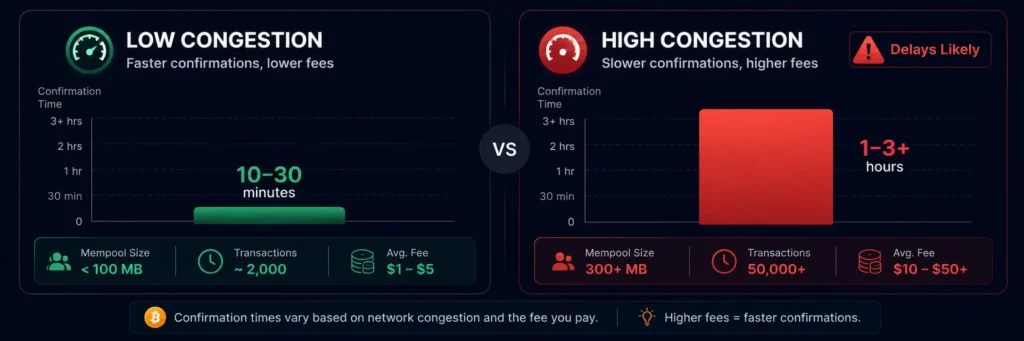
Confirmation time depends on two factors: network congestion and the fee you paid.
Low congestion (typical weekday mornings UTC):
- With a medium fee: first confirmation in 10-30 minutes
- 3 confirmations (typical platform requirement): 30-60 minutes
High congestion (major market events, weekends, high trading volume):
- Transactions with low fees may sit unconfirmed for hours
- Higher fees jump the queue — most wallets let you set a custom fee or select priority levels
The mempool rule of thumb: If mempool.space shows the pending transaction count is above 50,000 or fees above 50 sat/vB, that is elevated congestion. Either pay a higher fee or wait. If below 10,000 pending transactions, standard fees will get confirmed quickly.
If your transaction is stuck: Some wallets support Replace-By-Fee (RBF), which lets you rebroadcast the same transaction with a higher fee. If your wallet supports this and your transaction is stuck, RBF is the fastest solution. If your wallet does not support RBF, you can only wait for the transaction to eventually confirm or be dropped from the mempool (which typically takes 2 weeks).
The Price Volatility Window
This is the key difference between using Bitcoin and a stablecoin for card top-ups.
When you send Bitcoin, the dollar value is not locked until the transaction confirms. If Bitcoin’s price moves between send and confirmation, you receive the value at confirmation time, not send time.
Example: You send $500 worth of Bitcoin at 14:00. Bitcoin drops 4% during the 40-minute confirmation window. By the time the deposit confirms at 14:40, the transaction is credited as $480, not $500.
When this matters: Large deposits during volatile market conditions. A 4% move on a $5,000 deposit is $200.
When it is negligible: Small deposits ($50-$200) during stable market conditions. A 2% move on $100 is $2.
How to manage it: If price certainty matters for a specific top-up, use USDT or USDC instead of BTC. Stablecoins are pegged to $1 — $100 USDT in equals approximately $100 in your wallet regardless of when it confirms.
Common Mistakes When Topping Up With Bitcoin
Sending to the wrong address. Bitcoin transactions are irreversible. If you paste the wrong address, funds go to a stranger’s wallet with no recovery mechanism. Always copy-paste. Always verify the first and last 4 characters of the address after pasting.
Sending WBTC instead of native BTC. Wrapped Bitcoin (WBTC) is an ERC-20 token on Ethereum that represents Bitcoin in value but is technically a different asset on a different blockchain. Sending WBTC to a native Bitcoin deposit address will result in lost funds. Only native BTC on the Bitcoin network should be sent to a BTC deposit address.
Using a very low fee during high congestion. Your transaction will likely sit in the mempool for hours or not confirm at all. Check mempool.space before sending and pay an appropriate fee for current conditions.
Not accounting for the network fee in small deposits. If you send exactly $10 worth of BTC but pay $3 in network fees, only $7 arrives in your wallet. For small deposits, network fees take a proportionally larger cut. On Bitcoin, minimum practical deposits where the fee is not a significant percentage of the amount are typically $50+, depending on current fee rates.
Expecting instant confirmation. If you need card balance immediately, Bitcoin is not the right deposit asset. Use USDT on Tron for near-instant deposits. Use Bitcoin for larger planned deposits where a 30-60 minute wait is acceptable.
Reusing an old deposit address. Always generate a fresh deposit address from your Rivocard dashboard before each deposit. Do not reuse addresses from previous deposits.
When to Use Bitcoin vs Other Assets for Card Top-Ups
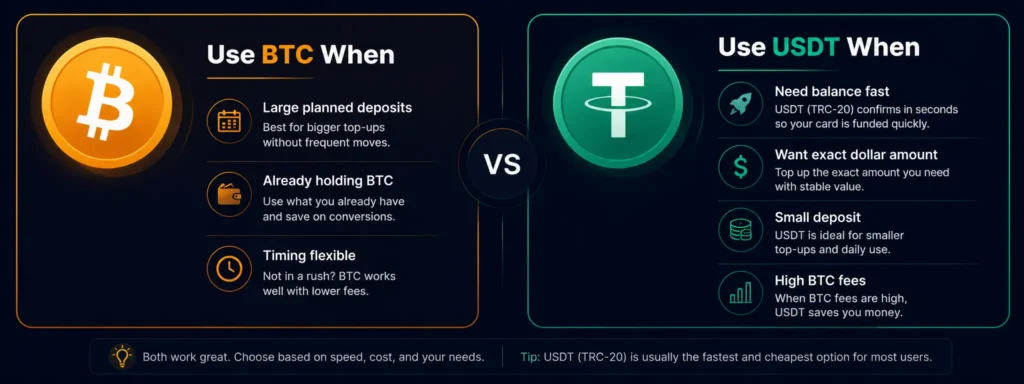
| Situation | Best deposit asset | Why |
|---|---|---|
| Need card balance within 2 minutes | USDT on TRC-20 | Seconds confirmation, fractions of a cent fee |
| Large planned deposit, timing flexible | Bitcoin (BTC) | Holds value well for larger amounts, widely available |
| Need exact dollar amount on card | USDT or USDC | Stablecoins avoid price variance during confirmation |
| Low budget deposit (under $50) | USDT on TRC-20 or XRP | Bitcoin fees too significant for small amounts |
| Already holding BTC, no conversion needed | Bitcoin (BTC) | No exchange needed, deposit directly |
| During high Bitcoin network congestion | USDT on TRC-20 | Bitcoin fees spike; Tron fees stay flat |
Tax Note
In most jurisdictions, sending Bitcoin from your wallet to a card platform wallet constitutes a disposal event — meaning capital gains or losses may be triggered at the exchange rate when the transaction confirms. The IRS guidance on digital assets applies for US taxpayers. Keep records of the BTC price at the time of each deposit for tax purposes. This is not tax advice — consult a qualified tax professional for your specific situation.
Once your Bitcoin top-up lands, your crypto virtual card is ready to spend immediately.
FAQs
How do I top up a crypto card with Bitcoin?
Log into your card account, select Bitcoin as your deposit asset, copy the BTC deposit address, and send Bitcoin from your wallet or exchange to that address. On Rivocard, the deposit itself is free. Once the Bitcoin network confirms the transaction (typically 20-60 minutes), the dollar equivalent appears in your wallet and you can fund a virtual card.
How long does a Bitcoin deposit take on Rivocard?
Typically 20-60 minutes from sending to wallet credit, depending on network congestion and the fee you paid. Each Bitcoin block takes roughly 10 minutes. Most platforms require 1-3 confirmations before crediting. If you paid a low fee during congestion, it can take longer.
Is there a fee to deposit Bitcoin on Rivocard?
No. Depositing Bitcoin to your Rivocard wallet is free. There are two separate costs to be aware of: (1) the Bitcoin network fee paid to miners — this varies by congestion and is not a Rivocard charge, and (2) the 5% Rivocard fee that applies when you fund a virtual card from your wallet balance — not at the deposit step.
What is the minimum Bitcoin deposit?
The minimum deposit equivalent is $10 USD worth of BTC. Given Bitcoin network fees, a deposit that small may see a large percentage eaten by fees during high-congestion periods. Practically, $50+ is a more sensible minimum when fees are above $2.
What happens if the Bitcoin price drops while my deposit is confirming?
The dollar amount credited to your wallet is calculated at the Bitcoin price when your transaction confirms — not when you sent it. A price drop during the confirmation window results in a slightly lower wallet balance. For large deposits during volatile periods, consider using USDT or USDC instead to avoid this variance.
Can I send Wrapped Bitcoin (WBTC) to my Rivocard BTC deposit address?
No. WBTC is an ERC-20 token on Ethereum, not native Bitcoin. Only native BTC on the Bitcoin network should be sent to a BTC deposit address. Sending WBTC to a BTC address will result in lost funds.
What if my Bitcoin deposit is stuck unconfirmed?
Check your transaction on mempool.space. If it is in the mempool with a low fee during congestion, you can try Replace-By-Fee (RBF) from your wallet if it supports that feature. If not, the transaction will eventually confirm when congestion clears or be dropped from the mempool after approximately 2 weeks.
Which wallets can I use to send Bitcoin to Rivocard?
Any Bitcoin wallet or exchange that supports on-chain BTC withdrawals — including hardware wallets (Ledger, Trezor), software wallets (BlueWallet, Electrum, Trust Wallet), and exchanges (Binance, OKX, Bybit, Kraken, Coinbase). The funds just need to be sent as native BTC on the Bitcoin network.
Does Rivocard support all Bitcoin address formats?
Rivocard generates deposit addresses in a specific format. Use the address exactly as shown in your dashboard. If your wallet cannot send to the format shown, use a different wallet that supports it. Most modern wallets support all three Bitcoin address formats (Legacy, SegWit P2SH, Native SegWit).
Should I use Bitcoin or USDT to top up my crypto card?
It depends on your situation. Use Bitcoin if you already hold BTC and do not want to swap, or if you are making a larger planned deposit where timing flexibility is acceptable. Use USDT on Tron if you need the balance fast, want price certainty, or are making a small deposit where Bitcoin fees would be proportionally large.
Get Started
Ready to top up your Rivocard with Bitcoin? Create your account and get started →
