

Quick answer: A crypto card top-up on Rivocard takes between seconds and 60+ minutes, depending entirely on which cryptocurrency and network you use. USDT on TRC-20 (Tron) and USDC on Solana typically confirm in seconds to under a minute — the fastest options available. Bitcoin is the slowest, taking 20-60 minutes under normal conditions and potentially longer during congestion. Once the blockchain confirms the transaction, your Rivocard wallet updates automatically with no additional delay on Rivocard’s side.
The variation is not a platform decision — it is a fundamental property of each blockchain network. This guide breaks down exact timings by network, explains why they differ, and tells you what to do when a deposit takes longer than expected.
The Two-Stage Timing Reality
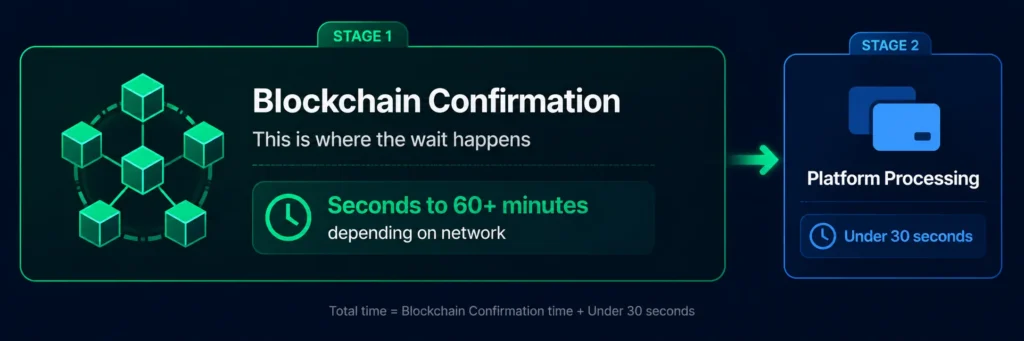
Before diving into network-by-network times, one important distinction: a Rivocard top-up has two separate timing stages.
Stage 1: Blockchain confirmation (this is where the wait happens) Your transaction must be included in a block by miners or validators and reach the required number of confirmations. This is entirely determined by the blockchain network you used — not by Rivocard. It ranges from seconds (Tron, Solana) to 20-60 minutes (Bitcoin).
Stage 2: Rivocard processing (essentially instant) Once the blockchain confirms, Rivocard detects the confirmed transaction, converts the crypto to its dollar equivalent, and credits your wallet. This processing step is automatic and near-instant — typically under 30 seconds after blockchain confirmation.
Total time = blockchain confirmation time + ~30 seconds.
In practice, Stage 2 is so fast that users experience the total top-up time as essentially equal to the blockchain confirmation time alone.
Top-Up Times by Network
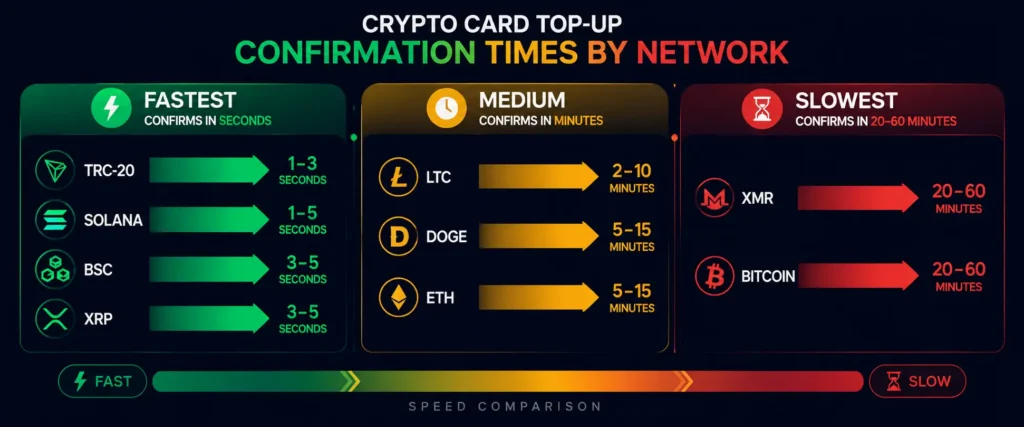
| Network | Asset | Typical confirmation time | Total time to wallet credit |
|---|---|---|---|
| Tron (TRC-20) | USDT, TRX | 3-30 seconds | Under 1 minute |
| Solana | USDC, SOL | 1-5 seconds | Under 1 minute |
| Binance Smart Chain (BEP-20) | BNB, USDT | 3-15 seconds | Under 1 minute |
| Ripple (XRP Ledger) | XRP | 3-5 seconds | Under 1 minute |
| Dash | DASH | Seconds (InstantSend) | Under 1 minute |
| Litecoin | LTC | 2-5 minutes | 2-6 minutes |
| Dogecoin | DOGE | 1-3 minutes | 2-4 minutes |
| Ethereum (ERC-20) | ETH, USDT, USDC | 1-5 minutes (up to 30+ during congestion) | 2-35+ minutes |
| Monero | XMR | 5-20 minutes | 6-21 minutes |
| Bitcoin | BTC | 20-60 minutes (normal), 1-3+ hours (congestion) | 21-65+ minutes |
These are real-world ranges under normal network conditions. Extreme congestion events (major market moves, network spam attacks, peak usage periods) can push any network’s times beyond the upper end of these ranges.
Why Times Vary So Much Between Networks
Every blockchain has a different consensus mechanism and block production schedule. Understanding why explains why you cannot expect Bitcoin to behave like Tron.
Tron (TRC-20): Uses Delegated Proof of Stake (DPoS) with 27 elected “Super Representatives” producing blocks every 3 seconds. Because block production is regular and fast, transactions get included almost immediately. Network fees are minimal because the architecture is designed for high throughput at low cost.
Solana: One of the fastest blockchains available, producing blocks roughly every 400 milliseconds. Confirmation times are near-instant under normal conditions.
Ethereum: Uses Proof of Stake with block times around 12 seconds — faster than Bitcoin, but gas fees are variable and spike dramatically during high network activity. A transaction that takes 2 minutes during quiet periods can take 30+ minutes during a congestion event because of mempool queuing at high fee thresholds.
Bitcoin: The original blockchain uses Proof of Work with a target block time of 10 minutes. Most platforms require 1-3 block confirmations before crediting a deposit, meaning the minimum realistic wait is 10-30 minutes even under ideal conditions. During congestion (high transaction volume competing for block space), transactions with lower fees can wait hours.
The fundamental trade-off: Bitcoin prioritizes decentralization and security over speed. Tron and Solana prioritize throughput and speed, with different architectural trade-offs. For a card top-up where you want the balance fast, the blockchain’s throughput characteristics matter more than its decentralization philosophy.
Which Network Is Fastest for a Rivocard Top-Up
If speed is your primary concern, here is the ranked list:
Fastest (under 1 minute):
- Solana (USDC or SOL) — seconds
- Tron TRC-20 (USDT or TRX) — seconds to 30 seconds
- Binance Smart Chain BEP-20 (BNB) — seconds to 15 seconds
- XRP Ledger (XRP) — 3-5 seconds
- Dash with InstantSend (DASH) — seconds
Medium (2-10 minutes):
- Litecoin (LTC) — 2-5 minutes
- Dogecoin (DOGE) — 1-3 minutes
- Ethereum ERC-20 (ETH, USDT, USDC) — 1-5 minutes under normal conditions
Slowest (20+ minutes):
- Monero (XMR) — 5-20 minutes
- Bitcoin (BTC) — 20-60 minutes, potentially longer
Practical recommendation: If you need card balance fast — within the next few minutes — use USDT on TRC-20 or USDC on Solana. Both are consistently under 1 minute, have negligible network fees, and offer stablecoin price stability so there is no market rate variance during the confirmation window.
What “Confirmation” Actually Means
When Rivocard says a deposit requires confirmations, this refers to the number of new blocks that have been added to the blockchain on top of the block containing your transaction.
Each new block added on top makes your transaction more secure — it becomes progressively harder to reverse because the blockchain has built on top of it. This is why most platforms require multiple confirmations before crediting funds: they want certainty that the transaction is genuinely settled, not a temporary fork.
Required confirmations vary by network and platform:
- Fast, high-throughput chains (Tron, Solana, BSC): typically 1-2 confirmations sufficient
- Medium chains (Litecoin, Ethereum): typically 6-15 confirmations
- Bitcoin: typically 1-3 confirmations; at 10 minutes per block, 3 confirmations = ~30 minutes minimum
Rivocard’s specific confirmation requirements per network are shown in the deposit flow when you initiate a deposit. These may be updated over time based on network conditions.
How to Track Your Deposit in Real Time
You do not have to wonder if your transaction is processing — you can track it directly on the blockchain:
For USDT TRC-20 (Tron): Go to tronscan.org, paste your transaction hash (TXID) from your sending wallet, and see the real-time confirmation status.
For Bitcoin: Go to mempool.space, paste your TXID. You can see exactly where your transaction sits in the mempool (if unconfirmed) and its current status.
For Ethereum: Go to etherscan.io, paste your TXID to see confirmation count and estimated completion.
Your sending wallet or exchange typically provides the TXID immediately after you confirm the transaction. Copy it and bookmark the explorer link for your network — checking it takes 30 seconds and tells you exactly what is happening.
What Affects Confirmation Time Beyond Network Choice
Even within a single network, confirmation times vary based on two factors:
Factor 1: Network congestion Every blockchain has a maximum throughput — a limit on how many transactions it can process per second or per block. When transaction volume exceeds this capacity, a backlog (mempool) builds up. Transactions with higher fees get prioritized; lower-fee transactions wait.
Bitcoin’s mempool is the most visible example of this: during major market events, thousands of transactions queue for block inclusion, and low-fee transactions can wait for hours.
For Tron and Solana, congestion is rare because their throughput capacity is much higher relative to normal demand. Ethereum is in the middle — congestion occurs regularly during high market activity.
Factor 2: Fee you paid On fee-market blockchains (Bitcoin, Ethereum), higher fees mean miners prioritize your transaction. Lower fees mean potentially waiting longer when the network is busy.
For Tron and Solana (fixed or negligible fees), this is not a variable — all transactions are processed based on order received, not fee amount.
How to handle this: For Tron and Solana top-ups: no action needed. The network handles it. For Bitcoin during congestion: either pay a higher fee (most wallets let you set this) or switch to a faster network for this deposit. Tools like mempool.space show current fee recommendations for different confirmation time targets.
What to Do If Your Top-Up Has Not Arrived
If your deposit has not appeared after the expected time:
Step 1: Verify the transaction confirmed on the blockchain. Use the appropriate explorer (Tronscan for TRC-20, Etherscan for ERC-20, mempool.space for Bitcoin) to check your TXID. If the transaction shows as unconfirmed, it is still waiting for block inclusion — this is a network issue, not a Rivocard issue.
Step 2: Confirm the deposit address and network matched. Check the explorer output to see which address received the funds. If the address differs from your Rivocard deposit address, the funds went elsewhere and are typically unrecoverable.
Step 3: Check that the amount met the minimum deposit. Rivocard requires a minimum of $10 USD equivalent per deposit. If the amount after network fees fell below $10, it may not credit.
Step 4: Wait a reasonable additional buffer. Even after on-chain confirmation, allow 5-10 extra minutes for Rivocard’s system to process the confirmation signal and credit the wallet. Occasional processing delays happen.
Step 5: Contact Rivocard support with your TXID. If the transaction confirms on-chain to the correct address, meets the minimum, and has not credited after 30+ minutes beyond expected time — contact support with your transaction hash. This provides the information needed to manually investigate.
The Speed vs. Stability Trade-Off
One more consideration: choosing the fastest network is not always the only priority.
Stablecoins (USDT, USDC) on fast networks = fastest + price stability. $100 USDT sent = approximately $100 received, regardless of when the confirmation happens. This is the ideal combination for most top-ups.
Volatile assets (BTC, ETH, SOL) on their respective networks = variable speed + price exposure. The dollar value of what you receive depends on the asset’s price at the moment of confirmation. If Bitcoin rises 5% during a 30-minute confirmation window, you receive more than expected. If it falls 5%, you receive less.
For users who want to minimize both wait time and price uncertainty, USDT on TRC-20 or USDC on Solana are the clear choice.
Fastest Possible Top-Up Scenario on Rivocard
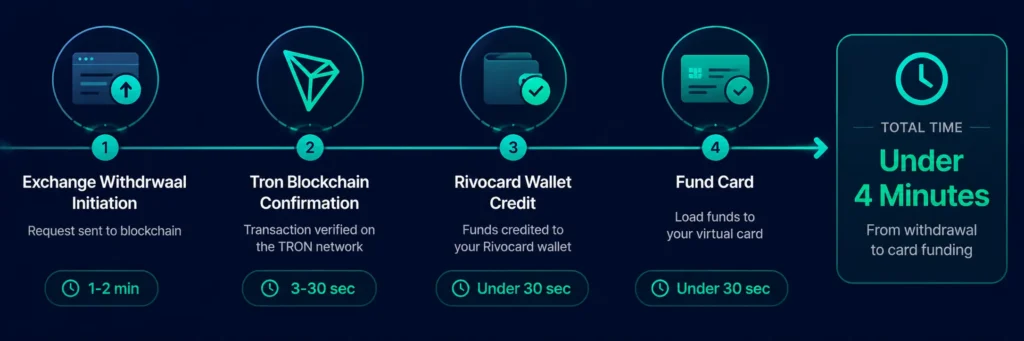
Best-case total time from “I am about to send crypto” to “card balance ready to spend”:
| Step | Time |
|---|---|
| Initiate USDT TRC-20 withdrawal from Binance | 1-2 minutes (exchange processing) |
| Tron blockchain confirmation | 3-30 seconds |
| Rivocard wallet credit | Under 30 seconds |
| Fund virtual card from wallet | Under 30 seconds |
| Total | Under 4 minutes |
This is the realistic fastest path. For most users sending from TRC-20-enabled exchanges like Binance, OKX, or Bybit, the total experience from initiating the withdrawal to having a funded card ready to spend is 3-5 minutes.
Once funded, your crypto virtual card is ready to use right away.
FAQs
How long does a crypto card top-up take on Rivocard?
It depends on the cryptocurrency network. USDT on TRC-20 (Tron) and USDC on Solana typically arrive in under 1 minute. Ethereum takes 1-30 minutes depending on congestion. Bitcoin takes 20-60 minutes under normal conditions. Once the blockchain confirms, Rivocard credits your wallet within about 30 seconds.
Which cryptocurrency is fastest for topping up a Rivocard?
USDT on TRC-20 (Tron) and USDC on Solana are consistently the fastest, with confirmations in seconds to under a minute. Both also have negligible network fees and stable dollar values. For speed, these are the best choices.
Why is my Bitcoin deposit taking so long?
Bitcoin’s blockchain produces a new block approximately every 10 minutes, and most platforms require 1-3 confirmations. That means a minimum of 10-30 minutes even under ideal conditions. During high-congestion periods, transactions with low fees can wait hours. Check mempool.space to see your transaction’s status and current network conditions.
Can I speed up my deposit once it is sent?
For Bitcoin, if your wallet supports Replace-By-Fee (RBF), you may be able to rebroadcast the transaction with a higher fee to prioritize it. For other networks, once sent, the transaction is in the network’s queue and you can only wait.
Why has my Ethereum deposit not arrived after 10 minutes?
Ethereum confirmation times increase dramatically during congestion. Check etherscan.io with your TXID to see how many confirmations the transaction has and whether it is still pending. During high-gas periods, consider using Tron-based USDT for future deposits.
How do I track my deposit in real time?
Use the blockchain explorer for your network: tronscan.org for Tron, etherscan.io for Ethereum, mempool.space for Bitcoin. Paste your transaction hash (TXID) from your sending wallet to see real-time confirmation status.
Does Rivocard add processing time on top of blockchain confirmation?
The additional processing time after blockchain confirmation is typically under 30 seconds. For practical purposes, the total top-up time equals the blockchain confirmation time.
Is USDT TRC-20 always faster than USDT ERC-20?
Yes, consistently. TRC-20 (Tron) confirms in seconds with fractions of a cent in fees. ERC-20 (Ethereum) takes 1-5 minutes under normal conditions and can take 30+ minutes during congestion, with much higher and more variable network fees.
What is the fastest possible top-up experience on Rivocard?
Sending USDT via TRC-20 from an exchange like Binance or OKX. Exchange withdrawal processing takes 1-2 minutes, blockchain confirmation takes 3-30 seconds, and Rivocard credits within 30 seconds. Total: under 4 minutes from initiation to funded card.
Can I deposit on a weekend or holiday?
Yes. Blockchain networks operate 24/7/365. Rivocard’s automated deposit processing also runs continuously. There is no business-hours restriction on deposits.
Get Started
Ready to top up your card in under 4 minutes? Create your Rivocard account →
