
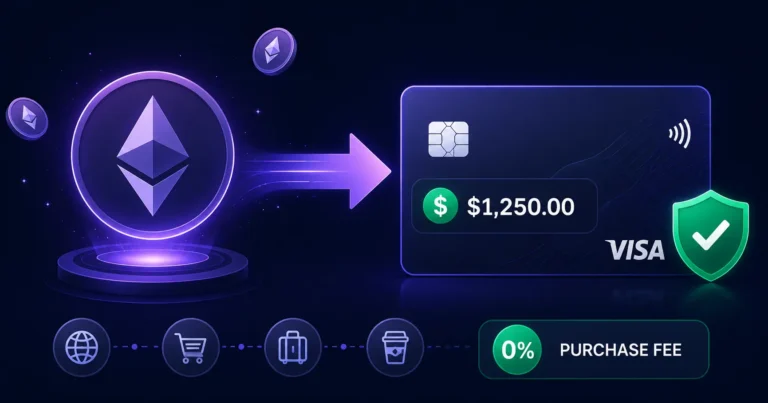
Quick answer: An Ethereum prepaid card lets you deposit ETH to your Rivocard wallet at no cost, which converts to a dollar balance you can load onto a virtual Visa card and spend anywhere Visa is accepted. The 5% fee applies only when you fund the card — deposit $200 worth of ETH, fund a card with that $200, the card has $190 to spend with 0% purchase fees. Ethereum is Rivocard’s second-fastest-confirming major asset after USDT/TRC-20 — typically 1-5 minutes per deposit — but carries two important considerations: variable gas fees that can be significant during congestion, and price volatility during the confirmation window that does not apply to stablecoins.
Most guides about “Ethereum prepaid cards” cover buying ETH with a prepaid card — the opposite direction. This guide covers using ETH to fund a Rivocard virtual Visa card and spend it as cash.
What Makes Ethereum Different From Other Deposit Assets
Before the steps, the ETH-specific characteristics that affect every deposit:
1. Variable gas fees — the biggest ETH-specific cost Every Ethereum transaction requires a gas fee paid to validators — separate from any Rivocard charge. These fees fluctuate based on network demand and can range from under $1 during quiet periods to $15, $30, or more during peak congestion. On a $100 ETH deposit with a $10 gas fee, only $90 worth of ETH arrives in your wallet. This makes gas fees a meaningful consideration for small and medium deposits in a way that does not apply to TRC-20 USDT (where gas is fractions of a cent).
2. Price volatility during confirmation ETH’s price moves continuously. The dollar value credited to your wallet is calculated at the ETH price when the transaction confirms — not when you sent it. At 1-5 minutes per confirmation (up to 30+ during congestion), meaningful price swings can occur. A $300 ETH deposit that drops 3% during a congestion-delayed confirmation arrives as $291.
3. ETH vs ERC-20 USDT — two different assets, same network Both ETH (native Ether) and USDT on ERC-20 (Tether on Ethereum) run on the Ethereum blockchain but are different assets. ETH is the network’s native currency. ERC-20 USDT is a stablecoin token — same network, but $1-pegged, no price volatility, separate deposit address. If you want the Ethereum network’s speed without ETH’s price risk, ERC-20 USDT is available as a separate deposit option on Rivocard.
How to Fund a Rivocard Card With Ethereum: Step by Step
Step 1: Create your Rivocard account. Sign up at rivocard.com with your email address. Email verification activates your account instantly — no KYC required to start. Full guide: how to create a Rivocard account.
Step 2: Check current Ethereum gas fees before sending. Before initiating any ETH deposit, check the current gas price at etherscan.io/gastracker. During normal conditions (weekday mornings UTC), gas fees are typically $1-$5. During high congestion, they can spike to $20-$50 or more. If gas fees are unusually high, consider:
- Waiting for a lower-fee period (typically off-peak hours)
- Using USDT on TRC-20 for this deposit instead (near-zero fees always)
- Accepting the higher fee if the deposit is time-sensitive
Step 3: Select ETH as your deposit asset. In your Rivocard dashboard, navigate to the deposit section and select Ethereum (ETH) as the deposit asset. Your dashboard will display an ERC-20 Ethereum deposit address (starts with 0x) and a QR code. This address is unique to your account and specific to the Ethereum network.
Step 4: Copy the ETH deposit address. Copy the address exactly — copy and paste only, never type manually. Verify the first 4 and last 4 characters after pasting to confirm clipboard integrity. A single wrong character sends funds to a different address permanently.
Step 5: Send ETH from your wallet or exchange. Open your ETH wallet (MetaMask, Ledger, Trust Wallet, Binance, Coinbase, Kraken, OKX, or any wallet/exchange supporting ETH withdrawals) and:
- Paste the Rivocard ETH deposit address
- Confirm the network is Ethereum mainnet (not Layer 2s like Arbitrum or Optimism unless Rivocard specifically supports them)
- Enter the amount (minimum $10 USD equivalent in ETH)
- Set gas fee — use the “standard” or “recommended” setting for normal confirmation; “fast” if time-sensitive
- Confirm and send
Step 6: Track your transaction. Copy the transaction hash (TXID) from your wallet after sending. Paste it into etherscan.io to see real-time confirmation status. A “Success” status with sufficient confirmations means Rivocard will credit your wallet shortly.
Step 7: Wallet balance appears. After the required confirmations, Rivocard converts your ETH to its dollar value at the rate active when the transaction confirms. This dollar amount appears in your wallet balance with no additional Rivocard fee.
Step 8: Create a virtual card and fund it. From your dashboard, create a virtual card (free) and fund it from your wallet balance. The 5% Rivocard fee applies at this step:
| You Fund Card With | 5% Fee | Card Balance |
|---|---|---|
| $100 | $5.00 | $95.00 |
| $200 | $10.00 | $190.00 |
| $500 | $25.00 | $475.00 |
| $1,000 | $50.00 | $950.00 |
Step 9: Spend anywhere Visa is accepted. Your card is active immediately. Online purchases, subscriptions, Google and Meta Ads, Apple Pay, Google Pay — all 0% fee. No FX fees on international purchases.
Ethereum Gas Fees: What to Expect and How to Manage Them
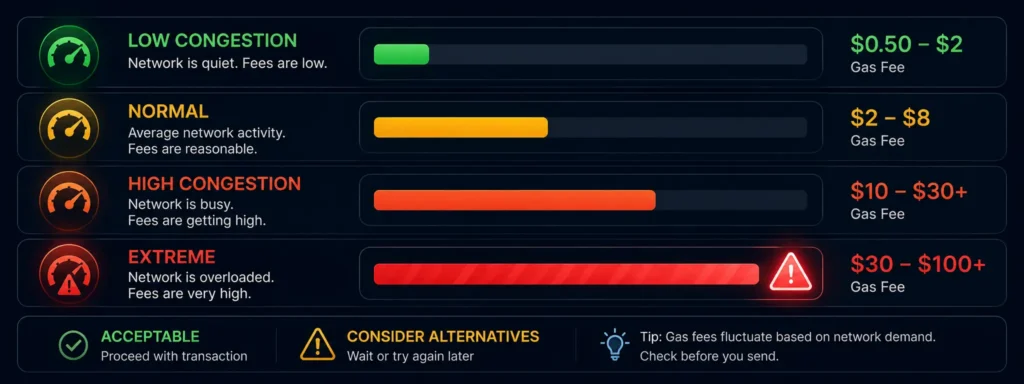
Gas fees are the most important ETH-specific variable to understand before depositing. They are paid to Ethereum validators — not to Rivocard — and are separate from the 5% card funding fee.
Current gas fee ranges (2026):
| Network condition | Typical gas fee on ETH transfer | Fee as % of $100 deposit |
|---|---|---|
| Low congestion (off-peak) | $0.50 – $2 | 0.5% – 2% |
| Normal conditions | $2 – $8 | 2% – 8% |
| High congestion (market events) | $10 – $30+ | 10% – 30%+ |
| Extreme congestion | $30 – $100+ | 30%+ |
How to reduce gas costs:
Check etherscan.io/gastracker before depositing. If the base fee is elevated, the most effective strategies are:
- Deposit during off-peak hours (early morning UTC on weekdays typically has lower fees)
- Deposit larger amounts less frequently rather than many small amounts (gas is per transaction, not per dollar)
- Switch to USDT on TRC-20 if speed matters more than using ETH specifically
For deposits under $50 in ETH: Gas fees at normal conditions represent 4-16% or more of your deposit amount — often more than Rivocard’s 5% card funding fee. For small deposits, USDT on TRC-20 is significantly more cost-efficient.
Ethereum Confirmation Times
Ethereum uses Proof of Stake with approximately 12-second block times. Most platforms require 12-20 confirmations before crediting a deposit.
| Network state | Typical confirmation time |
|---|---|
| Normal conditions | 1-5 minutes |
| Moderate congestion | 5-15 minutes |
| High congestion | 15-60+ minutes |
Transactions with higher gas fees get included in blocks faster. If your deposit is slow, it means your gas fee was below the threshold miners are currently prioritizing. You can use EIP-1559’s fee boost mechanism from supporting wallets to accelerate a pending transaction.
ETH vs USDT on Ethereum: Key Differences
If you want to use the Ethereum network but avoid ETH’s price volatility, USDT on ERC-20 is a separate option. Both use the Ethereum network — both pay ETH gas fees — but USDT’s stable $1 peg removes price risk during confirmation.
| ETH (native Ether) | USDT on ERC-20 | |
|---|---|---|
| Price stability | Volatile | Stable ($1 peg) |
| Network | Ethereum | Ethereum |
| Gas fee | Same — paid in ETH for both | Same — paid in ETH |
| Deposit address format | 0x… (Ethereum) | 0x… (Ethereum) |
| Confirmation time | Same | Same |
| Best for | ETH holders wanting to spend ETH | Stablecoin holders on Ethereum network |
| Price risk at deposit | Yes — ETH price at confirmation | Minimal — $1 peg |
Note: ERC-20 USDT and ETH have different deposit addresses on Rivocard. Always select the correct asset from your dashboard before copying the address.
ETH vs Other Rivocard Deposit Options
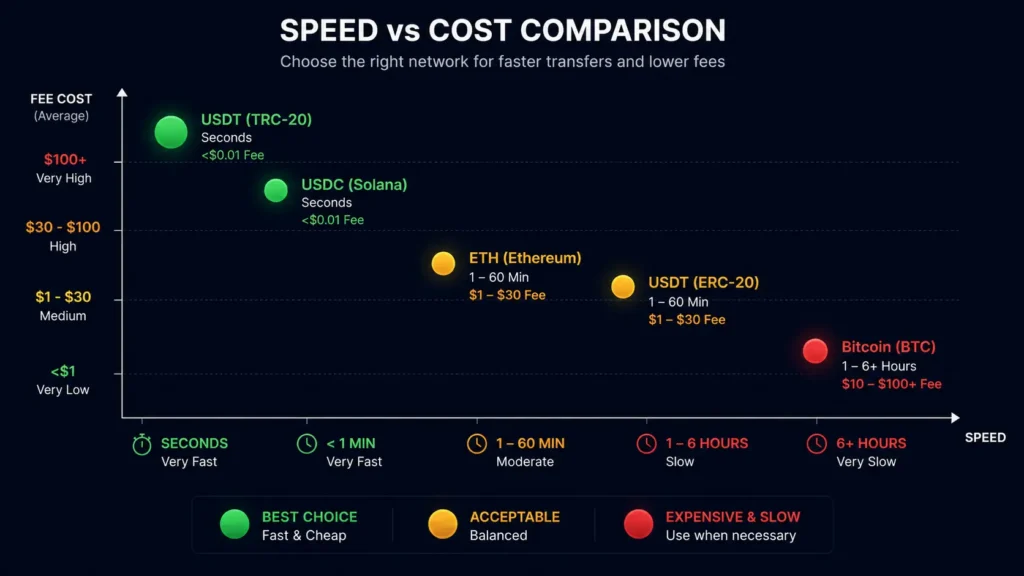
| Asset | Speed | Gas fee | Price stability | Best for |
|---|---|---|---|---|
| USDT TRC-20 | Seconds | Under $0.01 | Stable | All deposits — recommended default |
| USDC on Solana | Seconds | Under $0.01 | Stable | USDC holders on Solana |
| ETH | 1-60 minutes | $1-$30+ | Volatile | ETH holders wanting to spend directly |
| USDT ERC-20 | 1-60 minutes | $1-$30+ | Stable | USDT holders on Ethereum |
| Bitcoin | 20-60+ minutes | $1-$20+ | Volatile | Large planned deposits |
For Ethereum holders who need to spend their ETH but do not want to convert to a stablecoin first, direct ETH deposit is a valid and practical option — just account for gas fees in your deposit calculation and check conditions before sending.
The Price Volatility Calculation for ETH Deposits
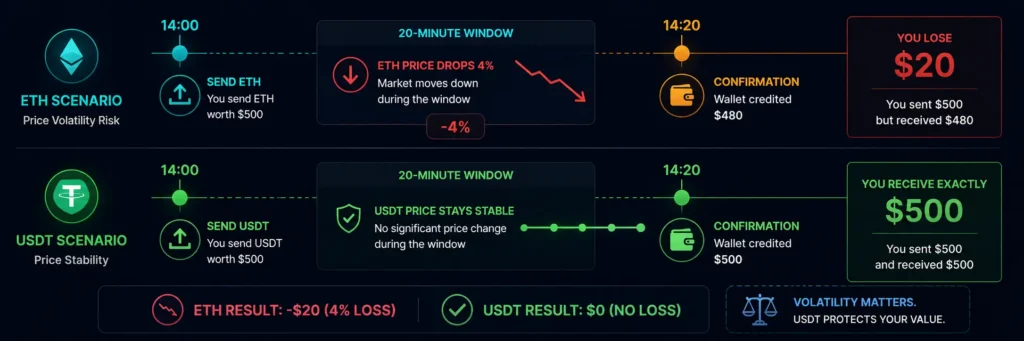
For ETH deposits (not stablecoins), the dollar amount credited is based on the ETH price at confirmation time — not at send time.
Example during a price move: You initiate an ETH deposit worth $500 at 14:00. ETH drops 4% during a 20-minute confirmation delay. Your wallet is credited $480 instead of $500.
How to manage this:
- Check ETH’s short-term price stability before initiating large deposits during volatile market conditions
- Consider depositing during stable price periods rather than during large market moves
- For complete price certainty, use USDT or USDC — stablecoins eliminate the confirmation-window price risk
For smaller amounts ($50-$200), even a 5% ETH price move during confirmation is a modest dollar variance ($2.50-$10). For larger deposits ($1,000+), the variance becomes more meaningful.
Sending ETH From Specific Sources
From MetaMask: Open MetaMask → click Send → paste the Rivocard ETH deposit address → enter amount → adjust gas (standard is fine for most cases) → confirm. MetaMask shows an estimated gas fee in ETH and USD before you confirm.
From Ledger hardware wallet (via Ledger Live): Connect Ledger → open Ledger Live → navigate to Ethereum account → Send → paste Rivocard address → enter amount → set network fee priority → sign with device → confirm.
From Binance: Wallet → Spot → ETH → Withdraw → enter Rivocard ETH address → select Ethereum (ETH) as network (not BEP-20, not other Layer 2s) → enter amount → confirm.
From Coinbase: Portfolio → ETH → Send → paste Rivocard ETH address → enter amount → confirm. Coinbase shows estimated network fees before sending.
Common ETH Deposit Mistakes
Sending on a Layer 2 instead of Ethereum mainnet Arbitrum, Optimism, Base, and zkSync are Ethereum Layer 2 networks — cheaper and faster, but sending to an Ethereum mainnet address from these networks does not deliver to Rivocard unless Rivocard explicitly supports that Layer 2. Always confirm which networks your Rivocard dashboard shows as supported for ETH deposits and send from the matching network.
Sending ERC-20 USDT to the ETH deposit address ETH and ERC-20 USDT are different assets despite using the same Ethereum network. They have separate deposit addresses on Rivocard. Sending USDT to an ETH address — or vice versa — typically results in a failed or unresolvable deposit. Always match the asset AND the address.
Not accounting for gas in the deposit amount Gas is deducted from your wallet before the transaction is sent — it is not deducted from the received amount. If you have exactly $200 worth of ETH and send $200, your wallet needs slightly more than $200 total to cover both the transfer and the gas fee. Ensure your wallet has enough ETH to cover both.
Depositing during extreme congestion If you must send ETH during a high-gas period, either use a higher fee to expedite or wait. A transaction sitting in the Ethereum mempool for 30+ minutes with a low gas fee during congestion adds unnecessary price volatility risk while not confirming.
FAQs
How do I use Ethereum to fund a prepaid card?
Log into your Rivocard account, navigate to the deposit section, select ETH as the deposit asset, copy the Ethereum deposit address (starts with 0x), and send ETH from your wallet or exchange. Once the Ethereum network confirms the transaction (1-60 minutes depending on conditions), the dollar equivalent appears in your wallet and you can fund a virtual Visa card.
Is there a fee to deposit Ethereum on Rivocard?
No — depositing ETH to your Rivocard wallet is free. The only costs are: (1) the Ethereum network gas fee paid to validators, which varies from under $1 to $30+ depending on congestion, and (2) the 5% Rivocard fee when you fund a card from your wallet balance. Both are separate and clearly separate from each other.
How long does an Ethereum deposit take on Rivocard?
Typically 1-5 minutes under normal network conditions. During high congestion, 15-60+ minutes. Ethereum processes approximately one block every 12 seconds, and most platforms require multiple confirmations. Check etherscan.io/gastracker for current conditions before sending.
What are Ethereum gas fees and how do they affect my deposit?
Gas fees are paid to Ethereum validators for processing your transaction — not to Rivocard. They are separate from the 5% card funding fee. Under normal conditions, gas fees for an ETH transfer run $2-$8. During congestion, $15-$50+. For deposits under $100, gas fees at normal conditions represent a meaningful percentage of your deposit — consider TRC-20 USDT for smaller deposits.
Can the ETH price change between when I send and when it arrives?
Yes. The dollar amount credited to your wallet is based on ETH’s price when the transaction confirms on-chain — not when you sent it. During volatile market conditions and longer confirmation windows, the credited amount may differ from the sent amount. Stablecoins (USDT, USDC) eliminate this risk.
Is ETH or USDT better for funding a Rivocard?
For most users, USDT on TRC-20 is more efficient — fractions of a cent in gas fees, seconds to confirm, and stable $1 value removes price risk. ETH is the right choice if you already hold ETH and want to spend it directly without converting. Check our stablecoin vs Bitcoin guide for the full comparison.
What is the minimum Ethereum deposit on Rivocard?
The minimum deposit is $10 USD equivalent in ETH. Note that during periods of high gas fees, a $10 ETH deposit may lose most of its value to network fees — ensure your deposit amount is sufficient to cover both gas fees and the minimum deposit requirement.
Can I send ETH from a Layer 2 network like Arbitrum to Rivocard?
This depends on which Layer 2 networks Rivocard supports. Ethereum mainnet deposits are always supported. Layer 2 deposits (Arbitrum, Optimism, Base) may or may not be supported — check your Rivocard dashboard’s deposit options before sending. Sending from an unsupported Layer 2 typically results in lost funds.
What should I do if my ETH deposit has not arrived?
Check the transaction hash on etherscan.io to verify: (1) the transaction confirmed on-chain, (2) it was sent to the correct Rivocard deposit address, and (3) the amount after gas fees met the $10 minimum. If all three are confirmed but the deposit has not credited after 30 minutes beyond expected confirmation time, contact Rivocard support with your transaction hash.
Can I use ETH on Ethereum Layer 2 to fund a Rivocard card?
Rivocard’s standard ETH deposit accepts transactions on the Ethereum mainnet. Layer 2 networks (Arbitrum, Optimism, Base, zkSync) are separate chains — only use them if explicitly shown as supported in your Rivocard deposit interface. When in doubt, use Ethereum mainnet for ETH deposits.
Get Started
Ready to spend your Ethereum holdings without the hassle of an exchange withdrawal? Create your Rivocard account and deposit ETH →
