
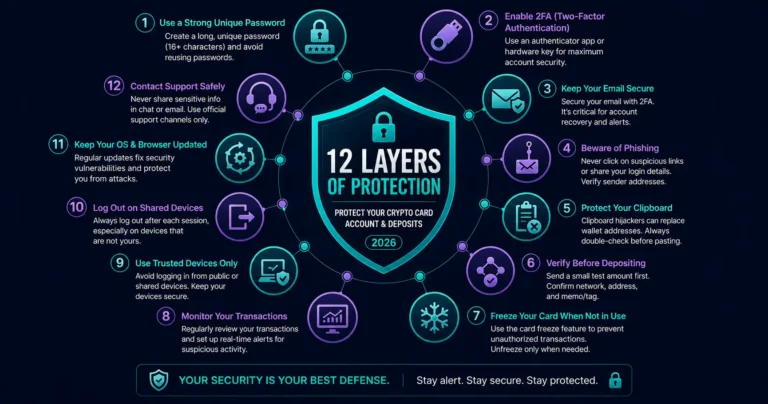
Quick answer: Crypto card fraud protection in 2026 requires defending two distinct attack surfaces: your card account (username, password, 2FA, and session security) and your crypto deposits (wallet address verification, network matching, and clipboard hijacker defense). The most common attacks are not technical exploits against the platform — they target you directly through phishing, SIM swapping, and clipboard malware. In 2026, automated phishing campaigns and AI-generated social engineering can deceive even experienced users. The 12 tips below address every meaningful attack vector specific to crypto card users, in order of impact.
Why Crypto Cards Have a Unique Fraud Profile
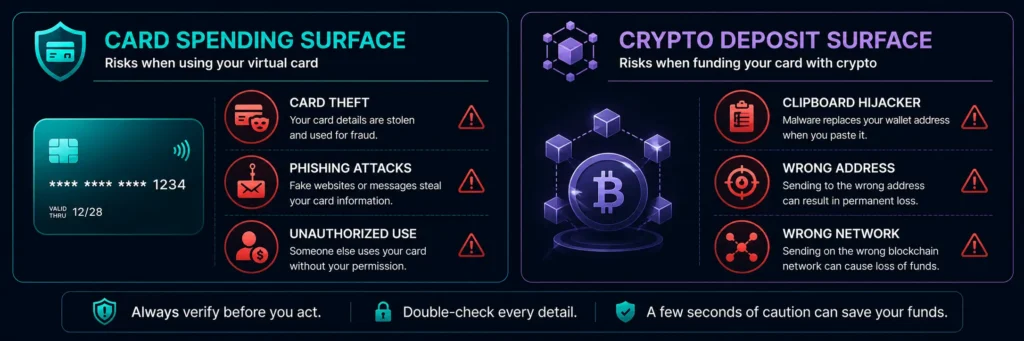
A crypto prepaid card has two security surfaces that traditional bank cards do not:
1. The card spending surface — your virtual Visa card, card number, expiry, and CVV. This works identically to any Visa card and carries the same fraud risks: card number theft, phishing for card details, unauthorized use.
2. The crypto deposit surface — sending cryptocurrency from an external wallet to your card platform’s deposit address. This is irreversible and unique to crypto: a wrong address, wrong network, or clipboard hijacker attack results in permanently lost funds with no recourse.
Traditional bank card fraud tips address surface one. Crypto card users need to manage both.
Tip 1: Enable Hardware Key or Biometric 2FA Immediately
Security professionals now recommend authenticator apps, passkeys, or physical security keys instead of SMS. These methods offer much stronger protection because they cannot be stolen through a simple phone number transfer.
SMS-based 2FA is vulnerable to SIM swap attacks — where an attacker convinces your mobile carrier to transfer your phone number to their SIM card, giving them access to your SMS verification codes. Once they have your SMS codes, your account’s second factor is compromised.
What to use instead:
- Hardware security keys (FIDO2/WebAuthn): Physical keys like YubiKey that must be physically present to authenticate. Immune to phishing and SIM swapping.
- Authenticator apps (TOTP): Google Authenticator, Authy, or 1Password TOTP. Better than SMS — codes are generated on-device and cannot be intercepted by SIM swap.
- Biometric authentication (FaceID/TouchID): Available on Rivocard — biometric data stays on your device’s secure enclave and never leaves it.
On Rivocard: go to account settings → security → enable hardware key, FaceID, or TouchID immediately after creating your account. This single step eliminates the most common account takeover vector.
Tip 2: Use a Unique, Strong Password
A strong password for your Rivocard account means:
- 16+ characters minimum
- Random — not a word, phrase, or memorable pattern
- Unique — not reused at any other service
Why uniqueness matters: Data breaches at other services regularly expose username/password combinations. Attackers run these leaked credentials against financial platforms in automated attacks called credential stuffing. If your Rivocard password is unique, a breach at another service cannot be used to access your card account.
Use a password manager (1Password, Bitwarden, or your device’s built-in manager) to generate and store a unique strong password. The password manager remembers it — you do not need to.
Tip 3: Watch for Clipboard Hijackers When Depositing Crypto
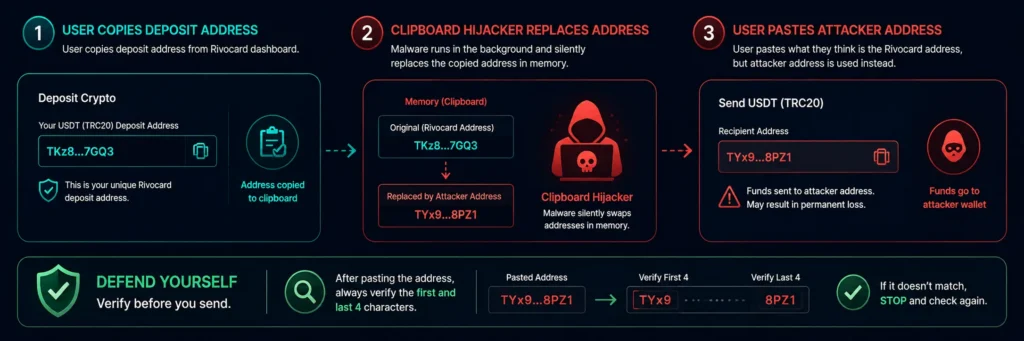
Clipboard hijackers are malicious software that monitor your clipboard and silently replace copied crypto addresses with attacker-controlled addresses. When you paste what you think is your Rivocard deposit address, you are actually sending funds to the attacker.
This is the single most dangerous attack vector specific to the crypto deposit side. It is silent, fast, and results in permanently unrecoverable lost funds.
How to protect against it:
- After copying a deposit address, paste it and verify the first 4 and last 4 characters against the original displayed in your Rivocard dashboard
- Keep your device’s operating system and security software updated — clipboard hijackers are malware that requires device compromise to operate
- Consider using the QR code scan option instead of copy-paste — QR codes cannot be hijacked by clipboard malware
- Do not install browser extensions, apps, or software from untrusted sources
Tip 4: Always Verify the Network Before Sending Crypto
Cross-network deposits are a significant and common source of lost funds. Sending TRC-20 USDT to an ERC-20 address, or Ethereum to a Bitcoin address, results in funds going to an address on the wrong blockchain — typically unrecoverable.
The verification checklist before every deposit:
- Note the network shown on your Rivocard deposit page (e.g., TRC-20)
- Open your sending wallet/exchange
- Confirm the withdrawal network selected matches — exactly
- TRC-20 addresses start with T. ERC-20 addresses start with 0x. Bitcoin addresses start with 1, 3, or bc1
- If the address format doesn’t match the network you selected, stop — something is wrong
See our how to top up with USDT guide for the full deposit process with network verification steps.
Tip 5: Freeze Your Card Immediately If Anything Seems Wrong
Rivocard’s dashboard lets you freeze your virtual card instantly — blocking all further transactions. This is the correct first response to any of the following:
- You see a transaction you do not recognize
- Your card details may have been exposed
- You receive unusual login notifications
- You suspect your account has been accessed without authorization
Freezing takes seconds and is reversible. Creating a new card with a new number takes seconds after that. The cost of hesitating is a continued stream of unauthorized transactions. The cost of freezing is zero — you can unfreeze or replace immediately.
Tip 6: Recognize and Avoid Phishing Attacks
In 2026, AI-generated phishing emails, SMS messages, and fake websites are sophisticated enough to deceive experienced users. Malicious browser extensions mimic trusted brands to capture private keys or alter transaction destinations.
Phishing targeting crypto card users typically takes these forms:
Fake Rivocard login pages: A phishing email with a link that appears to go to rivocard.com but actually goes to a lookalike domain (riv0card.com, rivocard-login.com, etc.). The fake page captures your credentials.
Fake “security alert” messages: An SMS or email claiming your account has been compromised, with a link to “verify your identity” — which is actually a credential harvesting page.
Fake customer support: Someone in a Telegram, Discord, or WhatsApp group claiming to be Rivocard support, asking for your login details, card number, or 2FA code.
Defense:
- Never click links in emails or SMS claiming to be from Rivocard — go directly to rivocard.com by typing it in your browser
- Check the URL carefully before entering any credentials — look for subtle misspellings
- Rivocard support will never ask for your password or 2FA code
- Enable hardware 2FA — even if your credentials are phished, a hardware key cannot be used remotely
Tip 7: Use Separate Virtual Cards for Separate Purposes
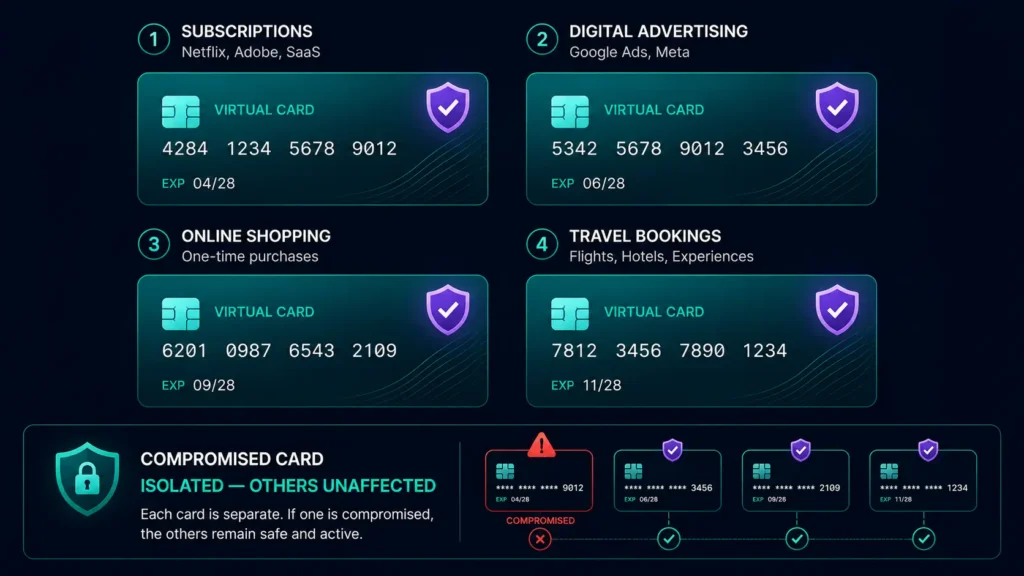
On Rivocard, card creation is free and unlimited. This enables a security practice that physical cards cannot: one card per use case.
Why this matters for fraud protection:
- If a card number used at one merchant is compromised (through a merchant data breach), only that card is affected — your other cards and wallet balance are unaffected
- You can freeze and replace a compromised card without disrupting other services
- Subscription services, ad platforms, and online stores each get a different card number — containing exposure per merchant
Practical card segmentation:
- Card 1: Subscription services (Netflix, Adobe, SaaS tools)
- Card 2: Digital advertising (Google Ads, Meta Ads)
- Card 3: Online shopping (one-time purchases)
- Card 4: Travel bookings
If card 3 is compromised from a merchant breach, cards 1, 2, and 4 continue working without interruption.
Tip 8: Monitor Your Transaction History Regularly
Unauthorized transactions on virtual cards are often small at first — fraudsters test cards with small charges before making larger ones. Regular monitoring catches this early.
What to look for:
- Small charges ($0.01, $1.00) from unfamiliar merchants — these are authorization tests
- Charges from merchants or countries you did not transact with
- Multiple charges in quick succession from the same merchant
Check your Rivocard transaction history at least weekly if you use the card regularly. Set up notifications if the platform supports it — real-time alerts for every transaction make unauthorized use immediately visible.
Tip 9: Never Share Card Details in Any Communication
Your card number, expiry date, and CVV together constitute everything needed to make online purchases. This combination should only be entered in legitimate checkout pages — never shared via:
- Email (not even to Rivocard support)
- SMS or messaging apps
- Screenshots or photos
- Phone calls
- Social media
Rivocard support does not need your card number, expiry, or CVV to assist you. If anyone claiming to be support asks for these details, it is a social engineering attack.
Tip 10: Protect Your Device
Malware can replace wallet addresses, steal passwords, or record everything you type. Even the strongest platform security cannot protect your account if the device you access it from is compromised.
Device security checklist:
- Keep your operating system updated — security patches close known vulnerabilities
- Keep your browser updated — browser vulnerabilities are common attack vectors
- Do not install browser extensions from untrusted sources — some extensions are designed to capture crypto-related credentials
- Use your device’s built-in security features (FaceID, TouchID, device PIN)
- Avoid accessing your Rivocard account on shared or public computers
- Consider a dedicated device or browser profile for financial account access
Tip 11: Avoid SMS 2FA — Use Authenticator App or Hardware Key
SMS 2FA is vulnerable to SIM swap attacks. SIM swap attacks occur when a criminal manipulates your mobile network provider into porting your phone number to a device under their control. Once accomplished, attackers can intercept SMS-based two-factor authentication codes and trigger password resets across linked accounts.
If Rivocard’s hardware key or biometric 2FA is already configured, SMS is not a factor in your account security. But if you use SMS-based codes for any connected service — including the email address linked to your Rivocard account — SIM swapping is a risk.
Protect against SIM swapping:
- Add a PIN or account lock to your mobile carrier account — requires the PIN for any SIM change
- Switch from SMS 2FA to app-based or hardware key 2FA everywhere possible
- Use an email address that itself has strong 2FA for account recovery
Tip 12: What to Do If Fraud Happens
Despite best practices, unauthorized activity may occasionally occur. The correct response sequence:
Step 1: Freeze the card immediately. From your Rivocard dashboard, freeze the affected card. This stops any further transactions instantly.
Step 2: Change your password. If your account may have been accessed, change your Rivocard password from a secure device immediately.
Step 3: Review all recent transactions. Identify the scope of unauthorized activity — when it started, amounts, merchant details.
Step 4: Contact Rivocard support. Report the unauthorized transactions with transaction details. The dispute process follows card-network rules for unauthorized transactions.
Step 5: Create a new card. Once you have frozen and reported the compromised card, create a new virtual card with a new number for future use.
Step 6: Investigate the source. Try to understand how the card details were obtained — was it a merchant breach, phishing, device compromise, or another vector? Addressing the source prevents recurrence.
FAQs
What are the most common types of crypto card fraud in 2026?
The most common threats are phishing attacks (fake login pages and fake support contacts), clipboard hijackers (malware that replaces copied deposit addresses with attacker addresses), SIM swap attacks against SMS 2FA, and credential stuffing using leaked passwords from other services. Most attacks target user credentials and behavior, not platform infrastructure.
How do I protect my Rivocard account from being hacked?
Enable hardware key or biometric 2FA immediately, use a unique strong password (16+ characters, not reused), never click links in emails claiming to be from Rivocard, and keep your device’s operating system updated. These four steps address the most common account takeover vectors.
What is a clipboard hijacker and how does it affect crypto card deposits?
A clipboard hijacker is malware that silently replaces crypto addresses you copy to your clipboard with attacker-controlled addresses. When you paste what you think is your Rivocard deposit address, you send funds to the attacker. Always verify the first and last 4 characters of a pasted address against what is displayed in your Rivocard dashboard, or use QR code scanning instead.
What should I do if I see an unauthorized transaction on my Rivocard?
Freeze the card immediately from your dashboard — this stops further transactions instantly. Change your password if account access may be compromised. Contact Rivocard support with transaction details. Create a new card with a new number for future use. Then investigate how the card details were obtained to prevent recurrence.
Why should I avoid SMS 2FA for my Rivocard account?
SMS 2FA is vulnerable to SIM swap attacks, where an attacker convinces your mobile carrier to transfer your phone number to their SIM card. This gives them access to your SMS verification codes. Rivocard supports stronger alternatives — hardware security keys (most secure), FaceID, and TouchID — all of which are immune to SIM swapping.
How does using separate virtual cards for each purpose protect me?
If one card’s number is compromised through a merchant data breach, only that card is affected. Your other cards and wallet balance remain unaffected. You freeze and replace the compromised card without disrupting other services. On Rivocard, card creation is free and unlimited, making per-merchant or per-category card segmentation practical.
Can Rivocard recover funds if I send a crypto deposit to the wrong address?
No. Blockchain transactions are irreversible — funds sent to the wrong address cannot be recovered by Rivocard or by any party. Always verify the deposit address by comparing the first and last 4 characters after pasting, confirm the network on your sending wallet matches the network shown in your Rivocard dashboard, and consider using QR code scanning to bypass clipboard manipulation risk.
What are signs that my crypto card has been compromised?
Small test charges ($0.01 to $1.00) from unfamiliar merchants, charges from merchants or countries you did not transact with, multiple quick charges from the same merchant, unexpected login notifications from unusual locations or devices. Any of these should trigger immediate card freezing and account password change.
Is it safe to use my Rivocard on public Wi-Fi?
Rivocard encrypts all communications using TLS, so data interception on public Wi-Fi is not the primary risk. The larger risk on public Wi-Fi is other attack vectors — fake access points, session hijacking, or device-level vulnerabilities. For financial account access, using mobile data or a trusted VPN is preferable to public Wi-Fi.
What does Rivocard’s Visa Zero Liability Policy cover?
Under Visa’s Zero Liability Policy, cardholders are not responsible for unauthorized transactions when they are reported promptly and when basic security practices were followed (the card was not shared, no PIN was disclosed, etc.). Report unauthorized transactions to Rivocard support as soon as you identify them to initiate the dispute process under this protection.
Get Started
Protect your card from day one — enable 2FA before your first deposit. Create your Rivocard account →
