
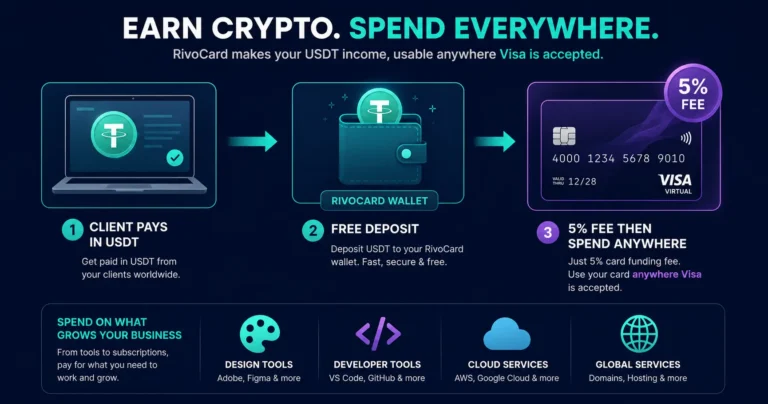
Quick answer: Rivocard gives freelancers and remote workers a direct path from crypto income to real-world spending. Receive USDT or any supported crypto from clients, deposit to your Rivocard wallet (free), fund a virtual Visa card (5% fee), and spend anywhere Visa is accepted — tools, software, cloud services, advertising, travel, everyday purchases — all at 0% purchase fees and 0% FX fees on international transactions. Crypto payments are becoming a normal part of freelance work in 2026, especially for remote workers dealing with international clients, slow bank transfers, and expensive conversion fees. For freelancers already receiving crypto income, Rivocard closes the loop: crypto in, Visa card spending out.
The Freelancer Payment Problem Crypto Cards Solve
Traditional international freelance payments are often slow and expensive because they rely on banking rails that involve wire fees, intermediary banks, currency conversion spreads, and limited operating hours. International wires take 3-5 days and cost 4-7% in combined fees.
The emerging alternative: clients pay in USDT or USDC directly to a freelancer’s wallet. Stablecoin payments using assets such as USDT or USDC can reduce settlement times from days to minutes while lowering transaction costs — this is why many freelancers and remote workers have started using crypto for cross-border payments.
The practical gap this creates: the freelancer has USDT in a wallet but their daily spending — software subscriptions, tools, cloud services, advertising, groceries via delivery apps — still requires a card that works at Visa-accepting merchants.
Rivocard fills that gap. It converts crypto income into a spendable Visa card balance without a bank account, without wire transfers, and without lengthy KYC processes (Basic KYC requires only email verification).
The Freelancer Workflow: Crypto Income to Card Spending
Step 1: Receive payment in USDT from your client. Client sends USDT (or any Rivocard-supported cryptocurrency) to your wallet address. USDT on TRC-20 is ideal — confirms in seconds, negligible fee, stable $1 value.
Step 2: Transfer USDT to your Rivocard wallet. Send your earned USDT from your wallet or exchange directly to your Rivocard TRC-20 deposit address. Free at this step. Your Rivocard wallet balance updates within seconds to minutes.
Step 3: Fund a virtual Visa card. From your Rivocard wallet balance, fund a virtual card. The 5% Rivocard fee applies here. Fund $200, card has $190.
Step 4: Spend on any Visa merchant. Your tools, SaaS subscriptions, cloud hosting, freelance platform fees, software, advertising — all paid at 0% purchase fee.
The total cost from receiving $1,000 in client USDT to spending $950 on business tools: 5% Rivocard card funding fee. No bank wire fee, no conversion spread, no FX fee on international purchases.
Freelance Business Expenses That Work With Rivocard
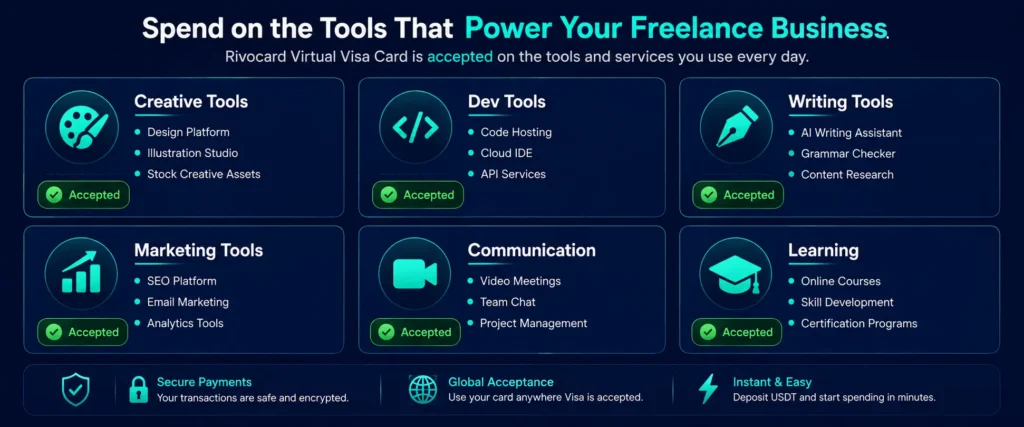
Freelance platform fees and subscriptions:
- Fiverr seller tools and promoted gigs
- Upwork connects and subscription plans
- Toptal and other platform fees
- Freelancer.com memberships
Design and creative tools:
- Adobe Creative Cloud ($54.99-$89.99/month)
- Figma ($12-$15/month)
- Canva Pro ($14.99/month)
- Sketch, Affinity, Procreate (one-time or subscription)
Development and technical tools:
- GitHub ($4-$21/month)
- Vercel, Netlify, Heroku (hosting)
- AWS, Google Cloud, Azure (cloud infrastructure)
- JetBrains IDEs ($24.90-$77.90/month)
- Linear, Jira, Basecamp (project management)
Writing and content tools:
- Notion ($8-$15/month)
- Grammarly ($12-$30/month)
- Hemingway App, ProWritingAid
- Google Workspace ($6-$18/month)
- Substack Pro fees
Marketing and analytics:
- Ahrefs, SEMrush, Moz (SEO tools)
- Mailchimp, ConvertKit, Beehiiv (email)
- Social scheduling tools: Buffer, Hootsuite, Later
- Google Ads, Meta Ads (for self-promotion)
Communication and meetings:
- Zoom Pro ($15.99/month)
- Calendly ($10-$20/month)
- Loom ($12.50/month)
- Slack (if client-paid plans)
Accounting and invoicing:
- QuickBooks, FreshBooks, Wave
- Invoice Ninja
- Toggl Track
Courses and professional development:
- Udemy, Coursera, Skillshare
- MasterClass, LinkedIn Learning
- Specific course platforms in your niche
All of these accept Visa. All charge 0% purchase fee via Rivocard. All work the same as a regular bank card from the merchant’s perspective.
The 0% FX Fee Advantage for International Freelancers
Most freelancers who work internationally face at least one currency conversion in their payment chain. Rivocard eliminates the FX fee at the spending step.
A 3% foreign transaction fee on every purchase adds up quickly when your entire spending life is international — tools billed in USD, hosting billed in EUR, software billed in GBP.
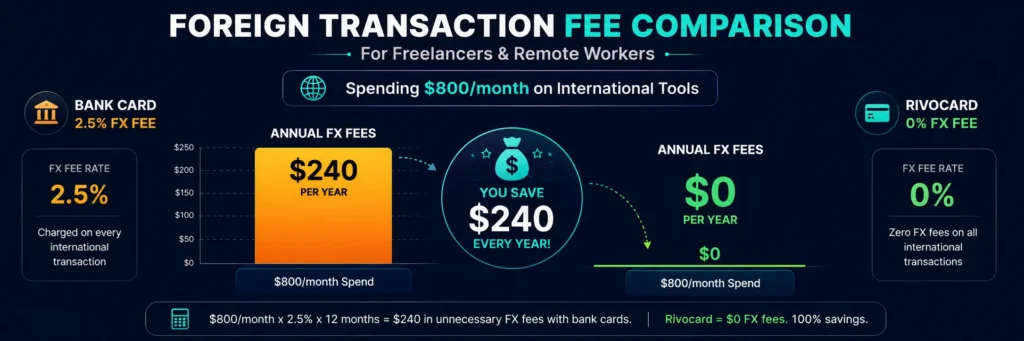
For a freelancer spending $800/month on tools and services billed in various currencies:
- Bank card at 2.5% FX: $20/month, $240/year in FX fees
- Rivocard at 0% FX: $0 in FX fees
The 5% Rivocard card funding fee is a separate upfront cost at the wallet-to-card step. The 0% FX fee at spending applies to every individual transaction — these compound differently and the relative advantage of 0% FX grows with international spending volume and frequency.
Setting Up Rivocard as a Freelance Payment Hub
For freelancers who receive crypto payments from clients:
Create a Rivocard account (email only, no bank account needed). Share your Rivocard USDT deposit address with clients as your payment destination. Or keep your existing wallet and transfer to Rivocard when you want to spend.
A practical monthly workflow:
- Receive USDT from clients throughout the month
- At month end (or as needed): transfer a portion to Rivocard wallet
- Fund your tools card for the month (software, SaaS, subscriptions)
- Fund a separate card for occasional one-off purchases
- Remaining crypto holdings stay in your wallet for savings or investment
Keeping a portion in crypto vs spending all through Rivocard: Convert client crypto payments to USDC or USDT within 24 hours of receipt for stability. Freelancers are not traders — income needs to be stable. If you want crypto exposure, buy it deliberately with a portion of your income after converting to stablecoins first.
The same principle applies to Rivocard usage: convert to card spending what you need for current expenses. Keep savings in your own wallet in USDT or another asset of choice.
Multiple Cards for Freelance Business Structure
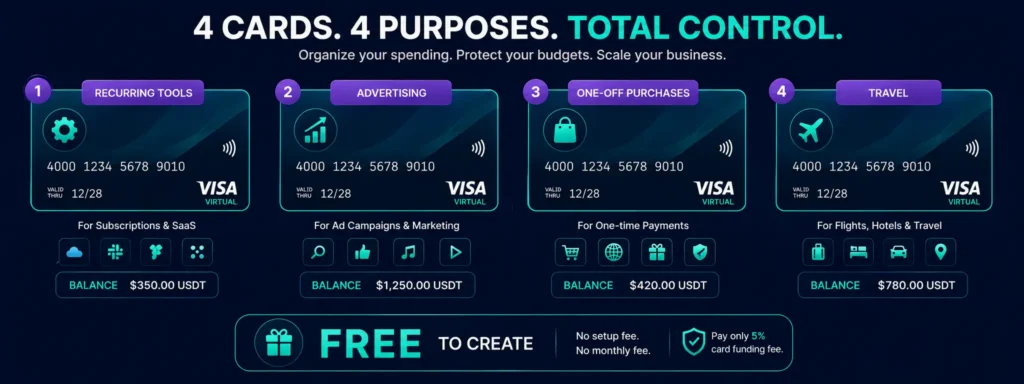
Rivocard’s unlimited free card creation supports organized business expense management:
Card 1 — Recurring software and tools: All monthly subscriptions. Adobe, GitHub, Notion, Figma, Google Workspace, Zoom, Grammarly. Fund monthly with enough to cover all renewals.
Card 2 — Advertising and marketing: Google Ads, Meta Ads, or any paid promotion for your freelance business. Separate budget, separate card, clear accounting.
Card 3 — One-off purchases and courses: Courses, books, one-time software licenses, design assets. Fund per-purchase or quarterly.
Card 4 — Travel and in-person expenses: Conference tickets, coworking spaces, business travel. Fund when traveling.
This structure gives clean expense categories for accounting and tax purposes, isolated breach risk, and easy cost visibility per business area.
No Bank Account Required
A significant benefit for freelancers in certain markets: Rivocard works without a bank account.
Using virtual cards without a bank account gives freelancers faster access to global payment tools, stronger spending control, and more flexible funding options.
For freelancers in markets where:
- Banking access is limited or restrictive
- International bank accounts require complex documentation
- Traditional cards are not widely issued for self-employed individuals
- Currency controls make bank transfers difficult
Rivocard requires only email verification at the Basic KYC tier. No bank account linked. No credit check. No income verification. Deposit USDT, get a Visa card.
Managing Variable Income on a Prepaid Card
Freelance income is variable — some months high, some low. Managing a prepaid card model around variable income:
Front-load tools spending. Fund your tools card for 2-3 months at a time when income is strong. This smooths out the monthly payment cycle and reduces the frequency of card reloads.
Separate essential and discretionary cards. Essential tools (GitHub, Google Workspace, core creative software) on a dedicated card funded with a buffer. Discretionary purchases on a separate card funded as needed. If income is low in a given month, the essential card keeps running while discretionary spending adjusts.
Keep a wallet buffer. Maintain a small USDT balance in your Rivocard wallet at all times — enough to fund a tools card reload if income is delayed or a large client payment is late.
Batch your deposits. Rather than making multiple small deposits, consolidate. Each USDT deposit to Rivocard is free, but batching means fewer transactions to track for accounting purposes.
Tax and Accounting Considerations for Freelancers
This is not tax advice, but important context for freelancers using crypto for business expenses:
USDT stability reduces capital gains complexity. If you receive USDT from clients and spend it from a Rivocard card funded with USDT, there is typically no capital gains event (since USDT value is constant at $1). Compare this to spending appreciated Bitcoin for business expenses, which creates a taxable gain in most jurisdictions.
Business expense tracking: Each Rivocard card’s transaction history can serve as a per-category expense record. Export or note transaction data for your accounting software.
Consult a qualified tax professional familiar with crypto and freelance/self-employment tax in your jurisdiction. Crypto tax rules vary significantly by country and evolve frequently.
FAQs
How do freelancers use a crypto card for business expenses?
Receive USDT or other crypto from clients, deposit to your Rivocard wallet (free), fund a virtual Visa card (5% fee), and pay business tools, SaaS subscriptions, cloud services, and other expenses from the card at 0% purchase fee. From the merchant’s perspective, it is a standard Visa card payment.
Can I use a Rivocard without a bank account?
Yes. Rivocard requires only email verification at the Basic KYC tier. No bank account, no credit check, no income verification. Deposit USDT to your wallet and fund a card. This makes it accessible to freelancers in markets where banking access is limited.
Does Rivocard work for paying freelance tools like Adobe and GitHub?
Yes. Adobe Creative Cloud, GitHub, Figma, Notion, Google Workspace, Zoom, Canva, and all major freelance tools accept Visa. Enter your Rivocard card details in each tool’s billing settings. 0% purchase fee applies on all charges.
How does a freelancer receive USDT from clients and spend it on Rivocard?
Share your USDT TRC-20 deposit address with clients as your payment destination, or use your existing wallet and transfer to Rivocard when ready to spend. Deposit to Rivocard wallet (free, seconds to confirm on TRC-20), fund a virtual card (5% fee), spend at any Visa merchant.
What is the total cost for a freelancer using Rivocard for $1,000 in monthly tools?
The Rivocard card funding fee is 5% – $50 on $1,000 in card funding. Purchase fee: $0. FX fee on international tool subscriptions: $0. Monthly account fee: $0. Total additional cost: $50/month (5% of tools spend).
Is Rivocard suitable for freelancers in countries with limited banking?
Yes. Rivocard requires only email verification and a crypto deposit – no bank account needed. For freelancers in markets where international cards are difficult to obtain or banking access is restricted, Rivocard provides a functional Visa card from crypto holdings.
How should a freelancer organize multiple Rivocard cards for business expenses?
Use one card for recurring software subscriptions, a separate card for advertising spend, a third for one-off purchases and courses, and a fourth for travel expenses if relevant. Card creation is free and unlimited – per-category isolation gives cleaner expense tracking with no extra cost.
Does receiving client USDT and spending via Rivocard create a taxable event?
In most jurisdictions, depositing USDT (stable at $1) to a card platform and spending from it involves minimal or no capital gains since the value has not appreciated. However, tax rules vary by jurisdiction and evolve frequently – consult a qualified tax professional familiar with crypto in your country.
Can I use Rivocard for coworking space memberships and in-person freelance expenses?
Yes for online payment of coworking memberships. For in-person use at coworking spaces with NFC card terminals, add your Rivocard virtual card to Apple Pay or Google Pay and tap to pay. 0% purchase fee and 0% FX fee apply.
Does Rivocard work for freelancers managing clients in multiple countries?
Yes. Rivocard charges 0% on all international transactions – no FX surcharge regardless of the merchant’s country or billing currency. Tools billed in USD, EUR, GBP, or any other currency all incur 0% FX fee. The 5% Rivocard fee is paid once at card funding, not per transaction.
Get Started
Receive crypto from clients and spend it immediately – no bank required. Create your Rivocard account in under 2 minutes
