
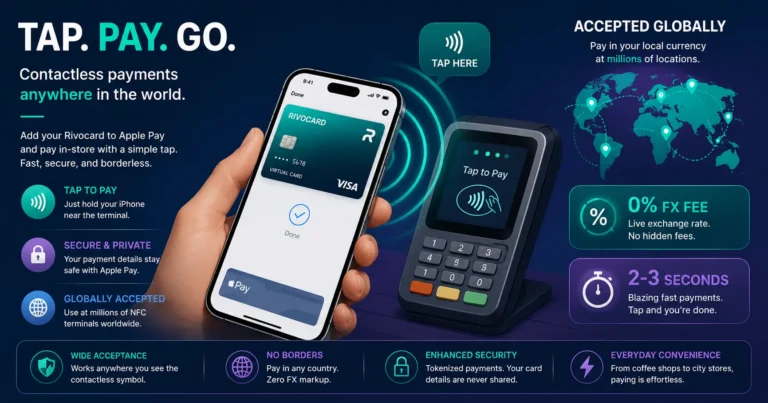
Quick answer: Contactless crypto card payments work through NFC (Near Field Communication) technology — your phone transmits a secure token to a payment terminal when you hold it within a few centimeters of the contactless reader. For Rivocard specifically, the virtual card is added to Apple Pay or Google Pay, and you tap your phone at any NFC terminal globally. The process takes under 3 seconds, charges 0% FX on international transactions, and is more secure than a physical card tap because your actual card number is never transmitted. In 2026, contactless payment is accepted at the vast majority of merchants in developed markets, and growing rapidly in emerging markets. This is the primary in-person payment method for Rivocard users (who have no physical card).
What Is Contactless Payment?
Contactless payment uses NFC (Near Field Communication) to transmit payment data between your device and a payment terminal without physical contact. The contactless symbol on terminals — four curved lines like a Wi-Fi symbol rotated 90 degrees — indicates NFC payment capability.
What can make a contactless payment:
- A physical card with an NFC chip (most modern bank and crypto cards)
- A phone with Apple Pay, Google Pay, or Samsung Pay
- A smartwatch with payment capability (Apple Watch, Samsung Galaxy Watch, etc.)
For Rivocard users, the phone via Apple Pay or Google Pay is the primary contactless payment method — there is no physical card to tap with.
How fast it is: Contactless payments at modern terminals complete in 2-3 seconds. The transaction is faster than inserting a chip card and typing a PIN.
How Tap-to-Pay Works With Rivocard
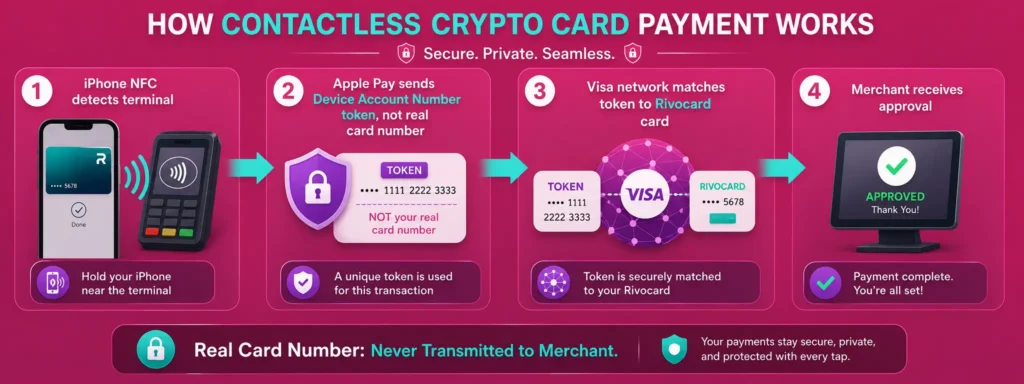
When you have added your Rivocard virtual card to Apple Pay or Google Pay, in-person contactless payment works as follows:
The user experience:
- At the payment terminal, hold your phone (or watch) near the contactless reader
- Your phone prompts for authentication — Face ID (look at phone), Touch ID (press fingerprint sensor), or device PIN
- Authenticate — the whole process takes 2-3 seconds
- The terminal confirms the payment — typically a beep, green light, or “approved” message
The technical process (behind the scenes):
- Your phone’s NFC chip detects the terminal
- Apple Pay or Google Pay transmits a Device Account Number (DAN) — a unique token — not your actual Rivocard card number
- The DAN is sent to the Visa network via the merchant’s payment system
- Visa matches the DAN to your actual Rivocard card and processes the authorization
- Your Rivocard balance is charged the equivalent dollar amount (at 0% FX for international transactions)
- The merchant receives a transaction confirmation
What the merchant sees: A standard Visa authorization. The merchant’s system never receives your actual 16-digit Rivocard card number. The token is unique per device and per transaction.
The Security Advantage of Contactless Crypto Card Payments
Contactless payments via Apple Pay are more secure than swiping or inserting a physical card for three reasons:
1. Real card number never transmitted: Your Rivocard card number is replaced by a device-specific token at Apple Pay provisioning time. This token — not your card number — is what payment terminals see. Even if a merchant’s terminal is compromised or their payment processor is breached, they cannot obtain your actual Rivocard card number from a contactless transaction.
2. Biometric authentication per transaction: Every in-person contactless payment requires Face ID or Touch ID authentication. Without biometric verification (or your device passcode as fallback), the payment cannot proceed. A physical card can be tapped without any authentication up to the contactless limit; your phone via Apple Pay requires your biometric every time.
3. Remote disabling: If your phone is lost or stolen, you can freeze the Rivocard card from any browser — this immediately stops all future payments including via Apple Pay. You can also remotely erase your iPhone via iCloud, which removes Apple Pay tokens. Physical cards require calling a support line and waiting for processing.
Where Contactless Payment Works Globally
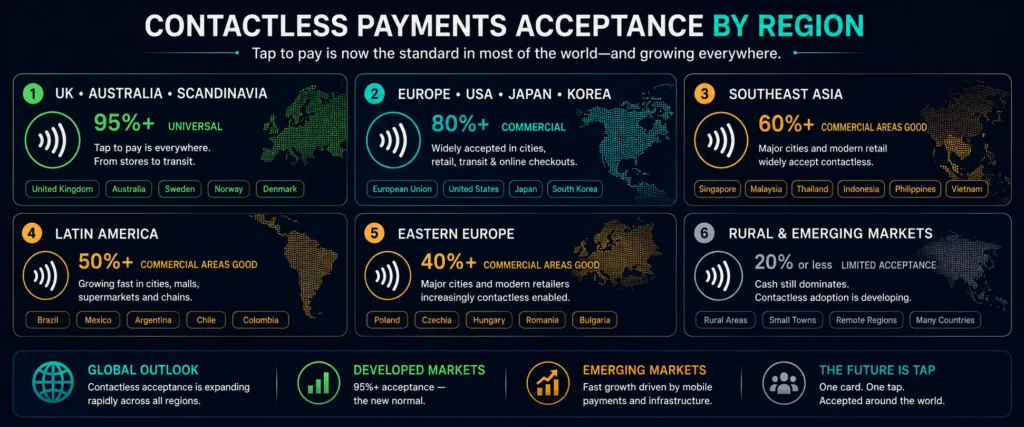
Contactless acceptance varies by country and region. In 2026:
Nearly universal contactless (95%+ of merchants):
- UK: One of the highest contactless adoption rates globally. All major retailers, restaurants, cafes, transport (TfL), and most independent merchants.
- Australia: Very high adoption — most POS terminals are contactless-capable
- Canada: Very high, especially in major cities
- Scandinavia (Sweden, Norway, Denmark, Finland): Near-cashless societies with essentially universal contactless
- Netherlands, Belgium: Very high adoption
- Singapore: Excellent contactless coverage throughout the city-state
High contactless adoption (80%+ in commercial areas):
- Germany, France, Italy, Spain (EU): Major retailers and chains universal; some older or smaller merchants may be chip-only
- United States: Major retailers, restaurant chains, transit (OMNY in New York, etc.); smaller merchants variable
- Japan: Apple Pay very widely supported; IC card (Suica) via Apple Pay works for transit and convenience stores; some traditional merchants prefer cash
- South Korea: Strong adoption in cities
- Hong Kong, Taiwan: Good coverage in commercial areas
Growing contactless adoption (commercial areas good, rural variable):
- Southeast Asia (Thailand, Vietnam, Malaysia, Indonesia): Tourist venues, malls, hotels, and modern retail good; local markets and street food often cash
- India: UPI dominates local payments; contactless Visa growing in commercial areas
- Latin America (Brazil, Colombia, Mexico, Chile): Commercial areas good; rural cash-dependent
- Eastern Europe (Poland, Czech Republic, Hungary): Improving rapidly; major cities excellent
Lower contactless adoption (plan for cash):
- Rural areas in most developing economies
- Local markets and street vendors globally
- Some government and utility payment points
- Certain countries with limited NFC terminal rollout
Contactless Payment Limits
Many countries have a maximum amount for contactless payment without PIN verification. Above this limit, the terminal may request PIN entry or chip insertion.
| Country/Region | Contactless limit |
|---|---|
| UK | No set limit (removed June 2024) |
| EU (most countries) | 50 EUR |
| Australia | No set limit (removed) |
| US | No set limit (varies by bank/processor) |
| Canada | 250 CAD (typical) |
| Japan | Varies by terminal |
For contactless payments via Apple Pay (rather than physical card), biometric authentication replaces the PIN requirement — there is typically no transaction limit for Apple Pay contactless payments that require biometric authentication. The limit restrictions apply to tap with physical cards (where no authentication is required).
In practice: Most international contactless transactions via Apple Pay have no limit concern because the biometric authentication satisfies the verification requirement that would otherwise trigger PIN entry.
Transit Systems: Contactless Crypto Card Payments for Transport
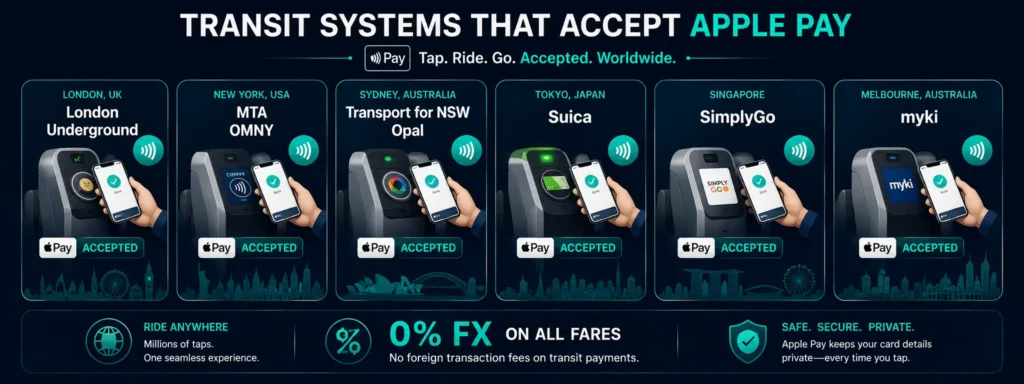
Many of the world’s major transit systems now accept Apple Pay or Google Pay directly at fare gates — no separate transit card needed.
Systems that accept Apple Pay contactless:
- London (TfL): All Underground, Overground, Elizabeth line, DLR, and bus routes. Tap in and out of fare gates with your iPhone. Daily and weekly fare caps apply automatically.
- New York (MTA): OMNY contactless on most subway lines and buses. Tap with iPhone.
- Sydney (Opal): Apple Pay accepted at Opal readers on trains, buses, ferries, and light rail.
- Singapore (SimplyGo/TransitLink): Contactless Visa on MRT and buses via Apple Pay.
- Tokyo: Suica IC card added to Apple Wallet works on JR lines, Tokyo Metro, and convenience stores. Add Suica to Apple Pay before arriving.
- Melbourne: Myki transit card accessible via Apple Pay on some route types.
- Chicago (Ventra): Apple Pay accepted on CTA trains and buses.
- Many European transit systems: Including Vienna, Stockholm, Copenhagen, and others accept contactless Visa at fare gates or readers.
For Rivocard users: Add your Rivocard to Apple Pay. At the transit entry gate, double-click the side button (Face ID iPhones), authenticate, and tap your phone to the reader. Rivocard charges 0% FX on the transit fare in local currency. No separate transit card purchase needed.
Practical Tips for Contactless Crypto Payments Abroad
Check NFC reader position: Contactless readers are not always at the same spot on different terminal models. Look for the contactless symbol (four curved lines) — it marks the reading zone. Terminals from different manufacturers place the reader at different positions on the terminal.
Tap, do not swipe or insert: If a terminal accepts contactless, tap rather than insert or swipe. Tap is faster and more secure.
Decline the chip/PIN option: Some terminals default to chip insertion even when NFC is available. Tap your phone first — if the terminal beeps or shows the “processing” indication, the tap was received. If nothing happens, the NFC may not be active for this transaction and chip entry may be required.
Airport terminals: Airport payment terminals in major international hubs almost universally support NFC contactless. Apple Pay is a reliable payment method at airport retail, food, and lounges in developed markets.
Restaurant and cafe payments: In many countries, the waiter brings a handheld terminal to the table. Look for the contactless symbol on the handheld device. Tap your phone directly on the terminal.
Markets and smaller vendors: While major chains are nearly universally contactless, smaller independent vendors and market stalls may still use older terminals or prefer cash. Have a small amount of local cash as backup.
FAQs
How do I make a contactless payment with a Rivocard?
Add your Rivocard virtual card to Apple Pay or Google Pay. At any in-person merchant with an NFC terminal (contactless symbol), double-click your iPhone’s side button (Face ID) or home button (Touch ID), authenticate, and hold your phone near the reader. The payment completes in 2-3 seconds at 0% FX fee.
Is tap-to-pay with Apple Pay more secure than a physical card?
Yes, in several ways. Your actual Rivocard card number is never transmitted – a device-specific token is used instead. Every payment requires biometric authentication (Face ID or Touch ID). If your phone is lost, you can remotely freeze the Rivocard card or erase the phone. Physical card taps require no authentication up to the contactless limit.
What is the contactless payment limit with Apple Pay abroad?
Apple Pay with biometric authentication typically has no transaction limit for contactless payments – the biometric verification replaces PIN entry that would otherwise be required above local contactless limits. Check with the specific terminal if a limit is imposed.
Can I use Apple Pay with Rivocard on London Underground?
Yes. TfL (Transport for London) accepts Apple Pay at all Underground, Overground, Elizabeth line, DLR, and bus fare gates. Add your Rivocard to Apple Pay and tap in and out normally. Daily and weekly fare caps apply. Rivocard charges 0% FX on the GBP fares.
Which countries have the best contactless payment acceptance?
UK, Australia, Canada, Scandinavia, the Netherlands, Belgium, and Singapore have near-universal contactless acceptance. Major EU countries, the US, Japan, and South Korea have high adoption in commercial areas. Southeast Asia, Latin America, Eastern Europe, and Africa vary – tourist and commercial areas good, rural less so.
Do I need to do anything special for contactless payments in Japan?
Japan’s convenience stores (7-Eleven, Lawson, FamilyMart) and major retailers support Apple Pay. For transit, add a Suica IC card to your Apple Wallet before traveling – this is the most convenient way to pay on Tokyo Metro, JR lines, and for convenience store purchases in Japan. Your Rivocard can be added to Apple Pay and used at Apple Pay-accepting merchants.
What happens if a terminal does not support contactless?
If a terminal is chip-and-PIN-only without NFC, your Rivocard via Apple Pay cannot complete the transaction – there is no physical card to insert. Pay with cash or another payment method. This scenario is increasingly rare at modern merchants but still occurs in some areas.
Is there a fee for contactless crypto card payments?
No additional fee beyond the standard card terms. On Rivocard: 0% purchase fee, 0% FX fee on international transactions. The 5% card funding fee was paid at the card loading step and is not charged again at each contactless payment.
Can I use Google Pay with Rivocard for contactless payments?
Yes. Add your Rivocard to Google Wallet on Android. Unlock your device and hold the back of the phone near an NFC terminal to pay. Works at any NFC-capable merchant globally. 0% FX applies identically to Google Pay transactions.
What is the contactless symbol I should look for at terminals?
The contactless symbol looks like four curved lines radiating outward from a dot, similar to a Wi-Fi symbol rotated 90 degrees. It appears on the terminal itself (often near the card insertion slot) and sometimes on a label on the terminal. If you see this symbol, NFC contactless payment is supported.
Get Started
Tap to pay in 200+ countries with your Rivocard via Apple Pay or Google Pay. Create your Rivocard account – card ready for Apple Pay in under 10 minutes
