
Quick answer: Yes. A Rivocard virtual Visa card works internationally in any of the 200+ countries and territories where Visa operates. Traveling with a crypto card in 2026 is surprisingly smooth — most people who take one abroad end up using it as their primary travel card because it works almost everywhere, keeps fees low, and removes currency headaches. Rivocard specifically charges 0% on international transactions — no foreign currency surcharge regardless of which country the merchant is in or which currency they bill in. For online purchases from international sites, the 0% FX fee applies automatically. For in-person international spending, add your Rivocard to Apple Pay or Google Pay and tap at NFC terminals. The card balance is in dollars; the Visa network handles currency conversion at the interbank rate with no Rivocard markup.
How International Transactions Work on a Crypto Cardy
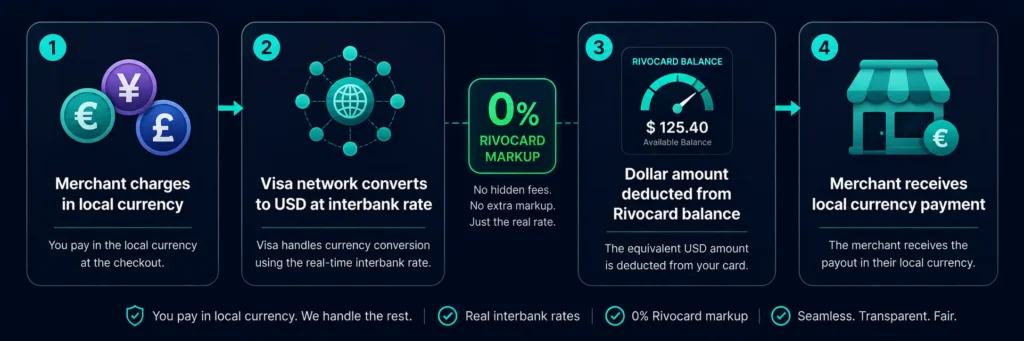
When you use a Rivocard virtual card at an international merchant — whether online or in person via Apple Pay — here is what happens behind the scenes:
Step 1: The merchant charges you in their local currency (EUR, JPY, GBP, AED, etc.).
Step 2: The Visa network converts the local currency amount to dollars at the current interbank exchange rate.
Step 3: The dollar amount is deducted from your Rivocard card balance.
Step 4: The merchant receives payment in their local currency through standard Visa settlement.
Your Rivocard card balance is in dollars. The currency conversion happens at the Visa network level, at the interbank rate, with 0% markup from Rivocard. The merchant sees a standard Visa authorization. The entire process is invisible to the cashier or merchant system — to them, it is an ordinary Visa card payment.
Crypto cards run on the same networks as traditional cards — Visa or Mastercard. If a merchant accepts Visa, they accept your crypto card, whether you are in Paris, Tokyo, Dubai, or Sao Paulo.
What 0% International Transactions Means in Practice
Most traditional bank debit cards charge a foreign transaction fee of 1.5-3% on every purchase made in a foreign currency. Rivocard charges 0%.
Example: Weekend in London for a US-based user:
- Hotel booked in GBP: $350 equivalent — 0% FX fee on Rivocard, $350 charged
- Restaurant dinner in GBP: $85 equivalent — 0% FX fee, $85 charged
- Underground travel in GBP: $22 equivalent — 0% FX fee, $22 charged
- Souvenir shopping in GBP: $60 equivalent — 0% FX fee, $60 charged
- Total international spend: $517 — Rivocard charges $0 in FX fees
On a 2.5% FX bank card: $12.93 in foreign transaction fees on the same spending. On a 0% FX Rivocard: $0.
For a two-week international trip with $2,000 in foreign currency spending, the FX fee saving at 2.5% is $50. At 3%: $60. These savings compound across every international purchase.
Using Rivocard Internationally: The Practical Setup
For online international purchases: No additional setup needed. Enter your Rivocard card number, expiry, CVV, and billing details at any international checkout. The 0% FX fee applies automatically. Whether purchasing from a UK retailer billed in GBP, a European SaaS billed in EUR, or a Japanese platform billed in JPY, there is no FX surcharge.
For in-person international purchases: Add your Rivocard virtual card to Apple Pay or Google Pay. At any international merchant with an NFC contactless terminal, tap your phone to pay. The Rivocard card handles the currency conversion at 0% FX. The tap-to-pay experience abroad is identical to using it domestically.
What to prepare before traveling:
- Ensure sufficient balance on your card. Estimate your spending and fund accordingly — if spending $1,500 over two weeks, have at least $1,600-1,800 on the card with buffer.
- Make sure the card is added to Apple Pay or Google Pay before departure.
- Keep your card number, expiry, and CVV accessible (securely noted offline) in case you need to make online bookings while abroad.
- Know your KYC-tier spending limits. Basic KYC limits are $500/transaction, $1,000/day. If any single purchase (e.g., a hotel stay) might exceed these, upgrade to Full KYC before travel.
The Dynamic Currency Conversion (DCC) Trap
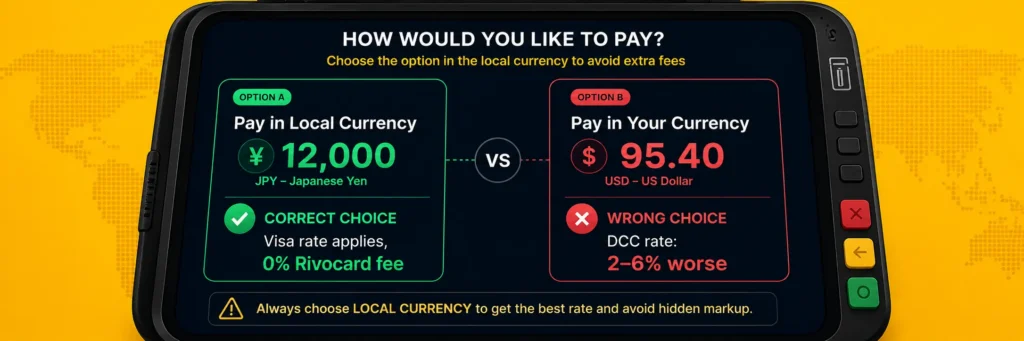
When a card terminal or ATM offers to charge you in your home currency rather than the local currency, always choose the local currency. The home-currency option is dynamic currency conversion (DCC) — the merchant sets the conversion rate, which can be significantly worse even if your card advertises low or zero FX fees.
This is one of the most common ways international travelers lose money, and it applies to every card including crypto cards.
The scenario: You are in Japan. At checkout, the terminal asks: “Pay in JPY or USD?” Choose JPY. Always. Choosing USD triggers DCC, where the merchant’s payment processor applies their own exchange rate — often 2-6% worse than the interbank rate the Visa network would use. Your 0% Rivocard FX fee becomes meaningless if you accept DCC and pay a 4% conversion markup to the merchant’s processor.
The rule: Always pay in local currency. Decline DCC at every ATM and POS terminal. Your Rivocard card handles the conversion to dollars at the Visa interbank rate, with 0% Rivocard markup.
Country-by-Country Acceptance Notes
North America (US, Canada, Mexico): Full Visa acceptance everywhere. Apple Pay and Google Pay very widely supported. No issues for Rivocard.
UK and Europe: Excellent Visa acceptance. Contactless payments are standard throughout Scandinavia, UK, Netherlands, Germany, France, and most EU countries. Apple Pay and Google Pay accepted at most modern terminals. Some rural areas in Eastern Europe may still be more cash-dependent.
Japan: Visa accepted at major merchants, hotels, convenience stores (7-Eleven, Lawson, FamilyMart all accept contactless), and tourist areas. Apple Pay is widely supported. Smaller independent merchants and some rural areas remain cash-preferred. The IC card (Suica) transit system supports Apple Pay — add it to Apple Wallet for seamless transit.
Southeast Asia (Thailand, Vietnam, Indonesia, Philippines, Malaysia): Visa accepted at tourist-area restaurants, hotels, malls, and modern retailers. Cash remains necessary in local markets and smaller vendors. 7-Eleven and major convenience chains accept contactless in most major cities. Singapore has excellent contactless acceptance throughout.
Middle East (UAE, Saudi Arabia, Qatar): Strong Visa acceptance in malls, hotels, and restaurants. Contactless is standard at most commercial venues. Dubai and Abu Dhabi are highly cashless in tourist and commercial areas.
Latin America (Brazil, Argentina, Mexico, Colombia): Visa accepted in commercial areas, hotels, and tourist venues. Cash still useful in smaller towns and markets. Argentina’s complex currency situation means USD/Visa transactions may have unique dynamics — use Rivocard’s 0% FX for best rates versus cash exchanges.
Africa: South Africa, Kenya, Nigeria, and other major markets have growing card acceptance in urban areas. Tourist venues and major retailers accept Visa. Cash remains important in rural areas and informal markets.
India: Strong UPI/local payment dominance, but Visa accepted at hotels, major retailers, online platforms, and tourist-area merchants. Rivocard works for online Indian purchases and at merchants with card terminals.
ATMs Abroad: What to Know
Rivocard virtual cards cannot be used at ATMs — ATMs require a physical card with a chip or magnetic stripe. For cash needs during international travel:
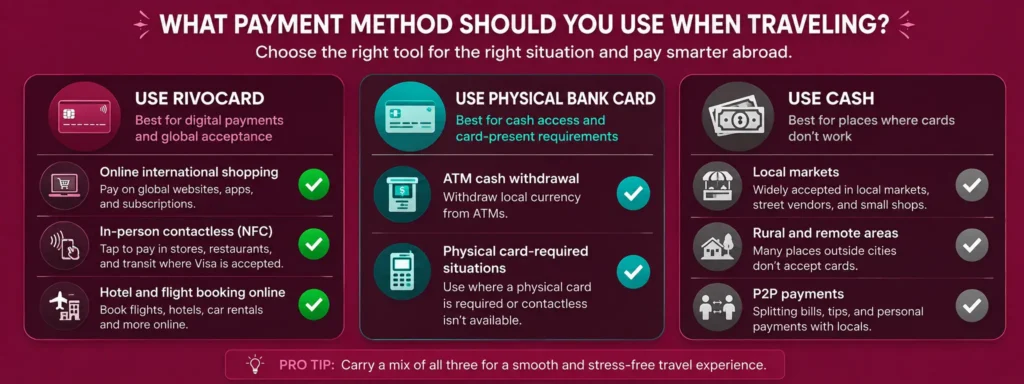
- Plan to use a physical bank card or physical crypto card for ATM withdrawals
- Withdraw local currency from ATMs at your destination rather than exchanging at airport bureaux de change (airport exchange rates are typically very unfavorable)
- DCC applies at ATMs too — always choose local currency when given the option
For in-person spending in cashless or card-accepting environments, Rivocard via Apple Pay covers most of your needs. Supplement with a physical card for ATM access and cash-heavy situations.
Managing Your Balance for International Trips
Before the trip: Fund your card with your estimated spending plus a 20% buffer. Fund one dedicated travel card rather than your everyday card — keeps trip spending isolated and visible.
During the trip: Check your balance periodically via your Rivocard dashboard. If running low, you can top up from your wallet — but you need internet access and a USDT deposit arriving (which takes under 5 minutes from TRC-20). Better to fund generously before departure.
Reload while traveling: If you need to reload mid-trip, you need access to your exchange (Binance, OKX, etc.), your Rivocard dashboard, and internet connectivity. This is generally feasible but adds friction during travel. Front-loading before departure is simpler.
Currency not to worry about: Since Rivocard handles all currency conversion at the Visa rate with 0% markup, you do not need to think about whether you are being charged in the right currency — as long as you decline DCC and pay in local currency, the conversion is handled optimally.
When to Use Rivocard vs Other Payment Methods Internationally
| Situation | Best tool | Why |
|---|---|---|
| Online purchases from international sites | Rivocard | 0% FX, instant, no setup |
| In-person contactless at modern terminals | Rivocard via Apple Pay or Google Pay | 0% FX, tap-to-pay |
| ATM cash withdrawal | Physical bank card | Virtual cards cannot use ATMs |
| Hotel check-in hold | Credit card or Rivocard with full balance | Some hotels prefer credit for holds |
| Car rental pickup deposit | Credit card | Many rental companies require credit |
| Split billing with local friends | Cash or local payment app | Card may not support local P2P |
| Emergency backup | Physical bank card | ATM access for cash if needed |
The practical international setup: Rivocard as the primary spending card for all online and contactless in-person purchases, a physical card as backup for ATMs and situations requiring physical card presence.
FAQs
Can I use a Rivocard internationally?
Yes. A Rivocard virtual Visa card works in any of the 200+ countries and territories where Visa operates – over 150 million merchant locations globally. It works for online international purchases, and for in-person contactless payments via Apple Pay or Google Pay.
Does Rivocard charge foreign transaction fees?
No. Rivocard charges 0% on all international transactions. Whether the merchant is in Japan, Germany, Brazil, or anywhere else, there is no foreign currency surcharge. Currency conversion happens at the Visa interbank rate with no Rivocard markup.
How does Rivocard handle currency conversion abroad?
When you make a purchase in a foreign currency, the Visa network converts the local currency amount to dollars at the current interbank rate. The dollar amount is deducted from your card balance. Rivocard applies 0% markup on this conversion. Always decline Dynamic Currency Conversion (DCC) at terminals – choose to pay in local currency, not your home currency, to ensure the Visa rate applies.
What is Dynamic Currency Conversion and why should I avoid it?
DCC is when a terminal or ATM offers to charge you in your home currency instead of the local currency. Declining and paying in local currency lets the Visa network handle conversion at the interbank rate with Rivocard’s 0% markup. Accepting DCC lets the merchant’s processor set the rate – often 2-6% worse. Always choose local currency.
Can I use Rivocard in Japan, Europe, and Southeast Asia?
Yes. Japan, all EU countries, UK, Singapore, Thailand, Indonesia, Malaysia, Philippines, and other major destinations have strong Visa acceptance. Japan’s convenience stores (7-Eleven, Lawson), most hotels, and Apple Pay-enabled transit systems all support contactless. Southeast Asia’s tourist and commercial areas widely accept Visa at modern terminals.
Can I use Rivocard at ATMs abroad?
No. Rivocard issues virtual cards, which cannot be used at ATMs. ATMs require a physical card with a chip or magnetic stripe. For international cash needs, use a physical bank card at ATMs. Rivocard covers all in-person contactless spending via Apple Pay or Google Pay.
Should I convert my currency before traveling or use Rivocard?
Use Rivocard directly at merchants – the Visa network applies the interbank exchange rate with 0% Rivocard markup, which is typically better than airport currency exchange bureaux or pre-trip cash conversion. Simply ensure sufficient card balance before departure.
How do I prepare my Rivocard before an international trip?
Fund your travel card with estimated spending plus 20% buffer. Add the card to Apple Pay or Google Pay on your phone. Check your spending limits (Basic KYC: $500/transaction, $1,000/day) and upgrade to Full KYC before traveling if you expect larger single purchases. Note your card details securely offline.
Does Rivocard work for international online shopping from foreign retailers?
Yes. Any international online retailer accepting Visa accepts your Rivocard. The 0% FX fee applies automatically to purchases billed in EUR, GBP, JPY, AUD, or any other currency. Enter your card details at checkout the same way as any other Visa card.
Which countries do not accept Rivocard?
Countries subject to comprehensive international sanctions where Visa cannot operate – North Korea, Iran, Cuba, Syria, and others under similar restrictions. In these countries no Visa card works. For all other countries with Visa acceptance, Rivocard works the same as any other Visa card.
Get Started
Ready to use your crypto for international spending at 0% FX fees? Create your Rivocard account and fund your travel card
