
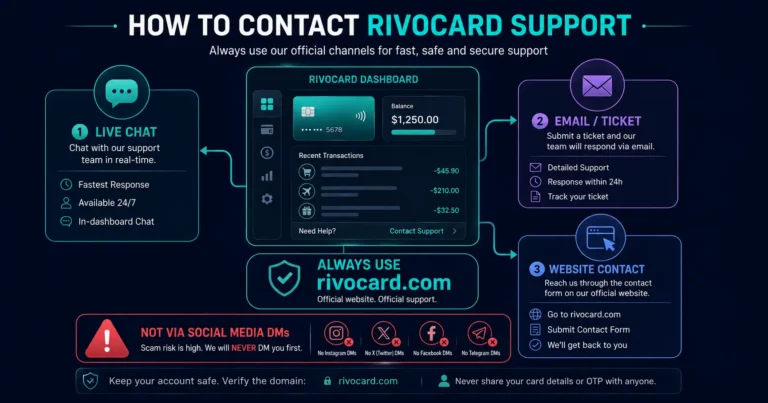
Quick answer: To contact Rivocard support, use the official support channels available from your Rivocard dashboard or the rivocard.com website — typically a live chat function, a support ticket system, or an official support email. Do not contact Rivocard through unofficial channels such as social media direct messages or third-party sites that claim to be Rivocard support — these are common vectors for support scams in the crypto card industry. Always verify you are on rivocard.com before submitting any account information. This guide covers how to reach support effectively, what information to include for faster resolution, and the most common issues that support can help resolve.
Official Rivocard Support Channels
Rivocard provides support through its official platform. The available channels may include:
Dashboard Support (Primary): When logged into your Rivocard account at rivocard.com, look for the support or help option in the navigation menu or footer. This is the most direct route to official support — you are already authenticated, so your account context is available to the support team.
Support Chat: Many crypto card platforms provide a live chat option accessible from the dashboard or the main website. Look for a chat bubble icon or “Help” button on the Rivocard interface. Chat support typically has shorter response times than email for routine issues.
Support Ticket / Email: For issues requiring detailed documentation (disputed transactions, account review requests, identity verification issues), a support ticket or email submission may be the appropriate channel. Submit tickets from within your authenticated dashboard session when possible.
Official Website Contact Page: Visit rivocard.com and navigate to the Contact or Support section. The official contact form and support email are listed there.
Important: Always access Rivocard support from rivocard.com — type the URL directly rather than clicking links in emails. Phishing sites mimicking crypto card support are common.
Before Contacting Support: Self-Service Checks
Many common issues can be resolved without contacting support:
Card declined: Check balance, spending limits, frozen status, and card details first. See the full decline troubleshooting guide before contacting support.
Deposit not credited: USDT on TRC-20 confirms in seconds; BTC may take 20-60 minutes. Check the transaction on a blockchain explorer (Tronscan for TRC-20, Blockchain.com for Bitcoin) using your transaction hash to confirm status. If the blockchain shows confirmed but Rivocard has not credited it, then contact support with the transaction hash.
Can’t log in: Try password reset from the login page. If your email is no longer accessible, contact support with account verification details.
Card details not showing: This can occur with display issues in some browsers. Try a different browser or clear cache. If the issue persists, contact support.
KYC not approved: Check for an email from Rivocard with specific instructions or reasons. Resubmit with corrected documents if prompted. Contact support if you have not received a status update within 24-48 hours.
What Information to Include in a Support Request
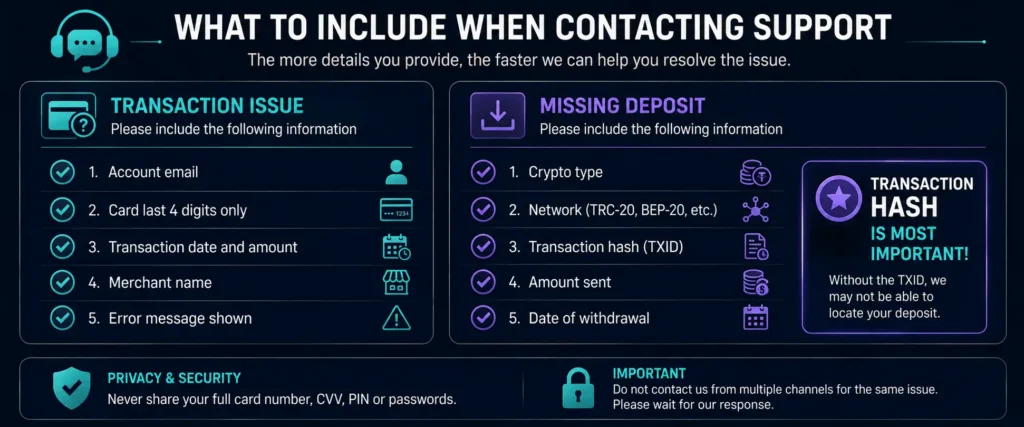
Providing complete information upfront significantly reduces resolution time. Include:
For transaction issues (decline, pending, incorrect charge):
- Your Rivocard account email
- The card number (last 4 digits only — never send the full 16-digit number)
- Transaction date and time (as precise as possible)
- Transaction amount and currency
- Merchant name and website (for online) or location (for in-person)
- The error message shown, if any
- Whether the issue is recurring or a one-time occurrence
For deposit not credited:
- The cryptocurrency you sent (USDT, BTC, ETH, etc.)
- The network used (TRC-20, ERC-20, Bitcoin mainnet, etc.)
- The transaction hash (txid) — available from your exchange withdrawal history or wallet transaction history
- The amount sent
- The date and time of the withdrawal from your exchange
- Your Rivocard deposit address that you sent to
For account access issues:
- The email address associated with your Rivocard account
- What you can and cannot access
- Whether you have tried the password reset process
For KYC issues:
- The document type you submitted (passport, national ID, driver’s license)
- The issuing country of the document
- Whether you received any error message during submission
- How long ago you submitted the documents
General rule: Include more context than you think is needed. Support agents handle many requests — clear, complete information gets faster resolution than back-and-forth clarification.
What Support Can Help With
Rivocard support can:
- Investigate declined transactions and provide specific decline reasons
- Confirm deposit receipt and trace missing deposits using your transaction hash
- Review and process KYC verification issues
- Unfreeze accounts or cards locked for security reasons (after verification)
- Investigate unauthorized transactions and initiate disputes
- Assist with account access when standard reset methods do not work
- Provide transaction receipts and statements
- Assist with card expiry and balance transfer questions
Rivocard support cannot:
- Override Visa network policies on blocked merchant categories
- Reverse a transaction that the cardholder authorized (only unauthorized transactions can be disputed)
- Waive the 5% card funding fee (this is a platform-level fee, not a case-by-case decision)
- Increase KYC-tier limits without the required identity verification documents
- Access your private cryptocurrency wallet or exchange accounts
Protecting Yourself From Support Scams
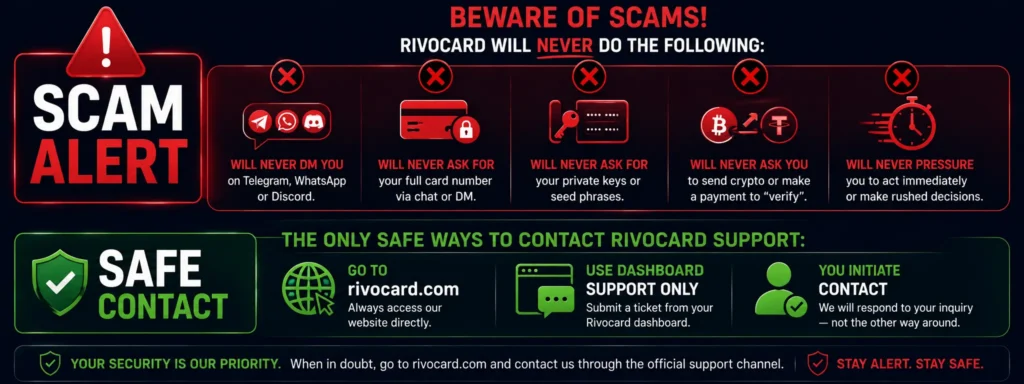
The crypto industry has a significant problem with fake support scams. Protect yourself:
Rivocard will never:
- Contact you via unsolicited direct message on Telegram, WhatsApp, Discord, or social media
- Ask for your full card number, PIN, or CVV over chat or email
- Ask for your private keys or seed phrases
- Ask you to send cryptocurrency to “verify” your account or resolve an issue
- Ask you to share your screen to “fix” an issue (legitimate technical support rarely needs this)
If someone claiming to be Rivocard support:
- Contacts you without you initiating the conversation
- Asks for your full card details or crypto credentials
- Pressures you to act quickly to “save your funds”
- Directs you to a URL that is not rivocard.com
That is a scam. Do not engage. Report it.
The safe support flow: You initiate contact. You go to rivocard.com directly. You use the support channel within your authenticated dashboard or the official contact page. You never share your full card number, PIN, or crypto private keys with anyone.
Expected Response Times
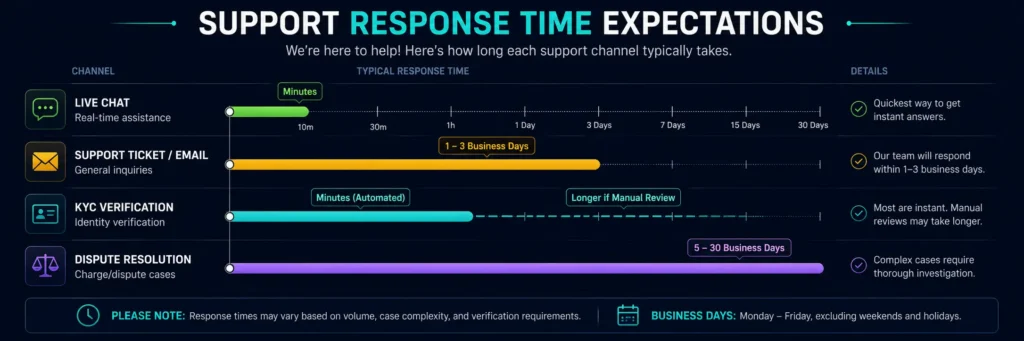
Response times vary by issue complexity and current support volume:
Live chat: Typically minutes for routine questions during business hours. May have a queue during peak times.
Support tickets/email: 1-3 business days for routine issues. Complex issues (disputed transactions, account reviews) may take longer as they require investigation.
KYC verification: Automated KYC typically processes in minutes. Manual review (complex documents, low image quality) may take 24-72 hours.
Dispute resolution: Card network dispute processes follow Visa’s timeline — typically 5-30 business days depending on the type of dispute and the merchant’s response.
Writing an Effective Support Message
Clear subject line: “Deposit not credited — TRC-20 USDT — sent 28 August 2026” is better than “Help needed.”
Chronological description: Describe what happened in sequence. “On [date] I sent [amount] USDT via TRC-20 to my Rivocard deposit address. The transaction confirmed on-chain (txid: [hash]) but my wallet balance has not updated. It has been [duration] since the on-chain confirmation.”
State what you need: “I need the deposit to be credited to my wallet balance” or “I need to understand why this transaction was declined.”
Attach evidence: Screenshots of the transaction from your exchange, the blockchain explorer confirmation, or the decline message. Visuals resolve issues faster than text descriptions.
Stay professional: Support agents resolve issues faster when communications are clear and respectful. Complex or emotional messages slow resolution.
FAQs
How do I contact Rivocard customer support?
Access Rivocard support through your account dashboard at rivocard.com or via the official support/contact page on the Rivocard website. Look for the Help, Support, or Chat option when logged in. Always initiate contact from rivocard.com directly – never through links in emails or social media.
What is the Rivocard support email?
Check the official support or contact page at rivocard.com for the current official support email. Support contact details may be updated by Rivocard – always verify from the official website rather than from external sources.
How long does Rivocard support take to respond?
Live chat typically responds within minutes for routine questions. Support tickets and email typically respond within 1-3 business days. KYC processing is usually automated and takes minutes, with manual review cases taking up to 72 hours.
What information should I include when contacting Rivocard about a missing deposit?
Include: the cryptocurrency sent, the network (TRC-20, ERC-20, etc.), the transaction hash (txid), the amount, the date and time of withdrawal from your exchange, and your Rivocard deposit address. The transaction hash is the most important piece of information for tracing a deposit.
Can Rivocard support reverse a transaction I made?
No. Rivocard support cannot reverse transactions you authorized. Only unauthorized transactions (where someone used your card without your permission) can be disputed. For authorized transactions, if there is a merchant error (wrong amount charged, service not delivered), you can initiate a dispute with the merchant directly or through Rivocard’s dispute process.
Is there a Rivocard phone number for support?
Check rivocard.com’s official contact page for current support channels. Crypto card platforms typically operate primarily through digital support channels (chat, email, ticket) rather than phone support. Verify any phone number from the official website only.
How do I report a scam impersonating Rivocard support?
Report via official Rivocard channels (through your dashboard or official contact page). You can also report phishing sites to Google Safe Browsing and fraudulent social media accounts to the relevant platform. Do not interact with the scammer or send any information or funds.
Can I get help with my Rivocard through Telegram or Discord?
Rivocard may have official community channels, but official support for account-specific issues should always go through rivocard.com’s support system – not through Telegram, Discord, or social media DMs. Anyone offering to resolve your Rivocard issues through these channels is likely a scammer.
What happens if I lose access to the email associated with my Rivocard account?
Contact Rivocard support via the official contact page on rivocard.com. You will need to verify your identity through alternative means. Have your account information ready (last four digits of your card, recent transaction details, etc.) to help establish account ownership.
How do I dispute an unauthorized transaction on my Rivocard?
Contact Rivocard support immediately through your dashboard or the official support channel. Freeze the affected card first to prevent further unauthorized charges. Provide: the card number (last 4 digits), the unauthorized transaction date and amount, the merchant name, and confirmation that you did not authorize the transaction.
Get Started With Support
If you need assistance, contact Rivocard support through the official channels in your dashboard. Go to Rivocard
