
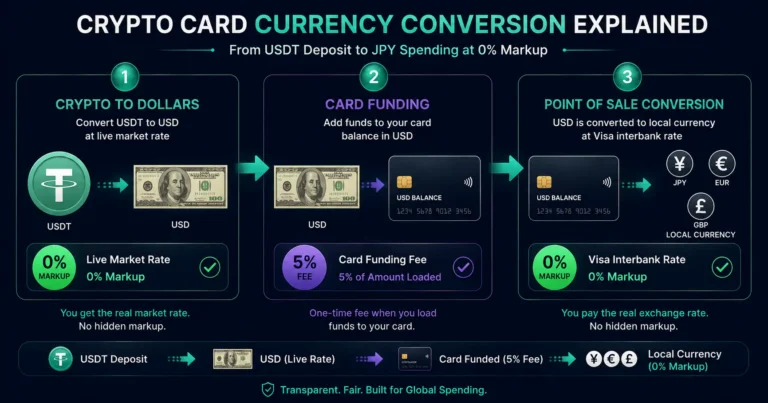
Quick answer: When you use a Rivocard virtual Visa card for an international purchase, currency conversion happens twice: once when your cryptocurrency converts to a dollar balance at deposit (at the live market rate with no Rivocard markup), and once when your dollar balance converts to the local purchase currency at the point of sale (at the Visa network’s interbank rate, also with no Rivocard markup). Rivocard charges 0% on both conversions — the only fee is the 5% card funding fee when moving wallet balance to a virtual card, which is unrelated to currency conversion. Understanding where each conversion happens, what rate applies, and where costs can silently appear (conversion spreads on some cards, Dynamic Currency Conversion at terminals) is essential for anyone using a crypto card internationally.
The Full Conversion Chain on Rivocard
A complete Rivocard transaction from crypto holdings to international purchase involves up to three conversions. Here is what happens at each step:
Conversion 1: Crypto to Dollars (At Deposit)
When you send USDT, BTC, ETH, or any supported cryptocurrency to your Rivocard wallet:
- The platform detects the incoming blockchain transaction
- Once confirmed, the crypto is converted to a dollar balance
- The conversion rate used: the live market rate at the moment of confirmation
- Rivocard markup on this conversion: 0%
- Result: your wallet holds a dollar balance equivalent to the deposited crypto’s value at that moment
For stablecoins (USDT, USDC): $100 USDT converts to $100 in your wallet. No meaningful conversion variance — the dollar peg means the rate is essentially 1:1. This is why stablecoins are preferred for predictable wallet balances.
For volatile assets (BTC, ETH): The dollar value at conversion time depends on the market price when the transaction confirms. If BTC is worth $60,000 and you send 0.01 BTC, you receive $600 in your wallet — assuming the price has not moved during the confirmation window. If it drops to $59,000 before confirmation, you receive $590.
The Rivocard rate source: Rivocard uses a live market rate reference to convert deposited crypto. This is not a proprietary rate — it tracks the broad market price. No conversion fee or spread is added by Rivocard at this step.
Conversion 2: None at Card Funding
When you move your dollar wallet balance onto a virtual card (the step where the 5% Rivocard fee applies):
- No currency conversion occurs
- Dollars move from wallet to card at 1:1
- The 5% fee is a platform service fee, not a conversion cost
At this point, your card holds a dollar balance. No foreign exchange has happened yet.
Conversion 3: Dollars to Local Currency (At Point of Sale)
When you use your Rivocard at an international merchant — whether tapping your phone in Japan, booking a hotel in Germany, or subscribing to a UK service:
- The merchant charges in their local currency (JPY, EUR, GBP, etc.)
- Your card billing currency is USD
- The Visa network converts the local currency charge to USD at the current interbank exchange rate
- This converted USD amount is deducted from your card balance
- Rivocard markup on this Visa network conversion: 0%
The Visa interbank rate: The rate Visa applies at the point of sale is the wholesale interbank rate — the rate at which banks trade currencies with each other. This is the same rate you see quoted as the “mid-market rate” on currency reference sites. It is typically the best non-specialist exchange rate available for consumer transactions.
Visa updates its exchange rates daily. The rate applied to a transaction is the rate at the settlement date of the transaction, not necessarily the rate at the exact moment of purchase (settlement typically occurs 1-2 days after the authorization).
How to check the Visa rate: Visa publishes its rates at visa.com/en_US/support/consumer/travel-support/exchange-rate-calculator.html. You can enter a currency pair and see the current interbank rate that would apply to a transaction today.
Where Currency Conversion Costs Can Appear (Hidden and Visible)
The Conversion Spread Problem
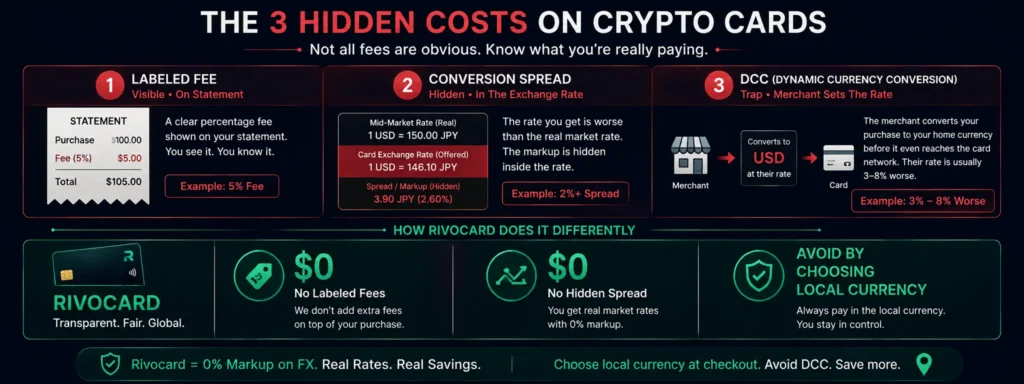
A “conversion spread” is the difference between the mid-market rate and the rate actually applied to a transaction. It is never labeled as a fee — it is embedded in the exchange rate itself.
How it works: The mid-market rate for USD/JPY might be 150.00. A card that applies a 1% spread converts at 148.50 (lower for the consumer). The 1.5 JPY difference per dollar represents the hidden cost. No line on the receipt shows this charge.
On Rivocard: No conversion spread is applied at either the deposit step or the spending step. The deposit uses the live market rate; spending uses the Visa interbank rate. Both are reference rates with no markup.
On some other crypto cards: “0% foreign transaction fee” is sometimes true (no labeled FX fee) while a conversion spread is applied at the crypto-to-fiat conversion step. A 0.5-1% spread means you are paying for currency conversion even when no fee line appears on your statement.
Dynamic Currency Conversion: The Merchant-Side Trap
At point of sale — whether in-person at a terminal or online at international checkout — you may be offered Dynamic Currency Conversion (DCC). This occurs when:
- A terminal shows your total in your home currency (USD) rather than local currency (JPY, EUR)
- An online checkout offers to charge you in “your currency” rather than the merchant’s local currency
- An ATM offers to process a withdrawal “in USD” rather than local currency
What DCC does: It shifts the currency conversion from the Visa network (which uses the interbank rate) to the merchant’s payment processor (which sets its own rate). Merchant processor rates are typically 3-8% worse than the Visa interbank rate.
The impact on your Rivocard transaction: If you accept DCC:
- The merchant converts JPY to USD at their processor’s rate (e.g., a 5% spread)
- Your Rivocard then charges the USD amount — at 0% FX, as always
- But the 5% spread was already applied before Rivocard even sees the transaction
Your card’s 0% FX is applied to a number that already has a 5% markup embedded in it. The effective cost: 5% in hidden conversion cost.
The rule: Always choose local currency. Without exception. Always.
Settlement Date Rate vs Authorization Rate
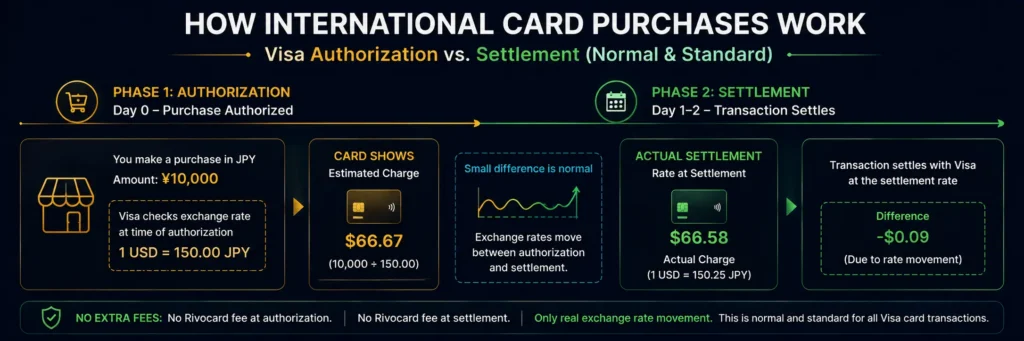
When you make a purchase, two things happen on slightly different timelines:
- Authorization: The transaction is approved in real time. The exchange rate at this moment is used to estimate the charge.
- Settlement: The transaction actually processes 1-2 business days later. The exchange rate at settlement time determines the final charge.
The difference between authorization rate and settlement rate is typically very small (fractions of a percent for stable currency pairs) but can occasionally be more noticeable during periods of rapid exchange rate movement.
This is not a fee or hidden cost — it is simply how card network settlement works. The settlement rate may result in a slightly higher or lower charge than what appeared at authorization. Rivocard applies no additional markup at either step.
The Complete Cost Picture at Each Step
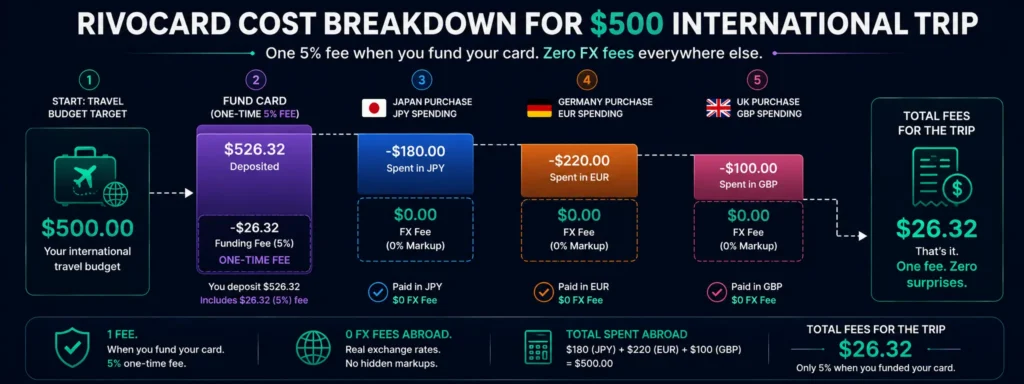
For a $500 international spending trip funded with USDT:
| Step | What happens | Rate used | Rivocard fee |
|---|---|---|---|
| Deposit USDT to wallet | USDT converts to dollars | Live market rate (1:1 for USDT) | $0 |
| Fund virtual card | Dollars move to card | 1:1 (no conversion) | 5% ($25 on $500 funded) |
| Buy something in Japan (JPY) | Dollars convert to JPY | Visa interbank rate | $0 |
| Buy something in Germany (EUR) | Dollars convert to EUR | Visa interbank rate | $0 |
| Buy something in UK (GBP) | Dollars convert to GBP | Visa interbank rate | $0 |
| Total conversion cost | $0 in conversion fees | ||
| Total platform fee | $25 (5% at card funding) |
The 5% fee covers the entire trip’s international spending — it is charged once at card funding, not on each foreign currency purchase.
How Rivocard Compares to Other Conversion Models
Traditional bank debit card:
- Deposit: bank account in home currency (no conversion)
- Spending internationally: 2.5-3% foreign transaction fee applied to each transaction
Exchange-linked crypto card (Bybit, Crypto.com):
- Holding: crypto in exchange account
- At spending: crypto converts to local currency in real time at exchange rate + conversion spread (0.5-2%)
- For Bybit specifically: 0.9% disclosed conversion fee on each transaction
Rivocard:
- Deposit: crypto converts to dollars at live market rate (no spread)
- Card funding: dollars to card at 1:1 (5% platform fee, not a conversion)
- Spending internationally: dollars convert to local currency at Visa interbank rate (no spread)
The key difference: Rivocard charges its fee as a transparent, labeled platform fee at a single point (card funding). Exchange-linked cards embed costs in conversion rates at each transaction, making the total cost less visible.
Checking What Rate You Will Get
Before depositing crypto: For USDT: the rate is essentially 1:1 (stable peg). For volatile assets (BTC, ETH): check the current market price on a reference site (CoinGecko, CoinMarketCap) to estimate the dollar value your deposit will receive. The actual credited amount is set at confirmation time.
Before making an international purchase: Check the current Visa exchange rate at visa.com for your currency pair. This tells you the rate that will apply to your international purchase (the settlement rate may differ slightly due to the 1-2 day settlement window).
After a purchase: Your Rivocard dashboard shows the dollar amount charged. Dividing this by the local currency amount of your purchase gives you the effective exchange rate applied. Compare this to the Visa reference rate for that date to confirm no unexpected costs were applied.
FAQs
How does currency conversion work on a Rivocard?
Conversion happens at two points: when you deposit cryptocurrency (converts to dollars at the live market rate), and when you spend internationally (dollars convert to local currency at the Visa interbank rate). Rivocard applies 0% markup at both conversion points. The only Rivocard fee is the 5% platform fee when funding a card from your wallet.
What exchange rate does Rivocard use for international purchases?
The Visa network’s interbank exchange rate applies to all international spending. This is the wholesale rate at which banks trade currencies – close to the mid-market rate seen on reference sites. Rivocard adds 0% on top of this rate.
Does Rivocard charge a currency conversion fee?
No. Rivocard charges 0% on currency conversion at both deposit and spending. The 5% card funding fee is a platform service fee charged when you move wallet balance to a virtual card – it is not a conversion fee and does not vary by currency.
What is a conversion spread and does Rivocard have one?
A conversion spread is a hidden cost embedded in the exchange rate – the difference between the market rate and the rate actually applied. Rivocard does not apply a conversion spread at either the deposit step or the spending step.
What is Dynamic Currency Conversion and how does it affect my Rivocard?
DCC is when a merchant terminal or ATM offers to charge you in your home currency rather than local currency. If you accept, the merchant’s processor applies their own exchange rate (typically 3-8% worse than Visa’s rate). Rivocard’s 0% FX is still applied, but to an amount already marked up by the DCC rate. Always decline DCC and pay in local currency.
Why does the amount charged sometimes differ slightly from the purchase amount?
International card transactions go through two stages: authorization (real-time rate) and settlement (1-2 business days later). The settlement rate may differ slightly from the authorization rate due to exchange rate movements in the interim. This is standard for all Visa cards – no fee applies, just the natural movement in exchange rates between authorization and settlement.
What rate is used when I deposit USDT to Rivocard?
USDT is pegged to $1 USD, so the deposit rate is effectively 1:1. For volatile assets (BTC, ETH, SOL), the live market rate at the time of blockchain confirmation determines the dollar value credited to your wallet. Check the current market price before sending to estimate the credited amount.
Is Rivocard’s conversion transparent compared to other crypto cards?
Yes. Rivocard’s cost structure is transparent: 0% at deposit, 5% (labeled) at card funding, 0% at spending. Exchange-linked crypto cards embed costs in conversion spreads at each transaction – these are real costs but not labeled as fees. Rivocard’s model makes the total cost visible in a single line item.
How do I check what Visa exchange rate will apply to my purchase?
Visa publishes its rates at visa.com (search ‘Visa exchange rate calculator’). Enter your currency pair to see the current rate. Note that the settlement rate (applied 1-2 days after purchase) may differ slightly from the rate shown at the time you check.
Can I estimate how many dollars I will pay for an international purchase?
Yes: find the Visa rate for your currency pair, divide the local currency amount by the Visa rate to get the approximate dollar charge. This is the amount deducted from your Rivocard balance. No additional conversion fee is added by Rivocard.
Get Started
Understand the full cost – then spend internationally at 0% FX. Create your Rivocard account
