
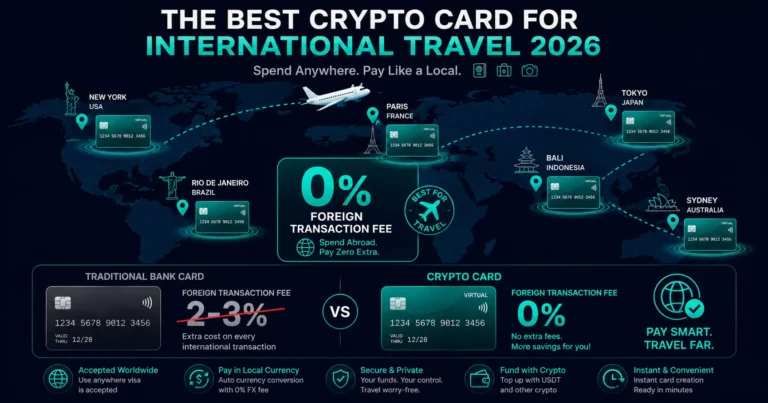
Quick answer: The best crypto card for international travel depends on your region and priorities. For stablecoin-first global travelers: KAST or Rivocard (0% FX, broad acceptance). For EEA and Australian Bybit users: Bybit Card (0% FX plus net-positive cashback). For lifestyle perks (lounge, streaming rebates): Crypto.com at mid-tier. For high cashback in EEA: Bleap (up to 20% in USDC). < cite index=”10-1″>Traditional bank cards often charge 2-3% in foreign transaction fees alongside hidden exchange rate markups. These costs add up quickly during a trip. Crypto cards with 0% FX fees solve that directly. This guide evaluates every major option on the criteria that actually matter when you are abroad: FX fees, ATM access, hotel and car rental hold handling, and what 0% FX really means when some cards still apply hidden spreads.
What Makes a Good Travel Crypto Card
< cite index=”11-1″>Travel exposes card weaknesses fast: foreign exchange fees, ATM limits, hotel deposit holds, fuel station pre-authorizations — the edge cases that do not matter at home become real costs abroad.
Five criteria matter for travel:
1. FX fee (the core criterion): The fee applied to international purchases. The difference between 0% and 3% on $5,000 of travel spend is $150. Cards that advertise “0% FX” but apply a conversion spread are not truly fee-free.
2. ATM access and limits: Whether you can withdraw local cash, how much per month is free, and what the overage fee is. Virtual-only cards cannot use ATMs.
3. Hotel and car rental holds: Many hotels place authorization holds at check-in ($50-$300+/night). Many car rental companies require a credit card at pickup. How a card handles these matters.
4. Global acceptance: Does the card work in your destination countries? Visa has slightly broader coverage than Mastercard, especially in emerging markets.
5. Physical vs virtual: Physical cards can do everything virtual cards can do plus ATM withdrawals. For travel, a physical card has a meaningful advantage.
The Main Options in 2026
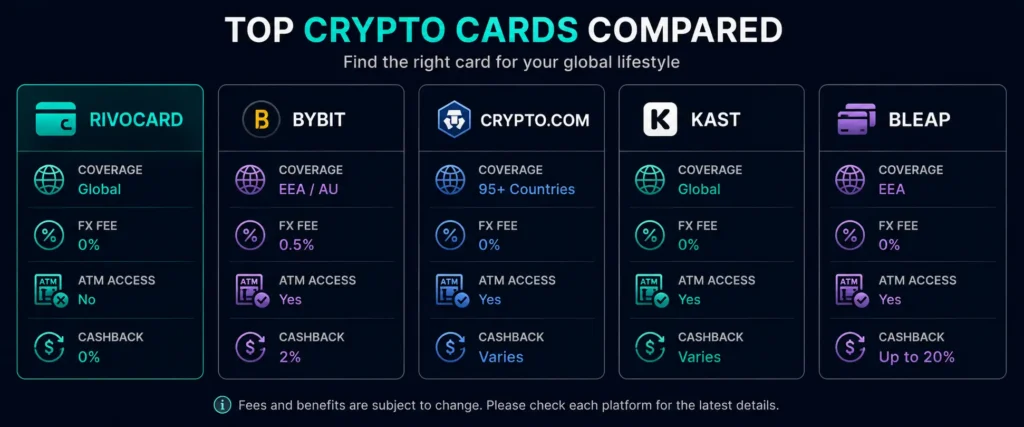
Rivocard (Global, Virtual Visa, 0% FX)
Coverage: Global — no country-of-residence restriction FX fee: 0% Conversion spread: 0% (deposit converts at live rate, no spread at spending) ATM access: No (virtual only) Physical card: No Cashback: 0% Card funding fee: 5% (once at load time) Hotel holds: Works if card has sufficient balance; some properties may prefer credit Best for: Online travel bookings (flights, hotels via Booking.com, Expedia), in-person spending via Apple Pay or Google Pay at NFC terminals, international subscriptions during travel
Travel use case: Rivocard is strong for the online booking portion of travel (where no physical card is needed), and for in-person spending at modern NFC terminals via Apple Pay. The virtual-only limitation means you need a physical backup for ATM access, and some hotel/car rental scenarios.
Bybit Card (EEA/AU, Physical Mastercard, 0% FX + Cashback)
Coverage: EEA (Bybit EU), Australia, select APAC/LATAM FX fee: 0.5% (EEA), 1% (Australia) — not truly 0% Conversion fee: 0.9% at transaction Cashback: 2% at Standard tier (net ~1.1% after conversion) ATM access: Yes, free up to ~200 EUR/month Physical card: Yes Best for: EEA and Australian travelers already on Bybit who want cashback and ATM access
< cite index=”14-1″>The Bybit Card is the top pick for travelers this summer: 0% card-level FX fee, cashback up to 10% (tier-dependent), Mastercard acceptance, and no staking required at the base tier. Note: Bybit’s “0% FX” refers to the card-level foreign transaction fee — the 0.9% conversion spread still applies at each transaction. The net result is still significantly better than standard bank cards at 2-3%.
Crypto.com Visa (95+ Countries, 0% FX + Perks)
Coverage: 95+ countries FX fee: 0% (Visa rate applied) Conversion spread: ~0.5% Cashback: 0% free tier (2026); 2-3% at mid-tiers with CRO staking or subscription ATM access: Yes, monthly limit varies by tier Physical card: Yes Best for: Travelers wanting premium perks (lounge, Netflix rebate, Spotify) at mid-tiers
< cite index=”10-1″>Crypto.com wins on lifestyle perks at higher tiers. For travelers who want lounge access and streaming service rebates alongside card spending, Crypto.com Pro tier (CRO staking required) provides a compelling travel card package.
Travel note: Crypto.com’s physical card works for hotels, car rentals, and ATMs — advantages that virtual-only cards lack.
KAST (Global, Stablecoin-First)
Coverage: Global (expanding) FX fee: 0% Conversion spread: 0% (1:1 USDC to USD conversion) Cashback: Varies by tier ATM access: Physical card option available Best for: Stablecoin holders globally who want clear 1:1 USDC conversion with no spread
< cite index=”9-1″>KAST is the strongest all-around pick for international travel for stablecoin users. It combines broad reach, clear stablecoin funding with 1:1 USDC conversion at no spread, and a usable physical card.
KAST’s 1:1 USDC/USD conversion eliminates the conversion spread issue that affects most other cards — what you deposit is what you spend, with nothing lost to rate manipulation.
Bleap (EEA, High Cashback)
Coverage: EEA + LATAM (expanding) FX fee: 0% Cashback: Up to 20% in USDC (category-specific) ATM access: Yes (free allowance) Physical card: Yes Best for: EEA travelers who want maximum cashback without staking volatile tokens
< cite index=”11-1″>Bleap delivers 0% FX fees and stable USDC cashback without staking a volatile token. Bleap’s 0% FX fees are the direct answer to BitPay’s 3% markup.
The “0% FX Fee” Caveat: What It Really Means
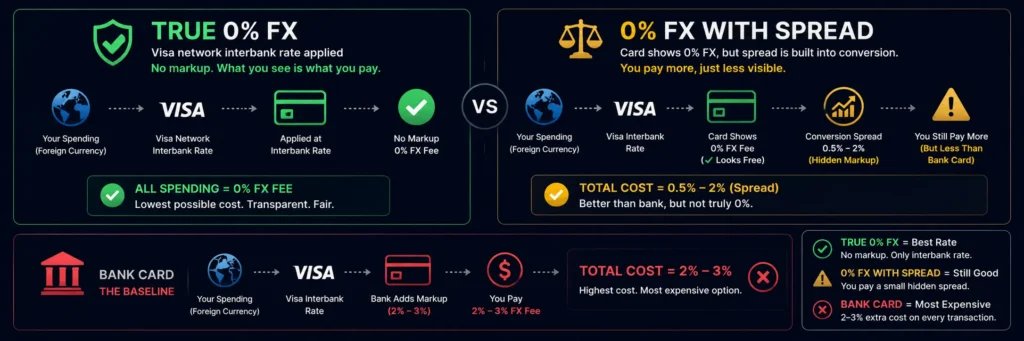
< cite index=”16-1″>Use a standard bank card abroad and you pay up to 3% on every transaction. Crypto cards with no foreign transaction fee solve that problem directly — but some cards still apply hidden costs after advertising no fees.
True 0% FX: The Visa or Mastercard network’s interbank rate is applied with no markup. Rivocard, Crypto.com Visa, and Bleap work this way.
“0% FX” with conversion spread: Some cards advertise “0% foreign transaction fee” but apply a conversion spread (0.5-2%) at the crypto-to-fiat conversion step. The card-level FX fee is 0%, but the spread on conversion means you pay more overall. Bybit’s 0.9% conversion spread is an example — still much cheaper than standard bank cards, but not truly free.
Dynamic Currency Conversion (DCC): At in-person terminals, always choose local currency when given a choice. Choosing “your home currency” activates DCC, where the merchant’s processor applies its own exchange rate — often 2-6% worse than the network rate, making even a 0% FX card expensive.
The ATM Access Gap
The biggest travel limitation for virtual-only cards (Rivocard): no ATM access. This matters for:
- Destinations where cash is still preferred (local markets, taxis, rural areas)
- Emergency cash needs
- Some accommodation and transport providers who prefer cash
The practical recommendation: For travel, maintain one physical card (traditional bank debit or a physical crypto card like Bybit or Crypto.com) specifically for ATM access. Use Rivocard or another virtual card for all card-based spending.
< cite index=”11-1″>The lowest-cost approach for ATM use is to withdraw larger amounts less frequently to stay within free allowances, and to lean on card and mobile payments where accepted rather than cash.
Hotel and Car Rental Holds
Hotels: Most hotels place an authorization hold at check-in for incidental expenses ($50-$500+ per night depending on property tier). Most Rivocard virtual Visa cards handle this if sufficient balance exists. Some luxury properties prefer credit cards for holds. Always check with the specific property beforehand for high-end accommodation.
Car rentals: Most major rental companies (Hertz, Enterprise, Avis, Budget) require a credit card at pickup for the damage deposit hold. Prepaid cards — crypto or traditional — are often excluded. If renting a car, maintain a traditional credit card for this specific step.
Pre-Trip Preparation for Crypto Card Travel
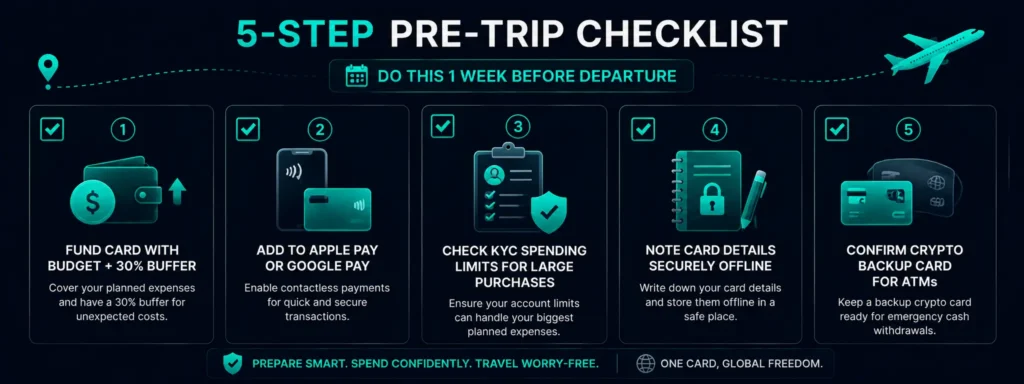
At least one week before departure:
- Ensure your card is funded with your estimated travel budget plus 20-30% buffer
- Confirm the card is added to Apple Pay or Google Pay for contactless use
- Check your KYC tier — if a single purchase (flight upgrade, hotel stay) might exceed your per-transaction limit, upgrade KYC before travel
- Note your card details (number, expiry, CVV) securely offline in case of phone loss
- Confirm your spending limits (Basic KYC: $500/transaction, $1,000/day)
At destination:
- Always tap with Apple Pay or Google Pay where NFC is available (no card number exposure)
- Decline Dynamic Currency Conversion — always pay in local currency
- Monitor card balance periodically via the Rivocard dashboard
- If balance runs low: reload from your wallet via mobile browser
Country-Specific Travel Notes
Japan: Apple Pay widely accepted at major retailers and convenience stores. Suica IC card (on Apple Watch/iPhone) works for transit. Cash still needed at some smaller merchants and rural areas.
Europe: Excellent contactless acceptance in UK, Scandinavia, Netherlands, Germany, France. TfL in London accepts Apple Pay directly. Chip-and-PIN still found at older terminals in some Eastern European countries.
Southeast Asia: Singapore has excellent contactless. Thailand, Vietnam, Indonesia — urban tourist areas accept Visa widely; cash still common at local markets.
Middle East: UAE and Qatar have strong card acceptance in commercial areas. Saudi Arabia improving rapidly.
Americas: US and Canada: excellent contactless. Latin America: good in urban commercial areas, cash useful in smaller towns.
FAQs
What is the best crypto card for international travel in 2026?
It depends on your region and needs. For global stablecoin users: KAST (1:1 USDC conversion, no spread) or Rivocard (0% FX globally). For EEA/AU Bybit users: Bybit Card (0% FX card-level plus net cashback). For premium travel perks: Crypto.com mid-tier. For maximum EEA cashback: Bleap. No single card is best for every traveler.
Does Rivocard charge foreign transaction fees?
No. Rivocard charges 0% on all international transactions. Currency conversion is handled by the Visa network at the interbank rate with no Rivocard markup. Whether you are spending in EUR, GBP, JPY, or any other currency, there is no FX surcharge.
Can I use a Rivocard at ATMs abroad?
No. Rivocard is a virtual-only card – ATMs require a physical card with a chip or magnetic stripe. For cash access during travel, maintain a separate physical bank card for ATM withdrawals.
How does DCC (Dynamic Currency Conversion) affect my crypto travel card?
DCC is when a terminal offers to charge you in your home currency instead of local currency. Always choose local currency. DCC lets the merchant’s processor apply their own exchange rate, often 2-6% worse than the Visa network rate. Your crypto card’s 0% FX fee becomes irrelevant if you accept DCC.
Will a Rivocard work at hotels and car rental pickups?
Hotels: the online booking step works without issue. At check-in holds, most properties accept any Visa card with sufficient balance; some luxury properties prefer credit. Car rental pickup: many major companies require a credit card for the deposit hold – prepaid cards may be excluded. Maintain a traditional credit card as backup for these scenarios.
Is it better to load travel funds before departure or reload abroad?
Load before departure – simpler and avoids the need for exchange access while traveling. Calculate your estimated budget plus a 20-30% buffer and load it before you leave. If you need to reload mid-trip, you need internet access, your exchange account, and approximately 5 minutes (using USDT TRC-20).
Which crypto card has the lowest FX fees for international travel?
Cards with truly 0% FX (no spread at spending): Rivocard (virtual, global), KAST (1:1 USDC). Cards with 0% card-level FX fee but some conversion spread: Bybit (0.9% conversion), Crypto.com (~0.5% spread). All of these are significantly cheaper than standard bank cards at 1.5-3%.
Does a crypto card work on London Underground?
Yes – via Apple Pay or Google Pay. TfL accepts contactless Visa cards at Underground, Overground, Elizabeth line, and bus fare gates. Add your Rivocard to Apple Pay and tap in and out as normal. Rivocard charges 0% FX on GBP transactions.
Should I use a crypto card as my only travel card?
For virtual-only cards like Rivocard: no. Keep a physical bank card for ATM access and scenarios where physical card presentation is required (some car rentals, some hotel check-ins). Use Rivocard for all online bookings and contactless in-person spending. For physical crypto cards (Bybit, Crypto.com): a physical crypto card plus one backup traditional card covers most travel scenarios.
What happens if my phone is lost while traveling and I use Apple Pay?
If your phone is lost: access your Rivocard dashboard from any browser, freeze the card immediately. This blocks Apple Pay on the lost phone and any further transactions. Create a new card from your laptop or another device. Contact Apple to remotely erase your lost iPhone to protect your Apple Pay tokens.
Get Started
Ready to fund your travels with crypto at 0% FX fees? Create your Rivocard account – card ready instantly
