
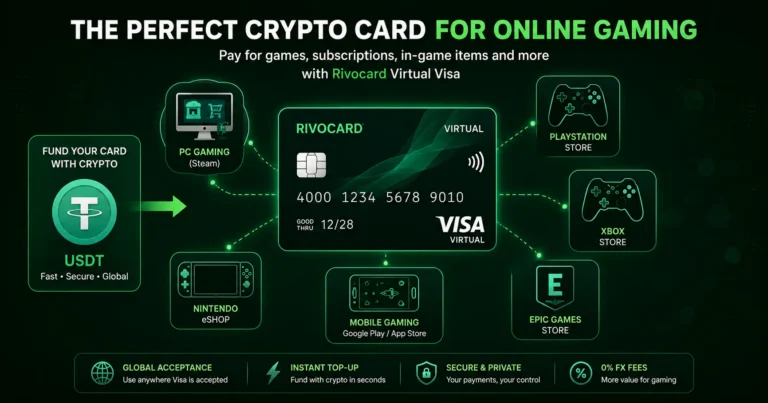
Quick answer: None of the major gaming platforms — Steam, PlayStation Store, Xbox, Nintendo eShop — accept cryptocurrency directly at checkout. The best way to pay for gaming with crypto is a Rivocard virtual Visa card: deposit USDT to your wallet, fund a card, and use it at any gaming store that accepts Visa. Steam removed Bitcoin payments in 2017, and as of 2026 none of the three biggest game storefronts have brought direct crypto back. A Rivocard virtual Visa card bypasses this entirely — Steam sees a normal premium card at checkout, and your games land in your library instantly. This works for Steam, PlayStation Network, Xbox Game Pass, Nintendo eShop, Epic Games Store, mobile app stores, and in-game purchases.
Why Gaming Platforms Do Not Accept Crypto Directly
Valve removed Bitcoin from Steam in December 2017, citing price volatility and high transaction fees that made small purchases impractical. Nearly a decade later, Steam still has not restored crypto payments, and neither has PlayStation Store or Nintendo eShop.
The reasons remain partially valid: volatile crypto assets create awkward checkout experiences when prices move during a transaction, and microtransaction-heavy gaming economics do not suit Bitcoin’s fee structure.
Stablecoins solve the volatility problem, and some movement is happening: Sony has announced plans for a US dollar-pegged stablecoin aimed at PlayStation purchases, with a dedicated Web3 division building the ecosystem. Until it ships, the gift card route and direct Visa card methods remain the practical options.
In the meantime, a Rivocard virtual Visa card is the cleanest solution: fund it with USDT, and every gaming platform that accepts Visa can be used immediately.
Gaming Platforms That Accept a Rivocard Visa Card
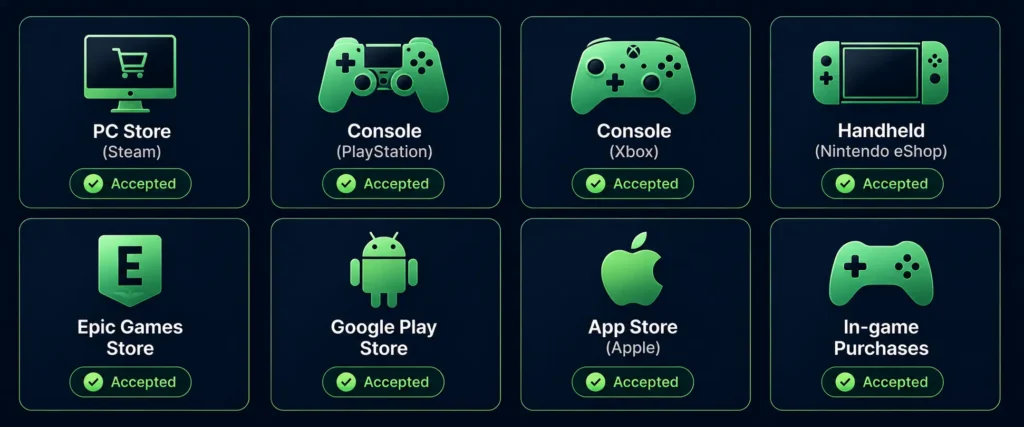
All major gaming platforms that accept Visa for payments work with Rivocard:
Steam (PC gaming): Steam accepts Visa debit and credit cards for all purchases — games, DLC, in-game items, Steam Wallet top-ups, and subscriptions. Add your Rivocard card in Steam account settings under Store and Purchase History, then Manage Payment Methods. Use it for any checkout. Match your card’s billing country to your Steam account region — mismatches are the most common reason for declines.
Xbox and Microsoft Store: Xbox Game Pass, individual game purchases, and Xbox Live Gold all accept Visa. Add your Rivocard card in Microsoft account payment options. Works for Xbox console purchases, PC Game Pass, and Microsoft Store digital content. Game Pass subscriptions bill monthly from the saved card.
Epic Games Store: Epic accepts Visa cards for all purchases. Add Rivocard in Epic Games account settings under Payment Methods. Works for all game purchases, V-Bucks for Fortnite, and any Epic digital content.
PlayStation Store: Sony’s PlayStation Store accepts Visa for PS4 and PS5 game purchases, PlayStation Plus and PS Now subscriptions, PSN Wallet top-ups, and add-ons. Add your Rivocard card in your PSN account’s payment methods. Works across all PlayStation platforms.
Nintendo eShop: Nintendo accepts Visa for eShop purchases on Switch. Add your Rivocard card in your Nintendo Account’s payment methods. Works for games, DLC, and Nintendo Switch Online subscriptions.
Google Play Store: Android games and apps accept any Visa card saved to your Google account. Add Rivocard to your Google account payment methods. Works for app purchases, in-app items, and Google Play subscription services.
Apple App Store: iOS game purchases and in-app items work with any Visa card saved to your Apple ID. Add Rivocard via your Apple ID payment methods or use it via Apple Pay directly on iPhone.
How to Set Up Rivocard for Gaming
Step 1: Create a Rivocard account (email only, no ID required at Basic KYC).
Step 2: Deposit USDT on TRC-20 from your exchange. Free at deposit, confirms in seconds.
Step 3: Create a virtual card and fund it. The 5% Rivocard fee applies at this step.
Step 4: Add the card to your gaming platform’s payment methods. This is usually found under Account, Payment Methods, or Wallet settings on each platform.
Step 5: Purchase games, top up wallet balances, or subscribe to gaming services normally. The card processes as a standard Visa payment.
The Gaming-Specific Card Strategy
For gamers who spend across multiple platforms, a per-platform card setup works well:
Gaming card 1 — PC (Steam and Epic): Fund monthly with your expected Steam and Epic spend. Having this separate from console spending means your PC and console budgets are isolated.
Gaming card 2 — Console (PlayStation or Xbox): Fund for monthly subscriptions (PS Plus, Game Pass) plus expected game purchases. Subscriptions charge automatically from the saved card — ensure it has balance before billing dates.
Gaming card 3 — Mobile (App Store, Google Play): Fund for in-app purchases, premium apps, and mobile subscriptions.
Gaming card 4 — Subscriptions only: Game Pass, PS Plus, Nintendo Switch Online, EA Play, and other gaming subscription services on a dedicated card. Fund quarterly to cover multiple months at once.
Card creation is free and unlimited on Rivocard — per-platform organization costs nothing extra.
Handling In-Game Purchases and Microtransactions
Most in-game purchases (V-Bucks in Fortnite, Apex Coins, League of Legends RP, FIFA Ultimate Team packs, Roblox Robux, etc.) are made through the platform’s wallet system. Top up the platform wallet with your Rivocard card, then spend from the platform balance on microtransactions.
This approach is often cleaner than card-per-transaction for microtransactions — top up the platform wallet in larger amounts less frequently, and spend from it on individual items.
Platform wallet top-up approach:
- Steam Wallet: top up via Rivocard, spend on any Steam content from the balance
- PSN Wallet: top up via Rivocard, spend on PlayStation Store content
- Microsoft Points/Credits: add via Rivocard, spend on Xbox content
- Nintendo eShop balance: top up via Rivocard, spend on Switch content
Steam-Specific Notes
Steam has a few quirks worth knowing:
Region matching: Your Rivocard billing country should match your Steam account’s region. A UK billing address trying to purchase at USD prices from a US Steam account may trigger a regional check. Use the billing address registered with Rivocard and ensure it aligns with your Steam region.
Steam Wallet vs direct purchase: You can either pay directly per game or top up your Steam Wallet and purchase from the balance. Both work with Rivocard. The wallet approach is convenient for frequent purchases — load the wallet once and buy multiple games.
Steam sales: No special preparation needed for Steam sales events. Your Rivocard works the same during sales as during regular periods. Ensure sufficient card balance before major sale events if you plan large purchases.
3D Secure: Steam occasionally triggers 3DS verification for new cards. Complete the verification when prompted. This typically only appears on the first use of a new card.
Gift Cards vs Rivocard for Gaming: Why the Card Wins
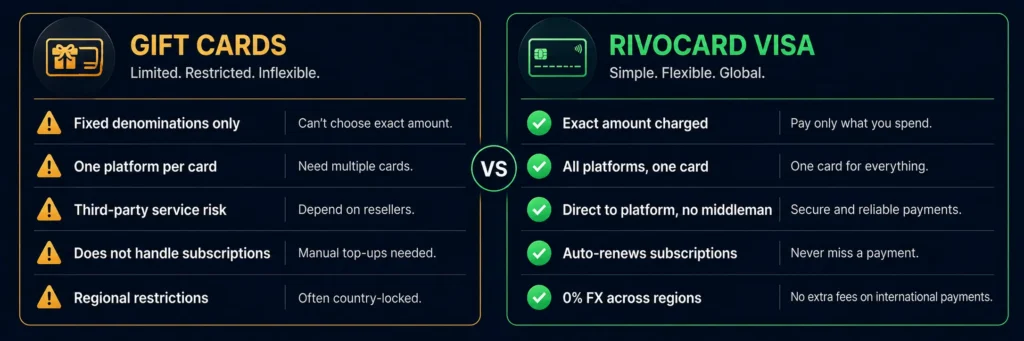
Gift card services sell digital codes for Steam, PlayStation, Xbox, Nintendo, Fortnite, and Roblox via cryptocurrency payment with near-instant delivery. This is the alternative method. Why Rivocard is generally better:
No third-party service required: Gift card services are intermediaries with their own fees, policies, and reliability risks. Rivocard deposits directly from your wallet — no third-party involved between your crypto and the gaming platform.
No denomination guessing: Gift cards come in fixed denominations ($10, $25, $50). A game costs $34.99 — you buy a $25 and a $10 gift card, with $0.01 leftover and no efficient way to use it. Rivocard charges exactly the amount of the purchase from your card balance.
No regional gift card issues: Gift cards are typically region-locked — a UK PSN card will not work on a US PSN account. Rivocard works directly with the platform in your account’s native currency, with 0% FX fee on regional differences.
Works for subscriptions: Gift card services typically sell one-time credits. Game Pass, PS Plus, Nintendo Switch Online, and other recurring subscriptions are best managed through a saved card that auto-renews. Rivocard handles this naturally — the subscription charges the card on renewal automatically.
One card, all platforms: A single Rivocard card (or one per platform in your organized setup) works across Steam, PlayStation, Xbox, Nintendo, and mobile simultaneously. Gift cards require separate purchases per platform.
The Cost of Gaming With Rivocard
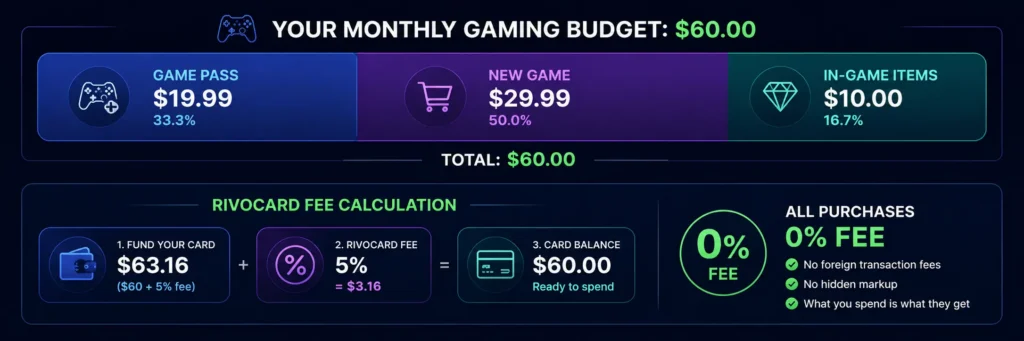
Example: Monthly gaming budget of $60
- Game Pass Ultimate: $19.99
- New game: $29.99
- In-game purchases: $10.00
- Total: $59.98
To have $60 on your gaming card: fund $63.16 from your wallet ($63.16 x 95% = $60). Rivocard fee: $3.16.
All gaming purchases: 0% fee. The total additional cost beyond the gaming spend: $3.16/month, or approximately $38/year — the only cost of converting crypto into gaming spending power.
FAQs
Can I use a crypto card to buy Steam games?
Yes. Steam accepts Visa cards for all purchases. Add your Rivocard virtual Visa card to your Steam account payment methods and use it for any game, DLC, or wallet top-up. Ensure your Rivocard billing address region matches your Steam account region to avoid regional mismatches.
Does Rivocard work for PlayStation Plus and Xbox Game Pass subscriptions?
Yes. Both PlayStation Plus and Xbox Game Pass accept Visa cards for subscription billing. Add your Rivocard card to your PSN or Microsoft account payment methods. The subscription renews monthly from the saved card – ensure the card has sufficient balance before each billing date.
Can I buy Nintendo Switch games with a crypto card?
Yes. Nintendo eShop accepts Visa for all purchases. Add your Rivocard card to your Nintendo Account payment methods and use it to buy games, DLC, and Nintendo Switch Online subscriptions on Switch.
Why do Steam, PlayStation, and Xbox not accept crypto directly?
Steam removed direct Bitcoin payments in 2017, citing price volatility and high transaction fees that made small purchases impractical. As of 2026, neither PlayStation Store nor Nintendo eShop have added direct crypto payments. Sony has announced plans for a PlayStation stablecoin but it has not yet launched.
Is it better to use a Rivocard or gaming gift cards for crypto gaming purchases?
Rivocard is generally better for regular gaming purchases. It requires no third-party service, charges exactly the purchase amount with no denomination rounding, works across all platforms simultaneously, handles recurring subscriptions automatically, and avoids regional gift card restrictions. Gift cards may be simpler for very occasional purchases on a single platform.
Can I use a Rivocard for in-game purchases like V-Bucks and Robux?
Yes. In-game currency is purchased through each platform’s store, which accepts Visa. Add your Rivocard to your Epic Games account for Fortnite V-Bucks, to the Roblox payment methods for Robux, or top up the respective platform wallet to spend on in-game items.
Does Rivocard work for mobile gaming on iOS and Android?
Yes. For iOS, add your Rivocard to your Apple ID payment methods or use it via Apple Pay. For Android, add it to your Google account. Both app stores then use the saved card for game purchases and in-app items.
What is the cost of using Rivocard for gaming?
Rivocard’s only fee is 5% when you fund the virtual card from your wallet balance. On a $60 monthly gaming budget, the fee is approximately $3.16. All game purchases, in-app items, and subscription charges from the card are 0% fee.
Can I use Rivocard for gaming on PC, console, and mobile?
Yes. One Rivocard account supports unlimited virtual cards. Create a dedicated card for each platform or use one card across all gaming platforms – both approaches work. The card works on PC (Steam, Epic), console (PlayStation, Xbox, Nintendo), and mobile (iOS App Store, Google Play).
Does Rivocard charge an FX fee for games priced in different currencies?
No. Rivocard charges 0% on all international transactions. A UK Steam store charging in GBP, a European PlayStation store charging in EUR, or a Japanese Nintendo eShop charging in JPY – all incur 0% FX fee. Currency conversion happens at the Visa interbank rate with no Rivocard markup.
Get Started
Ready to fund your gaming with crypto? Create your Rivocard account and start gaming
