
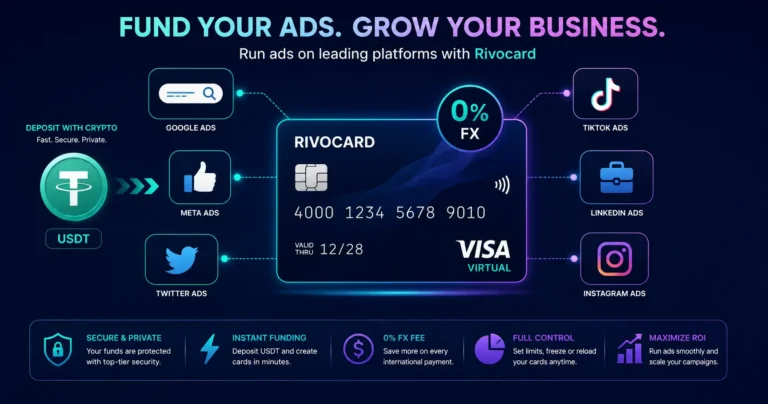
Quick answer: A Rivocard virtual Visa card works for Google Ads, Meta Ads (Facebook and Instagram), TikTok Ads, LinkedIn Ads, Twitter/X Ads, Snapchat Ads, Pinterest Ads, and any other ad platform that accepts Visa for billing. Deposit USDT to your Rivocard wallet, fund a virtual card, save the card in your ad account’s billing settings, and ad charges process automatically from that balance. Card creation is free and unlimited — the industry-standard one-card-per-ad-account isolation strategy costs nothing extra on Rivocard. In 2026, stable ad payments are as important for media buying as creatives, offers, trackers and analytics — if your card fails, your campaigns stop.
Why Crypto-Funded Cards Work Well for Digital Advertising
Digital advertising billing has specific requirements that make traditional banking relationships difficult for some advertisers:
No bank account required: Rivocard works with crypto deposits only. No bank account, no wire transfer approval, no ACH hold waiting period. Deposit USDT, fund a card, add to ad account. The workflow from crypto holdings to live campaigns takes under 10 minutes.
Instant card issuance: Ad campaigns cannot wait for physical cards to arrive. Rivocard virtual cards are issued in seconds from your dashboard. A new card for a new ad account is ready immediately.
No FX fees on international ad billing: Google Ads, Meta Ads, and TikTok Ads may bill in USD from US-entity billing, but advertisers in certain regions face local currency billing. Rivocard charges 0% on all international transactions — no FX surcharge regardless of which currency the ad platform bills in.
Instant card replacement: If an ad platform flags or declines a card, create a new Rivocard virtual card with a new number in under 60 seconds. Add it to the ad account and campaigns resume. No waiting for a new physical card in the mail.
Spending isolation: The best approach is to use dedicated virtual cards for different ad accounts, keep enough balance, avoid repeated payment declines, set up backup cards, and control expenses across the team. Rivocard’s free unlimited card creation makes this standard practice practical at no extra cost.
Which Ad Platforms Accept Rivocard
All major advertising platforms accept Visa cards for billing:
Search:
- Google Ads (Search, Display, YouTube, Shopping)
- Microsoft Advertising (Bing Ads)
Social:
- Meta Ads (Facebook and Instagram)
- TikTok Ads
- LinkedIn Ads
- Twitter/X Ads
- Snapchat Ads
- Pinterest Ads
Programmatic and Display:
- Amazon DSP
- The Trade Desk
- DV360 (Google’s demand-side platform)
App and Mobile:
- Apple Search Ads
- Google App Campaigns
Affiliate and Performance:
- Most affiliate network top-ups and platform fees accept Visa
From the ad platform’s perspective, a Rivocard Visa card is indistinguishable from any business debit or credit card. They receive a standard Visa authorization and settlement.
The One-Card-Per-Ad-Account Strategy
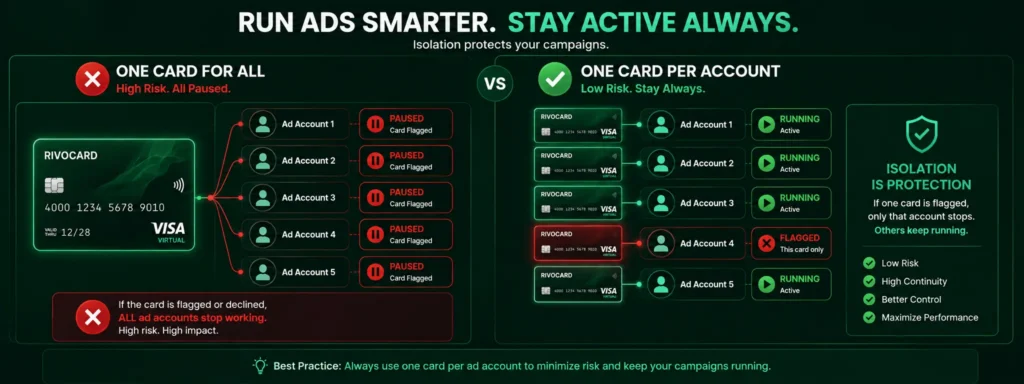
The standard agency setup uses a separate card per ad account or client for isolation and clean reporting. This applies equally to individual advertisers managing multiple accounts and agencies managing client campaigns.
Why isolation matters:
If you run all your ad accounts from one card and that card is flagged or declined:
- All ad accounts on that card stop delivering
- All campaigns pause simultaneously
- You have to update billing across every account at once
If each ad account has its own dedicated card:
- A flag on one card affects only that account
- Other accounts continue running
- You replace just the flagged card and update that one account
On Rivocard: Card creation is free and unlimited. Creating 10, 20, or 50 dedicated ad account cards costs nothing in creation fees. The 5% Rivocard fee applies only when you fund each card from your wallet — not to the act of creating cards.
Setup for 5 ad accounts:
- Card 1: Google Ads Account A — funded $300
- Card 2: Google Ads Account B — funded $300
- Card 3: Meta Ads — funded $500
- Card 4: TikTok Ads — funded $200
- Card 5: LinkedIn Ads — funded $150
Total wallet funded: $1,450. Rivocard fee (5%): $72.50. Total cards spendable: $1,377.50 across 5 isolated accounts.
How to Set Up Rivocard for Google Ads
Step 1: Create your Rivocard account (email verification only).
Step 2: Deposit USDT to your wallet. TRC-20 USDT recommended — confirms in seconds.
Step 3: Create a virtual card and fund it. For Google Ads, fund at least enough for your expected monthly ad spend plus Google’s threshold billing buffer.
Step 4: In Google Ads, go to Billing, then Payment methods, then Add payment method. Select credit or debit card. Enter your Rivocard card number, expiry, CVV, and billing name and address.
Step 5: Google may run a small authorization charge (typically $0 to $1) to verify the card. Ensure your card has balance for this.
Step 6: Set your billing threshold or monthly billing date. Google charges your card when spend reaches a threshold or on a fixed monthly date. Ensure your card balance covers this before the charge date.
Step 7: Monitor and reload. When the card balance runs low, reload from your Rivocard wallet.
How to Set Up Rivocard for Meta Ads (Facebook/Instagram)
Step 1: In Meta Ads Manager, go to Billing, then Payment methods, then Add payment method.
Step 2: Select debit/credit card. Enter your Rivocard card number, expiry, CVV, name, and billing address.
Step 3: Meta runs an authorization check of $0 to $1 when you add a new card. Your card must have balance to pass this.
Step 4: Set this as your primary payment method for the ad account, or keep your existing primary and use Rivocard as a backup method.
Step 5: Meta bills on a threshold basis (every $25, $50, $250, $750, etc. depending on your spend level) and at the end of each month. Ensure your card has sufficient balance before billing.
Important for Meta: Meta Ads is known for aggressive card flagging when billing patterns seem unusual. Using USDT-funded Visa cards is standard practice for many media buyers. If a card is flagged, create a new Rivocard card immediately and add it to the ad account under a new payment method entry. Campaigns can resume within minutes.
How to Set Up Rivocard for TikTok Ads
Step 1: In TikTok Ads Manager, go to Billing, then Payment, then Add payment method.
Step 2: Select credit or debit card. Enter Rivocard details.
Step 3: TikTok requires a minimum deposit for prepaid billing. Ensure the card has sufficient balance to meet TikTok’s minimum.
Step 4: TikTok Ads uses a top-up model — you add funds to your TikTok Ads balance using your card, rather than billing your card directly for ad spend. This means you control when and how much you add, which integrates well with Rivocard’s per-card balance approach.
Handling Ad Platform Billing Thresholds
Each major ad platform has its own billing model. Understanding these prevents unexpected card declines:
Google Ads: Threshold billing. You get charged when cumulative spend reaches a threshold (starts at $25, increases to $50, $200, $350, $500, or $500 per month for established accounts). Keep enough buffer on the card to cover at least one threshold charge.
Meta Ads: Also threshold-based. Starts at $25, can increase to $500+ for established accounts. Plus a monthly settlement charge for any remaining balance. Card must cover both.
TikTok Ads: Top-up model. You add funds to your TikTok Ads balance. More predictable for card management — you decide when to top up and by how much.
LinkedIn Ads: Invoice or credit card billing. Credit card charges typically occur when spend reaches a threshold or at campaign end. LinkedIn has higher minimum spends per campaign than other platforms.
Twitter/X Ads: Credit card charged per billing cycle. Relatively straightforward billing.
The Real Cost of Using Rivocard for Ad Spend
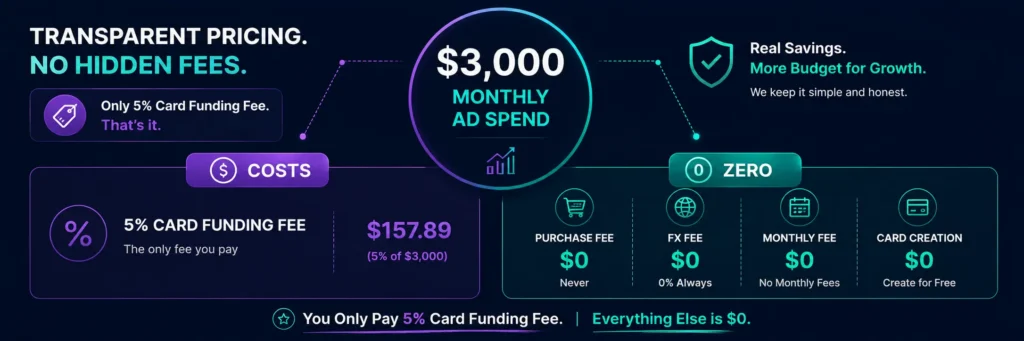
For a media buyer spending $3,000/month across all platforms:
| Cost item | Amount |
|---|---|
| Monthly ad spend | $3,000 |
| USDT deposit needed (covering 5% fee) | $3,157.89 |
| Rivocard card funding fee (5%) | $157.89 |
| Network fee for USDT TRC-20 deposit | Under $0.01 |
| Rivocard purchase fee on ad charges | $0 |
| FX fee on international billing | $0 |
| Monthly Rivocard account fee | $0 |
| Card creation fee (unlimited cards) | $0 |
| Total additional cost vs ad spend | $157.89 (5.26%) |
The 5% is the total additional cost. No hidden fees, no per-card creation fee, no monthly platform fee, no FX markup.
When Rivocard Is the Right Ad Spend Card
Rivocard works well for:
- Solo advertisers and small businesses spending $500-$10,000/month on ads
- Users already holding USDT who want to deploy it directly into ad spend
- Users without traditional business bank accounts or credit facilities
- Advertisers who need cards immediately without waiting for banking approval
- Teams that want per-account isolation without paying card creation fees
Where higher-volume buyers may need specialized tools: For media buyers spending $50K/month or more, purpose-built media buyer cards with specialized BIN management, automatic bind fee refunds, and agency-specific features may offer cost advantages at scale. Rivocard’s 5% funding fee is proportionally larger at very high volumes compared to platforms offering 0-1% top-up fees (though those often have monthly subscription costs that change the math at lower spend levels).
The honest assessment for ad spend: Rivocard is a solid, straightforward option for entry-to-mid-level ad spend with no bank account required, free unlimited card creation, and instant deployment. For very high-volume professional media buying, evaluate purpose-built media buyer card platforms alongside Rivocard based on your specific monthly spend volume.
Best Practices for Ad Spend Card Management
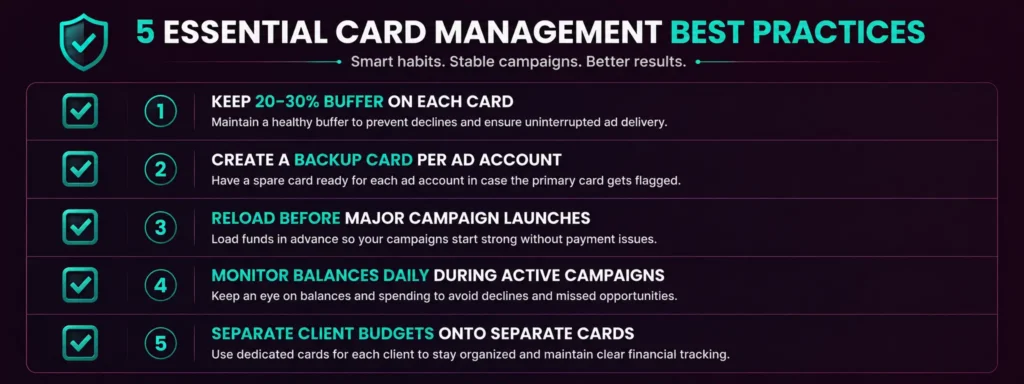
Keep buffer on each card. Ad platforms bill at thresholds or fixed dates. Unexpected traffic spikes can push spend higher than anticipated. Keep 20-30% more on the card than your minimum expected charge amount.
Create a backup card for each ad account. If your primary card is flagged or runs out of balance mid-cycle, a backup card in the same ad account’s payment methods lets you instantly switch without campaign downtime.
Reload before major campaigns. If you are launching a high-spend campaign, reload the card before launch rather than hoping the balance lasts through the campaign.
Monitor card balances daily during active campaigns. A card hitting zero balance mid-campaign causes ad delivery to pause. Most ad platforms do not notify you in real-time — you discover the pause when checking campaign performance.
Separate client budgets onto separate cards. If you manage ads for multiple clients, each client’s budget on its own Rivocard card gives clean accounting, isolated exposure, and easy per-client reporting.
FAQs
Can I use a Rivocard virtual card for Google Ads?
Yes. Google Ads accepts Visa cards for billing. Add your Rivocard card in Google Ads billing settings under Payment methods. Google uses threshold billing – your card is charged when cumulative spend reaches defined thresholds. Keep sufficient balance to cover at least one billing threshold.
Does Rivocard work for Meta Ads (Facebook and Instagram)?
Yes. Meta Ads Manager accepts Visa cards for billing. Enter your Rivocard card details in the Billing section under Payment methods. Meta uses threshold billing. If a card is flagged, create a new Rivocard card instantly and add it to the ad account.
Can I use Rivocard for TikTok Ads?
Yes. TikTok Ads uses a top-up model where you add funds to your TikTok Ads balance using your card. Add your Rivocard card in TikTok Ads Manager billing settings and use it to add funds to your ad balance.
How many ad account cards can I create on Rivocard?
Unlimited. Card creation on Rivocard is always free regardless of how many cards you create. The one-card-per-ad-account strategy – industry standard for isolation and clean billing – costs nothing extra in card creation fees.
What is the cost of using Rivocard for ad spend?
The only cost is Rivocard’s 5% card funding fee, charged when you load your wallet balance onto a virtual card. There is no purchase fee on ad charges, no FX fee, no monthly account fee, and no card creation fee. For $3,000/month in ad spend, the Rivocard cost is approximately $158/month.
What happens if an ad platform declines or flags my Rivocard?
Create a new Rivocard virtual card from your dashboard (takes under 60 seconds), add it to the ad account as a new payment method, and campaigns can resume. No waiting for physical card replacement. Your other ad account cards are unaffected if you use one card per account.
Should I use one card for all my ad platforms or separate cards?
Separate cards per ad account is strongly recommended. If one card is flagged, only that account pauses – all others continue running. It also gives cleaner per-account spending records. Since Rivocard card creation is free and unlimited, there is no cost to this approach.
Does Rivocard charge FX fees on international ad billing?
No. Rivocard charges 0% on all international transactions. Whether you are billed in USD, EUR, GBP, or any other currency by an ad platform, there is no additional FX surcharge.
How do I reload a Rivocard card during an active ad campaign?
Go to your Rivocard dashboard, select the card, and fund it from your wallet balance. The 5% fee applies to the reload amount. The balance updates immediately. If your wallet is low, deposit more USDT first (arrives in seconds via TRC-20).
Is Rivocard suitable for high-volume media buyers spending $50K/month or more?
Rivocard works at any spend level, but at very high volumes, purpose-built media buyer card platforms with specialized BIN management and bulk pricing may offer cost advantages. Evaluate both options based on your specific monthly spend, number of accounts, and whether free unlimited card creation offsets Rivocard’s 5% fee vs lower-percentage alternatives with card creation fees.
Get Started
Ready to fund your ad campaigns with crypto? Create your Rivocard account – cards ready in under 5 minutes
