
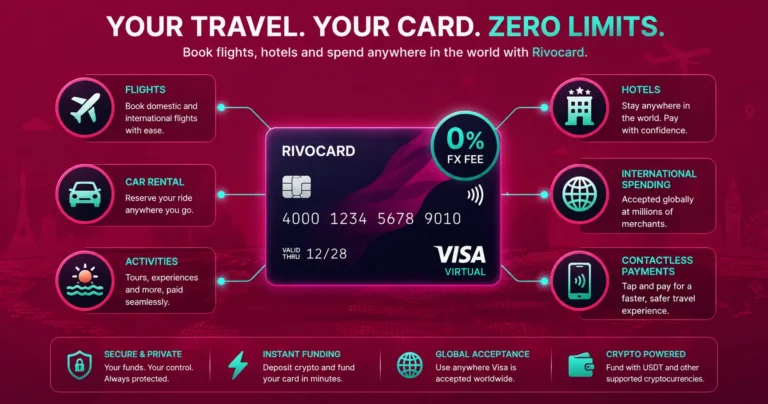
Quick answer: A Rivocard virtual Visa card works for all travel bookings made online — flights, hotels, car rentals, vacation homes, tours, and activities at any site accepting Visa. Book with Booking.com, Expedia, Google Flights, Airbnb, direct airline sites, and any travel platform exactly as you would with a regular bank card. The standout advantage for travel: Rivocard charges 0% on international transactions — no foreign currency surcharge regardless of where the merchant is located or what currency they charge in. By 2026, crypto cards are becoming a core travel payment tool, simplifying payments and reducing dependence on traditional banking systems. This guide covers the full travel booking workflow, what to know about hotel check-in holds, and how to get the most from Rivocard on international trips.
Why a Crypto Card Works Better Than a Bank Card for International Travel
Traditional bank debit cards and many credit cards add 1-3% on every international transaction as a foreign transaction fee. On a $3,000 travel budget across a two-week international trip, that represents $30-$90 in fees that exist purely for currency conversion.
Rivocard charges 0% on all international transactions. Whether you book a Tokyo hotel from a Japanese site billing in yen, a European flight billing in euros, or a South American tour billing in local currency — the charge reaches your card at 0% FX markup.
Additional travel advantages:
- Instant card issuance: no waiting for a travel card to arrive in the mail before your trip
- Multiple cards: use one card for accommodation bookings, another for flights, another for on-trip expenses
- Instant freeze: if your phone is lost while traveling, freeze the card from any browser immediately
- Balance control: load exactly what you plan to spend, limiting exposure during travel
- Works via Apple Pay or Google Pay for in-person contactless payments at destinations
Booking Flights With a Rivocard Virtual Visa
All major flight booking platforms accept Visa cards. Booking flights with a Rivocard virtual card works identically to any other card.
Booking platforms that accept Rivocard:
- Google Flights (directs to airline or OTA for payment)
- Expedia, Kayak, Skyscanner, Momondo, Priceline
- Direct airline websites: British Airways, Emirates, Qatar Airways, Singapore Airlines, United, Delta, American, Lufthansa, Air France, and essentially all commercial airlines
- Budget airlines: Ryanair, EasyJet, Wizz Air, Southwest
What to enter at flight checkout: Your 16-digit card number, expiry date, CVV, name on card, and billing address registered with Rivocard. For the billing country, use the country in your Rivocard billing address.
Practical tip for flight bookings: Use a dedicated travel booking card for all flight purchases. This gives you a clean record of all travel bookings in one card’s transaction history, and if any booking platform’s system is breached, your other cards are unaffected.
Multi-leg bookings and price locks: Some airlines offer price lock or hold features that require a card authorization at booking. These authorization holds (not actual charges) work with Rivocard virtual cards the same as any other card.
Booking Hotels With Rivocard
Online hotel booking — through platforms like Booking.com, Hotels.com, Agoda, Expedia, or directly at hotel websites — works seamlessly with Rivocard.
Platforms that accept Rivocard:
- Booking.com, Hotels.com, Agoda, HotelsCombined
- Expedia, Priceline, Orbitz
- Direct hotel chains: Marriott, Hilton, IHG, Hyatt, Accor, Wyndham, Best Western
- Boutique and independent hotel websites
The hotel check-in hold distinction: This is the one travel-specific caveat worth understanding. Most hotels place a hold on the payment card at check-in — an authorization for incidental expenses, typically ranging from $50 to $500+ per night depending on the property. This hold is not a charge; it is a temporary reservation of that amount on the card.
How this applies to Rivocard:
- The online booking step: works without issue at all platforms
- The check-in hold: most hotels process these against the card on file. Rivocard virtual cards can handle holds if the card has sufficient balance. Some luxury properties or business hotels specifically request a credit card (not prepaid) for holds — this varies by property.
Practical approach for hotel travel: Book online with Rivocard normally. Fund the booking card with enough to cover both the room cost and the expected hold amount. For upscale hotels where prepaid card policies may be stricter, contact the property in advance to confirm their hold policy, or maintain a traditional credit card for check-in holds only while paying the room itself with Rivocard.
Booking Vacation Rentals
Airbnb, Vrbo, and vacation rental platforms accept Visa cards for all bookings:
- Airbnb: all Visa cards accepted at checkout. Airbnb charges the full reservation amount at booking (no separate check-in hold), making it more straightforward for Rivocard than traditional hotels.
- Vrbo: same — Visa cards accepted, payment typically collected at booking or close to it.
- Booking.com vacation homes: Visa cards accepted.
Vacation rentals generally have simpler payment structures than hotels for Rivocard users — they charge the full amount upfront rather than placing a separate check-in hold, so the card needs to have sufficient balance at booking time only.
Car Rentals: What Works and What to Watch For
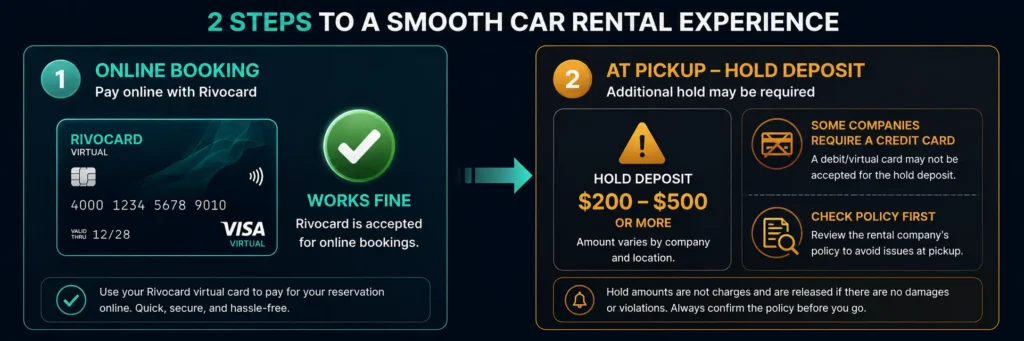
Car rental is the most complicated travel category for any prepaid card — not just crypto cards.
Online booking: All major car rental platforms (Hertz, Enterprise, Avis, Budget, Europcar, Sixt, Rentalcars.com) accept Visa cards for online reservations. Rivocard works for the booking step.
At pickup: Car rental companies place a hold on the card at vehicle pickup, typically $200-$500 for standard vehicles, significantly more for luxury or specialty vehicles. Most major rental companies prefer or require a credit card (not prepaid) for this hold because:
- Credit cards offer the company a larger assurance amount through the credit line
- Some national car rental programs have specific prepaid card exclusion policies
Practical approaches for car rental with Rivocard:
- Use a dedicated travel credit card for the car rental hold, and book/pay the rental itself on Rivocard if allowed
- Look for car rental companies that specifically accept debit and prepaid cards (Enterprise is generally known for more flexible policies in some regions, but policies vary by location)
- Check the specific rental company’s card policy for your departure location before booking — policies differ between countries and even locations
Car rental is the one travel category where maintaining a traditional credit card as a backup is most useful for Rivocard users.
Activities, Tours, and Experiences
Tour operators, activity booking platforms, and experience providers accept Visa widely:
- Viator: Tours and activities worldwide, accepts Visa at checkout
- GetYourGuide: Activities and experiences, accepts Visa
- Klook: Asia-Pacific focus, accepts Visa
- Airbnb Experiences: Booked through Airbnb, accepts Visa
- Direct booking with local operators through their websites
Activities booked online with Rivocard work without issue — these are standard online Visa card transactions with no hotel-style check-in hold or car rental deposit complication.
In-Destination Spending with Rivocard
Beyond bookings, Rivocard is useful for day-to-day spending during a trip via Apple Pay or Google Pay.
At restaurants, shops, and markets: Add your Rivocard virtual card to Apple Pay or Google Pay. Use it at any contactless NFC terminal. Most modern merchants in tourist destinations globally support contactless payments. The transaction processes at 0% FX fee — you pay the local price in local currency with no bank surcharge.
At transit systems: Many urban transit systems support tap-to-pay via Apple Pay or Google Pay — London Underground, New York MTA, Tokyo Subway, Singapore MRT, Sydney Opal, and many others. Rivocard via Apple Pay works at any transit system that accepts contactless Visa.
At supermarkets and convenience stores: Daily grocery and convenience purchases via Apple Pay with Rivocard work at any NFC-enabled terminal.
ATMs: Rivocard virtual cards cannot be used at ATMs — ATMs require a physical card with a chip or magnetic stripe. For cash needs during travel, plan ahead by withdrawing local currency from a bank ATM using a physical bank card before or at your destination.
The 0% FX Fee Advantage for Travelers
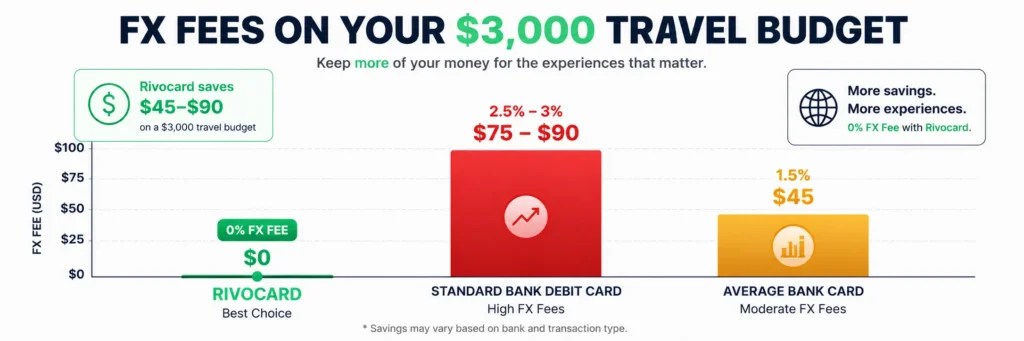
This is where Rivocard’s model provides concrete savings compared to most bank cards.
When assessing crypto cards for travel, travelers should weigh ease of use against fee stability and regional coverage. By 2026, crypto cards are becoming a core travel payment tool, offering transparent fees and borderless usability.
Example: Two-week Europe trip with $3,000 budget
| Card type | FX fee | Cost on $3,000 | Annual saving vs Rivocard |
|---|---|---|---|
| Rivocard | 0% | $0 | — |
| Standard bank debit | 2.5-3% | $75-$90 | — |
| Travel credit card (no FX) | 0% | $0 | — |
| Average bank card | ~1.5% | ~$45 | — |
For users traveling frequently or spending significant amounts internationally, 0% FX fee is a meaningful saving. Rivocard’s 5% card funding fee means the upfront cost is higher than a 0-1% FX card — but for international-heavy spenders, the combination of stablecoin funding, 0% FX, and instant card issuance makes it competitive overall.
Funding Your Travel Card Before a Trip
Planning your deposit:
Before a trip, deposit enough USDT to cover:
- Flight costs (if not already booked)
- Accommodation costs (total nights)
- Expected daily spending (food, transport, activities)
- Hotel holds if you plan to fund a single card for check-in holds too
- Buffer (15-20% for unexpected expenses)
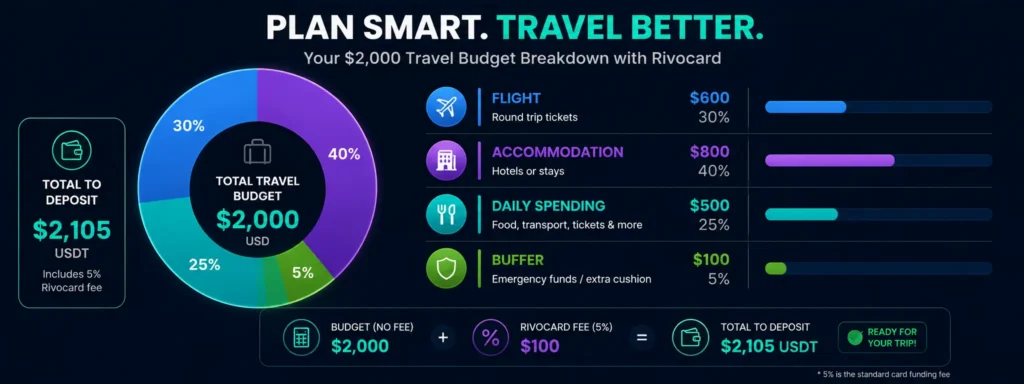
Example for a 10-day trip with $2,000 budget:
- Deposit $2,110 USDT to wallet (covers $2,000 budget after 5% Rivocard fee)
- Create travel card, fund $2,110 from wallet — card has $2,000 to spend
- For the trip: flight $600, accommodation $800, daily $500, buffer $100
USDT advantages for pre-trip funding:
- Stable value — the $2,000 you plan to spend stays $2,000 regardless of crypto market moves during the trip
- Instant funding — no need to plan weeks ahead for card delivery
FAQs
Can I use a Rivocard virtual card for travel bookings?
Yes. A Rivocard virtual Visa card works for all travel bookings made online – flights, hotels, car rentals, vacation rentals, tours, and activities. Any travel platform that accepts Visa accepts Rivocard for the online booking step.
Does Rivocard charge foreign transaction fees when booking international travel?
No. Rivocard charges 0% on all international transactions – no FX surcharge regardless of the merchant’s country or currency. Whether booking a Japanese hotel billing in yen or a European flight billing in euros, there is no foreign transaction fee.
Can I use Rivocard at hotel check-in for the incidental hold?
Usually yes, if the card has sufficient balance. Some luxury hotels and business hotels specifically request a credit card (not prepaid) for incidental holds. The online booking step works without issue at all properties. Check the specific hotel’s hold policy before arrival if you are concerned.
Does Rivocard work for Airbnb bookings?
Yes. Airbnb accepts Visa cards for all bookings. Airbnb charges the full reservation amount at booking rather than placing a separate check-in hold, making it more straightforward for Rivocard than traditional hotels.
Can I use Rivocard for car rentals?
Rivocard works for online car rental bookings. At pickup, most major car rental companies prefer or require a credit card for the deposit hold. Check the specific company’s card policy for your location. Car rental is the travel category where maintaining a traditional credit card as a backup is most practical.
Does Rivocard work with Apple Pay and Google Pay for in-person spending during travel?
Yes. Add your Rivocard virtual card to Apple Pay or Google Pay and use it at any NFC contactless terminal globally – restaurants, shops, transit systems, and any merchant with tap-to-pay capability. Rivocard charges 0% FX fee on these in-person international transactions.
Can I use Rivocard at ATMs while traveling?
No. Rivocard issues virtual cards without a physical chip or magnetic stripe, which are required for ATM cash withdrawals. For cash during travel, use a physical bank card at ATMs or plan cash withdrawals before departure.
How much should I load onto a travel Rivocard before a trip?
Load your estimated total travel budget plus a 15-20% buffer for unexpected expenses. Account for Rivocard’s 5% card funding fee: to have $2,000 available on the card, fund approximately $2,105 from your wallet. Use USDT for stable value – the dollar amount stays predictable regardless of crypto market moves during your trip.
Can I use Rivocard at Booking.com and Expedia?
Yes. Both Booking.com and Expedia accept Visa cards for all bookings – hotels, flights, vacation rentals, and activities. Enter your Rivocard card details at checkout the same as any other Visa card.
What is the best way to use Rivocard for a multi-destination international trip?
Fund a dedicated travel card with your full trip budget before departure. Use Apple Pay or Google Pay for day-to-day in-person purchases at 0% FX. Make online bookings with the same or a separate card. Keep the card number written securely offline in case you need to reference it without your phone. Monitor the balance before major bookings to ensure sufficient funds.
Get Started
Ready to fund your next trip with crypto at 0% FX fees? Create your Rivocard account – card ready instantly
