
Quick answer: To top up a crypto card with USDT, log into your Rivocard account, select USDT and your preferred network (TRC-20 recommended), copy the deposit address, and send USDT from your wallet or exchange. On Rivocard, USDT deposits to your wallet are free — no fee at this step. Once the network confirms (seconds on TRC-20, 1-5 minutes on ERC-20), your wallet balance updates and you can fund a virtual card instantly. The 5% Rivocard fee only applies at the wallet-to-card funding step.
USDT is the most practical cryptocurrency for topping up a crypto card — it is fast, cheap, stable in value, and available on every major exchange. This guide walks through every step, including how to send from Binance, OKX, and Bybit specifically, and the one critical decision (TRC-20 vs ERC-20) that most guides skip.
Why USDT Is the Best Asset for Topping Up a Crypto Card
Before the steps, a quick explanation of why USDT dominates crypto card top-ups:
Price stability. USDT is pegged to $1. Send $200 USDT, receive approximately $200 in your wallet. No price movement during the confirmation window, no variance between what you sent and what arrived. This is the single biggest practical advantage over Bitcoin or Ethereum for card top-ups.
Network speed. On Tron (TRC-20), USDT confirmations take seconds to under a minute. Compare this to Bitcoin (20-60 minutes) or Ethereum (1-5 minutes during normal conditions, much longer during congestion).
Low network fees. TRC-20 USDT network fees are typically under $1 — often fractions of a cent. For frequent card top-ups, this adds up significantly compared to Bitcoin or ERC-20 Ethereum fees.
Universal availability. Every major exchange (Binance, OKX, Bybit, Kraken, Coinbase) supports USDT withdrawals. You do not need to use a specific platform to access it.
The TRC-20 vs ERC-20 Decision (Read This First)
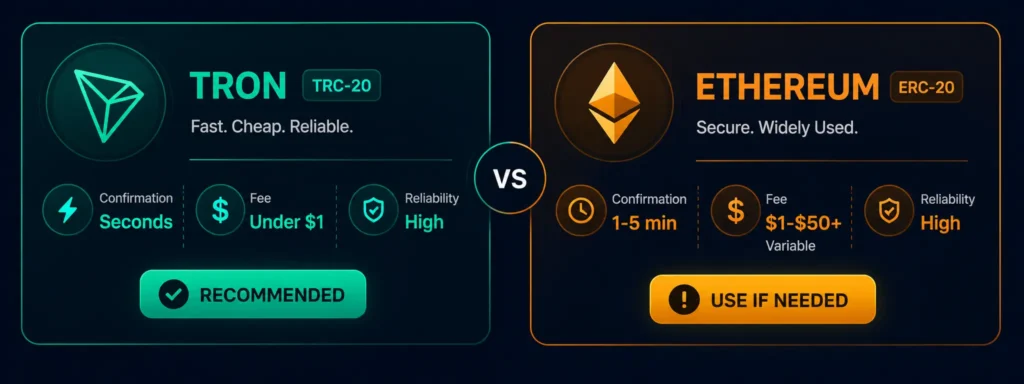
USDT runs on multiple blockchains simultaneously. The two you will encounter most often on Rivocard are:
| TRC-20 (Tron) | ERC-20 (Ethereum) | |
|---|---|---|
| Confirmation time | Seconds to ~1 minute | 1-5 minutes (longer during congestion) |
| Network fee | Fractions of a cent to ~$1 | $1-$50+ (highly variable) |
| Address format | Starts with T | Starts with 0x |
| Rivocard deposit fee | Free | Free |
| Best for | All top-ups — default choice | Only if your USDT is already on Ethereum |
Default to TRC-20 for every Rivocard top-up. It is faster, cheaper, and the most widely supported across exchanges. The only reason to use ERC-20 is if your USDT is specifically on the Ethereum network and you cannot or do not want to switch networks first.
The critical rule: The network you select in your sending wallet must match the network of the deposit address Rivocard gives you. TRC-20 addresses start with T. ERC-20 addresses start with 0x. Sending USDT on the wrong network results in lost funds — always verify both sides match before sending.
Step-by-Step: How to Top Up a Crypto Card With USDT on Rivocard
Step 1: Log into your Rivocard account. Go to crypto virtual card dashboard and sign in. If you do not have an account yet, see our step-by-step account creation guide — it takes under 2 minutes and no KYC is required to start.
Step 2: Navigate to the deposit section. From your dashboard, click “Deposit,” “Top Up,” or “Add Funds” — whichever button appears in your interface. This opens the wallet deposit flow.
Step 3: Select USDT and choose TRC-20 network. From the asset list, select USDT (Tether). You will then be prompted to choose a network — select TRC-20. Your dashboard will display:
- A TRC-20 USDT deposit address (starts with T)
- A QR code for scanning
Step 4: Copy the deposit address. Click the copy button next to the address, or scan the QR code with your sending wallet. Do not type the address manually — a single character error sends funds to a different address with no recovery.
Step 5: Send USDT from your wallet or exchange. See the specific exchange guides below. The key steps are always the same:
- Paste the Rivocard TRC-20 address
- Select TRC-20 as the network
- Enter the amount (minimum $10 USDT)
- Confirm the network fee
- Send
Step 6: Wait for confirmation. TRC-20 USDT typically confirms in seconds to under a minute. Your wallet balance on Rivocard updates automatically once confirmed. There is nothing to do during this step — the blockchain handles it.
Step 7: Create and fund a virtual card. With your wallet balance updated, go to card creation. Create a new virtual card (free) and choose how much to fund it from your wallet balance. The 5% fee is deducted from the funded amount:
| You Fund Card With | 5% Fee Deducted | Card Balance |
|---|---|---|
| $50 | $2.50 | $47.50 |
| $100 | $5.00 | $95.00 |
| $200 | $10.00 | $190.00 |
| $500 | $25.00 | $475.00 |
| $1,000 | $50.00 | $950.00 |
The fee is shown before you confirm. The card is funded and active immediately after confirmation.
Step 8: Spend. Your card is now ready. Use the card number, expiry, and CVV anywhere Visa is accepted online. Add it to Apple Pay or Google Pay for in-person contactless payments. All purchases are 0%.
How to Send USDT From Binance
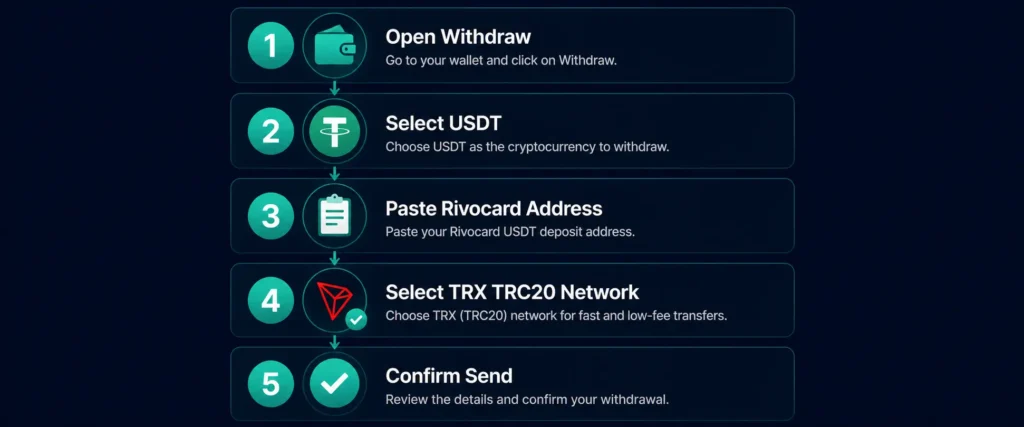
Binance is the most common source for USDT deposits. Here is the exact process:
- Log into Binance and go to Wallet → Fiat and Spot
- Find USDT and click Withdraw
- Paste your Rivocard TRC-20 deposit address in the “Address” field
- In the “Network” dropdown, select TRX (TRC20) — not ERC20, not BEP20
- Enter the amount (Binance shows the network fee, typically under $1 on TRC-20)
- Click “Withdraw” and confirm with your 2FA method
- The transaction appears as pending and typically confirms within 1-3 minutes on Binance’s side plus the blockchain confirmation
Binance minimum USDT withdrawal via TRC-20: typically 10 USDT. Check current minimums in your Binance withdrawal interface as these can change.
How to Send USDT From OKX
- Log into OKX and go to Assets → Withdraw
- Search for and select USDT
- Choose External Withdrawal
- Paste your Rivocard TRC-20 address
- Select TRON (TRC20) as the network
- Enter the amount
- Confirm and complete verification
- OKX processes withdrawals quickly — TRC-20 USDT typically arrives within 1-3 minutes
How to Send USDT From Bybit
- Log into Bybit and go to Assets → Withdraw
- Select USDT
- Choose On-Chain Withdrawal
- Paste your Rivocard TRC-20 address in the wallet address field
- Select TRC20 as the chain
- Enter the amount
- Review the fee (shown before confirmation)
- Submit and verify with 2FA
Bybit withdrawal processing is typically fast. TRC-20 USDT usually confirms within 2 minutes from submission.
How to Send USDT From a Self-Custody Wallet (Trust Wallet, MetaMask, Ledger)
For hardware or software wallets:
Trust Wallet:
- Open Trust Wallet → select USDT
- Tap “Send”
- Paste the Rivocard TRC-20 address (ensure you are on the Tron network in Trust Wallet, not Ethereum)
- Enter amount → confirm
MetaMask: MetaMask is primarily an Ethereum/EVM wallet. If your USDT is on Ethereum, you can send ERC-20 USDT — use the Rivocard ERC-20 deposit address (starts with 0x) in this case, not the TRC-20 address. Network fees on Ethereum are higher.
Ledger hardware wallet: Use Ledger Live with the Tron app installed to send TRC-20 USDT. Connect your Ledger, open Ledger Live, go to the Tron account, and initiate a send transaction to the Rivocard TRC-20 address.
How Long Does a USDT Top-Up Take?
| Network | Typical confirmation time | Total time to spendable balance |
|---|---|---|
| USDT TRC-20 (Tron) | Seconds to ~1 minute | Under 2 minutes |
| USDT ERC-20 (Ethereum) | 1-5 minutes (up to 30+ during congestion) | 2-35+ minutes |
| USDT BEP-20 (BSC) | Seconds to ~1 minute | Under 2 minutes |
TRC-20 is consistently the fastest and most predictable. ERC-20 speed depends heavily on current Ethereum network congestion.
What If Your USDT Top-Up Has Not Arrived
If your deposit has not appeared after longer than expected:
Step 1: Check the transaction on the blockchain. For TRC-20 transactions, go to tronscan.org and search for your transaction hash (TXID). This shows whether it confirmed on-chain and to which address.
Step 2: Verify the address and network matched. If the transaction confirms on Tronscan to a different address than your Rivocard deposit address — the funds went elsewhere and cannot be recovered. If it confirms to the correct address, the issue is on the platform’s processing side.
Step 3: Verify the deposit minimum was met. Rivocard has a $10 minimum deposit. If you sent less than the minimum, the deposit may not credit. Check the amount.
Step 4: Contact Rivocard support. If the transaction hash shows confirmed on-chain to the correct address and the deposit has not arrived after 15 minutes, contact Rivocard support with your TXID. They can manually investigate and credit the deposit.
Common Mistakes to Avoid
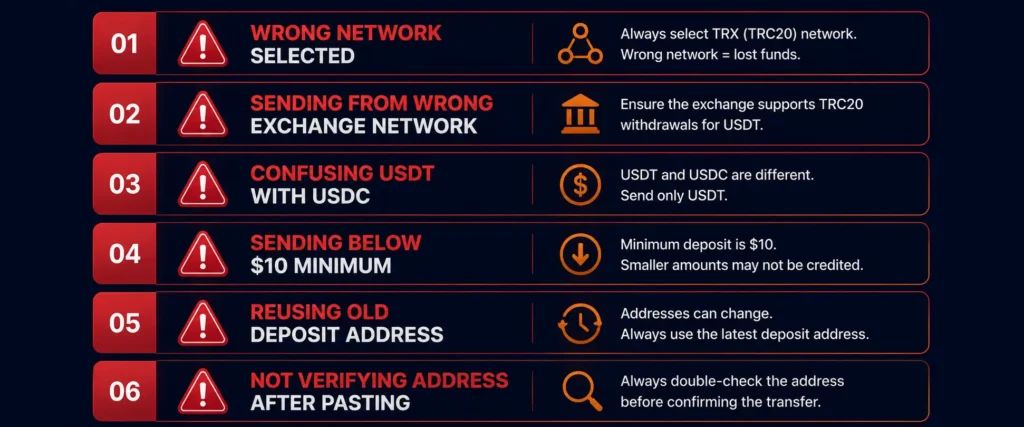
Wrong network. The single most common and most costly mistake. Sending TRC-20 USDT to an ERC-20 address (or vice versa) means the funds go to a different blockchain and are typically unrecoverable. Always verify: your wallet shows TRC-20 selected AND the Rivocard address starts with T.
Sending USDT from a CEX to the wrong withdrawal network. On Binance, ERC-20 USDT and TRC-20 USDT are different options in the withdrawal network dropdown. Selecting the wrong one sends funds on the wrong chain. Double-check the network selection in your exchange withdrawal screen.
Confusing USDT with USDC. Both are stablecoins pegged to $1 and look similar in wallet interfaces. They are different tokens — USDC cannot be received at a USDT deposit address. Always confirm the asset is USDT before sending.
Sending below the minimum. The Rivocard minimum deposit is $10 USDT. Check the minimum in your dashboard before sending.
Reusing an old deposit address. Always copy a fresh address from your dashboard before each deposit. Do not store and reuse deposit addresses.
Not verifying the recipient address after pasting. Some malware replaces clipboard content with attacker addresses. After pasting, verify at minimum the first 4 and last 4 characters of the address match what your Rivocard dashboard shows.
Maximizing Efficiency: Bulk Deposits vs Frequent Small Top-Ups
Since Rivocard charges the 5% fee only at the card-funding step (not on deposits), your deposit strategy does not affect that fee. But it does affect your blockchain network fees.
Bulk deposits: Deposit a month or quarter’s worth of spending at once. Pay the network fee once (fractions of a cent on TRC-20). Your wallet balance sits at no cost until you fund cards from it.
Frequent small deposits: Pay a network fee each time. On TRC-20, this is negligible. On ERC-20, multiple small deposits could add up in fees.
For TRC-20 USDT, the network fee is so low that deposit frequency barely matters. For ERC-20, consolidating deposits saves meaningful fees.
FAQs
How do I top up a crypto card with USDT?
Log into your Rivocard account, select USDT as the deposit asset, choose TRC-20 as the network, copy the deposit address, and send USDT from your wallet or exchange to that address. The deposit is free. Once confirmed (seconds on TRC-20), your wallet balance updates and you can fund a virtual card — where the 5% fee applies.
Which USDT network should I use for topping up — TRC-20 or ERC-20?
Use TRC-20 (Tron) for virtually all top-ups. It confirms in seconds, fees are fractions of a cent, and it is the most efficient option. Only use ERC-20 if your USDT is on Ethereum and you specifically want to use that network.
Is there a fee to deposit USDT to Rivocard?
No. Depositing USDT to your Rivocard wallet is always free. The only cost at this step is the blockchain network fee paid to the Tron or Ethereum network — not to Rivocard. The Rivocard 5% fee only applies when you fund a virtual card from your wallet balance.
How long does a USDT TRC-20 deposit take to arrive on Rivocard?
Seconds to under a minute for TRC-20. The blockchain confirmation is fast, and Rivocard credits deposits automatically once confirmed. Total time from sending to having a spendable card balance is typically under 2 minutes.
What is the minimum USDT deposit on Rivocard?
$10 USDT equivalent. This applies regardless of which network you use.
Can I send USDT from Binance to Rivocard?
Yes. In Binance, go to Withdraw → USDT → select TRX (TRC20) as the network → paste your Rivocard TRC-20 deposit address → confirm. USDT from Binance via TRC-20 typically arrives in 1-3 minutes.
What happens if I send USDT on the wrong network?
Funds sent on the wrong network (e.g., ERC-20 USDT sent to a TRC-20 address) typically cannot be credited to your account and may be unrecoverable. Always verify both the network selection in your sending wallet and the format of the deposit address (TRC-20 addresses start with T, ERC-20 addresses start with 0x).
Can I send USDC instead of USDT to Rivocard?
Rivocard supports both USDT and USDC deposits, but they have separate deposit addresses. Do not send USDC to a USDT deposit address. Select the correct asset in your Rivocard dashboard and use the matching deposit address for whichever asset you are sending.
Does Rivocard support USDT on BSC (BEP-20)?
Check your Rivocard dashboard for the current supported networks. BEP-20 (Binance Smart Chain) support varies by platform and can be added or changed. Always use the network options shown in your dashboard rather than assuming a network is supported.
Is a USDT deposit to Rivocard a taxable event?
In many jurisdictions, converting crypto to fiat is a taxable disposal event — and the deposit step on Rivocard is where USDT converts to a dollar wallet balance. USDT’s stable peg to $1 means capital gains on the USDT itself are typically minimal or zero, but confirm your specific obligations with a tax professional or check your country’s tax authority guidance.
Get Started
Ready to top up your Rivocard with USDT? Create your account →
