
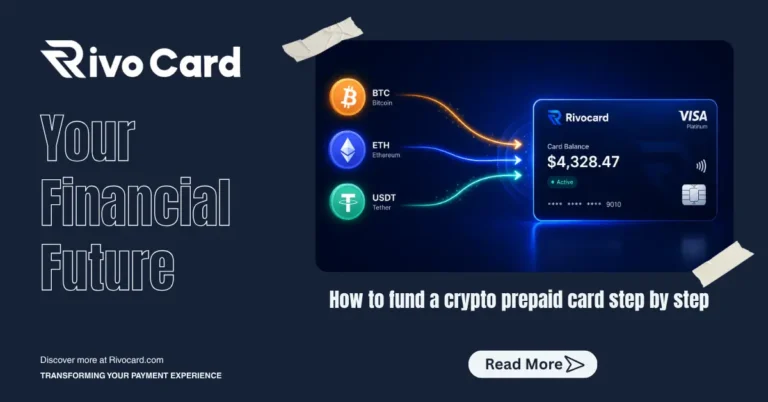
Quick answer: To fund a crypto prepaid card, log into your card account, copy the deposit address shown for the cryptocurrency you want to send (making sure the network matches), and send funds from your crypto wallet or exchange to that address. Once the blockchain confirms the transaction, the platform converts your crypto to fiat and your card balance is ready to spend. The whole process usually takes anywhere from seconds to several minutes, depending on which crypto you choose.
The mechanics sound simple — and they are, once you know what you’re doing. But this is also the step where most first-time users lose money, almost always to one of a few specific mistakes that this guide is built to prevent.
What “Funding” Actually Means
When you “fund” a prepaid card with crypto, three things happen behind the scenes:
- You transfer crypto from a wallet or exchange to a deposit address the card provider gives you.
- The blockchain confirms the transaction — this is the variable-time step.
- The provider converts that crypto to fiat (USD, EUR, etc.) and credits your card balance.
Once those three things are done, the balance behaves like cash on any prepaid Visa or Mastercard — spendable anywhere either network is accepted. If you’re new to how the prepaid model works, our guide on how a crypto prepaid card works covers the full mechanics.
Step-by-Step: How to Fund Your Card
Step 1: Log into your card account and open the deposit/top-up page. Most crypto card platforms have a clearly labeled “Top Up,” “Add Funds,” or “Deposit” button on the dashboard. Click it to start.
Step 2: Select the cryptocurrency you want to deposit. You’ll see a list of supported cryptocurrencies for the platform. Common options include Bitcoin (BTC), Ethereum (ETH), and stablecoins like USDT. Pick the one you actually hold and want to use — don’t switch to a different asset just because it’s listed.
Step 3: Choose the correct network. This is the step that costs people the most money when they get it wrong. Many cryptocurrencies — especially stablecoins like USDT — exist on multiple blockchains (Ethereum, Tron, BSC, and others). The deposit address shown is only valid on the specific network the platform tells you to use. Sending USDT on the wrong network to an address that expects a different one usually results in funds that can’t be recovered.
Read the network displayed carefully. Match it exactly to the network you’ll send from.
Step 4: Copy the deposit address. The platform will display a long string of characters (the deposit address) and usually a QR code. Either:
- Copy and paste the address into your sending wallet, or
- Scan the QR code if you’re sending from a mobile wallet app.
Never type the address manually — even one wrong character means the funds go somewhere else and can’t be recovered.
Step 5: Send the crypto from your wallet or exchange. Open the wallet or exchange you’re sending from, paste the address (or scan the QR), confirm the network matches, enter the amount, and send. You’ll see a small network fee — this is paid to the blockchain itself, not the card provider, and varies by network.
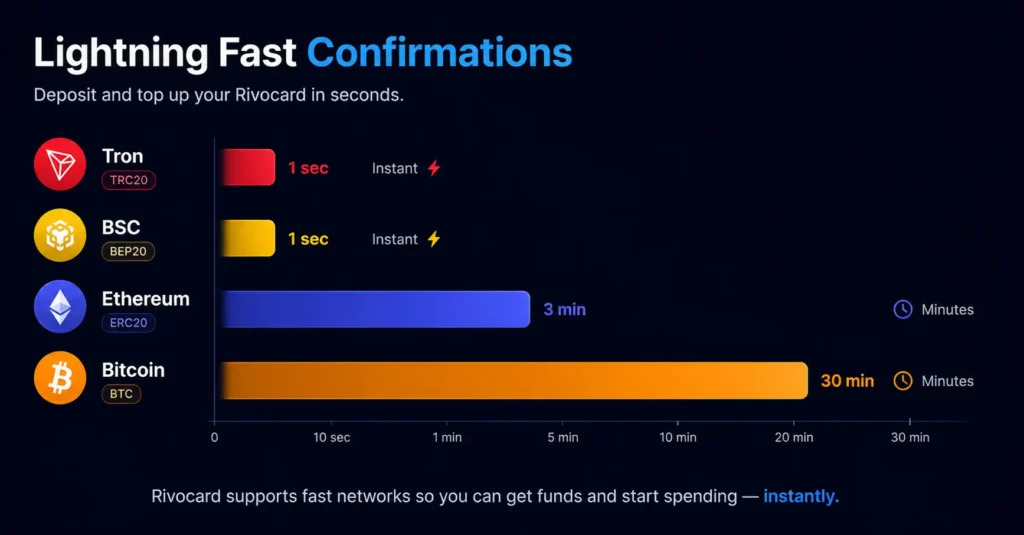
Step 6: Wait for blockchain confirmation. This is the variable-time step. Different blockchains take different amounts of time to confirm transactions:
| Network | Typical Confirmation Time |
|---|---|
| Tron (TRC-20 USDT) | Seconds to ~1 minute |
| Ethereum (ETH, ERC-20 USDT) | ~1–5 minutes |
| Binance Smart Chain (BSC) | Seconds to ~1 minute |
| Bitcoin (BTC) | ~10–60 minutes (multiple block confirmations required) |
You can usually paste your transaction hash into a blockchain explorer (like blockchain.com/explorer for BTC or etherscan.io for ETH) to track real-time progress.
Step 7: Card balance is credited. Once confirmed, the platform converts your crypto to fiat at the rate active when the funds land, and your spendable card balance updates. You’re now ready to spend.
Choosing Which Crypto to Send
If you have multiple assets to choose from, this isn’t just a personal preference — it materially affects how fast and how cheap the funding step is:
- For speed: USDT on Tron (TRC-20) is typically the fastest practical option, with confirmations in seconds and very low network fees.
- For simplicity: Stablecoins (USDT, USDC) avoid the timing problem of price moving between when you send and when it converts. Your $100 in USDT is approximately $100 when it lands.
- For cost: Avoid Ethereum-based transfers during periods of high network congestion — ERC-20 fees can spike significantly. Tron and BSC are usually much cheaper.
- For larger amounts: Bitcoin is fine for larger one-time deposits where the slightly longer confirmation time isn’t an issue, since BTC network fees are predictable.
A practical rule of thumb: for small, frequent top-ups, use USDT on Tron. For large, one-time deposits, use whatever asset you already hold in size.
How Long Does Funding Take?
Total time = blockchain confirmation time + brief processing time on the card platform’s side.
For fast networks (Tron, BSC), the entire process from clicking “send” to having a spendable balance is usually under a minute. For slower networks (Bitcoin during high congestion), it can be 30+ minutes.
If your funds haven’t appeared after a reasonable wait:
- Check the transaction hash on a blockchain explorer. Confirm it’s been mined and has the required number of confirmations.
- Verify you sent on the correct network. This is the single most common cause of “missing” deposits.
- Confirm the address matches what your card platform showed you — character-for-character.
- Contact support with your transaction hash if everything looks correct and the funds still haven’t credited after the expected confirmation time.
The 5 Mistakes That Cost First-Time Users Money
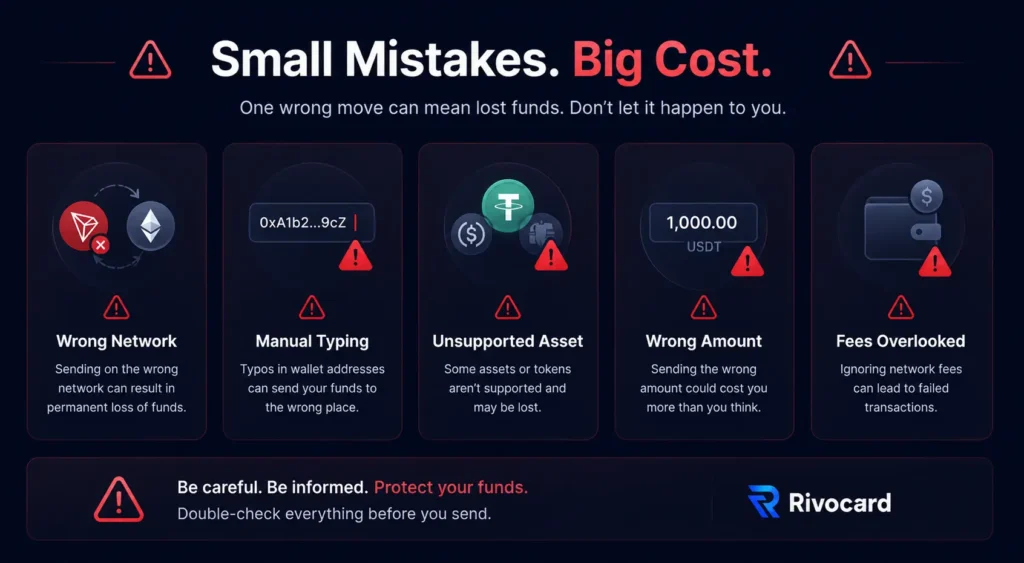
These are not theoretical — they’re the actual top reasons funds get lost when people fund a card with crypto for the first time:
1. Sending on the wrong network. A USDT deposit address for TRC-20 (Tron) won’t recognize a USDT transfer sent on ERC-20 (Ethereum), and vice versa. The address looks similar enough that it’s easy to assume “USDT is USDT” — it isn’t. Funds sent to the wrong network are usually unrecoverable.
2. Typing the address manually. A single wrong character means the transaction goes to a different address entirely. Always copy/paste or scan the QR code — never type.
3. Sending an unsupported asset. If a platform supports BTC, ETH, and USDT and you send LTC (Litecoin), you can’t expect the system to recognize it. Confirm the asset is on the supported list before sending.
4. Sending more than the maximum (or less than the minimum). Many platforms have minimum and maximum deposit amounts per transaction. Sending below the minimum may result in the deposit being lost to fees; sending above the max may flag it for manual review.
5. Forgetting about network fees. The amount you send isn’t always the amount you receive — network fees are deducted from your transaction. Sending exactly $10 may leave you with $9.50 (or less) on the card after fees. If you’re sending a precise amount, factor this in.
Is Funding a Crypto Prepaid Card Safe?
The transfer itself is as safe as any other crypto transaction — it relies on the same blockchain infrastructure used for everything else in crypto. The risk isn’t the transfer mechanism; it’s user error (wrong network, wrong address). Take the time to double-check both, and the transaction itself is straightforward.
Once funds arrive on the card platform, they’re protected under the same standards as any regulated card product — encryption, PCI DSS-compliant processing, and card-network protections at the spending end. You can read more about Rivocard’s security measures if you want the full picture.
Funding vs. Spending: Two Different Steps
Worth being clear on: funding the card and spending from it are two separate steps with two separate sets of fees.
- Funding involves a blockchain network fee (paid to miners/validators) and possibly a conversion fee from the card platform.
- Spending typically involves only the card platform’s transaction fees, plus standard card-network fees (like foreign transaction fees if you spend in a different currency).
This matters for budgeting: $100 deposited isn’t $100 spent. Build in a small buffer for fees so you don’t end up just short of the amount you actually need.
Follow the same steps on RivoCard to get your own instant virtual card funded by crypto.
FAQs
Can I fund a crypto prepaid card with any cryptocurrency?
No — only with cryptocurrencies the platform explicitly supports. Sending unsupported assets usually means losing them with no recovery option. Always check the supported list before sending.
What happens if I send crypto to the wrong network?
In most cases, the funds are unrecoverable. The deposit address only recognizes transactions on the network the platform specified. This is the single most common — and costliest — mistake people make.
How long does it take to see my card balance update?
It depends on the blockchain. Tron (TRC-20 USDT) and BSC typically credit balances within a minute. Ethereum can take a few minutes. Bitcoin can take 30+ minutes during congestion.
Do I pay fees to fund a crypto prepaid card?
es — typically two: a blockchain network fee (paid to the network, not the card) and possibly a conversion fee from the card platform. Total fees vary significantly by network — Tron is usually the cheapest, Ethereum the most expensive during congestion.
Can I fund my card directly from an exchange like Binance or Coinbase?
Yes — exchanges support withdrawals to external addresses. Just paste the card platform’s deposit address into the exchange’s withdrawal form, double-check the network, and send.
What’s the minimum amount I can deposit?
This varies by platform. Always check the deposit page for the current minimum before sending — some platforms have minimums to prevent the deposit being eaten up by network fees.
Can I fund the card with multiple cryptocurrencies at once?
Not in a single transaction. Each deposit is for one asset on one network. You can, however, make multiple deposits using different assets — they’ll all convert to the same fiat balance.
Why hasn’t my balance updated even though the transaction shows confirmed on the blockchain?
The most likely causes: wrong network, deposit below the platform minimum, or the platform is still processing. If everything looks correct and the funds haven’t credited within a reasonable time after confirmation, contact the platform’s support with your transaction hash.
Can I withdraw the balance back to crypto if I change my mind?
This depends on the platform’s specific terms. Many support withdrawal back to crypto, sometimes with fees attached. Check the platform’s withdrawal policy before depositing if this is important to you.
Ready to fund your card and start spending? Get started with Rivocard →
