
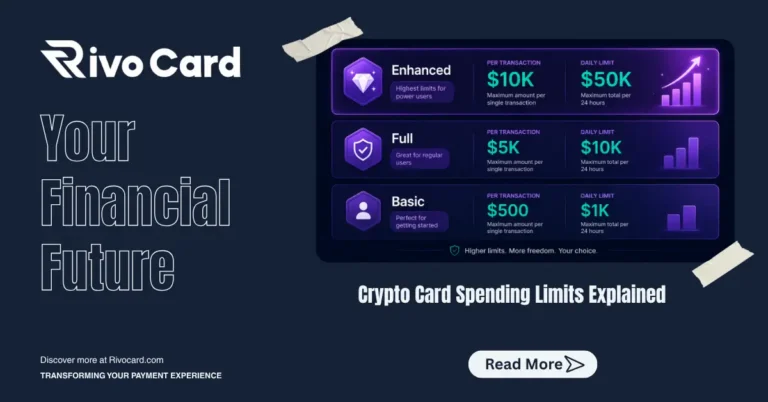
Quick answer: Crypto card spending limits control how much you can spend per transaction, per day, and per month. On Rivocard, limits are tied to your KYC verification tier: Basic KYC (email only) allows $500 per transaction, $1,000 per day, and $5,000 per month. Full KYC (ID + selfie) raises these to $5,000 per transaction, $10,000 per day, and $50,000 per month. Enhanced KYC unlocks $10,000 per transaction, $50,000 per day, and unlimited monthly spending. Most everyday users never exceed Basic KYC limits. Limits reset daily and monthly, and upgrading your KYC tier takes effect immediately.
Understanding which limit applies to your specific blocked transaction — and what to do about it — is what this guide covers.
Why Spending Limits Exist
Spending limits on crypto cards are not arbitrary restrictions — they are regulatory requirements tied to Anti-Money Laundering (AML) and Know Your Customer (KYC) compliance frameworks. Card issuers operating under financial regulations must monitor transaction volumes and apply risk-appropriate controls based on user verification level.
The underlying logic: a fully verified user (with confirmed identity, address, and source of funds) presents lower regulatory risk than an anonymous user. Higher verification unlocks higher limits because the issuer can demonstrate compliance with AML requirements for larger transaction volumes.
Standard crypto card tiers in 2026 typically allow $5,000–$25,000 monthly for everyday spending, while premium tiers offer $50,000 or more for fully verified users. Rivocard’s structure is consistent with this industry pattern.
The Four Limit Types on Rivocard
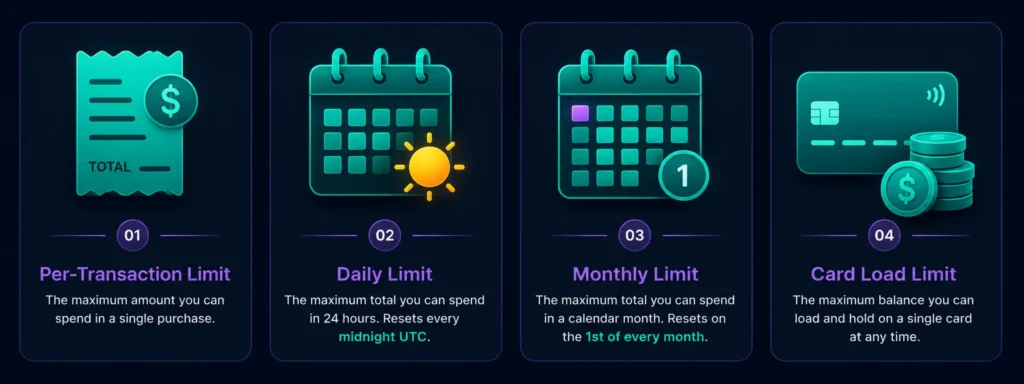
Rivocard has four separate limit types that operate independently:
1. Per-transaction limit The maximum single purchase or card funding amount. If a transaction exceeds this limit, it is declined regardless of your available balance.
2. Daily spending limit The maximum total you can spend across all transactions in a single calendar day. Resets at midnight UTC each day.
3. Monthly spending limit The maximum total you can spend across all transactions in a calendar month. Resets on the first of each month.
4. Card load limit The maximum balance a single virtual card can hold. Different from spending limits — this controls how much you can put on one card at creation or through reloads.
Each operates independently. You could hit your per-transaction limit on a single large purchase while still having daily and monthly limit headroom. Understanding which limit is blocking a specific transaction tells you exactly what to do.
Rivocard Limits by KYC Tier
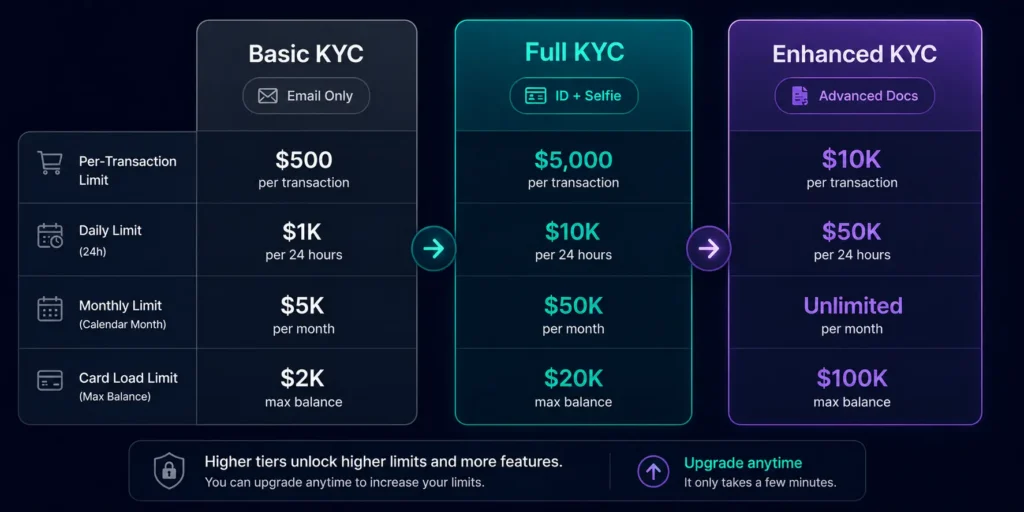
| Limit Type | Basic KYC | Full KYC | Enhanced KYC |
|---|---|---|---|
| Per transaction | $500 | $5,000 | $10,000 |
| Daily spend | $1,000 | $10,000 | $50,000 |
| Monthly spend | $5,000 | $50,000 | Unlimited |
| Card load limit | $2,000 | $20,000 | $100,000 |
Basic KYC requires only email verification — no identity documents. This is the starting tier for all new Rivocard accounts.
Full KYC requires a government-issued photo ID (passport, national ID, or driver’s license) plus a real-time selfie. Verification typically completes in minutes.
Enhanced KYC requires additional verification documentation beyond Full KYC. This tier serves high-volume users and businesses.
What Each Limit Means in Practice
Per-transaction limit ($500 on Basic, $5,000 on Full) This controls the maximum value of a single purchase. A $600 online purchase would be declined on Basic KYC — not because of daily or monthly limits, but because the individual transaction exceeds $500.
Common transactions that hit per-transaction limits on Basic KYC:
- Flights booked as a single purchase
- Hotel pre-authorizations for longer stays
- High-value software or SaaS annual plans
- Large ad spend top-ups on Google or Meta
Daily limit ($1,000 on Basic, $10,000 on Full) This resets at midnight UTC each day. A user on Basic KYC who spends $700 in the morning and tries to spend $400 more in the afternoon will see the second transaction declined (total $1,100 exceeds $1,000 daily limit), even though neither individual transaction exceeds the $500 per-transaction limit.
Monthly limit ($5,000 on Basic, $50,000 on Full) The cumulative cap for the entire calendar month. A user who spends $4,800 through the first three weeks of the month on Basic KYC will hit the monthly cap with $200 remaining.
Card load limit ($2,000 on Basic, $20,000 on Full) Controls how much balance a single card can hold. If you want $3,000 on one card on Basic KYC, you cannot do it — the card load limit prevents it. Work around this by using multiple cards (each funded up to $2,000) or upgrade to Full KYC.
When Limits Reset
Daily limits reset at midnight UTC each day — not based on your local time zone.
Monthly limits reset on the first day of each calendar month at midnight UTC.
Per-transaction limits do not accumulate or reset — each individual transaction is evaluated against the limit independently.
Card load limits are cumulative for the lifetime of that card — they are not monthly. If a card has a $2,000 limit and you have loaded $1,800 total across multiple fundings, you can only load $200 more before the card is at its limit.
How to Identify Which Limit Blocked Your Transaction
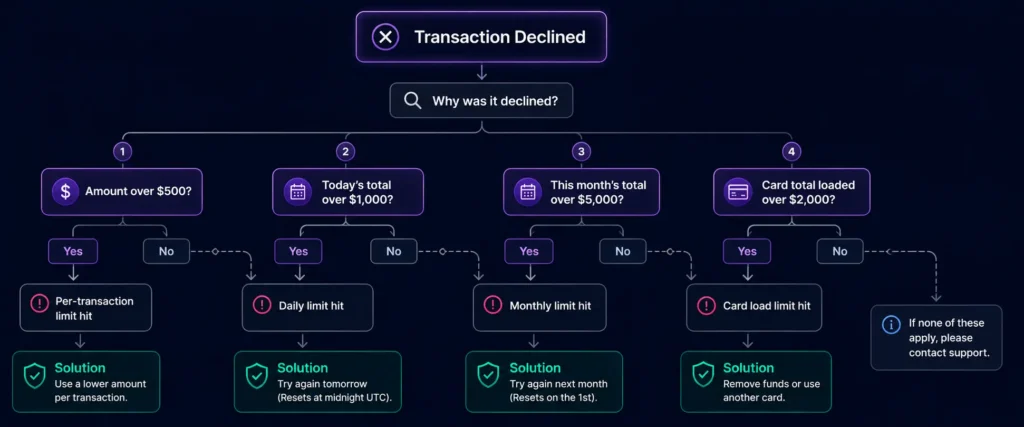
When a transaction is declined, the decline reason from Rivocard support or your dashboard should indicate the specific limit triggered. If it is unclear, here is the diagnostic logic:
Transaction was for more than $500 (Basic) or $5,000 (Full)? → Per-transaction limit hit. Solution: split the purchase if possible, or upgrade KYC tier.
Transaction was within per-transaction limits but total today already exceeds $1,000 (Basic) or $10,000 (Full)? → Daily limit hit. Solution: wait until tomorrow (midnight UTC reset) or upgrade KYC tier.
Transaction was within per-transaction and daily limits but total this month already exceeds $5,000 (Basic) or $50,000 (Full)? → Monthly limit hit. Solution: wait until the first of next month or upgrade KYC tier.
Card balance was sufficient but the card’s total loaded amount has hit $2,000 (Basic) or $20,000 (Full)? → Card load limit hit. Solution: create a new card, or upgrade KYC tier.
How to Increase Your Spending Limits
Upgrade from Basic to Full KYC: Go to your Rivocard dashboard → account settings → verification → submit a government-issued photo ID and real-time selfie. Verification typically completes in minutes for clear, well-lit submissions. Limits update immediately upon approval.
This single action raises:
- Per-transaction limit: $500 → $5,000 (10x increase)
- Daily limit: $1,000 → $10,000 (10x increase)
- Monthly limit: $5,000 → $50,000 (10x increase)
- Card load limit: $2,000 → $20,000 (10x increase)
For most users who outgrow Basic KYC limits, completing Full KYC once permanently resolves the constraint.
Upgrade from Full to Enhanced KYC: Contact Rivocard support or check your dashboard for the Enhanced KYC process, which involves additional verification documentation. This tier is primarily for high-volume users and businesses requiring limits above Full KYC thresholds.
Working Within Basic KYC Limits
If you cannot or prefer not to complete Full KYC, here are practical approaches to work within Basic tier limits:
Split large purchases across days. A $1,800 hotel booking that exceeds the $500 per-transaction limit cannot be done in a single charge. However, if the merchant allows multiple card charges or if you can pay in installments, two charges of $900 each on separate days work within both per-transaction ($900 < $500 — wait, $900 exceeds Basic’s $500 limit). In this case, a single purchase of $900 cannot be done on Basic — upgrade to Full KYC is the only solution.
Use multiple cards for the card load limit. Create two or three virtual cards and fund each at the $2,000 Basic limit. Total spendable balance of $4,000-$6,000 across multiple cards, each individually within limits.
Plan spending around the daily reset. If you need to spend $1,500 across two purchases, split them across a daily reset: $750 today and $750 after midnight UTC tomorrow. Both are within the $500 per-transaction limit… wait — $750 exceeds Basic’s $500 per-transaction limit as well. This is a practical illustration of why the per-transaction limit is often the binding constraint on Basic KYC, not the daily or monthly limit.
The realistic Basic KYC user profile: Basic KYC is practical for: subscriptions under $500 each, daily online shopping under $1,000 total, cumulative monthly spending under $5,000. Users regularly spending more than this in single transactions or high daily volumes benefit significantly from completing Full KYC.
Limits in the Context of Rivocard’s No-KYC Starting Point
A key feature of Rivocard’s limit structure is that Basic KYC (email verification only, no ID) already provides meaningful spending capacity: $500 per transaction, $1,000 daily, $5,000 monthly. Many platforms require full identity verification before any spending is possible — Rivocard’s tiered approach means users can start spending immediately and upgrade verification only when their needs require it.
The limits are also designed so that typical consumer spending patterns fit within Basic KYC. Subscriptions (Netflix $15/month, Adobe $55/month, cloud hosting $100/month) and regular online shopping all sit comfortably within Basic limits. The per-transaction cap becomes relevant primarily for higher-value single purchases — flights, hotels, large software purchases, significant ad spend.
Spending Limits vs Deposit Limits
A common point of confusion: spending limits (how much you can spend from a funded card) are separate from deposit limits (how much crypto you can send to your wallet per transaction). Rivocard’s deposit limit is $10,000 per transaction regardless of KYC tier — significantly higher than Basic KYC’s $1,000 daily spending limit. This means you can have a large wallet balance that you gradually spend within your tier’s spending limits.
For full details on deposit limits specifically, see our crypto card deposit limits guide.
FAQs
What are the spending limits on a Rivocard crypto card?
Spending limits depend on your KYC tier. Basic KYC (email only): $500 per transaction, $1,000 daily, $5,000 monthly. Full KYC (ID + selfie): $5,000 per transaction, $10,000 daily, $50,000 monthly. Enhanced KYC: $10,000 per transaction, $50,000 daily, unlimited monthly.
Why was my crypto card transaction declined even though I have balance?
A transaction can be declined due to spending limits even when your card has sufficient balance. Check whether the transaction amount exceeds your per-transaction limit, whether your daily total has reached the daily limit, or whether your monthly total has reached the monthly limit. Each operates independently.
When do Rivocard spending limits reset?
Daily limits reset at midnight UTC each day. Monthly limits reset on the first day of each calendar month at midnight UTC. Per-transaction limits do not reset — each transaction is evaluated individually against the limit.
How do I increase my Rivocard spending limits?
Complete a higher KYC tier from your dashboard. Full KYC requires a government-issued photo ID and real-time selfie — typically verified in minutes. This raises your per-transaction limit 10x (from $500 to $5,000), daily limit 10x (from $1,000 to $10,000), and monthly limit 10x (from $5,000 to $50,000).
What is the difference between spending limits and card load limits?
Spending limits control how much you can spend from a card over time. Card load limits control how much balance a single card can hold. Both are KYC-tier dependent: Basic KYC has a $500 per-transaction spend limit and a $2,000 card load limit.
Can I increase my spending limit without completing KYC?
No. Spending limits are tied to KYC verification tiers. Basic KYC (email verification) comes with Basic tier limits. The only way to access higher limits is to complete a higher KYC tier.
What happens to my spending balance when I hit the daily limit?
The card balance itself is unchanged — the funds are still on the card. You simply cannot make additional purchases until the daily limit resets at midnight UTC. The balance carries over to the next day.
Is there a per-transaction limit on card funding as well as spending?
Yes. Separate limits apply to card load amounts (how much you fund a card) and spending (how much you spend from it). The card load limit is $2,000 on Basic KYC and $20,000 on Full KYC — separate from the $500 and $5,000 per-transaction spending limits.
Do spending limits apply to Apple Pay and Google Pay transactions?
Yes. Spending limits apply to all transactions on the card regardless of how the payment is initiated — direct card entry, Apple Pay, Google Pay, or any other method.
How long does it take to increase limits after completing Full KYC?
Limit upgrades take effect immediately upon KYC approval. For most users with clear ID photos and a matching selfie, approval is automated and completes in minutes. Manual review cases take longer — typically up to 24 hours.
Get Started
Want to see the full breakdown of limits and fees side by side? Read the complete Rivocard fees and limits guide →
