
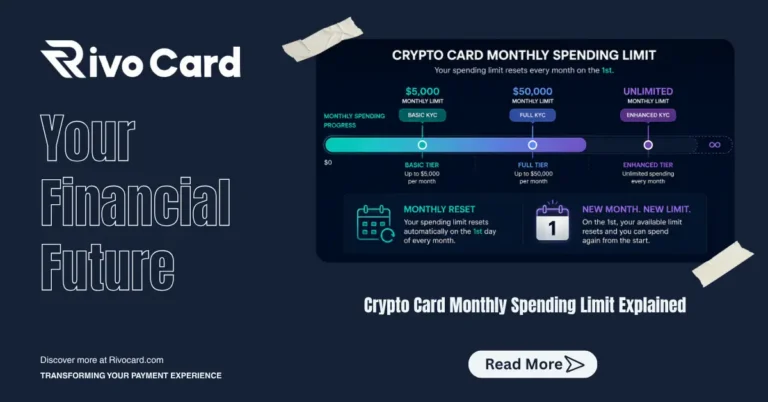
Quick answer: The monthly spending limit on a crypto card is the maximum total amount you can spend across all transactions in a single calendar month. On Rivocard, monthly limits are tied to your KYC verification tier: $5,000/month on Basic KYC (email verification only), $50,000/month on Full KYC (ID + selfie), and unlimited monthly spending on Enhanced KYC. Limits reset on the first of each month at midnight UTC. Most everyday users never hit Basic KYC limits — $5,000/month covers most subscription, shopping, and moderate ad spend use cases comfortably.
Why Monthly Spending Limits Exist on Crypto Cards
Monthly limits are not arbitrary platform decisions — they are regulatory requirements tied to AML (Anti-Money Laundering) and KYC compliance frameworks in the jurisdictions where card issuers operate.
Regulators require card issuers to monitor transaction volumes and flag unusual activity. Monthly spending limits are one of the primary mechanisms for this monitoring. The higher the user’s verified identity level, the more trust the regulatory system can place in them, and the higher their limits can go.
There is also a risk management dimension: card issuers face chargeback and fraud exposure on every transaction processed. Monthly limits cap that exposure at known thresholds, with higher-verified users representing lower fraud risk profiles.
Rivocard’s Monthly Spending Limits by KYC Tier
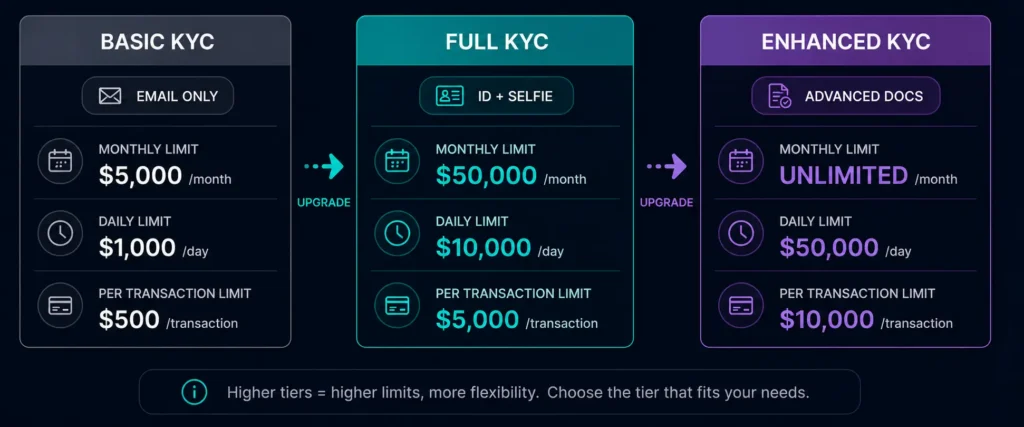
| KYC Tier | Monthly Spending Limit | Daily Spending Limit | Per-Transaction Limit |
|---|---|---|---|
| Basic KYC (email only) | $5,000 | $1,000 | $500 |
| Full KYC (ID + selfie) | $50,000 | $10,000 | $5,000 |
| Enhanced KYC (advanced docs) | Unlimited | $50,000 | $10,000 |
Key observations:
- Basic KYC requires no identity documents — just email verification
- Full KYC raises monthly limits 10x with a typical 5-minute verification process
- Enhanced KYC removes the monthly cap entirely for high-volume users
What the Monthly Limit Actually Tracks
The monthly spending limit tracks cumulative purchase amounts from all your Rivocard virtual cards within the calendar month. It does not track:
- Deposits to your Rivocard wallet (deposits are not spending)
- Card funding actions from wallet to card (this is the card load limit, separate)
- Card balance that remains unspent
Only actual purchase transactions — amounts debited from card balances at merchants — count toward the monthly spending limit.
Practical example: You deposit $2,000 USDT to your wallet on Basic KYC. You fund three cards: $500, $700, and $800. Card funding is tracked by the card load limit, not the monthly spending limit. During the month, you make purchases totaling $1,800 across all three cards. Your monthly spending counter shows $1,800 — not $2,000 (the deposit amount) or $2,000 (the funded amount).
When the Monthly Limit Resets
Monthly spending limits reset on the first day of each calendar month at midnight UTC.
This is important for planning:
- If you hit your monthly limit on January 28th, you can spend again from February 1st (midnight UTC)
- The reset is tied to UTC, not your local time zone — users in UTC+8 (Singapore, Malaysia, Philippines) see their limit reset at 8:00am on the first of the month local time; users in UTC-5 (US Eastern) see it reset at 7:00pm on the last day of the previous month
What Happens When You Hit the Monthly Limit
When your cumulative spending reaches the monthly limit:
- Further purchase transactions are declined
- Your card balance is not affected — funds remain on the card
- You cannot spend again until the monthly reset (first of next month at midnight UTC)
- Deposits to your wallet and card funding actions are not blocked
The practical implication: If you hit $5,000 in spending on January 25th on Basic KYC, you have 6 days where purchases decline even though your card balance may have remaining funds. The funds stay on the card — you can spend them from February 1st.
Monthly Spending Limit vs Monthly Card Load Limit
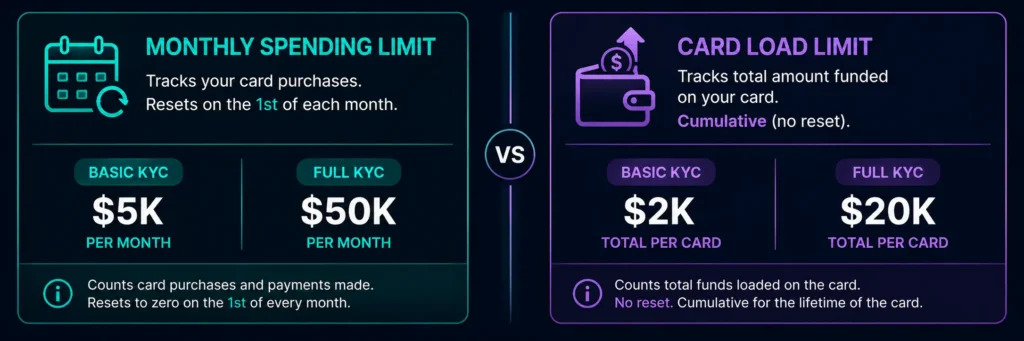
These are two different limits that both operate on a monthly-ish basis but work differently:
| Monthly Spending Limit | Card Load Limit | |
|---|---|---|
| What it tracks | Total purchases from all cards | Total balance loaded onto a single card |
| When it resets | Monthly (1st of each month) | Does not reset — cumulative per card |
| Basic KYC amount | $5,000/month | $2,000 per card (total, not monthly) |
| Full KYC amount | $50,000/month | $20,000 per card (total, not monthly) |
The card load limit is a per-card lifetime cap, not a monthly cap. Once a card has received $2,000 in total funding (across creation and all reloads), you cannot add more to that specific card on Basic KYC — regardless of when those fundings happened.
Industry Context: Where Rivocard’s Limits Fit
Standard crypto card tiers in 2026 typically allow $5,000–$25,000 monthly for everyday spending, while premium tiers on major platforms offer $50,000 or more for fully verified users.
Rivocard’s structure:
- Basic KYC at $5,000/month = at the low end of industry standard for no-verification tiers — but unique in that Basic KYC requires only an email address, while most “no-verification” tiers at other platforms require some form of basic identity check
- Full KYC at $50,000/month = at the upper end of standard industry tiers for verified users
- Enhanced KYC at unlimited = consistent with enterprise-tier offerings at major platforms
The standout feature of Rivocard’s monthly limit structure is the accessibility of the starting tier — $5,000/month without submitting any identity documents.
Who the Monthly Limit Affects in Practice
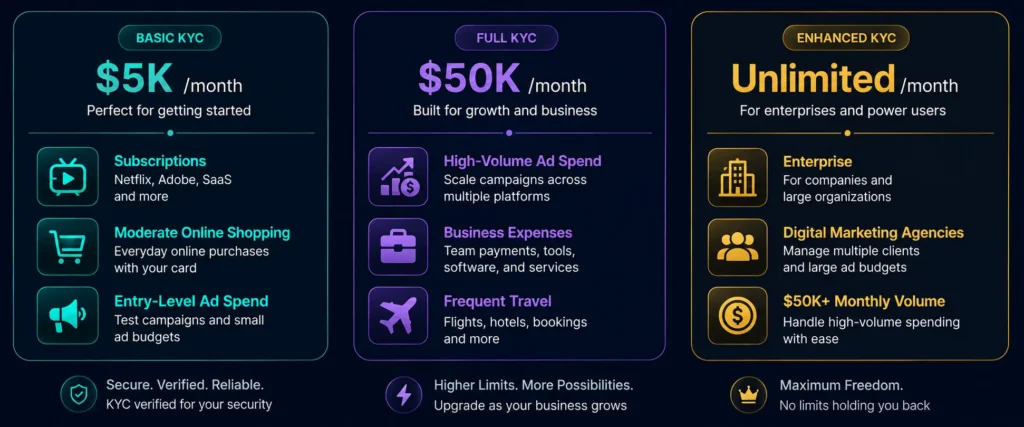
Basic KYC ($5,000/month) covers:
- Monthly subscriptions (Netflix $18, Adobe $55, cloud hosting $100, SaaS tools $200) → typically $400-$600/month, well within Basic limits
- Regular online shopping at moderate volume → $1,000-$2,000/month, within limits
- Digital advertising at entry level → $1,000-$3,000/month, often within limits
- Occasional travel bookings → depends on single booking values, may hit per-transaction limits before monthly
Who typically needs Full KYC ($50,000/month):
- Digital advertisers running $5,000+/month ad budgets
- Businesses using crypto cards as primary payment infrastructure
- Users with high-volume subscription portfolios
- Frequent travelers with high monthly spending
Who needs Enhanced KYC (unlimited):
- Enterprise users and businesses
- High-volume digital marketers
- Anyone needing more than $50,000/month in card spending
How to Check Your Current Monthly Spending
Your Rivocard dashboard should show your current month’s spending total. Before making a large purchase near the end of a month, checking your remaining monthly limit prevents a surprise decline at checkout.
If your dashboard does not surface this directly, calculate it: review your transaction history for the current calendar month and sum the purchase totals.
Strategies for Managing Around Monthly Limits on Basic KYC
If you need to spend more than $5,000/month but prefer not to complete Full KYC, practical options are limited — the monthly limit is cumulative across all cards on the account, so creating multiple cards does not increase it.
The realistic options:
- Complete Full KYC. The 5-minute process raises your monthly limit 10x, from $5,000 to $50,000. For most users who need higher limits, this is the right solution.
- Plan spending around the monthly reset. If you need to make a $4,000 purchase and have already spent $3,000 this month, wait until the 1st of next month when the limit resets.
- Use a second account at a different provider. Not ideal, but an option for users who specifically cannot or prefer not to complete KYC at Rivocard.
How to Increase Your Monthly Spending Limit
Basic → Full KYC: From your Rivocard dashboard → account settings → verification → submit a government-issued photo ID and a real-time selfie photo. Verification is typically automated and completes in minutes for clear submissions. Limits update immediately upon approval.
Full → Enhanced KYC: Contact Rivocard support or check your dashboard for the Enhanced KYC process. This tier is primarily for high-volume users and businesses.
Monthly Limit and Tax Considerations
This is not tax advice, but a practical note: many users track their monthly crypto card spending for tax purposes since converting crypto to fiat (which happens at the wallet deposit step on Rivocard) may create taxable events in their jurisdiction. Monthly spending summaries from your dashboard can assist with this tracking.
For US taxpayers, the IRS digital assets guidance covers obligations when converting and spending cryptocurrency. Consult a qualified tax professional for your specific situation.
FAQs
What is the monthly spending limit on a Rivocard crypto card?
Monthly spending limits depend on your KYC tier: $5,000/month on Basic KYC (email verification only), $50,000/month on Full KYC (government ID + selfie), and unlimited monthly spending on Enhanced KYC.
When does the monthly spending limit reset?
Monthly limits reset on the first day of each calendar month at midnight UTC. This applies regardless of your local time zone.
What counts toward my monthly spending limit?
Purchase transactions made from your virtual cards count toward the monthly limit. Deposits to your Rivocard wallet and card funding actions (moving money from wallet to card) do not count toward the monthly spending limit.
What happens when I hit my monthly spending limit?
Further purchase transactions are declined until the limit resets on the first of the following month. Your card balance is not affected — funds remain on the card and can be spent after the monthly reset.
How do I increase my monthly spending limit on Rivocard?
Complete a higher KYC tier from your dashboard. Full KYC (government-issued ID + real-time selfie) typically takes 5 minutes and raises the monthly limit from $5,000 to $50,000, effective immediately upon approval.
Is the monthly spending limit the same as the card load limit?
No. The monthly spending limit tracks total purchases across all cards in a calendar month and resets monthly. The card load limit is the maximum total balance a single card can hold — it is cumulative and does not reset monthly.
Does creating multiple virtual cards increase my monthly spending limit?
No. The monthly spending limit applies to the total across all your cards on the same account. Multiple cards share the same monthly spending counter.
Is $5,000 per month enough for most users?
For personal everyday spending — subscriptions, online shopping, occasional travel bookings — $5,000/month on Basic KYC is typically sufficient. Users running significant digital ad spend ($3,000+/month), managing business expenses, or making frequent large purchases typically benefit from completing Full KYC.
Does the monthly limit apply to Apple Pay and Google Pay transactions?
Yes. All purchase transactions from the card count toward the monthly limit, regardless of how the payment was initiated — direct card entry, Apple Pay, Google Pay, or any other method.
Can I see how much of my monthly limit I have used?
Yes — check your Rivocard dashboard for current month spending totals. If this is not surfaced directly, calculate it by summing your transaction history for the current calendar month.
Get Started
Want to see all limits in one place before you sign up? Check the full Rivocard limits and fees table →
