

Quick answer: To reload a crypto card on Rivocard, log into your dashboard, select the card you want to add funds to, choose how much to reload from your wallet balance, and confirm. The 5% Rivocard fee is deducted from the reload amount — reload $100, the card receives $95. If your wallet balance is low, deposit more crypto first (free, takes seconds on TRC-20 USDT). The entire reload process from login to updated card balance takes under 60 seconds if your wallet has sufficient funds.
Reloading and depositing are two different actions on Rivocard — understanding which one you need prevents confusion about where fees apply.
Reloading vs. Depositing: The Difference That Matters
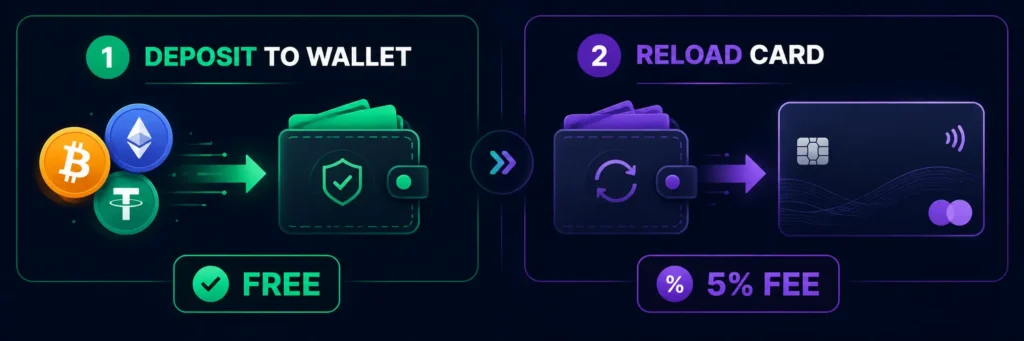
On Rivocard, your account has two separate balances:
1. Your Rivocard wallet balance — where deposited cryptocurrency converts to dollars. Depositing crypto to this wallet is always free.
2. Your virtual card balance — the spending balance on each individual card. Moving money from your wallet to a card triggers the 5% fee.
“Reloading a card” means adding funds from your wallet balance to a specific virtual card. This is the step where the fee applies.
“Depositing crypto” means sending cryptocurrency from an external wallet or exchange to your Rivocard account. This is always free.
| Action | What it is | Fee |
|---|---|---|
| Deposit crypto to wallet | Send BTC/USDT/ETH from external wallet to Rivocard | Free |
| Reload a card | Move funds from your Rivocard wallet to a virtual card | 5% deducted from reload amount |
| Make a purchase | Spend from card balance | 0% |
If your card balance is low but your wallet has funds, you just need to reload. If both your card and wallet are low, you need to deposit first, then reload.
Step-by-Step: How to Reload a Crypto Card on Rivocard
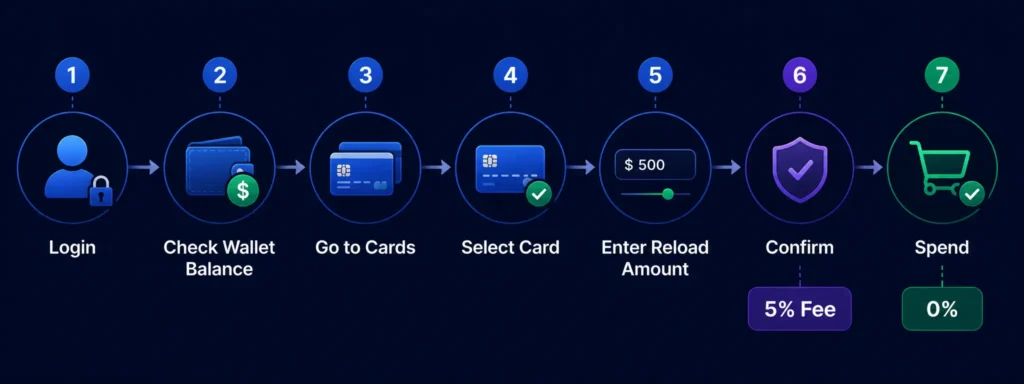
Step 1: Log into your Rivocard dashboard. Go to Rivocard instant virtual card platform and sign in to your account.
Step 2: Check your wallet balance. Before reloading, confirm your wallet has enough balance to cover the reload amount plus the 5% fee. If your wallet balance is $95 and you want to reload $100 to a card, you do not have enough — you need at least $100 in wallet balance for a $100 reload (the fee is deducted from the $100, giving the card $95).
If your wallet is low, deposit more crypto first. See our guide on how to top up a crypto card with USDT for the fastest deposit method.
Step 3: Navigate to your cards. From your dashboard, go to the cards section. You will see all your virtual cards with their current balances.
Step 4: Select the card you want to reload. Click on the specific card you want to add funds to. Each card has its own balance and can be reloaded independently.
Step 5: Enter the reload amount. Enter how much you want to add to the card from your wallet balance. The dashboard will show you:
- The reload amount you entered
- The 5% fee (deducted from the reload amount)
- The net amount that will be added to the card balance
- Your remaining wallet balance after the reload
Step 6: Confirm the reload. Review the amounts and confirm. The reload is instant — the fee is deducted and the card balance updates immediately.
Step 7: Start spending. Your card is now reloaded and ready to use. No wait, no delay.
How the 5% Reload Fee Works
The fee is deducted from the amount you are reloading — not added on top:
| Reload Amount | 5% Fee Deducted | Added to Card Balance |
|---|---|---|
| $50 | $2.50 | $47.50 |
| $100 | $5.00 | $95.00 |
| $200 | $10.00 | $190.00 |
| $500 | $25.00 | $475.00 |
| $1,000 | $50.00 | $950.00 |
If you need a specific amount on the card, calculate backward. To end up with exactly $100 on the card, reload approximately $105.26 (since $105.26 × 95% = $100).
The fee is always shown before you confirm — no surprises after the fact.
When to Reload an Existing Card vs. Create a New Card
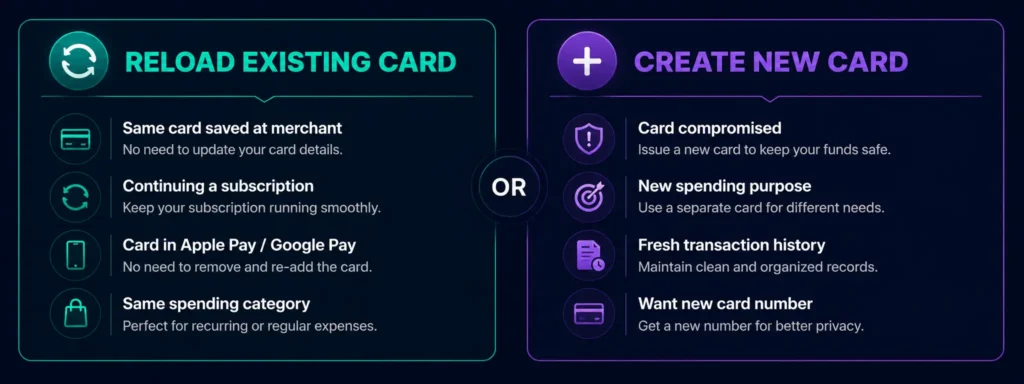
On Rivocard, you can create unlimited cards for free. The 5% fee applies in both cases (reloading an existing card and funding a new card). So the choice is not about cost — it is about how you prefer to manage your spending.
Reload the existing card when:
- You want to continue using the same card number for a recurring service (subscription, ad account, software tool)
- You are managing a specific budget on one card and want to add to it
- The card is already saved to Apple Pay, Google Pay, or stored at a merchant — reloading keeps that card active without needing to update payment details elsewhere
Create a new card when:
- The existing card number has been compromised or you want a fresh card for security
- You want to allocate a separate budget for a new purpose (new ad campaign, travel, specific vendor)
- The old card has expired
- You want a clean transaction history for a new spending category
Since card creation is free and unlimited on Rivocard, there is no financial penalty for creating new cards whenever it makes sense to do so.
How Often Should You Reload?
There is no minimum reload frequency, no inactivity fee, and no expiry on your card or wallet balance. You can reload as often or as infrequently as you want.
Two common approaches:
Reload on demand. Reload the card when the balance gets low, for the amount you need. This gives precise control over each card’s balance and spending. Best for users who track spending carefully or use cards for specific purposes.
Reload in larger amounts less frequently. Reload a larger amount at once to avoid the mental overhead of frequent reloads. The 5% fee is the same percentage regardless of reload size, so larger reloads are not more expensive on a percentage basis — but they do move more money from your wallet to a card where it is “committed” to spending.
Most users find a middle ground: reload in amounts that cover 2-4 weeks of expected spending on that card, then reload again when the balance runs low.
What If Your Wallet Does Not Have Enough Balance to Reload?
If your Rivocard wallet balance is lower than the amount you want to reload, you will need to deposit more crypto first.
Fastest reload path from zero wallet balance:
- Open Binance (or any exchange) → withdraw USDT via TRC-20 to your Rivocard wallet deposit address
- TRC-20 USDT confirms in seconds to ~1 minute
- Wallet balance updates automatically
- Reload your card from the updated wallet balance
- Card is ready to spend
From initiating the USDT withdrawal to having a reloaded card, this takes under 3 minutes on TRC-20. It is the fastest end-to-end path for adding spending balance when your wallet is empty.
Reloading Multiple Cards
If you maintain several virtual cards (one for subscriptions, one for ad spend, one for travel, etc.), you can reload each independently from your wallet balance.
The process is the same for each card — go to that card in your dashboard, enter the reload amount, confirm. Each reload deducts from your shared wallet balance and credits the specific card.
Practical tip: Check your total wallet balance before reloading multiple cards in one session. Each reload draws from the same wallet, so if you plan to reload three cards at $200 each, confirm you have at least $600 in your wallet before starting (the fee is already accounted for within each $200 reload — the card gets $190 each, wallet loses $200 each).
Reloading vs. Closing and Reopening a Card
Some users wonder whether it makes more sense to close a card with a zero balance and create a new one rather than reloading the same card. The practical answer:
Reloading is simpler when the card is already saved somewhere (a merchant’s checkout, Apple Pay, an ad account) — you keep the same card number, no need to update payment details.
Creating a new card is better when you want a fresh start, a different spending purpose, or a new card number for security reasons. Since card creation is free on Rivocard, there is no cost disadvantage to this approach.
Neither approach has a fee advantage over the other — both trigger the same 5% when you fund the card.
Reload Limits and KYC Tiers
How much you can reload depends on your KYC verification tier:
| KYC Tier | Card Load Limit | Daily Spend |
|---|---|---|
| Basic KYC | $2,000 | $1,000 |
| Full KYC | $20,000 | $10,000 |
| Enhanced KYC | $100,000 | $50,000 |
The card load limit applies to the total amount you can put on a card (across all reloads for that card). If you are hitting limits that restrict your usage, completing higher-tier KYC verification from your dashboard unlocks larger limits. For full details on fees and limits, see our Rivocard fees breakdown.
FAQs
How do I reload a crypto card on Rivocard?
Log into your dashboard, go to your cards, select the card you want to reload, enter the amount you want to add from your wallet balance, and confirm. The 5% fee is deducted from the reload amount and the card balance updates instantly.
How long does it take to reload a crypto card?
The reload itself is instant — once you confirm, the card balance updates immediately. If your wallet needs to be topped up first, a TRC-20 USDT deposit takes seconds to under a minute, making the total reload time under 2 minutes from deposit to spendable card balance.
What fee applies when I reload a crypto card on Rivocard?
The same 5% fee that applies to initial card funding also applies to every reload. The fee is deducted from the reload amount — reload $100, the card receives $95. Depositing crypto to your Rivocard wallet (the step before reloading) is always free.
Can I reload a crypto card directly from crypto without going through the wallet?
No. On Rivocard, the model is wallet-first: you deposit crypto to your Rivocard wallet (free), and reload cards from that wallet balance (5% fee). There is no direct crypto-to-card reload — the wallet is always the intermediary.
Is there a minimum reload amount?
You need at least the minimum wallet balance to reload. The minimum deposit to your Rivocard wallet is $10 USDT equivalent. In practice, reload amounts below $20 may not be worthwhile given the 5% fee ($1 fee on a $20 reload, leaving $19 on the card).
Can I reload multiple cards in one session?
Yes. You can reload as many cards as you want in one session, each independently. Each reload draws from your shared wallet balance.
Should I reload a card or create a new one?
If the card is already saved at a merchant or in Apple Pay or Google Pay, reload it to keep the same card number active. If you want a fresh card for a new purpose, create a new one — card creation is free and unlimited on Rivocard. Both options trigger the same 5% fee when funded.
What happens if I reload more than my card limit allows?
Each KYC tier has a maximum card load limit. If a reload would exceed that limit, it will be blocked. Either reload a smaller amount or complete additional KYC verification to unlock a higher limit tier.
Does Rivocard charge a fee to reload with different cryptocurrencies?
No. The reload fee is always 5%, regardless of which cryptocurrency was used to fund your wallet. The cryptocurrency type only affects the deposit step (which is free), not the card reload step.
Is there an inactivity fee if I do not reload my card for a while?
No. Rivocard does not charge inactivity fees. Your card balance and wallet balance are not reduced by inactivity. You can reload and spend whenever you need to, with no timeline pressure.
Get Started
Ready to reload your Rivocard and keep spending? Log into your dashboard →
