
Quick answer: Crypto to card conversion is the process of turning cryptocurrency into a spendable fiat balance on a virtual Visa or Mastercard. On Rivocard, it works in two stages: first you deposit crypto to your Rivocard wallet at no cost, which converts your crypto to a dollar balance. Then you fund a virtual card from that wallet balance — a 5% fee is deducted at this step. Once the card is funded, every purchase is 0% and the merchant sees a standard Visa payment, with no trace of crypto involved.
If you have ever wondered exactly what happens between “I sent crypto” and “I can pay at checkout,” this guide breaks it down stage by stage — including the mechanics, the timing, and the specific fees that apply at each point.
Why Conversion Is the Core of Every Crypto Card
Every crypto card on the market — regardless of the provider — solves one fundamental problem: merchants do not accept cryptocurrency. Bitcoin, USDT, Ethereum — none of these are recognized by payment terminals. The card network (Visa or Mastercard) operates entirely in fiat currency.
Conversion is the bridge. It is the process that takes your crypto holdings and transforms them into something a payment terminal can process. Without it, your crypto stays locked inside blockchain infrastructure and cannot reach the checkout counter of any merchant on Earth.
The question is not whether conversion happens — it always does. The question is when it happens, how much it costs, and what model the specific card platform uses to execute it.
The Two Conversion Models Used by Card Platforms
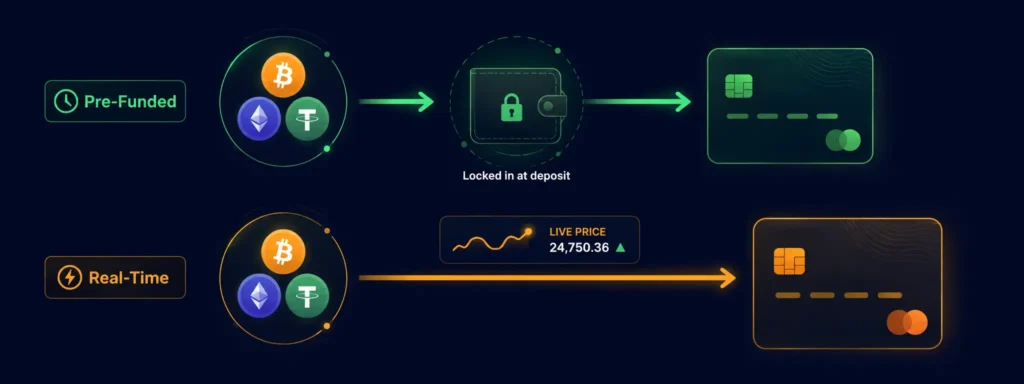
Before explaining how Rivocard specifically works, it helps to understand the two dominant models used across the industry:
Model 1: Pre-funded conversion (what Rivocard uses) Your crypto is converted to fiat before you spend it. You deposit crypto, the platform converts it to dollars, and that dollar balance sits on your account ready to be loaded onto a card. The market price used is the rate at the moment the deposit confirms. After that, market movements do not affect your balance.
Model 2: Real-time conversion at point of sale Your crypto stays as crypto until you actually make a purchase. At the moment of the transaction, the platform sells the equivalent amount of your crypto at the current live rate and settles the fiat payment with the merchant. Your “balance” is therefore your crypto holdings valued at whatever the market says right now.
| Pre-Funded (Rivocard) | Real-Time at Point of Sale | |
|---|---|---|
| When conversion happens | At deposit, before spending | At the moment of each purchase |
| Price certainty | High — locked at deposit time | Low — moves with the market |
| Balance visibility | Clear fiat balance you can see | Fluctuates until you spend |
| Speed at checkout | Instant — balance already in fiat | Split-second conversion required |
| Best for | Predictable spending, budgeting | Users comfortable with live prices |
Neither model is universally better — they suit different use cases. Rivocard uses the pre-funded model deliberately, so your spending power is always predictable.
How Conversion Works on Rivocard — Stage by Stage
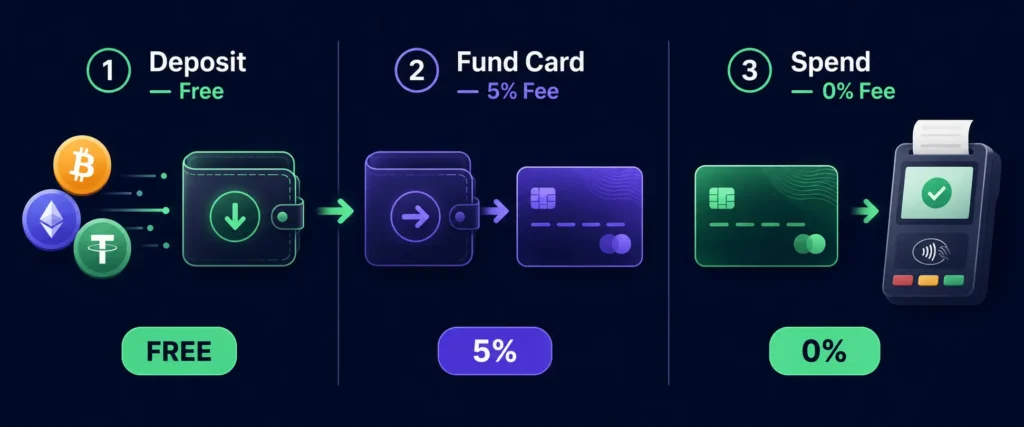
Rivocard’s conversion process has two distinct stages. Understanding both prevents the most common confusion users have about where fees apply.
Stage 1: Crypto Deposit to Your Rivocard Wallet (Free)
When you send cryptocurrency to your Rivocard deposit address, the platform receives the on-chain transaction, waits for blockchain confirmation, and converts your crypto to its dollar equivalent at the live market rate the moment it lands.
What happens technically:
- You initiate a transfer from your external wallet or exchange
- The transaction is broadcast to the relevant blockchain
- The blockchain network confirms the transaction (seconds on Tron, minutes on Ethereum, 20-60 minutes on Bitcoin)
- Rivocard detects the confirmed transaction and applies the conversion rate active at that moment
- The dollar equivalent appears in your Rivocard wallet
Cost at this stage: $0. Rivocard charges no deposit fee. The only cost is the blockchain network fee paid to miners or validators — which is separate from Rivocard entirely and varies by network. Tron-based USDT is typically fractions of a cent. Ethereum can cost significantly more during congestion.
What gets converted and at what rate: For stablecoins (USDT, USDC), the conversion is approximately 1:1 since they are pegged to the dollar. For volatile assets (BTC, ETH, SOL), the rate is the live spot price at confirmation time. A deposit of $500 worth of Bitcoin becomes $500 in your wallet — though if Bitcoin’s price dropped 2% during the confirmation window, you might land with $490 instead.
Stage 2: Funding a Virtual Card from Your Wallet (5% Fee)
Once your wallet has a dollar balance, you create a virtual card and choose how much to fund it. This is where the 5% fee applies — it is deducted from the amount you fund the card with.
What happens technically:
- You select how much to transfer from your wallet balance to a virtual card
- Rivocard deducts a 5% fee from the funded amount
- The card receives the funded amount minus the 5% fee
- The card is immediately active and usable
The math:
| Wallet Funding Amount | 5% Fee | Card Balance You Receive |
|---|---|---|
| $50 | $2.50 | $47.50 |
| $100 | $5.00 | $95.00 |
| $200 | $10.00 | $190.00 |
| $500 | $25.00 | $475.00 |
| $1,000 | $50.00 | $950.00 |
The fee is always shown before you confirm any card funding action. No surprises after the fact.
This same 5% applies to reloads. If you add more funds to an existing card later, the same deduction applies on each reload.
Stage 3: Spending (0% Fee)
Once the card is funded, every purchase is 0%. No transaction fees, no foreign exchange fees, no per-use charges. The card runs on the Visa network, so merchants receive a standard fiat payment and have no visibility into the crypto origin of the funds.
What happens technically at checkout:
- You tap, swipe, or enter your card details online
- The merchant’s terminal sends an authorization request to Visa
- Visa routes it to Rivocard’s issuing bank infrastructure
- Rivocard checks the card balance and approves or declines
- The purchase amount is deducted from the card balance
- The merchant receives a standard fiat settlement
The entire authorization process takes the same fraction of a second as any other card payment. The crypto history of the funds is invisible to every participant in the payment chain except Rivocard.
What Determines the Conversion Rate
On the deposit side (Stage 1), the conversion rate for volatile assets is the live market rate at the moment blockchain confirmation occurs. Rivocard does not set this rate — it is determined by the market at that instant.
For stablecoins, the rate is approximately $1 per USDT or USDC, with minor variations depending on the stablecoin’s peg accuracy at any given moment (USDT and USDC have historically maintained a very tight peg to $1).
There is no spread markup on the conversion itself — meaning Rivocard does not add a percentage on top of the market rate the way some exchange-linked cards do. The 5% fee is charged separately and clearly, only at the card-funding stage.
How Long Does Conversion Take
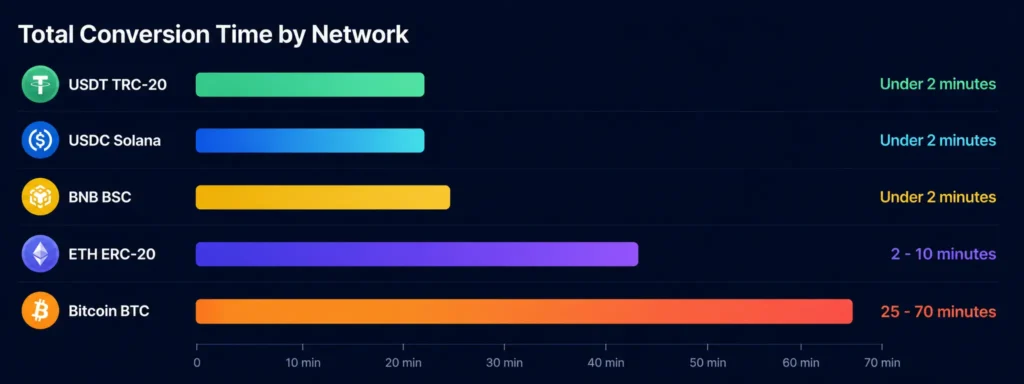
Total time from “I initiated a crypto transfer” to “my card balance is ready to spend” depends almost entirely on the blockchain network you used for your deposit:
| Deposit Network | Blockchain Confirmation | Total Time to Spendable Balance |
|---|---|---|
| USDT on Tron (TRC-20) | Seconds to ~1 minute | Under 2 minutes total |
| USDC on Solana | Seconds | Under 2 minutes total |
| BNB on BSC | Seconds to 1 minute | Under 2 minutes total |
| ETH or ERC-20 USDT | 1-5 minutes | 2-10 minutes total |
| Bitcoin (BTC) | 20-60 minutes | 25-70 minutes total |
After the blockchain confirms and the wallet balance appears, funding a card from that wallet is instant — there is no additional processing delay at the Stage 2 conversion step.
The Tax Dimension of Conversion
This section is factual context, not tax advice. In many jurisdictions, converting cryptocurrency to fiat is treated as a taxable disposal event — meaning capital gains or losses may be triggered at the moment of conversion. The deposit step (Stage 1) is where this conversion technically occurs on Rivocard, since that is when crypto becomes a fiat dollar balance.
The spending step (Stage 3) involves spending fiat — not crypto — so it does not typically create a separate taxable event in most jurisdictions. But specific rules vary significantly by country. The IRS guidance on digital assets covers US-based obligations. Residents of other countries should check their local tax authority’s current guidance.
Common Misconceptions About Crypto Card Conversion
“The card holds cryptocurrency.” No. Once conversion happens at the deposit stage, the card holds fiat currency — dollars. There is no cryptocurrency on the card itself. The card is a standard prepaid Visa funded with a fiat balance.
“The fee is charged on every purchase.” No. On Rivocard, the 5% fee applies only when you fund or reload a card from your wallet. Individual purchases are 0% regardless of size or frequency.
“My balance changes with the market after I deposit.” No. After the Stage 1 conversion, your wallet balance is fixed in dollars. If Bitcoin drops 20% after your deposit, your dollar balance does not change — the conversion already happened at the rate when your deposit confirmed.
“The conversion rate changes between deposit and spending.” No. The rate is locked at Stage 1 (deposit confirmation). Everything after that uses the fixed dollar balance.
“Conversion takes a long time.” It depends on the network. For Tron-based USDT, the entire process from send to spendable card balance can take under two minutes. Bitcoin is the slowest option at 20-60 minutes.
Why the Two-Stage Model Matters for You
The separation between wallet deposits (free) and card funding (5% fee) gives you meaningful control that single-stage models do not:
- Deposit in bulk when fees are low. If you plan to spend $500 this month, you can deposit $500 all at once. Only fund the card when you actually need the balance — this avoids unnecessary fee triggers.
- Hold spare balance in the wallet at zero cost. Money sitting in your Rivocard wallet is not charged any maintenance fee. You can maintain a buffer and fund cards on demand.
- Create multiple cards for different purposes. Each card can be funded separately, with the 5% fee only triggered when you actually move money to a card.
FAQs
What is crypto to card conversion?
Crypto to card conversion is the process of turning cryptocurrency into a spendable fiat balance on a payment card. On Rivocard, this happens in two stages: a free deposit converts your crypto to a wallet balance in dollars, and then a 5% fee applies when you fund a virtual card from that wallet. The merchant always receives a standard fiat payment — no cryptocurrency is ever involved at the point of sale.
When does the 5% fee on Rivocard apply?
The 5% fee applies only when you fund a virtual card or reload an existing card from your Rivocard wallet balance. Depositing crypto to your wallet is free. Spending from your card balance is 0%. The 5% only triggers at the wallet-to-card funding step.
Does the crypto conversion rate change after I deposit?
No. On Rivocard, conversion happens at the moment your deposit confirms on the blockchain. That rate is locked in as a fixed dollar balance in your wallet. Market movements after that point do not affect your balance.
How long does crypto to card conversion take on Rivocard?
It depends on the blockchain network. USDT on Tron typically takes under 2 minutes from send to spendable card balance. Ethereum takes 2-10 minutes. Bitcoin takes 20-70 minutes. After your wallet balance appears, funding a card from it is instant.
Is there a fee to deposit crypto to Rivocard?
No. Depositing any supported cryptocurrency to your Rivocard wallet is always free. The only cost on the deposit step is the blockchain network fee paid to miners or validators — this is not a Rivocard fee and varies by network.
What conversion rate does Rivocard use for volatile assets like Bitcoin?
Rivocard uses the live market rate at the moment your blockchain transaction confirms. There is no spread markup on top of the market rate. The 5% card funding fee is charged separately and clearly, only at the card-funding step.
Is conversion taxable?
In many countries, converting cryptocurrency to fiat is treated as a taxable disposal event. This would typically occur at the deposit stage on Rivocard, since that is when crypto becomes a fiat dollar balance. Rules vary by jurisdiction — consult the IRS digital assets guidance for US obligations or your local tax authority for other countries.
Can I reverse a conversion after depositing?
No. Once a blockchain transaction confirms and the conversion happens, the resulting dollar balance is in your Rivocard wallet. Crypto transactions on the blockchain are irreversible. You can spend the wallet balance or fund cards from it, but you cannot convert back to crypto.
Does Rivocard support multiple cryptocurrencies for conversion?
Yes. Rivocard supports 12+ cryptocurrencies including BTC, ETH, USDT (TRC-20 and ERC-20), USDC, SOL, LTC, XMR, DASH, XRP, DOGE, BNB and TRX. See the full supported cryptocurrencies list for current details.
What happens if I send crypto to the wrong network?
The transaction will be broadcast to the wrong blockchain and will not be credited to your Rivocard wallet. Funds sent to the wrong network are typically unrecoverable. Always confirm the network shown on your Rivocard deposit page matches the network you are sending from before initiating any transfer.
Ready to convert your crypto and start spending? Get started with your crypto virtual card
